
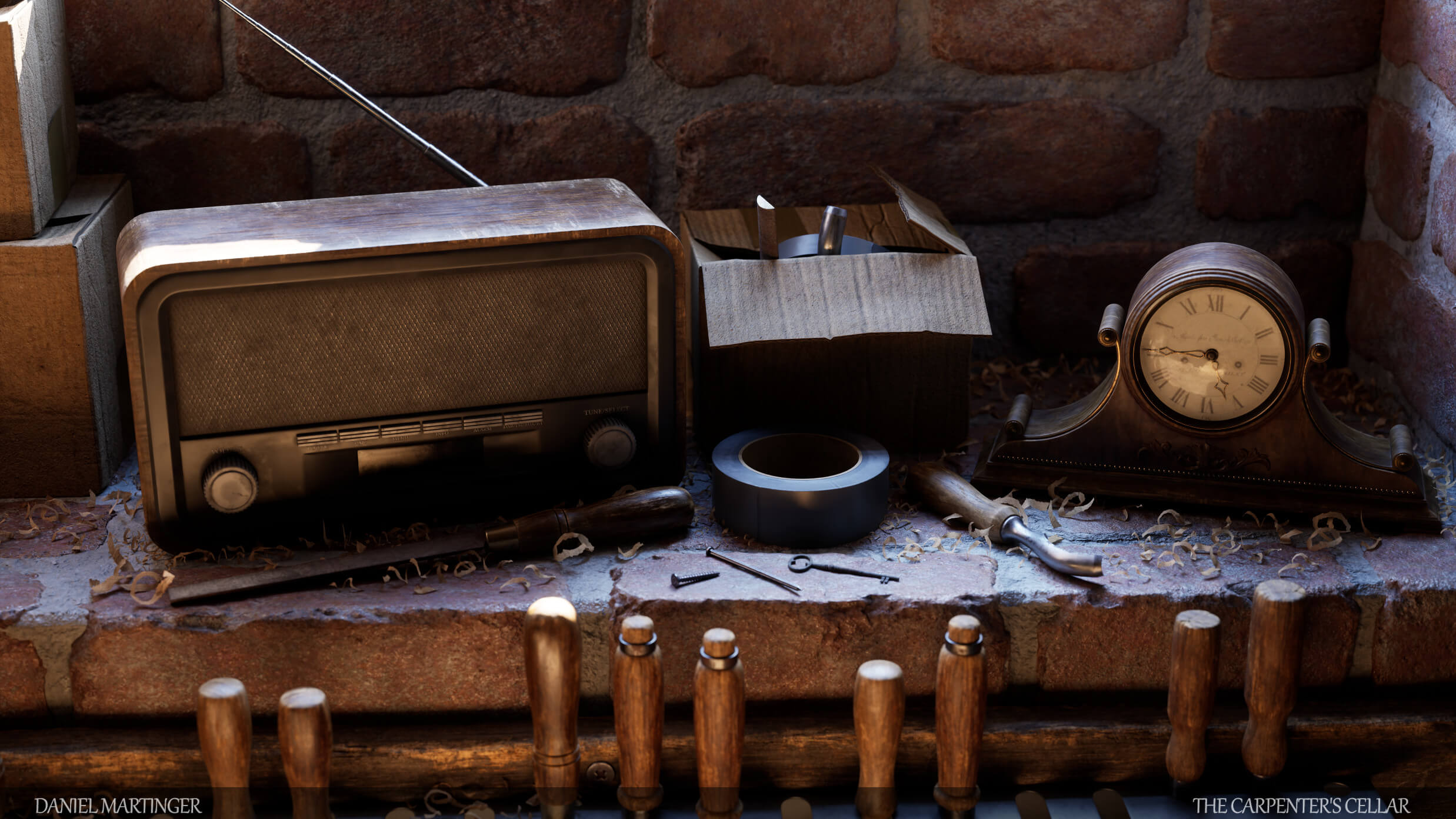
Daniel Martinger, Prop/Environment Artist at The Outsiders, has shared some screenshots and a video from an Unreal Engine 5 environment that will blow you away. These shots and video show one of the most highly detailed cellars we’ve ever seen, using UE5’s full path tracing capabilities.
Honestly, the quality of the visuals here surpasses even the amazing Matrix Awakens tech demo. Everything, from the materials to the lighting looks as photorealistic as it can get. The only thing that gives away its in-engine nature is some lighting artifacts.
Now I don’t expect any current-gen game to look anything like that. After all, this is using full path tracing. Thankfully, the artist is also working on a version that takes advantage of UE5’s Lumen. So, theoretically, we’ll be getting this kind of graphics only when next-gen consoles come out (Playstation 6).
Speaking of Unreal Engine, we also suggest taking a look at the following videos. There is an awesome Unreal Engine 5 Superman Fan Tech Demo that you must watch. There are also two cool videos showing The Sims 5 and Dragon Age: Inquisition. Let’s also not forget these cool Star Wars KOTOR and Counter-Strike Global Offensive fan remakes. And finally, here is a Half Life 2 Fan Remake, an Oblivion fan remake, a Silent Hill fan remake, a World of Warcraft remake, a Skyrim remake, and a Zelda Ocarina of Time UE5 Remake.
Enjoy!

John is the founder and Editor in Chief at DSOGaming. He is a PC gaming fan and highly supports the modding and indie communities. Before creating DSOGaming, John worked on numerous gaming websites. While he is a die-hard PC gamer, his gaming roots can be found on consoles. John loved – and still does – the 16-bit consoles, and considers SNES to be one of the best consoles. Still, the PC platform won him over consoles. That was mainly due to 3DFX and its iconic dedicated 3D accelerator graphics card, Voodoo 2. John has also written a higher degree thesis on the “The Evolution of PC graphics cards.”
Contact: Email


It’s surprisingly realistic, but it would be better if it wasn’t so blurry. I hope UE5 games have the option to turn off TAA, because that garbage is horrible.
Nothing that cannot be fixed by sharpening.
Game developers already add tons of sharpening on top of TAA, and it isn’t enough. You literally cannot sharpen out all of the blur TAA adds, and attempting to do so causes obvious oversharpening. To make matters worse, TAA causes a serious ghosting effect during motion (perceived as added blur) which makes things look horrible, and there is literally nothing you can do about it.
Please refer to the following Reddit thread for information and screenshots showing why TAA is bad:
https://www.reddit.com/r/FuckTAA/comments/oi0v86/taa_on_vs_taa_off_comparisons_sharpness_texture/
Not general sharpening, but FidelityFX CAS. When enabled it can restore majority of details lost due to TAA. This combination works wonders in Back 4 Blood, Trine 4, Shadow of the Tomb Raider or even Resident Evil Village.
CAS isn’t enough either, not in-game CAS, and not ReShade’s implementation of CAS. Take it from someone who disables TAA in every game they play, there is literally no way to get rid of the blur caused by TAA. You can reduce the blur in motionless scenes (not eliminate it), but it is 100% impossible to clear it up in scenes with motion because it isn’t just adding blur it’s also causing ghosting.
Please read the link I posted and look at the example screenshots and videos/GIFs. I had to wait more than 24 hours for it to be approved, and it explains/demonstrates things quite well.
I don’t need to read any explanations. I have my own personal experiences with it and I am someone who despise blurry image.
But don’t take my word for it. Here are some screenshots:
1. TAA: https://imgur.com/SnutC6B
2. TAA + CAS: https://imgur.com/arUuWlT
3. No TAA: https://imgur.com/tauQIRT
As you can see, not only CAS makes everything sharp and detailed, it even surpasses plain image.
Until you start moving, and the ghosting happens.
BTW, did you try CAS without TAA? What about CAS without TAA and ReShade’s SMAA for Anti-Aliasing?
Also, did you try any other games? I guarantee you that Back 4 Blood is an anomaly. Maybe they do a better job of tuning TAA, and maybe they use more sharpening on their TAA even without CAS, but it’s not normal for CAS to be able to clear up TAA’s blurriness. Trust me, I use ReShade’s implementation of CAS in every game I play, and I disable TAA in every game I play.
Nah, TAA is a blurry mess even in B4B. But CAS can be tuned and apparently they did an excellent job.
And it works wonders in other games too. For example, in RE8 it is sharp just like in B4B.
In RE8 I edited the game’s executable to disable TAA, and injected SMAA and sharpening with ReShade because it looks better.
Trust me, I am 100% aware of what TAA does, what it looks like, and why it’s utter garbage. I disable it in every game I play, because I can’t stand it. I don’t have Back 4 Blood, but I have other games with TAA, and I can show you before and after screenshots.
I recommend you try gaming without it as well, to see what it’s like. If you game on a high refresh rate display, or an OLED display, then you will notice that visuals are much clearer when you’re moving around in game with TAA disabled (this is something that sharpening is completely incapable of reducing because it’s ghosting and not blurring).
I tried it without TAA and I hated it. I find ANY kind of aliasing to be utter garbage and I want it gone. By any means necessary.
Here is screenshot from RE8: https://imgur.com/Zmd0x2Z
This is perfectly acceptable level of image quality in my book. Especially so when it removes shimmering and specular aliasing.
That RE8 screenshot is rather blurry. Pretty sure RE8 is a lot clearer than that without TAA.
BTW: SMAA can be tuned to find the majority of aliased edges. In games where a built-in SMAA isn’t doing very good, that’s just because the developers didn’t put enough time in to fine tuning its settings. I find ReShade’s SMAA to be superior to the SMAA in some games (Far Cry 5 is an excellent example of poorly tuned SMAA), and you can always fine tune the shader settings by hand if it isn’t finding all of the aliased edges.
For comparison, here’s a screenshot of the same scene at roughly the same position (default FOV) the way I have RE8 configured:
https://imgur.com/a/Igh9emm
I have disabled TAA by HEX editing the binary.
I have the game’s version of CAS turned on.
ReShade is injecting SMAA, CAS, DELC_Sharpen (enhances details in textures), FakeHDR, and a slight gamma lift to compensate for the darkening of the FakeHDR shader.
Yes, I’m doubling down on CAS. The game’s implementation isn’t quite enough for me.
I guess on your OLED with black frame insertion you get perfectly sharp picture during motion (like on CRT or plasma), so you can notice even slight blur during motion. I’m however using 60Hz IPS LCD, and on this monitor picture is blurry during motion no matter what, so I cant tell the difference between TAA and NO TAA during motion. Only in GTA3 remaster I have noticed obvious trails behind my car with TAA, but I havent seen such obvious trails in different TAA games.
I can see slight blur that TAA adds to the static pictue, but sharpening definitely helps (from normal viewing distance picture looks razor sharp). I’m however also using nvidia DSR x2 on top of that, because higher resolution adds more fine details on the textures (or should I say DRS restore blured fine details because of TAA). With DSR x2 even FXAA/SMAA looks good (without DRS there’s obvious shimmering during motion), so I use it in most games.
TAA is integral to modern rendering, that won’t happen and it’s not unique to UE.
It’s hard to turn off TAA mainly because TAA is a subset of temporal tech implemented in game engines. Anything labeled “temporal” in the context of computer graphics means data from across many frames. So devs take advantage of the data they have access to in order to generate things like velocity maps for per-object motion blur and and to buffer items that take a long time to render over several frames.
So yes, you can disable TAA if you disable the code path for AA and swap in a Full Screen AA solution like SMAA but with that you get the usual drawbacks of non-temporal AA which is image stability and specular aliasing.
Some versions of SMAA like the one included in Cryengine have a temporal filter to aid with specular aliasing without the blurriness of TAA. A great implementation of this is the SMAA in Ryse: Son of Rome and SMAAT2X in Crysis 3.
Watch Digital Foundry’s video on the Matrix demo. Even if the faces aren’t the most impressive, all the aspects about how the game renders are leagues ahead of any other engine right now. It shows a lot of new possibilities for future games.
A lot of potential,for sure!
Ok…even Gears 5 is trash for you…I may agree that G5 isn’t a masterpiece,but for sure it’s not trash, and technically it’s a great UE4 showcase,but I wonder if there is currently a single game in the universe that you like and enjoy…
A game for which you don’t criticize the developers, rather you praise them?
Does it exist? I’m curious!
Indeed…are you a real gamer in the first place,or do you frequent the forums just to throw sheet on everyone?
At this point the question is a must!
Blow us away?! Seriously?
John this looks sooo photorealistic!
But I didn’t quite understand how it’s rendered!
What do you mean by “full path-tracing” ???
Does Unreal Engine 5 support full path-tracing rendering, and can it run in real time on modern GPUs? Really?
Tell me if I’m wrong…this demo is natively rendered and FULLY path-traced…like,for example QUAKE 2 RTX?
So, if the right horsepower exists, could developers create a full path-traced video game natively on UE5?
It’s prerendered. In the description the creator says he will make a version with Lumen (the real-time lighting solution in UE5 which uses some ray-tracing features but is not fully path-traced) for comparison.
RAGE is the only feeling you have! you are always angry, always grumpy and always unpleasant!
I would love stutter on this room
After playing years using Nvidia 3D Vision it takes much more than photorealism and some tech demo to blow me away. Even VR didn’t impress me that much and I decided to stick with good old 3D Vision and sold my Odyssey and never looked back.