
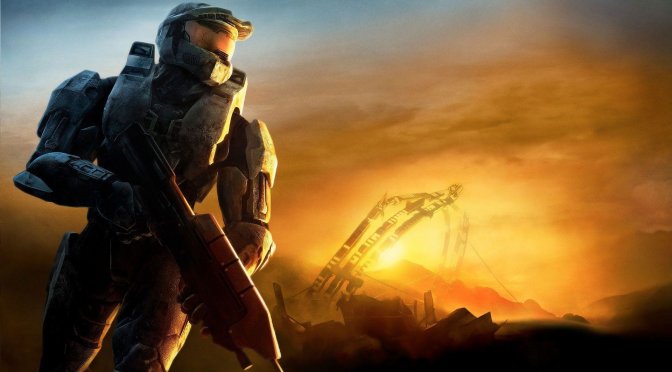
Halo 3 artwork-2

Halo 3 looks absolutely incredible with Reshade Ray Tracing

Earlier this month, Microsoft and 343 Industries have released Halo 3 on the PC. And today, YouTube’s ‘Digital Dreams’ has shared a video, showcasing the graphical improvements that Reshade Ray Tracing can bring to this old Halo game.

As we’ve already reported, this post-process solution can improve a game’s Global Illumination and Ambient Occlusion effects. Reshade is only using depth information available in screen space in order to provide these “path tracing” effects. Furthermore, Reshade does not know the light direction which may lead to some “inaccurate” effects.

Halo 3 is a really old game and benefits greatly from this Reshade Ray Tracing Mod. The following video showcases some of the new Ray Tracing “tricks” that this mod implements. Thus, you will immediately notice better Ambient Occlusion effects, color bleeding from various sources and better Global Illumination effects.

Since Halo 3 does not require a high-end GPU, we strongly suggest using this Reshade Ray Tracing Mod. While this mod comes with a significant performance hit, PC gamers will be able to enjoy it with 60fps on modern-day hardware. Not only that, but the game will look way, way better.

In case some of you are interested, you can find here other PC games with Reshade Ray Tracing effects. These past few months we’ve covered a lot of games. Some of them appear to benefit greatly from it, while others do not. You can also find Reshade Ray Tracing Mod videos for Star Citizen, Resident Evil 3 Remake, Watch Dogs, and Red Dead Redemption 2.

Lastly, and speaking of Halo 3, you should also check this cool third-person mod out.

Enjoy!

4K Halo 3 MCC - Raytracing GI - Ultra graphic comparison - Gameplay - get ready for Halo infinite!

23 thoughts on “Halo 3 looks absolutely incredible with Reshade Ray Tracing”

  1. Why do you promote this spammer? He can’t even be bothered to properly configure the shader so it doesn’t look like blown out dogshaite.

    1. it’s not that he doesn’t bother, he purposefully adds other effects to exaggerate and bait more clicks.

  2. Is halo 3 old game? Are you kidding us? It game was released at 2007. How is it be “really old game”?

      1. If you started playing in 2010 to, of course, it’s relic. But for me, it’s just game for Xbox 360 — nothing more. Relic is consoles (and games for them) which was launched in 80s — 90s like NES, SNES etc. What about Halo 3, it was cool game which had one awful level. Of course, I’m talking about The Floodgate.

        The gameplay of Halo 3 isn’t old. There aren’t relic elements in it. Let’s see (for example) on Halo Infinite, which Microsoft have showed thgourgh its stream. It was very strange for me. For why developers want going to add open world in it? It isn’t halo point! There are a lot of Ubisoft’s games in current game industry with some sh*t modern, service elements in it.

        I wouldn’t like to get another one modern game within halo label. I want to get the game with classic gameplay but modern graphic — nothing more. It’s like Halo 3 or Halo: Reach but with new plot and missions. Do you think the gameplay of Halo 3 is old? In my opinion, it isn’t truth.

  3. I’m not a fan of Reshade overall, and this particular one reminds me of the Fakefactory Cinematic mod for Half Life 2…where there’s nothing subtle and every addition is overblown.

  4. Good job john keep up promote more spammer + worse sh*t full of saturation nothing more waste of time added some quint lightroom light effects & called it ray tracing

  5. Looks like absolute dogsht. Only good for screenshots using perfect edits and only in certain areas where it works best. Look at 5:21. Flickering all over the place.

  6. “HUD also lacks Immersion”
    SHUT THE F*K UP AND EAT OUR POINTLESS HITMARKERS YOU DOPAMINE ADDICT

  7. The added Reshade effects are nice enough but the game looks absolutely terrible to begin with.

    Lipstick on a pig issue to the max.

  8. For the love of God, stop calling that screen space effect a raytracing. It can’t magically bounce rays from lost data hidden behind objects or out of camera frustum. This post process RT nonsense needs to stop.

    1. Dude I know very well what Reshade is since I use it a lot. What I’m trying to say is: if he’s showcasing only the fake ray tracing effects why would he go out his way to crank up the saturation and contrast? Unless the ray tracing option automatically enables this horrid saturation and contrast which doesn’t make any sense to me.

Leave a Reply

Your email address will not be published. Required fields are marked *
