
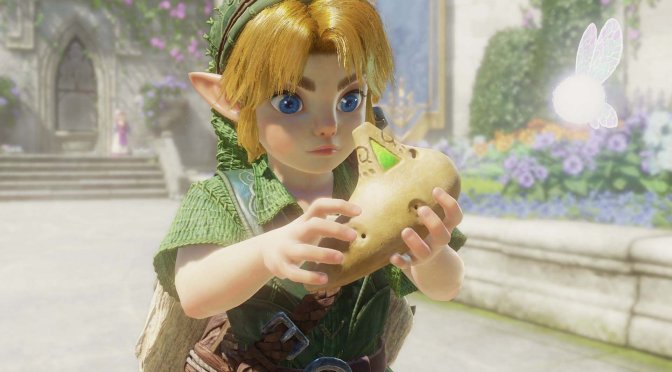
I still can’t believe how fast the unofficial PC port of The Legend of Zelda: Ocarina of Time Remake is moving forward. Just a couple of days ago, I informed you about its release. And now, modders are working on a multiplayer mode for it.
So here is a video showcasing a WIP version of this Multiplayer Mod. From what I can see, the mod was tested on the Nintendo Switch 2 emulator, Lichii. However, it should also be compatible with the unofficial PC port when it comes out.
What’s amazing is that, in just one week, PC gamers can already enjoy this new Zelda game on their own systems. And the PC version offers a much better experience than the one on Nintendo Switch 2. You can run the game at native 4K or use DLSS for a sharper image. You can even try DLSS 5. And now, we are getting mods like this, too. It’s mind-blowing.
It’s also worth noting that earlier today, the team behind Lichii released a new major version of it. Versions 5.1, 5.2, and 5.3 focus on better speed, fewer crashes, faster shader loading, and better support for AMD and older NVIDIA cards.
One of the biggest changes is how the emulator handles shaders. Lichii now builds the game’s shaders before you start playing. The first build takes about 15 minutes on an 8-core CPU. But this only needs to happen once for each GPU and driver setup. After that, new areas load with far less stutter. A pause that once lasted about 0.7 seconds for each new shader now takes around 40 to 70 ms. This also makes later visits to new areas feel much smoother.
The emulator also uses less PC memory. The new updates cut RAM use by about 2.3 GB. They also cut video memory use by about 2.4 GB in Castle Town. This leaves more room for other apps and helps PCs with 16 GB of RAM. Lichii also fixes slowdowns caused by moving NPCs and large crowds. These changes can add about 3 FPS each in Castle Town.
AMD users get several key fixes. Version 5.3 now turns off shader libraries by default on AMD cards that use the Windows driver. This fixes a setting that failed to work in version 5.2 and caused RX 5000 and RX 6000 cards to crash while building shaders. Lichii also fixes a bug that could make AMD cards write texture data into the wrong memory. This could cause black blocks, odd patterns, and even a GPU crash.
AMD users are also asked to send a log after the shader setup screen. Lichii now records why some game shaders are skipped during this step. This is useful because many of the shaders were first saved on an NVIDIA card. The new logs should help the team improve shader support on AMD.
Older NVIDIA cards also get some help. Version 5.2 adds a new way to draw objects that need mesh shaders. GTX 10 series cards and older models do not support them. Lichii now uses a compute-based fallback instead. This brings back some objects that were once invisible. Some plants and walls may still flicker or go missing, so this fix is not complete yet.
The updates also improve the app itself. Version 5 adds a new home screen, a dark Graphite theme, and an in-app news page. Players can move the mouse to the top of the game window to find quick controls for pausing, restarting, stopping, and switching to fullscreen. A new performance graph shows FPS, frame time, recent low FPS, and a line for the 60 or 30 FPS target. Loading screens no longer appear as sudden FPS drops on the graph.
The home screen also has a full right-click menu again. It gives modders quick access to tools such as opening the mod data folder, dumping RomFS, removing a game, checking files, and starting a game without custom settings. Players can also delete the shader cache from the Help menu or the game’s right-click menu. This can help if the cache becomes damaged. Lichii will build the shaders again the next time the game starts.
There are more fixes for common problems. Dialogue text no longer shows bits of other textures when a new text box appears. The emulator also fixes missing objects, wrong lighting, chat bubbles, and the Press Start prompt when the shader cache is empty. It also fixes memory issues that could cause a crash during long play sessions.
The app now handles Windows display scaling better, too. This helps users with 4K screens avoid windows that are too large or text that is too small. The Game Settings window can also be resized, and long tabs can scroll. The OK and Apply buttons stay within reach. Other fixes cover slow memory access, rare deadlocks, missing mod folders, and long Windows file paths.
Finally, Lichii now retries failed updates. If GitHub’s file server returns an error or the connection drops, the app tries again before giving up. Windows 11 users also get a more precise game clock built in, so some players no longer need a separate registry tweak.
The team tested Lichii with The Legend of Zelda: Ocarina of Time on a Ryzen 7 7800X3D and an RTX 4080. The game held a steady 60 FPS in many areas and rarely fell below 45 FPS, even in the Water Temple. After shader preparation, the test also had no shader stutter. These results may vary on other PCs.
There is currently no ETA for when the Multiplayer Mod will come out. Naturally, though, I’ll be sure to keep you posted.
Those interested can download the latest version of the Nintendo Switch 2 emulator, Lichii, from this link.
Stay tuned for more!
Mulitplayer Ocarina of Time Remake
by
u/Remarkable-Emu-5718 in
decomps

John is the founder and Editor in Chief at DSOGaming. He is a PC gaming fan and highly supports the modding and indie communities. Before creating DSOGaming, John worked on numerous gaming websites. While he is a die-hard PC gamer, his gaming roots can be found on consoles. John loved – and still does – the 16-bit consoles, and considers SNES to be one of the best consoles. Still, the PC platform won him over consoles. That was mainly due to 3DFX and its iconic dedicated 3D accelerator graphics card, Voodoo 2. John has also written a higher degree thesis on the “The Evolution of PC graphics cards.”
Contact: Email