
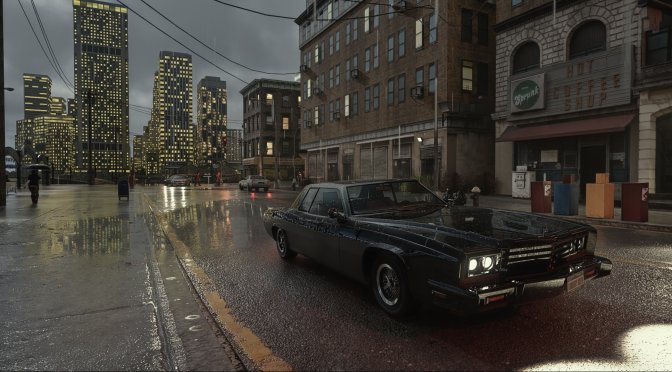
Modder ‘xoxor4d’ has released Updates 1.7.1 and 1.7.2 for his amazing RTX Remix Path Tracing Mod for Grand Theft Auto 4. So, let’s see what this new update brings to the table.
Update 1.7.1 brings the biggest change. The game is now rendered through the RTX Remix API. Before this update, Remix had to catch every draw call from GTA 4 and rebuild the scene. This put a lot of work on the CPU, which hurt performance in busy parts of the city. It also limited how far players could see.
The new system takes the game’s own 3D data and sends it straight to the Remix runtime. This skips most of the old Direct3D 9 path. It allows for much longer draw distances and better use of the GPU. The game still uses full path tracing. The new system also handles cars, people, objects, and the world in a better way. It keeps car damage, dirt, paint, and flat tires. It also keeps the game’s own mesh and material mods working.
The update also brings a full water overhaul. Waves now cover a much larger area around the player. The game also adds new waves in the distance. These waves follow the same wind and motion as the water near the player. A new shore system makes water fade out as it gets shallow or meets land. This removes the hard, bright lines that once appeared along coasts. Players can also pick from four water presets: Performance, Standard, Quality, and Insane.
Rain and wet surfaces have also seen a major upgrade. The new wetness system creates puddles in low spots, road dips, and potholes. Puddles grow as rain falls and dry from the edges once the rain stops. They also react to wind and raindrops. Roads and other surfaces stay wet for longer, then slowly dry out. Rain no longer falls through roofs and bridges. The system also handles wet cars better. Best of all, this new wetness system uses less GPU power than the old one.
Rain itself has also changed. The old rain effects are off by default. The Remix runtime now handles rain particles, which look better and no longer show up inside buildings. The new system also adds rain shadows under roofs and bridges.
The sky, fog, and weather have also been improved. The new atmosphere system lets aerial perspective and volumetric fog work together. This helps create better sunrises and sunsets, with more natural haze and sun rays. Players can also edit weather presets through separate config files. The update fixes many small issues with fog, rain, stars, and the moon. Lightning no longer leaves a long trail in the fog, and raindrops now react to sky light in the right way.
Night scenes also look better. Distant street lights now work as they should. Fake distant cars, which once stretched across the screen, have also been fixed. These changes help make the city feel more alive at night. Blood can now appear on people, too.
Update 1.7.1 also adds HDR support. This works with both the Alt HDR10 tonemapper and the default Psycho17 tonemapper. The update also adds the latest official DLSS 5 model and improves auto exposure. Car headlights should look better, and very distant trees now have more detail.
There are many other changes under the hood. The runtime now uses the GPU to handle mesh skinning. It also improves how it loads and replaces textures. New settings let players turn parts of the Remix API on or off. These include world objects, people, cars, and water. The menu has also been split into clear tabs for easier use.
The update fixes several crashes and freezes. It fixes crashes when players switch to another window or minimize the game at the wrong time. It also fixes crashes tied to people and other animated objects. The HUD and menus now keep the right size after a change in screen resolution. Explosion colors have also been fixed by removing old baked lighting from some effects.
There are also changes to the installer and AutoPBR. AutoPBR changes many game materials to make them look more like real-world surfaces. The new optional RTXIO version is much faster to load. It can cut load times to just a few seconds and also reduce stutters. The installer guides players through the setup. It also gives clearer error messages and uses Git to speed up future updates.
Update 1.7.2 builds on these changes with more performance tweaks. It updates the weather settings to reduce cloud depth and other costly effects. This helps improve performance, especially when the GPU is the main limit. The timecycle system also now writes weather values only when they change. This avoids needless work while the game runs.
The RTX Remix menu has also gained new DLSS Neural Rendering and HDR settings. The SetGameValue function no longer waits for a reply from the server, which helps avoid delays. Graphics presets now use SHARC below the Ultra setting and turn on sparse rendering. The Auto preset now stops at High. Particle light settings have also been tuned for each preset.
The update also changes the main RTX config file. It removes fixed graphics settings so Remix can pick a preset that fits each PC. More settings have been tuned for better GPU performance. These changes include turning off Homogeneous Volumetrics and adjusting cloud, level-of-detail, sampling, and distant haze settings.
Finally, the installer has been updated. It has clearer text and now picks the right RTXIO file based on the user’s Windows version. This makes setup easier and helps avoid issues with the wrong file.
You can go ahead and download the latest version of the RTX Remix Mod for GTA 4 from here.
Have fun!
John is the founder and Editor in Chief at DSOGaming. He is a PC gaming fan and highly supports the modding and indie communities. Before creating DSOGaming, John worked on numerous gaming websites. While he is a die-hard PC gamer, his gaming roots can be found on consoles. John loved – and still does – the 16-bit consoles, and considers SNES to be one of the best consoles. Still, the PC platform won him over consoles. That was mainly due to 3DFX and its iconic dedicated 3D accelerator graphics card, Voodoo 2. John has also written a higher degree thesis on the “The Evolution of PC graphics cards.”
Contact: Email