
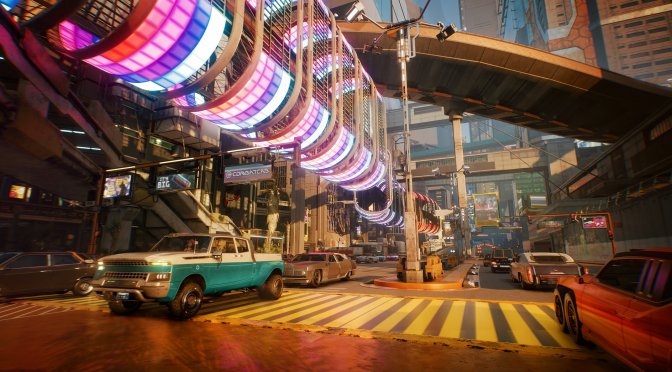
Cyberpunk 2077 new screenshots September 2020-6

NVIDIA has released a fix for the “GeForce 522.25 driver map glitches” in Cyberpunk 2077

Last week, NVIDIA released a new driver, NVIDIA GeForce 522.25 WHQL driver, for its graphics cards. However, it appears that this driver introduces some map glitches in Cyberpunk 2077. Thankfully, though, the green team released a hotfix to address it.

You can download this hotfix from here. The NVIDIA GeForce 522.25 WHQL driver introduced some DX12 performance improvements, so this hotfix is a must-have for those that want to replay this game.

Speaking of Cyberpunk 2077, we also suggest taking a look at these other mods. The Rebalance Megamod attempts to overhaul numerous aspects of the game, such as the AI, armors, perks, melee, player stats, weapons and more. There is also an enhanced Photo Mode Unlocker that you can download. Let’s also not forget the amazing Metro System Mod. Furthermore, this mod improves the game’s graphics by increasing the decoration LODs. And lastly, there is a mod that adds a flying mechanism to all cars, as well as mods that unlock/introduce new explorable areas.

Stay tuned for more!

20 thoughts on “NVIDIA has released a fix for the “GeForce 522.25 driver map glitches” in Cyberpunk 2077”

  1. FOR THOSE WHO OWN THE 30-SERIES CARDS, DO NOT INSTALL THIS DRIVER. ISSUES WITH CRASHING/UNEXPECTED ERRORS ARE QUITE COMMON AMONG USERS. ACCORDING TO THE NVIDIA SUBREDDIT, THE MOST STABLE DRIVER FOR AMPERE OWNERS IS 512.95

    1. I guess I’ve been fortunate. The only game I have crashing on me is Resident Evil Village, but it’s a buggy mess anyway.

      Maybe it’s because I only got my RTX 3070 Ti a few days ago? Or maybe my card isn’t one of the ones having the crashing issues with this driver? Or perhaps it’s because I did a fresh install of the NVIDIA graphics driver (and everything else) with version 522.25?

      1. Good to see that you’ve upgraded to a RTX 3070 Ti, because that opens the door to two interesting comparisons you could make:

        1.
        In the past you had complained about the poor Vulkan renderer performance of No Man’s Sky on your previous 1080 Ti (Pascal).
        Is that still the case with Ampere?

        2.
        Remember how GravityMark was running fine with DX11 but underperformed with both DX12 & Vulkan on your end, while my RTX 3060 Ti showed great performance with DXVK on Linux?

        Now, I’m pretty sure that your relative performance should be greatly improved, thanks to Ampere’s optimized architecture for these bare-metal APIs.

        It would be great if you could confirm that.

        Thanks!

        1. No Man’s Sky performance is slightly better, however it is still CPU limited due to horrible game design. They don’t take advantage of Vulkan’s excellent multithreading, instead using only 2 render threads and leaving GPU usage below 90% due to CPU bottleneck even on a Ryzen 7 3800X…

          You should note that Windows 10 and DirectX 12 were released to market (RTM) almost a year before the GTX 10 series of graphics cards, and the GTX 1080 Ti came out almost a year after that. I’m sure the GTX 10 series of graphics cards were designed with DirectX 12 in mind, and they ran D3D12 games very well (better than D3D11 in the same games). The version of GravityMark that I installed when you asked me to try it either had an issue with my GTX 1080 Ti, or it had an issue with NVIDIA drivers for Windows 10 around that time. The performance issues we saw in GravityMark did not exist in any games that I had around the time, and were indicative of an issue with the benchmark.

          As for updated benchmarks, the screenshots are below. I used the same settings as before (all defaults). Note that D3D11 was CPU bottlenecked at the default resolution and GPU usage was below 90% during the test (they appear to only use a single render thread which was maxing out the CPU core it was running on). Also note that this does not appear to be the same version of GravityMark that I used previously.

          https://uploads.disquscdn.com/images/c3e3fbaa50383d7c93a745781594265b827d49e59b46b957926f146689d8a2b5.png

          https://uploads.disquscdn.com/images/75bf6e415317f7f095d39eaa0b0dbcd28f1cc81baa544e8629c658b6232dcd33.png

          https://uploads.disquscdn.com/images/c0bbcec89042d6a4ae81a03aa05c08ae234ab316253c9f549d6809e27ad4525e.png

          https://uploads.disquscdn.com/images/7098587e71d66cf456488c721ea1119c43467fc6be8078c03c45eee9a50753da.png

          1. Thanks alot, these results actually confirm my assumptions!

            And once again Vulkan dominates DX12, even after nVidia having optimized it as much as possible.

            Just more confirmation that DX12 is infact an inferior API by design…

            Thanks again for these data points!

          2. Don’t be too fast to to assume DirectX 12 isn’t as good as Vulkan on Windows. I don’t have many games that have both Vulkan and DirectX 12, however I tried Zombie Army 4 Dead War and I consistently get 10-20 FPS lower in Vulkan than in D3D12. It’s possible that the GravityMark benchmark doesn’t support async compute, while some games do support it (Sniper Elite 4 and 5 both do, and possibly Zombie Army 4).

            Unfortunately Sniper Elite 5 doesn’t have a benchmark, however I get 40 FPS higher in the menu (a fairly simple 3D rendered scene) in D3D12 than in Vulkan.

            Note that ReShade is in use in both games, and also recently had some DirectX 12 performance improvements. I have yet to try with ReShade uninstalled.

    2. First off, STOP YELLING YOU NEANDERTHAL!
      Second off, those issues had to be limited because this is the first time I even heard about those issues.

    3. Haven’t had any issues on my 3060 Ti yet so far, but it’s only been a few days since I’ve installed the driver, so who knows what’ll happen in the long run. I’ll change to 512.95 if I run into these issues, so thanks for the warning.

  2. CB77 was crashing with the new driver for a friend with the 3080 Ti. He was getting quite paranoid with his newly aquired card.

  3. Wasn’t this driver supposed to be all awesome and give us “free fps” in many games? and it ends up being the worst driver in a long time… WHY is this a trend nowadays. lets say something is gunna be amazing and not deliver AT ALLLLL! yaaa!!!

  4. I have read your article carefully and I agree with you very much. This has provided a great help for my thesis writing, and I will seriously improve it. However, I don’t know much about a certain place. Can you help me?

  5. I may need your help. I tried many ways but couldn’t solve it, but after reading your article, I think you have a way to help me. I’m looking forward for your reply. Thanks.

Leave a Reply

Your email address will not be published. Required fields are marked *