
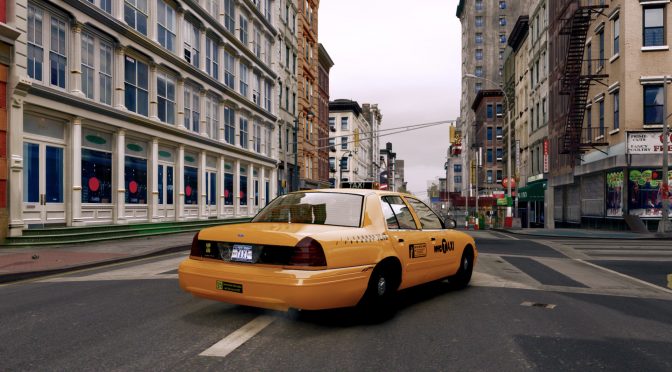
NexusMods’ member ‘hip63’ has released a mod pack for Grand Theft Auto 4, aiming to completely overhaul the game’s graphics. Since this is a mod pack, it does not feature any brand new graphical mod. Still, this is one of the best ways via which you can improve the graphics of this GTA game.
Going into more details, GTA IV Ultimately Beautiful Edition features iCEnhancer Natural Lighting 3.0 by DayL, ReShade Anti-aliasing (FXAA), Complete Edition Real Cars, Liberty’s Legacy Trainer and Simple Native Trainer. This mod pack is only for the Steam version of GTA 4.
GTA IV Ultimately Beautiful Edition is 7.8GB in size, and you can download it from here. hip63 is also working on version 2.0 which will add numerous features and will come out soon.
Speaking of GTA 4, here are some other cool mods for it. This mod restores the game’s multiplayer experience and it’s a must-have. Moreover, there is also a cool mod that adds to the game vehicles from 1950-1993 and a New York City Name-Conversion Mod
Have fun!

John is the founder and Editor in Chief at DSOGaming. He is a PC gaming fan and highly supports the modding and indie communities. Before creating DSOGaming, John worked on numerous gaming websites. While he is a die-hard PC gamer, his gaming roots can be found on consoles. John loved – and still does – the 16-bit consoles, and considers SNES to be one of the best consoles. Still, the PC platform won him over consoles. That was mainly due to 3DFX and its iconic dedicated 3D accelerator graphics card, Voodoo 2. John has also written a higher degree thesis on the “The Evolution of PC graphics cards.”
Contact: Email
I’m using DXVK with GTA 4 and can’t rid of the screen tearing without turning on V-sync (both via in-game options and forced on through Nvidia CP). V-sync will cap the framerate to 50fps. I using G-sync via VRR over Displayport 1.4, but it has no effect. The Fast option from the Nvidia CP seems to have no effect.
change your refreshrate.
I’ve set the Nvidia CP at my monitor’s max refresh rate, 144Hz.
My specs:-
Windows 11 Pro
Intel i5 12600KF
Gigabyte GeForce RTX 3080 Eagle OC 10GB Graphics Card
Corsair Vengeance 32GB (2x16GB) DDR5-5200 CL40 Memory Kit
ASUS PRIME Z690-A DDR5 Gaming Motherboard
Corsair HX1000 1000W Fully Modular 80Plus Platinum Power Supply
Here’s another way to get rid of tearing:
In the folder where the main game .exe is located, create a plain text file named dxvk.conf (please make sure it’s NOT dxvk.conf.txt).
Add the following line in there:
d3d9.presentInterval = 1
Hope it helps!
Thanks, I tried this and it’s just a v-sync solution. When I enabled it the 50fps cap returns.
Okay, then how about the following new configuration line:
d3d9.numBackBuffers = 3
This should activate triple-buffering, which should uncap your framerate while still getting rid of tearing at the same time.
However, do note that this can also mean that your GPU will always work at 100% utilization, even when your system is able to hit the framerate target.
Thanks, that worked!
I’m also using this other dxvk.conf command that I found:-
# True enables the mailbox present mode in case regular Vsync is disabled.
# This should avoid tearing, but may be unsupported on some systems
# or require setting dxgi.numBackBuffers to a higher value in order
# to work properly.
#
# False enables the relaxed fifo present mode in case regular Vsync is enabled.
# This should result in tearing but reduce stutter if FPS are too low,
# but may be unsupported on some systems.
#
# Please do not report issues with this option.
#
# Supported values: Auto, True, False
# dxgi.tearFree = Auto
d3d9.tearFree = Auto
That’s good to hear!
Do note though that d3d9.tearFree = Auto is already set by default, because the example dxvk.conf on GitHub is showing these standard values for reference purposes.
But since it’s already working out for you this way, I wouldn’t try to change the value to “True” and just leave it at the default “Auto”.
And another great option to keep in mind is the following:
d3d9.maxFrameLatency = 1
dxgi.maxFrameLatency = 1 # for DX10 & DX11 games
Usually this will result in more consistent frametimes, especially with some games setting a value of 3 frames on IDXGIDevice::SetMaximumFrameLatency for unknown (but certainly stupid) reasons (e.g. God of War).
“v1.0.0.23”
Is this the one without GFWL? Never got much far in GTA modding because of this.
Yes. It’s the “Complete Edition” that they released onto Steam and Rockstar Launcher in 2020. It patched out GFWL but replaced a selection of licensed music tracks from Radio Vladivostok and removed the multiplayer.
You can still use a fan patch to restore the removed music tracks and a downgrader to restore GFWL for multiplayer. See PCgamingwiki and Steam Guides for instructions.
Achievements were added to Steam/RSL + cloud saves to RSL, if you care
about those. Steam release requires RSL, but it’s just a modern
replacement for Rockstar Social Club so nobody should be surprised.
That’s a lot of work just to run GTA4 with better performance. If your PC is too slow to run this game at 60fps you can always adjust distance slider settings, because GTA4 is not nearly as demanding then. Max distance slider doesn’t even improve graphics in this game that much, so you will waste hardware resources for very little LOD difference.
I havent played GTA4 in the last 5 years, maybe even more, but it looks like modern CPU’s can finally max this game at 60fps (90-130fps) even without patches.
https://www.youtube.com/watch?v=ysHjPg_OBxY
bro the game barely runs at a consistent framerate on a 3080 with a high end cpu
Is this v1.2 the version where the shadows are all f??u???c???k???e???d up? If so no, the best version of GTA IV is still the 1.7 version the one that doesn’t have removed songs or content and has improved graphics.
Isnt that taxi screenshot from GTAIV ENB mod?
Straight garbage
Jogo bom deve ser sempre jogado!!!
Guys try GTA CONNECTED ! It’s awesome,it’s super fun and it holds up even today! Let’s max out those servers! In the evening we have 20+ players!
https://gtaconnected.com/downloads/
How long are we going to keep rehashing 15 year old games? This is stupid
What do you mean?
hundreds of websites and videos with millions of views have been using the very same Danvs’ Photorealistic natural ENB Series thumbnail for literally 11 years , i was in highschool when that photo came out, ironically, that is an extremely easy look to achieve, is just 1 texture pack, 1 modded vehicle and the ENB on the 1.0.4.0 version, i dont mind people trying to improve but i think people’s gravitation speak for itself, that was really GTA 4’s peak visuals, everything else is a sidegrade at best, usually a downgrade.
@John Papadopulous.
May want to check your resources before writing an article. The mod has since been deleted from tye website and isnno longer available.
Showing off a graphics mod with not-maxed settings?? The car’s headlights don’t cast shadows. I remember them casting shadows in the PC version of GTA 4, no mods.
The Mod was deleted from “Moddb” !!!!!!!!!