
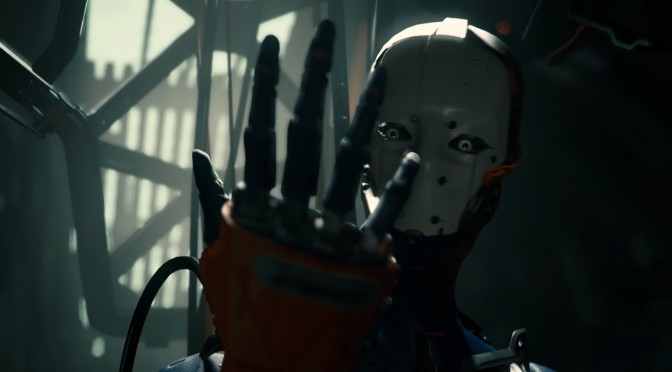
Back in June, Unity released a video showcasing its new real-time tech demo for Unity 5 Engine. This tech demo impressed everyone and today, Unity Technologies released that demo to the public. Yeap, that’s right; you can go ahead, download and run this gorgeous tech demo on your machines.
The requirements for this demo are a bit high as it is expected to run with 30fps at 1440p – on Fantastic settings – on a GeForce GTX 980 with Intel Core i7.
The demo features two graphics options; Fantastic and Good. The first option is the main target, intended for reasonably powerful gaming computers, whereas the second one is intended for less powerful desktops and gaming laptops.
Players can play this tech demo back as a film, pause and rotate the camera to look around (within a restricted area), and they can move light sources in real time.
Those interested can download the demo from here.
And here are the controls for the Adam Tech Demo:
- Left Mouse Button toggles playback
- Right Mouse Button rotates the camera while playback is paused
- Light Icon on bottom right corner control enables lighting control: Indoors – control position of tube light in the room, Outdoors – control position of the sun
Have fun!


John is the founder and Editor in Chief at DSOGaming. He is a PC gaming fan and highly supports the modding and indie communities. Before creating DSOGaming, John worked on numerous gaming websites. While he is a die-hard PC gamer, his gaming roots can be found on consoles. John loved – and still does – the 16-bit consoles, and considers SNES to be one of the best consoles. Still, the PC platform won him over consoles. That was mainly due to 3DFX and its iconic dedicated 3D accelerator graphics card, Voodoo 2. John has also written a higher degree thesis on the “The Evolution of PC graphics cards.”
Contact: Email
Right on time, when I have a new GPU. It took long, though!
It dosent let me download it where is the download button? Also while th requirements are high(30 fps on 970 overclocked or 980 and i7) it is fully playble on my pc since as long as it dosent drop under 30 fps on 1440p there will not be any issues.
Right click on the file then click download
You’re wrong. The visuals are stunning, way beyond anything I’ve seen in Unity before. It runs brilliantly with my 1070 too. It’s like watching a movie at points. Superb.
He’s far from wrong, Unity probably the worst engine on the market today.
Gamebyro has that title as well as a host of other smaller engines.
This, so much this…
Pretty sure you mean Gamebryo and that engine was dropped back in 2012.
Nope, Gamebryo still exists, & is (as of Skyrim: Special Edition) still being actively used by Bethesda, under its new moniker; Creation Engine.
Don’t fall for their bullsh*t, most of these “new-gen” engines are nothing more than recycled, slightly updated versions of the old engines they were already using.
I mean, seriously, we’re talking about an engine that didn’t even have a 64-bit executive until 2015 (Fallout 4). THAT’S how bad their tech is.
You need help?
Gamebryo was dropped in 2012, if someone still uses their modified version much like Bethesda, it’s their problem.
Doesn’t change the fact Gamebryo is dead.
Call it whatever you want, “Modified Gamebryo”, “Creation”, whatever, the point stands; the core systems in Bethesda’s Creation Engine are by-&-large carryovers from its direct predecessor, Gamebryo.
As such, while the “Gamebryo” moniker may be dead, “Gamebryo” is also not dead, as far as its coding is concerned.
Whatever makes you feel big, won’t even be wasting my time.
Okay then, thanks!
😉
Gamebryo is still very much alive. It hasn’t been taken out back and shot yet.
Do your research next time before spouting off incorrect information.
You mean that same engine that is still being used by Bethesda? Albeit modified, but is still based on the same engine. Don’t be so dense.
Right.. Windows XP was dropped back in 2014, but according to you guys since people are still using it, it wasn’t dropped.
That’s the logic you all following and is ridiculous.
The creation engine is used by Skyrim SE and Fallout 4. That’s not old. So dense.
Right.. go troll someone else, say hello to the block feature.
Come down off thy mighty mountain, almighty God, & meld your knowledge into our plebeian minds;
“Fallout 4 kind of still uses the Oblivion engine”
“In fact it seems that, in a round about way, Fallout 4 is still using tech shared with Bethesda’s last-gen output. Confirmed via a brief comment during Bethesda’s E3 press conference last night, Fallout 4 is running on ‘a next-generation version of [Bethesda’s] Creation Engine’, effectively meaning a modded iteration of the same tech that powered Skyrim four years ago. Thing is though, for all of said engine’s new name back in 2011, Creation itself was actually an upgraded and modified version of Gamebryo, the same engine Bethesda used for Fallout 3, and Oblivion before it.
“The Creation Engine is a 3D video game engine created by Bethesda Game Studios based on the Gamebryo engine.”
To quote a TV show that is unfortunately outliving its pinnacle;
“It is known.”
You clearly have problems reading.
Nevermind, say hello to block feature.
Actually you and him are wrong. Unity is best for indie games.
And it runs great too. People try alpha early access Unity games and bashing them for bad performance.
https://uploads.disquscdn.com/images/1a4ae2710fdb06ca6a65a78c47671b8269c51faf6f1bb2c2c5cbb174cb5365e7.png
Lol… You lost your mind…
All you have to back it up is a graph with random values (what the hell it means by using and primary) Jesus…
Not only that, but it’s focused on Mobile, so it clearly has nothing to do with this discussion (that is on PC).
With both Unreal Engine and Cry Engine Free, there’s no reason to use Unity, that is decades behind those two.
Actually, if you get off your high horse for a minute & go to the actual website, you’ll find that the Mobile & Desktop Graphs are
COMPLETELY SEPARATE.
The demo runs great and is VERY impressive, especially regarding lighting and shading.
How to turn off the FPS limiter (which is set to 50% of the refresh rate)?
I’m stuck at ~16 fps on “fantastic” settings using an i7-5820K@4.4GHz and original Titan X using 373.06 version drivers. The GPU utilization is at <50% and I can barely tell the difference b/w graphical settings.
What resolution? You should be getting much better performance.
1440p.
i7 3770 @ 4.2Ghz – Titan X ( Maxwell, like you ) and I get 30FPS with the GPU used @ 42% max ( 375.70 ) @ 1080P. Something must be wrong with your drivers mate.
You only get 30fps on “Good” graphical settings :
solid 60fps here @ 1440p
even @ 4k most of the time it runs 60fps but some animations are not targeting that all like when ADAM was ripping his suite
also this demo needs 7gb of VRAM ?
here’s a 60fps video @ 1440p
https://www.youtube.com/watch?v=booS1uxQkpo&feature=youtu.be
How to turn off the FPS limiter? My FPS are limited to 37.
what’s your GPU ?
GTX 1070.
The FPS limit isn’t as arbitrary as it looks, by the way, it’s set at half my refresh rate (75Hz).
It is most likely vsync cutting your FPS in half because your system can’t maintain 75fps. Try forcing vsync off (or force adaptive vsync) to see what kind of fps you’re getting. Or run the demo at a lower resolution and see if you can hit a constant 75fps.
Forcing the v-sync off didn’t help. And I can’t change the resolution in the launcher. I was only able to lower the quality from “Fantastic” to “Good”, and my frame rate was locked to an even lower value (30 FPS).
BTW, the resolution I’m using in this demo is 1280×720. I doubt a 1070 wouldn’t be able to handle this, especially given it’s not some ultra beautiful demo.
try Custom resolution utility , create a new res like 1440p 120hz , save it restart PC and add that 120hz in nvidiaCP and apply it then run the demo
Ah, so it’s 60 when cut in half? Nice idea, although my monitor won’t handle more than 85 Hz.
Fair enough then… I’m stumped.
Hey, by the way, what’s your config?
TitanX Pascal
Nice card! But 1070 shouldn’t have problems with this demo either. Maybe your refresh rate is 120 Hz, so the stupid demo which cuts the frame rate in half still can yield 60 FPS?
wow nice!
lol 0fps to 30fps on fantastic settings, second half of the demo was just 0fps with sound. on normal it was constant 30fps. but i don’t get Unity’s launcher at all, what fantastic even means ? also no 16:10 support.
Unity doesn’t support 16:10 natively.
It only runs at a constant 30 fps in “good” preset, how do I unlock the framerate on my 144 hz lcd? It was below 30 in Fantastic. GTX 1070+Core i5 4690k/16 gigs. It does look amazing in Fantastic settings, I will say that.
Recore uses Unity and it runs really nicely. There is a demo in the win 10 store that lets you play half an hour, its pretty good. Ori and the Blind Forest is another slick looking and running game that is really good. In the hands of skilled devs Unity can produce really nice results.