
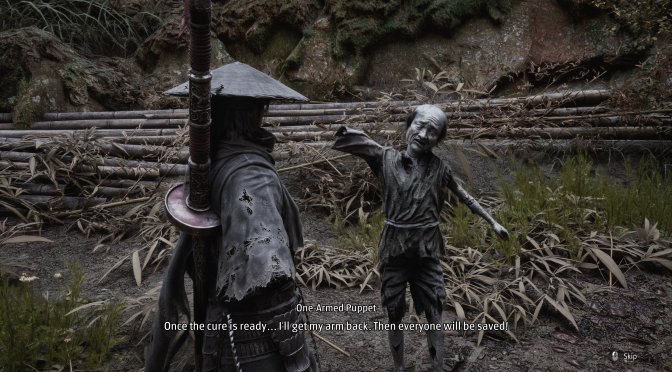
It appears that a must-have mod for Phantom Blade Zero has just been released. This mod is no other than Ultra+, which aims to fix many of the game’s visual issues. It brings several key upgrades to ray tracing and path tracing. These changes help reduce noise, flickering, and other visual flaws. Not only that, but it comes with a new HD Texture Pack. So, let’s dive in.
One of its main features is a longer draw distance for trees and shadows. With ExtendedDrawDistance, trees and their shadows stay dynamic much farther away. This helps reduce the number of static objects in the distance. The mod also lets more objects show up in ray tracing and path tracing. This can make the world look more full and real.
Ultra+ also aims to reduce the noise and flickering seen with path tracing. It does this with two settings: PT_EnableSharc and PTIndirectDownsample. The first can help reduce the boiling effect, which is most clear on things like leaves and plants. The second lets path-traced light run at full screen size instead of just one-quarter of it. This can improve the image, but it uses much more PC power.
The mod also improves shadows. With FoliageShadows turned on, many small plants and objects can cast shadows. This includes grass, shrubs, bamboo, ivy, leaves, moss, and small stones. Even branches and water plants can cast shadows. This helps add more depth to the world.
Another key feature is ray-traced ambient occlusion. This adds more depth to areas where objects meet or sit close to each other. Players can pick between the standard ray-traced AO mode and a denoised version. They can also tune its strength and range. The mod also lets players turn off the game’s screen-space contact shadows.
Ultra+ has another useful PC feature called GameCVarProfiles. The game often changes its own graphics settings while you play. This can undo some of the mod’s fixes. Ultra+ stops this from happening to the settings it controls, so its changes stay in place. This can also help reduce stutters. The default Pinned mode keeps the mod’s own settings in place while letting the game change other settings. Frozen mode stops the game from changing any CVars.
The mod also offers some extra options for PC users. Players who use the game’s own ray reconstruction can skip the denoiser and upscaler settings in Ultra+. There is also a custom ray reconstruction preset with a responsivity bias, which is shared through the Ultra+ Discord. You can press ALT + F2 to switch between the modded game and the standard version. This comparison mode does not show the changes to foliage shadows.
As I said, there is also an optional HDNatureTextures add-on. It is a large download, at about 2.9GB, and takes up around 6.6GB once installed. It needs the main Ultra+ mod, which raises the game’s texture size limits so the new 4K textures can work.
HDNatureTextures replaces 518 rock, cliff, stone, ground, tree trunk, branch, and cave textures with sharper 4K versions. Many of the original textures are smaller than their source images. The add-on also improves the game’s tiled rock detail. It adds terrain blending to 201 rock, cliff, stone, and rocky ground materials. It also includes 4K versions of the game’s rock detail normal maps. These changes add finer detail and help rocks stay sharp when viewed up close.
You can go ahead and download the mod from its official website.
Have fun!
Kudos to our reader “Psycho” for bringing this to our attention!
John is the founder and Editor in Chief at DSOGaming. He is a PC gaming fan and highly supports the modding and indie communities. Before creating DSOGaming, John worked on numerous gaming websites. While he is a die-hard PC gamer, his gaming roots can be found on consoles. John loved – and still does – the 16-bit consoles, and considers SNES to be one of the best consoles. Still, the PC platform won him over consoles. That was mainly due to 3DFX and its iconic dedicated 3D accelerator graphics card, Voodoo 2. John has also written a higher degree thesis on the “The Evolution of PC graphics cards.”
Contact: Email