
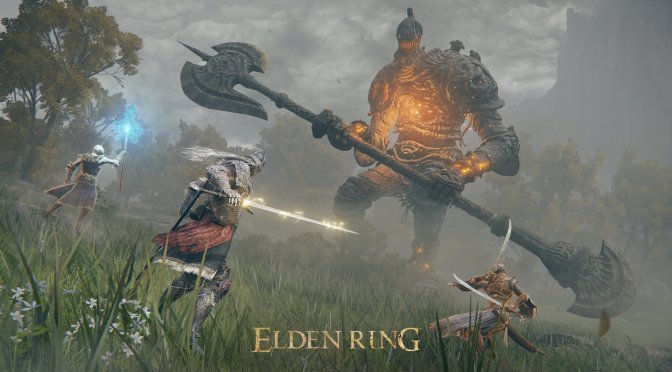
Elden Ring new screenshots-3

New Elden Ring Mod attempts to fix stuttering by implementing VKD3D fixes natively in DX12

Now here is something interesting for all those that experience stutters in Elden Ring. Modder ‘soupstream’ released a mod/unofficial patch that aims to fix the stuttering that a lot of players have experienced.

According to soupstream, this patch implements various VKD3D fixes natively in D3D12. Theoretically, these VKD3D fixes should minimize the stutters that PC gamers have reported.

Now as with all mods/unofficial patches, we strongly recommend using it in Offline Mode. Otherwise, FromSoftware may ban you for using it.

You can download the mod/patch from here. Since I don’t have any major stuttering issues on my system, I could not test the mod. Still, this may fix your stutters so be sure to at least give it a go.

Speaking of Elden Ring, I also suggest taking a look at this mod that removes the awful Chromatic Aberration effect. You can also download an easier-to-use Field of View Mod.

Flawless Ultrawide is another must-have mod as it enables support for ultra-wide resolutions/monitors. There is also an unofficial Photo Mode. Furthermore, this mod will unlock the game’s framerate. And lastly, there is a mod that disables the automatic camera re-centering.

Have fun!

37 thoughts on “New Elden Ring Mod attempts to fix stuttering by implementing VKD3D fixes natively in DX12”

  1. The stuttering wasn’t fixed? When it released I had the odd stutter. Then after a mini patch I haven’t had a single stutter at all.

  2. Finding a compiled VKD3D that actually works on Windows is a pain.
    Hopefully this exe works on more D3D12 games.

    1. I would wait for the next major update to VKD3D-Proton [3.0] (not plain VKD3D, which is completely useless as a functioning Direct3D12-to-Vulkan API translator), because there will be further overhead reduction achieved which should allow it to even surpass executing those games natively on Windows.

      BTW, here is the reason why DirectX12 is such a fundamentally flawed API:

      Dealing with API jank – There are a few very poorly designed parts of the D3D12 API which also surprisingly don’t serialize very well, such as CreatePipelineState which takes in a polymorphic stream of types and respective structures with very funky alignment rules.

      CreatePipelineState is simply terrible. There exists so many other ways of doing this such as Vulkan’s pNext method, however Microsoft decided to use the most annoying way of encoding pipeline state imaginable, a polymorphic object stream. I wouldn’t be as frustrated if it could simply be treat as an opaque blob, but it contains COM pointers, descriptor handles, etc. So it needs unwrapping to be serialized and sent to D3D12.

      1. Sorry, I’m not too familiar with Windows, so I’m assuming that the reason Vulkan 1.3 is not available for Windows 7 is because the newer drivers from the GPU vendors are locked to Windows 10 & 11, correct?

        If so, then unfortunately no, VKD3D-Proton 3.0 won’t work on Windows 7, because it will explicitly require newer extensions mandated by Vulkan 1.3.

        However, soon enough SteamOS 3.0 will be released to the public, which should provide a pretty solid Linux gaming experience out-of-the-box, even for non-Steam games.

        It includes a so-called “soft” real-time Linux kernel, which is perfect for achieving the lowest latency possible while still providing really good throughput performance, i.e. perfect for gaming.

        On their Steam Deck, Valve defaults to the “schedutil” CPU governor right now, which is a good fit for an APU with a shared power budget, however on a PC with a discrete GPU, the performance governor (as the name implies) ensures that you can get the absolute maximum performance out of your CPU.
        I’m still hopeful that Valve will add an easy toggle to switch between the two, else users will have to do it manually once.

        So, hopefully once SteamOS 3.0 is out in the wild, more Windows user will feel confident enough to make the jump, because the grass is genuinely greener around here!

  3. I can’t believe the mainstream media gave this game 10/10 with all the issues it has.

    Phil Fish was right, Japanese games always get disproportionately high scores by the mainstream media.

      1. Ever since I began reading gaming magazines in the 90s, technical issues were part of the final score.

        It has only been recently that mainstream reviewers, who are bought out with early review copies, give 10/10 to games like Cyberpunk and Elden Ring, even though they have major technical problems.

        1. You cannot compare the two. I’ve played both on launch. Another know-it-all who believes too much of what he reads online. Shame

      2. Everything should be critiqued. Otherwise the publishers would give zero fuggs about technical issues (not that a lot of them do anyway).

    1. I think it has to do with all the garbage we’ve been served the past couple of years.
      With that said, I love the game. The stutters I’ve had are in concentrated areas mostly, and luckily I haven’t met any bosses in those places yet.

      What I find amusing though is people trashing this game are mostly people who haven’t even played the game, yet people who play it are loving it. You also have to consider the fact that many people will fail hard in this game and also therefore might talk bad about it. I’ve even seen rage posts about not having a difficulty scale.

  4. “Since I don’t have any major stuttering issues on my system, I could not test the mod.”

    that doesnt exist. The game’s issues are hardcoded in the game. Theres no such thing as “my pc doesnt have it”. Any pc in existence has it, because its ingrained in the game

        1. They showed exactly the opposite. Newer and faster pc’s have it more mild, older pc’s more severe. But theres no such thing as i dont have none. Any time you’re seeing something new in the game there will be stutters

          1. Check there new video about steam deck. One of their PC didnt have it. The other had it and they were with close specs. I am not saying there is no problem. Its obvious that there is. But I dont have the problem.

    1. Plenty of people have done a number of system tweaks online to remove stuttering issues. I have had some success with them also for most areas of the game.

    2. 35 hours into Elden Ring, have almost no stuttering. Just a tiny bit each new area I’ve seen for a second or two here and there, almost nothing to be worried about, let alone install some dubious patch that could get me banned.

      Make sure you have the latest OS and game updates, game ready drivers, etc.

    3. I’m not having stutters at all and it was constant for the first 10-15 hours, so it was definitely shader compilation that eventually goes away.

      1. Exactly which the first thing you do is go to NVIDIA settings and set Shader cache to unlimited. Set Performance to max, viola most people will be set to play. These guys hang on Digital Foundries nuts and to be honest, they aren’t all that.

    4. If you’d be more interested in actually procesing what you’re reading instead of trying to be smart when its not the case …

      Theres no such thing as it doesnt happen to me regarding ER’s stutters. Its how the game was made. Someone claiming the game doesnt stutter is 100% either lying or he just has no idea what he’s talking about. If you could go to the home of every person who says the game is fine for them, in every case, without a single exception, they would be lying.

      People who are claiming the game doesnt stutter for them are basically saying that they have a magical version of the game made by someone else that behaves different that the game that was actually released. Its 100% false

    5. It depends on your specs and settings. Digital foundry mentioned you can brute force shader compilation with fast DDR5 and Valve mentioned the game is creating a ton of memory management work.

      I’ve got 2 of basically the highest end gaming PCs you can get. Both have 12900k/3090 and the only difference is one has 6400C32 DDR5 and the other has 6000C36.

      The one running 6000C36 is hooked up to a 4K TV and it stutters so much, sometimes freezing for more than a second. The 6400C32 machine is running at 1440p and basically never stutters.

    6. Been PC gaming since before most of you were alive.YOu name the system I have XP with it since early 80’s. Digital foundry are console plebs trying to be PC gamers. I have the hardware to test exactly the same as they did. There was one stutter I recorded in 12 hours of footage. If John or any of you are willing to pay me for my efforts I will happily prove it. Only fools work for free, and bigger fools rely on Digital Foundry. 100 an hour, so 1200.00 bucks. Take it or leave. Can take Venmo or bitcoin.

      To add I maintain a rock solid 60fps Max settings @2k 99% or the time. The most FPS frame drops was 3fps.

Leave a Reply

Your email address will not be published. Required fields are marked *