Shadow of the Tomb Raider-new

Shadow of the Tomb Raider PC Performance Analysis

Square Enix has just released the highly anticipated third part of the Tomb Raider reboot, Shadow of the Tomb Raider. Once again, Nixxes has handled the PC version so it’s time now to benchmark it and see how it performs on the PC platform.

For this PC Performance Analysis, we used an Intel i7 4930K (overclocked at 4.2Ghz) with 8GB RAM, AMD’s Radeon RX580 and RX Vega 64, NVIDIA’s GTX980Ti and GTX690, Windows 10 64-bit and the latest version of the GeForce and Catalyst drivers. Shadow of the Tomb Raider supports multi-GPUs from the get-go, which is why we’ve decided to also test our GTX690 (otherwise we wouldn’t).
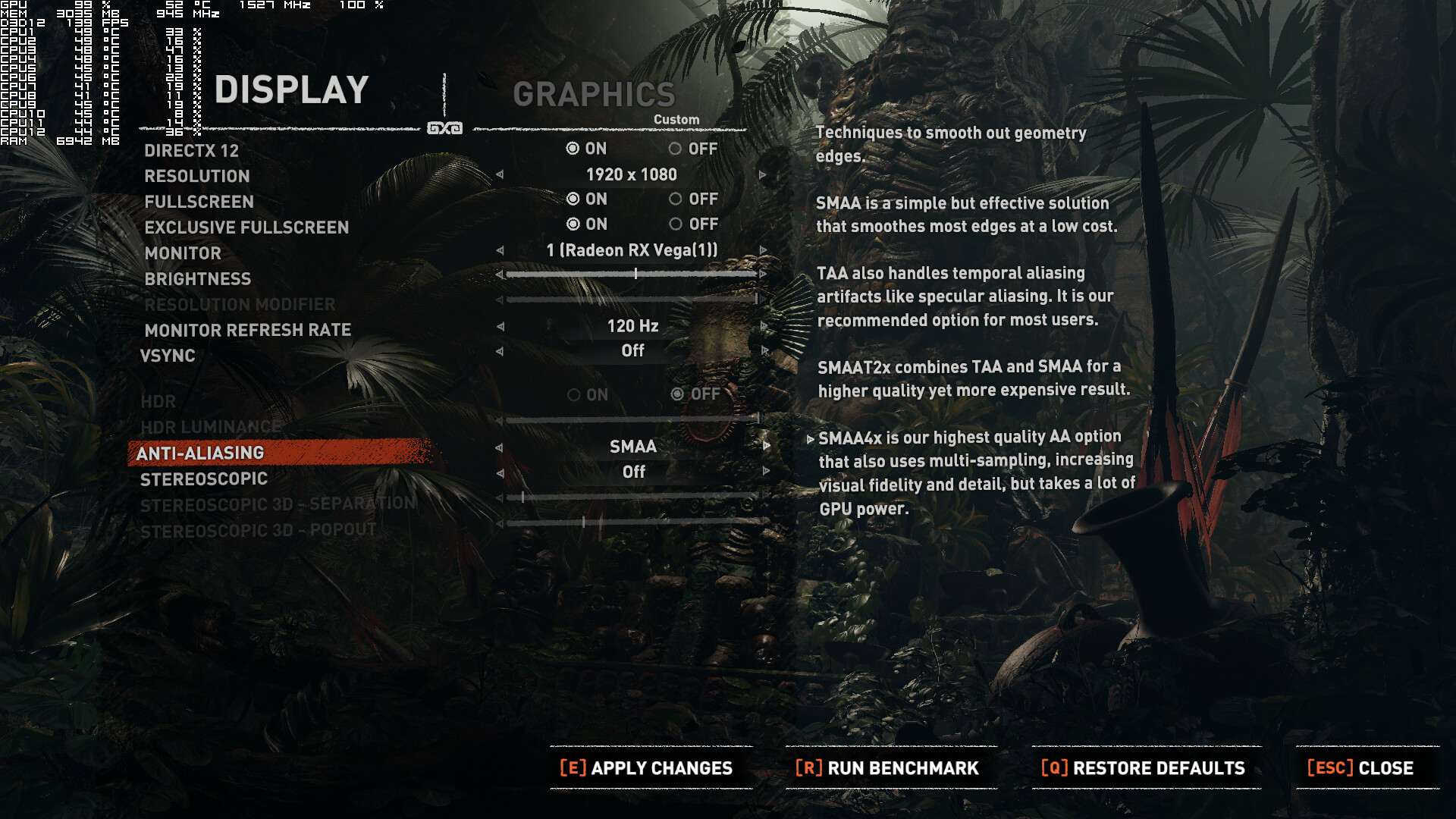
Nixxes and EIDOS Montreal have implemented a nice amount of graphics settings to tweak. PC gamers can adjust the quality of Textures, Texture Filtering, Shadows, Ambient Occlusion, Depth of Field, Level of Detail, Screen Space Contact Shadows and Pure Hair. There are also options to enable or disable Tessellation, Bloom, Motion Blur, Screen Space Reflections, Lens Flares and Screen Effects. The game also supports both DirectX 11 and DirectX 12, supports high refresh rates, features an unlocked framerate and comes with four anti-aliasing solutions.
Since the game supports both DX11 and DX12, we’ve decided to benchmark first these APIs. And it appears that DX12 is the API that all PC gamers should be using. DirectX 12 performs incredibly well and benefits from a lot of threads, and we witnessed higher minimum framerates by almost 100% on both our AMD Radeon RX Vega 64 and NVIDIA GeForce GTX980Ti. Do note, however, that DX11 seems to be completely unoptimized in this title. And we are saying this because other open-world games with way more NPCs on screen, like Watch_Dogs 2, Assassin’s Creed Unity, Assassin’s Creed Origins and Just Cause 3, perform significantly better than Shadow of the Tomb Raider and scale way better on quad-cores and six-cores.
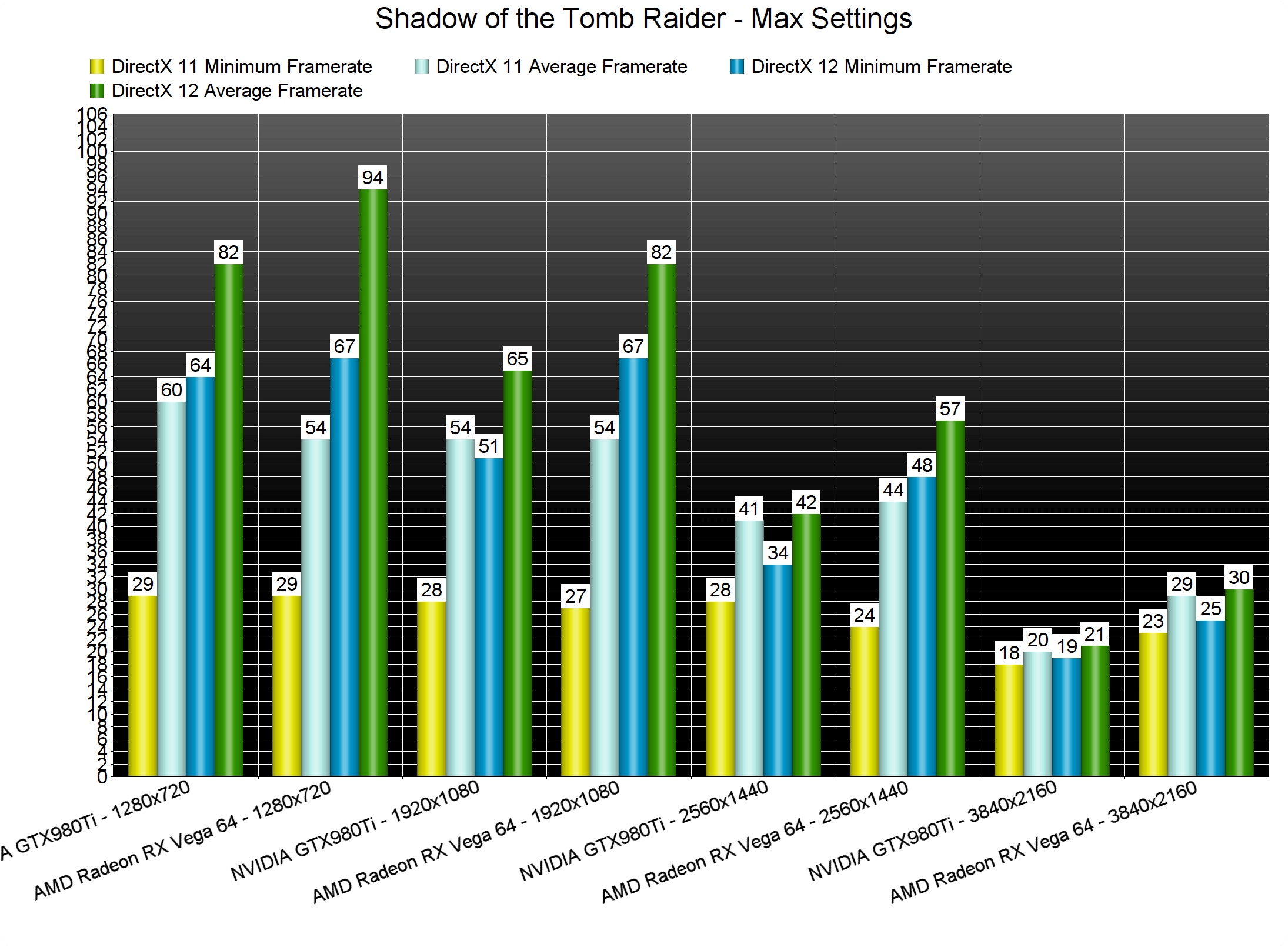
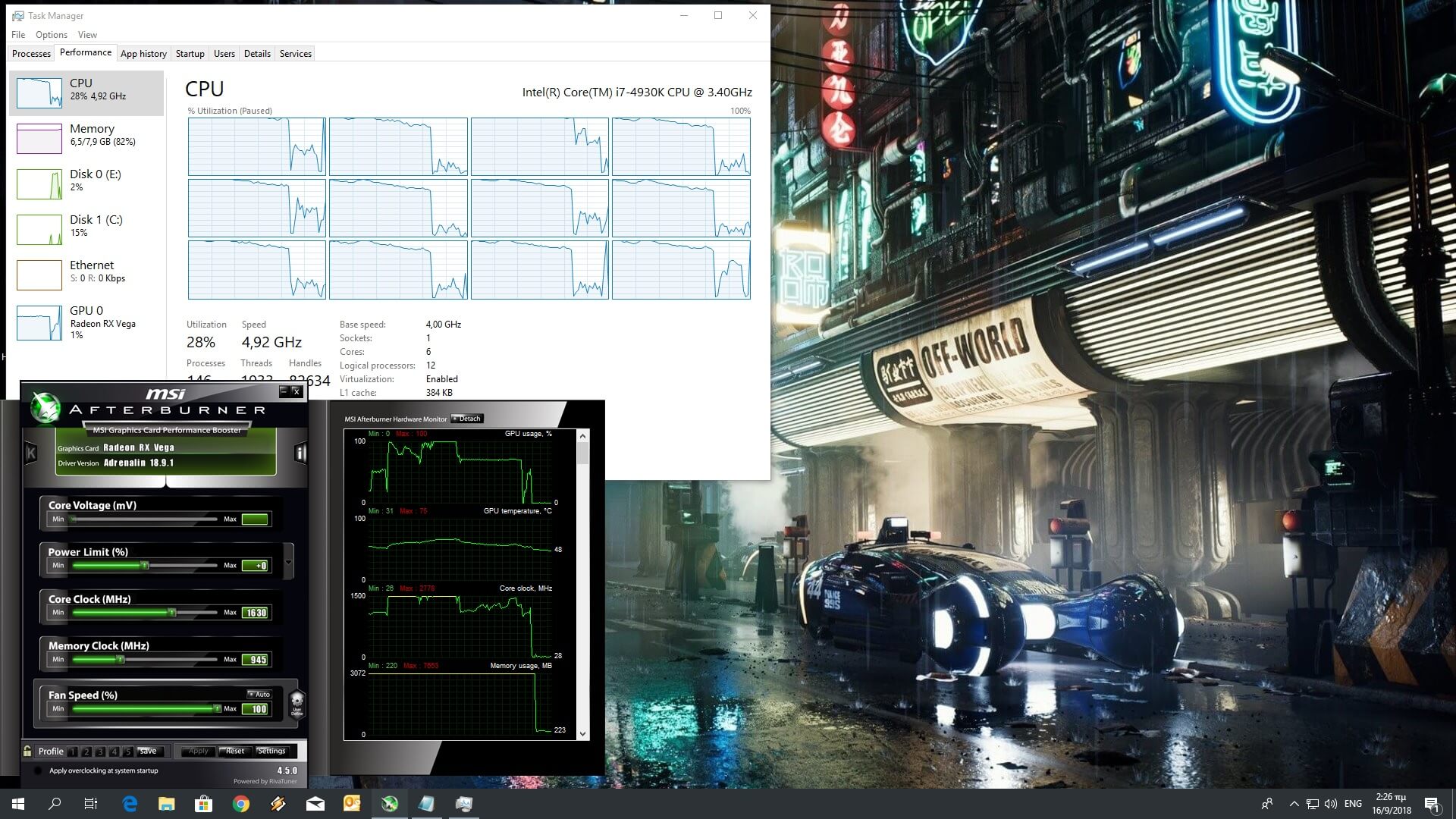
Since DX12 is way faster than DX11, we’ve decided to use it in all of our other benchmarks. In order to find out how the game performs on a variety of CPUs, we simulated a dual-core and a quad-core CPU. Without Hyper Threading, our simulated dual-core system was able to run the built-in benchmark with a minimum of 22fps and an average of 39fps on Max settings at 720p. With Hyper Threading enabled, it was able to push a minimum of 31fps and an average of 54fps. Not too bad actually for such a CPU. What really impressed us, however, was the fact that Hyper Threading makes a lot of difference in minimum framerates on both our six-core and simulated quad-core systems. Shadow of the Tomb Raider is one of the few games that sees actual performance improvements on CPUs that can handle more than six threads, so we strongly suggest enabling Hyper Threading if your CPU supports it.
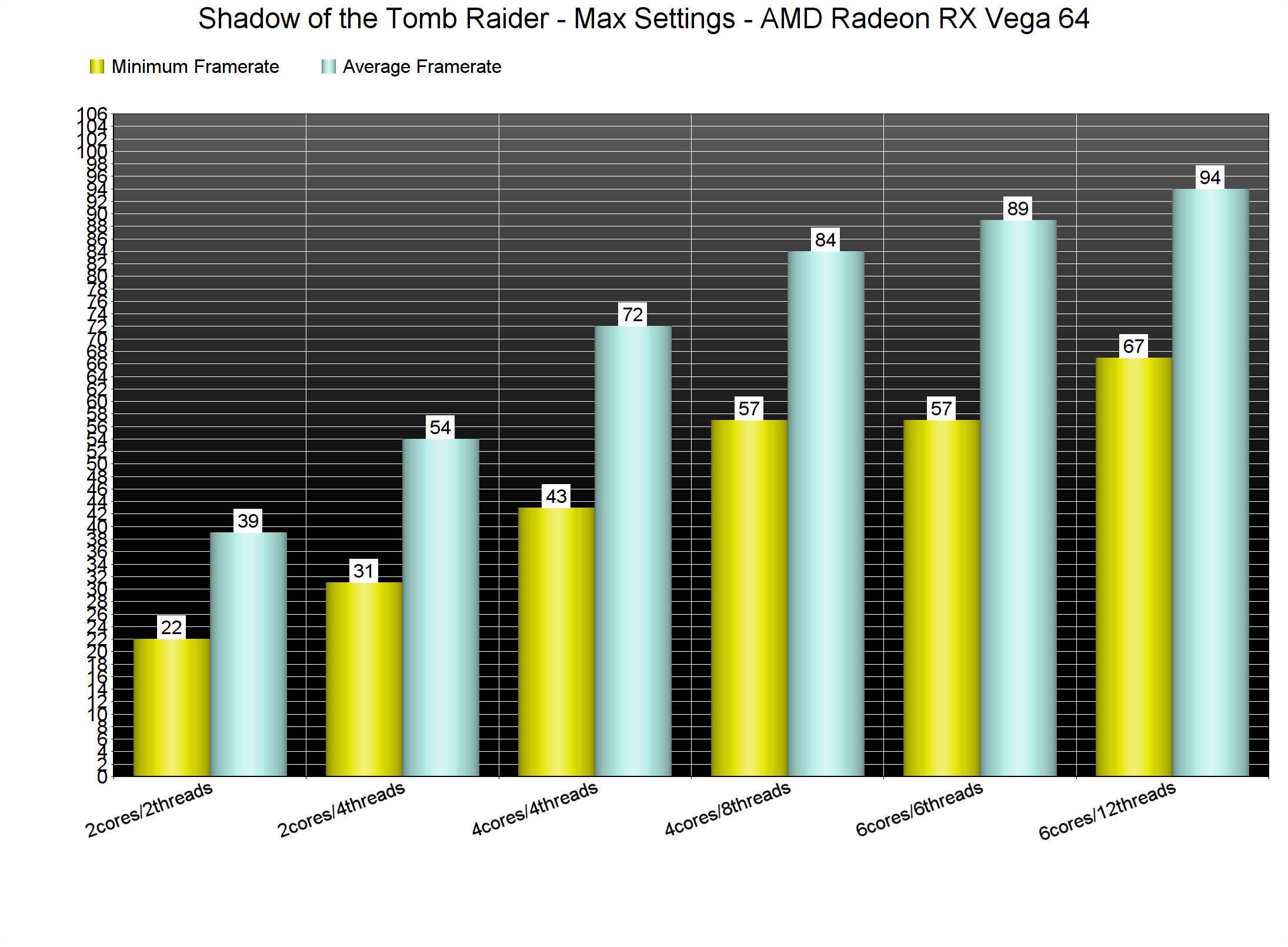
As you can clearly see, although Shadow of the Tomb Raider requires a high-end CPU in order to be enjoyed with constant 60fps, it can run smoothly even on a bit older quad-cores (that support Hyper Threading). Unfortunately, there aren’t any graphics settings that can improve CPU performance, meaning that there is nothing they can do in order to improve overall performance those that are CPU-limited.

Shadow of the Tomb Raider also requires a high-end GPU in order to be enjoyed. For our GPU tests we used SMAA for our anti-aliasing option and set the game to Max settings. As we’ve already stated, the Highest present does not max out the game (as there are still some settings that can be pushed further). The settings that can be further pushed to higher values are Shadows, Anisotropic Filtering, Level of Detail and Screen Space Contact Shadows.

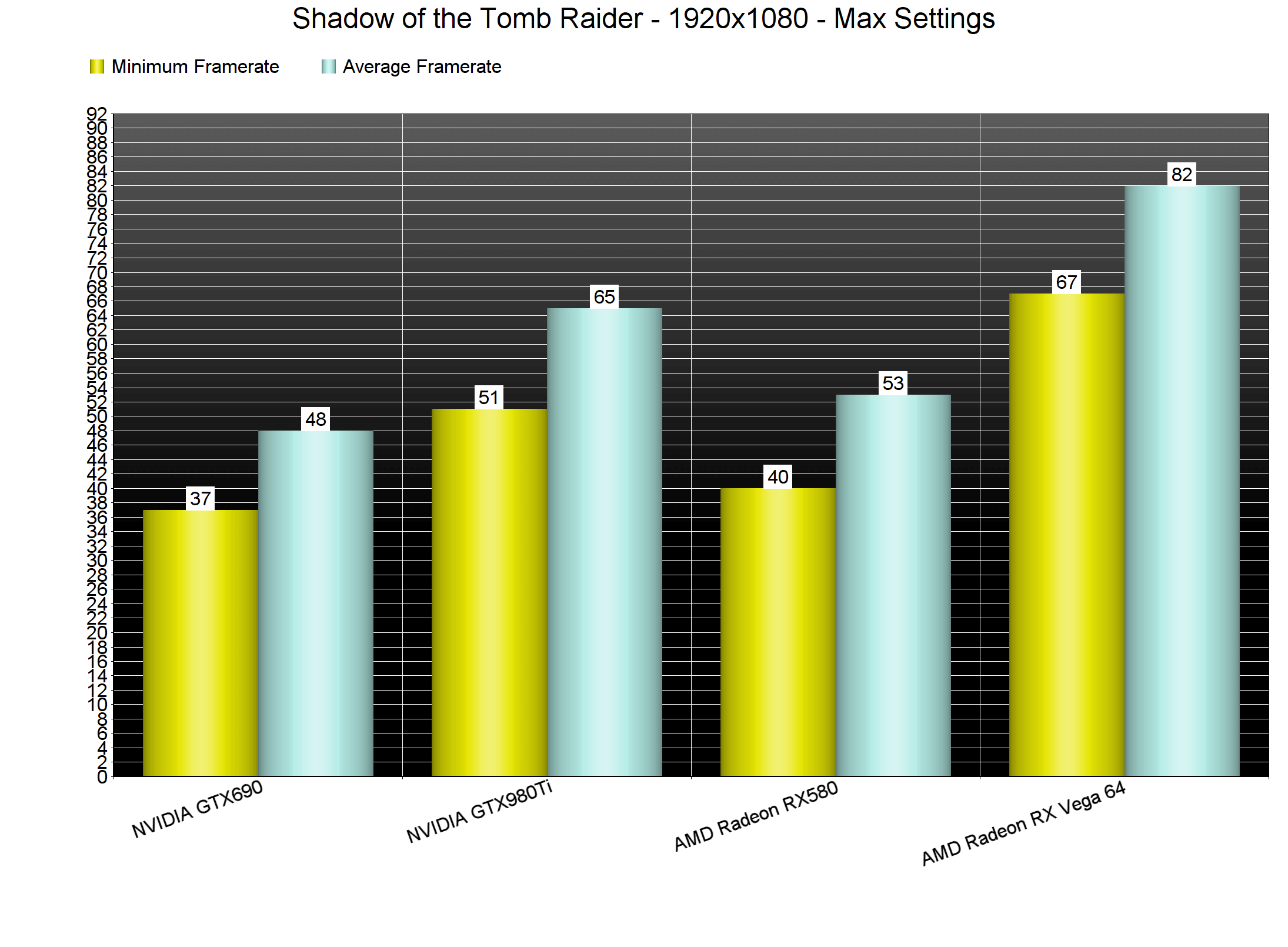
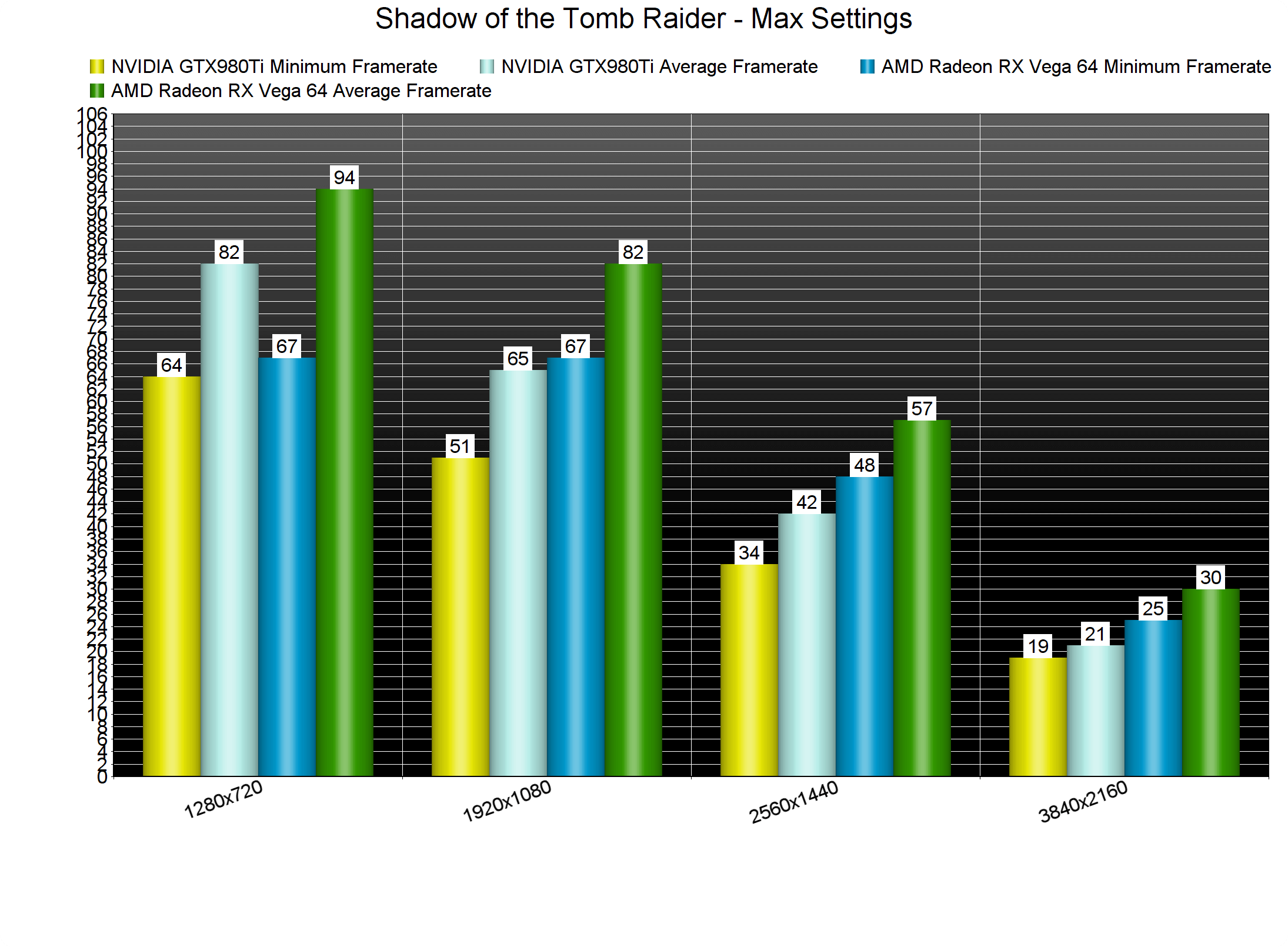
Shadow of the Tomb Raider is one of the very few games in which our NVIDIA GeForce GTX980Ti was unable to offer a constant 60fps experience at 1080p as we got a minimum of 51fps and an average of 65fps. On the other hand, AMD’s Radeon RX Vega 64 had no trouble at all running the game with more than 60fps at all times. As said, SLI is working fine in Shadow of the Tomb Raider and as such, our GTX690 was able to run the game with a minimum of 37fps and an average of 48fps (though we had to lower our Textures to Low in order to avoid any VRAM limitation).
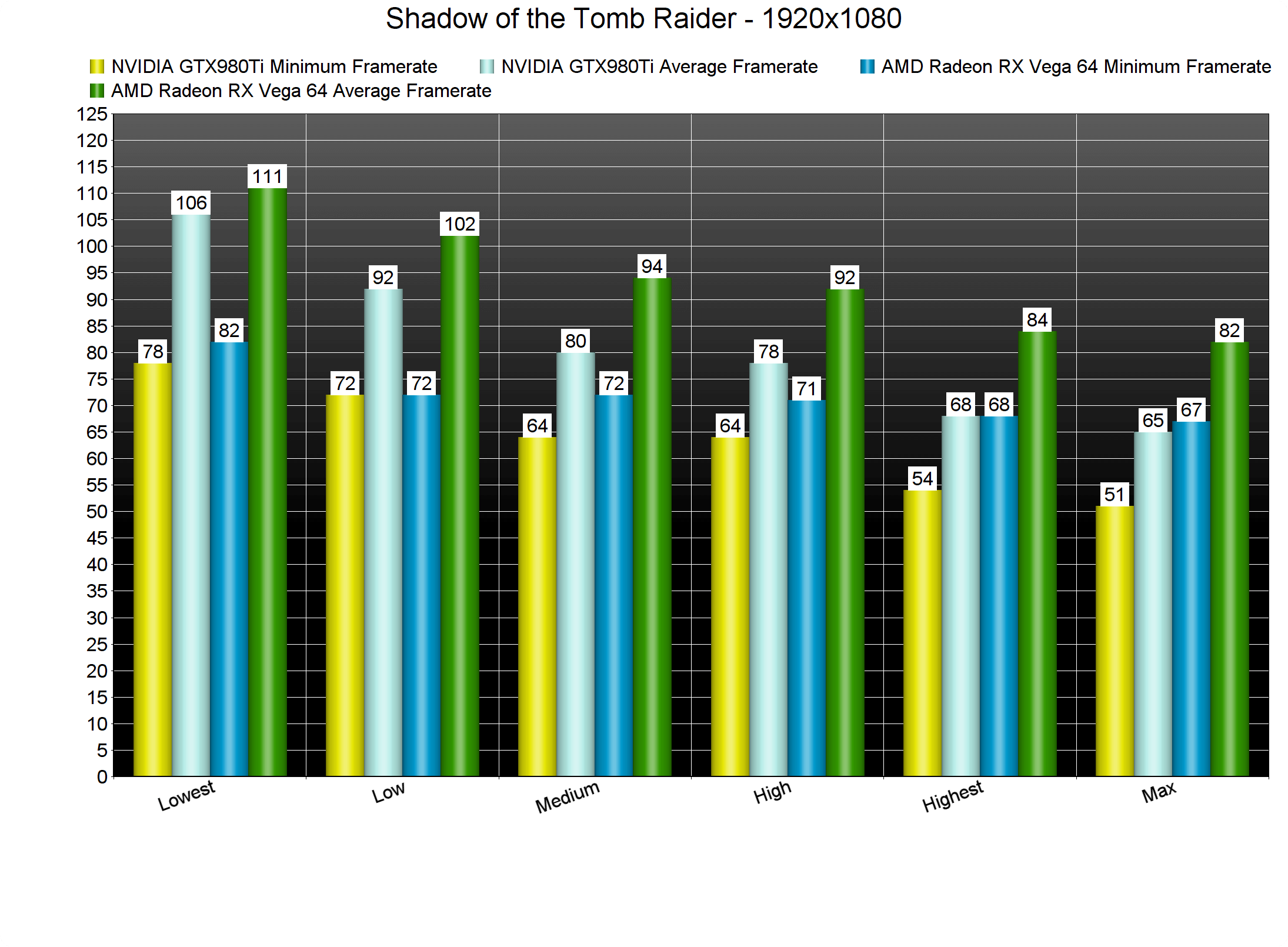
The game comes with five graphics presets: Lowest, Low, Medium, High and Highest. However, and as we’ve already stated, most of these settings have little to no effect at all to the overall CPU burden. On High settings our GTX980Ti was able to offer a constant 60fps experience and on the Lowest settings our minimum framerate was 78fps and 82fps on the GTX980Ti and the Vega 64, respectively.
Surprisingly enough, our GTX980Ti was maxed out even on 1280×720. Yeap, on that really low resolution our GTX980Ti was used, most of the times, at 97%. As we’ve already mentioned, there are options to lower the GPU burden, however we are a bit surprised by how GPU-bound this game can actually be. Both the GTX980Ti and the Vega 64 were unable to offer a smooth gaming experience at 1440p on Max settings. And as for 4K… well… the AMD Radeon RX Vega 64 is borderline close to a 30fps experience.
Graphics wise, Shadow of the Tomb Raider looks amazing. Lara’s character model – and most of the main characters – are highly detailed and look awesome. NPCs, on the other hand, are not particularly impressive, though they are better than those featured in Assassin’s Creed Origins. The environments are full of details and the Volumetric effects are gorgeous. Lara can also interact with numerous objects and bend grass or bushes.

Now while Shadow of the Tomb Raider is undoubtedly one of the most beautiful PC games to date, it does suffer from minor graphical issues/glitches. The shadow cascade, for example, is really low and you will easily notice the transition between Low and High shadows. There are also a lot of object pop-in issues even on Max settings, and some dynamic shadows are extremely pixelated when viewed from specific angles. Furthermore, almost every anti-aliasing solution blurs the image and since Reshade does not work with DX12, there is nothing you can really do other than completely disabling AA (yes, even SMAA softens the image).

Overall, Shadow of the Tomb Raider performs great on the PC, though there is still room for improvement. Yes you will need a high-end system, however the game justifies those requirements. Also, it runs way, way better – at launch – than its predecessor. Though we don’t expect to see any new settings that will lessen the CPU burden, it would be really cool if Nixxes could further optimize the game (especially when it implements its real-time ray tracing effects). Shadow of the Tomb Raider also currently suffers from some graphical issues and the DX11 performance is questionable to say the least. The game also comes with lots of settings to tweak and there is an option to completely disable mouse smoothing (it’s enabled by default so make sure to disable it). It’s a well polished product, though it’s not perfect yet.

Enjoy!

102 thoughts on “Shadow of the Tomb Raider PC Performance Analysis”

  1. I doubt dx11 is broken, it’s too hard to grasp dx12 is faster with so many improvements over dx11? I have seen huge performance boost in hitman on direct dx12 compared to dx11 and I’m not surprised seeing even better performance in new tomb raider game build from ground up for dx12. Also comparisons to watch dogs 2 and other games pointless, because it doesnt matter how many charactes on the screen each game has, it’s overall graphics fidelity that’s important. Nee tomb raider has insane draw distance with with dense jungle and vegetation, it’s not huge but empty world like assassins creed origins.

    1. Actually no. The Level of Detail setting only affects the visual quality of the static 3D models (like houses, grass, trees) and not the amount of NPCs that are on screen. In fact, shadows have a bigger CPU impact (the 10fps gain on Lowest setting is because shadows are completely disabled) than the Level of Detail setting.

      1. Well, this was the case with RotTR and according to in-game description, it still applies here as well. Though yes, shadows impact it as well.

      2. Higher LOD uses more draw calls and there for more CPU and one reason why consoles use a lower LOD setting.

    1. Game is very demanding if you want to play it at 4K 60fps (titan V OC can do that) but it’s doesnt mean it’s unoptimized because there are games with even 2x higher requirements and with much worse graphics at the same time.

        1. Yea i wonder if there are a lot of effects that have a minor impact visuals while having a HUGE impact on performance. Haven’t played the game but it’s far from a shabby looking game. Anyways you and i do not have the same standards in terms of « good looking games ».

          1. It doesn’t look bad or anything, it’s just nixxes being nixxes again, making bad ports, because a 2080Ti should easily reach past 60fps on such game in 4K there’s no excuse for that, and i’d say pretty solid 60fps should be a reach for a 1060/580 at 1080p.

    1. Unfortunately there are more and more games that dips below 60fps on RX 580 with maxed out details even at 1080p. I’m looking at gamegpu benchmarks right now and besides new tomb raider I can list you:
      battlefield 5 (50fps dips), F1 2018 (51fps), no man’s sky (44fps), monster huner world (45fps), Jurassic World (45fps), final fantasy XV (43 fps and that’s without Nv effects), mass effect andromeda (53fps), Kingdom Come Deliverance (32fps), Assassins Creed Origins (43fps) and these are still not all demanding games (mafia 3, the evil within 2, GR Wildlands, QB, ARK, hunt showdown, new deus ex, watch dogs 2)

      1. But my crystal ball tells me that it’s ALL THOSE devs not optimizing the games correctly and not my precious RX 580!!!1one.

        1. Well, maybe that’s the case because current gen games are still based on PS4/xbox one platforms, yet multiplatform games requirements are higher and higher with each year. GTX 780 and GTX 970 could run all PS4 games at ease few years ago, but not now.

          1. These are all my comments, although I’m posting on few other sites and sometimes when I dont have a time I rather copy fragments of my previous comments than write a new one. Writing on my phone is time consuming.

      2. Those are pretty poor optimized games anyway, but the new tomb raider doesn’t manage to get a solid 60fps+ framerate at 4k with the 2080ti on those alleged leaked benchmarks.

        1. It’s 59 fps according to official leaks, so it’s close and perfectly playable on gsync monitor. 2080ti with OC should provide 60fps average, but keep in mind tomb raider will be updated with RTX and DLSS features. DLSS will increase performance, while RTX effects will decrese performance,a nd who knows how demanding new tomb raider will be then. With RTX it will be very possibly the most demanding game out there :P. BTW. On youtube one guy have posted titan Volta gameplay from new tomb raider and he could run tomb raider in 4K with 57 fps average maxed out and 70fps+ with high settings. High settings looks also very good and 70+ fps is very good result.

          1. Decently played on GSYNC monitors, yeah probably, but not many have those, so… Also with this power any games should run at the very least 60 fps on average, with a minimum not going under 40, and max settings without any DLSS or RTX stuff, just classic normal AA and ultra settings.

      3. Well, hunt showdown is still fairly early development. And watch dogs 2 is really dependent on your CPU. The other games are probably unoptimized.

        1. Not maxed out. SMAA 2TX option in Shadow of Tomb Raider dips even a GTX 1070 to the 66 FPS range at 1080P, while SMAA 4X dips it to 48 FPS. Aliasing quality is barely noticeable, better performing AA can be used nad you’ll have your 60 solid on DX12.

          1. No, just one insanely demanding graphics option that will be demanding in any game where you find it.

          2. What are you talking about, normal SMAA was used, not SMAA TX2, because it seems to be te lightest available in the game, TAA is going to be more expensive in terms of performance.

          3. I don’t care about that, i’m talking about these benchmarks, also be sure the settings are the same, and when you refer to something that isn’t on the website you’re discussing on, post the source.

        2. Yes yes it will on 1080p i’m sure but the target isn’t 1080p anymore is it ? Put that card on 2/4k and you’re not going far… sadly

          1. You’re a high end gamer but 1080p is the most used resolution. The Steam Hardware Survey gives a general idea about what resolution people are using…..

            1080p 61%
            1440p 4%
            4K 1%

            The number of people using 1440p and 4K are increasing but very slowly. It will still be many years before 1080p isn’t the most used resolution.

      1. An RX 580 is a solid card for 1080p. It’s comparable to a GTX 1060 6GB in performance. This game is just very demanding.

          1. That’s not true. I have one and it handles any game on the market at 1440p/60 with no issues. A couple of the highest end settings on a select few games may need to be dialed back, but 99% of all titles run at max at 1440p, assuming you have the 8 gb model.

          2. I’m pretty sure it won’t handle

            Cod blackout
            Hunt showdown
            Ac origins

            @1440p/60.

            I know because i have a titan and i have dips under those and sometimes averaging under 60 aswell depending on the situation. Sure id you put all the details to low… while we there even a GTX960 can do the trick..

          3. If your’e getting dips under 60 with a titan you have other problems.
            Even the 1050ti in my gaming laptop can handle any game at 1080p/60 with no issues, assuming you choose the correct settings. And no, I’m not talking about low.

          4. We were talking about 1440p/60 not 1080. There’s a major difference in pixel count. And my system is fine there’s no way around the fact that the RX580 can’t do +60fps on those mentionned games above on 1440p without sacrifices and even on low it’s far fetched.

          5. Are you on crack ?

            youtube.com/watch?v=JlPaxClh8Wk

            on 1080p he’s not even hitting 60fps were not talking 1440p, i’m not giving this time anymore.

      2. lol, please cut the crap….u haven’t got a clue.

        580 is not a weak gpu. enjoy your overpriced turd video card from Nvidia, ’cause that’s what you always do (and, also willing to shell out more cash for the upcoming RTX series as well, LMAO).

        1. Tell you what. 1080p was the 2010’s resolution. Compare the 580 to the 1080ti (not talking about $) and the easy pick is the 1080ti… If you can’t buy 1000$ gpus don’t be pissed at others. The 580 is ok gpu for 1080p anything higher than that you’ll have to get another gpu OR drop visual fidelity which is not the best case scenario. Get on 2k/4k. I will probably buy the RTX2080Ti from evga once is comes out true but that doesn’t mean i’m not looking at AMD’s technologies and gpus to come. They just have nothing to run 2k/4k so manu gamers like me that are running those resolutions, for us, the 580 is VERY weak.

          Matter of perspective.

          1. It’s not really an argument to say it’s a 2010 resolution when there are 144Hz+ monitors. I’d rather keep my 1080p/144hz G-Sync over a 4K 60hz any day, 60hz is horrible even just on the desktop alone.

          2. I play on a 2k rog swift monitor and i enjoy 144hz with 2k resolution. Also 4k/144hz are coming if i’m not mistaken (granted expensive). But i agree with you that 60hz even on desktop moving stuff around is attrocious.

          3. Most of your games won’t even touch 144hz at 2K so 4K/144hz is next to useless unless you just play old games.

          4. Rocket league
            Rainbo six siege
            Diablo 3
            League of legends

            All of those are maxing 144hz with gpu usage to spare. Gsync really is wonderful over 100fps.

          5. This is very true.
            Monitors exist long before they’re usable. And don’t give me that future proofing crap. Card performance improvements per gen is putting on the brakes, which is why most are still using 1080p.

        2. Please don’t turn this into an AMD vs nvidia fight, i only meant the 580 because that’s what’s used in the benchmark, the same applies to to the 1060.

        3. I’ve found that the people who hate on AMD cards have never actually used one. Anything 570 or up and a pretty decent chip. Even the Vega 64, minus the power draw.

  2. Its actually not bad if we compare the xbox one x runs this game at 60fps 1080p with few drops under 60 at normal(medium settings) drop some stuff one notch and you will get locked 60fps at a better visual fidelity with a mid range gpu like a 1060/580

      1. Performance mode 1080p 60fps
        Quality mode 4k 30fps

        Both are at normal settings and both drops frames below their target framerate especially in 4k its dreadfull

        1. Ugh… Well consoles are much more cost effective AND easier to hide in living rooms etc. It fits a bunch of peoples needs so i guess it’s here to stay.

          1. Well consoles are fine when playing from your couch. I had a blast playing Spiderman PS4 ( and other PS4 exclusives ). Now, don’t even think about playing it on your PC screen… the poor quality will make your eyes bleed upclose…

            But at least consoles games are optimized, unlike PC ports that are usually an isult to paying customers when it comes to optimization ( not even talknig about useless “ultra” settings )…

  3. Nice anaylsis John.It seems this game is way demanding than FFXV. Can’t wait too see how it performs on RTX GPUs.

  4. Yes yes it will on 1080p i’m sure but the target isn’t 1080p anymore is it ? Put that card on 2/4k and you’re not going far… sadly

  5. Your cpu and ddr3 is limiting too much vegas performance and amd in general, quite a different result from other sites where 980ti is significantly worse than vega under dx12

  6. Well, maybe that’s the case because current gen games are still based on PS4/xbox one platforms, yet multiplatform games requirements are higher and higher with each year. GTX 780 and GTX 970 could run all PS4 games at ease few years ago, but not now.

      1. True, PS4 Pro settings are much lower than Xbox One X and PC settings. Its all about memory.

        PS4 Pro can use only 4 GB of memory for graphics (5 for whole game). Xbox One X use 8 GB of memory for graphics ( 9 for whole game) like any good PC, For example GTX 1080 also use 8 GB for graphics like Xbox One X… 2x more than PS4 Pro

  7. At one point developpers will have to remember they are making games not movies… This game i the perfect frustrating illustration of modern games… Devs force you to walk while talking to someone over the radio, slow you down while crawling between two “world hubs”, force another boring cutscene… Stop interrupting the game flow !!!

    On the other hand, they managed to push some discreet baizuo agenda ( more subtle for once )…

  8. If it was ported from someone who actually knew what they were doing it’d have been the same results on very high/ultra with nothing fancy enabled.

  9. Days of the i72600k are coming to a close. The cpu is really old and new games should push tech forward. If you can’t afford a new cpu now then save up and buy one on sale later. Or play games with less detail. Your choice.

    1. It wouldn’t change much, just a couple of fps because intel is slightly faster in games. The game is poorly optimized like everything nixxes does, end of story.

Leave a Reply

Your email address will not be published. Required fields are marked *