
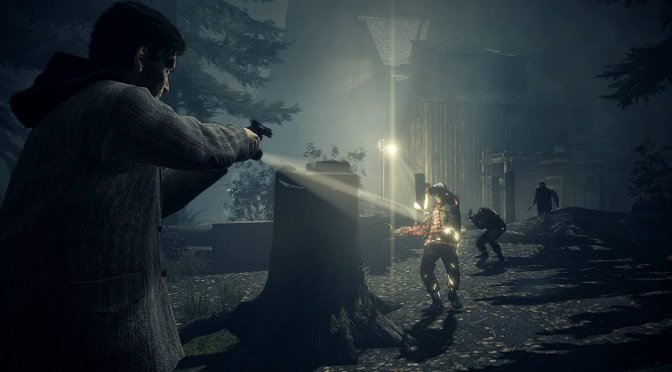
Now here is a pleasant surprise. Remedy has just released Title Update 1.33 for Alan Wake Remastered and shared its full patch notes. So, let’s see what this new update brings to the table.
Patch 1.33 adds official support for HDR. This will please a lot of PC users who wanted to experience this game in HDR. Moreover, it updates SDR to 10bit. This will reduce visible colour banding, even when gaming at SDR.
Moreover, Update 1.33 increases the framerate limit from 200FPS to 240FPS. It also adds a new camera mode. This new camera is similar to those we’ve seen in modern third-person titles.
And that’s not all. Patch 1.33 improves the quality of DLSS and fixed grass transparency. Grass will now be more pleasing to look at. On top of that, vegetation will move the way vegetation is expected to when it’s windy or when Alan walks into some trees or bushes. This patch also improves FOV scaling and the way lens flare works. It will now fade in/out much more smoothly. Plus, it improves the DX12 rendering path, meaning that the game will be more stable on your PC.
It’s also worth noting that Update 1.33 fixes various polygonal rendering errors and visible depth buffer issues. This has greatly reduced the amount of visual glitches. Furthermore, it fixes multiple issues related to mouse input. It also fixes DPI awareness, where you had to set your display to 100% scaling to not crop the image.
All in all, this is a great patch for Alan Wake Remastered. It came out a bit late, but, as they say, better late than never.
Like always, Epic Games Store will download Patch 1.33 the next time you launch its client. Below, you can also find its full changelog.
Alan Wake Remastered Patch 1.33 Release Notes
GAMEPLAY
- Added a command to skip the intro. (Shoutout to every speedrunner, and anyone on their 67th run of the game just looking to get into the gameplay quicker.)
- The sprint camera no longer activates when pressing the shift button when Alan is next to a wall or exhausted. This could sometimes cause Alan to not be able to move.
- The camera behaves the way it should when Alan is on top of a moving object.
- When loading from a checkpoint, the camera left/right side now resets properly.
- Vegetation moves the way vegetation is expected to when it’s windy or when Alan walks into some trees or bushes. Even above 30 FPS.
- Swapping between weapons takes a regular amount of time now, and not any longer than necessary.
VISUALS
- Added HDR.
- Added a new, optional camera style mode. You can use this if you want the game to look a bit more modern. If you prefer to keep a look as close to the original as possible, don’t touch this.
- Unlocked the framerate from 200 FPS to 240 FPS.
- Improved DLSS and fixed grass transparency. Grass is now more pleasing to look at.
- Updated SDR to 10bit – it used to be 8bit. This reduces visible colour banding.
- Improved FOV scaling. (The math was off. Whoops.)
- Improved the way lens flare works. It now fades in/out much more smoothly.
- Improved the DX12 rendering path – this lowers the risk of crashes and glitches.
- Fixed polygonal rendering errors and visible depth buffer issues. This has greatly reduced the amount of visual glitches.
- The videos you could play on in-game TVs used to be affected by display brightness settings. Not anymore – fixed it!
- Fixed the enemies’ dark shield burning effect flare. It looks the way it’s supposed to now.
- In Ultrawide, fixed the enemies’ visual distortion effect looking weaker so that it displays properly.
- In Ultrawide, fixed cutscenes having both pillarbox and letterbox. You can now enjoy cutscenes in native 21:9!
- In Ultrawide and 4:3, fixed FOV and lens flares not scaling properly.
- Fixed DPI awareness where you had to set your display to 100% scaling to not crop the image. You don’t need to do that anymore.
UI
- Added a setting to scale the gameplay UI. It was quite tiny by default – you can now make it bigger.
- Fixed multiple issues related to mouse input
- Fixed it so that custom settings no longer leave multiple settings undefined. You are once again able to customise your settings, and the game will actually remember what you told it.

John is the founder and Editor in Chief at DSOGaming. He is a PC gaming fan and highly supports the modding and indie communities. Before creating DSOGaming, John worked on numerous gaming websites. While he is a die-hard PC gamer, his gaming roots can be found on consoles. John loved – and still does – the 16-bit consoles, and considers SNES to be one of the best consoles. Still, the PC platform won him over consoles. That was mainly due to 3DFX and its iconic dedicated 3D accelerator graphics card, Voodoo 2. John has also written a higher degree thesis on the “The Evolution of PC graphics cards.”
Contact: Email