

Croteam has released a new update for The Talos Principle 2 that adds support for AMD FSR 3.0 Frame Generation. As such, we’ve decided to benchmark it and share our overall impressions. So, let’s see whether this AMD FSR 3.0 implementation is as good as the one we saw in Like a Dragon: Infinite Wealth.
For these benchmarks, I’ve used an AMD Ryzen 9 7950X3D, 32GB of DDR5 at 6000Mhz, and NVIDIA’s GeForce RTX 4090. I also used Windows 10 64-bit, and the GeForce 551.23 driver. Moreover, I’ve disabled the second CCD on our 7950X3D.
Croteam has added a built-in benchmark tool for The Talos Principle 2, which made it easier to test it. Moreover, DLSS 3 Frame Generation is still locked behind an older NVIDIA driver. As such, the only Frame Generation solution right now is AMD FSR 3.0 (for those who want to keep their drivers up to date).
Below you can find our benchmarks on our NVIDIA GeForce RTX 4090. NVIDIA DLSS 3 Super Resolution is faster than AMD FSR 3.0 and Intel XeSS. Not only that, but DLSS provides the best image quality. However, for those who want to boost their performance even more without reducing any graphics settings, AMD FSR 3.0 Frame Generation is currently the only way.
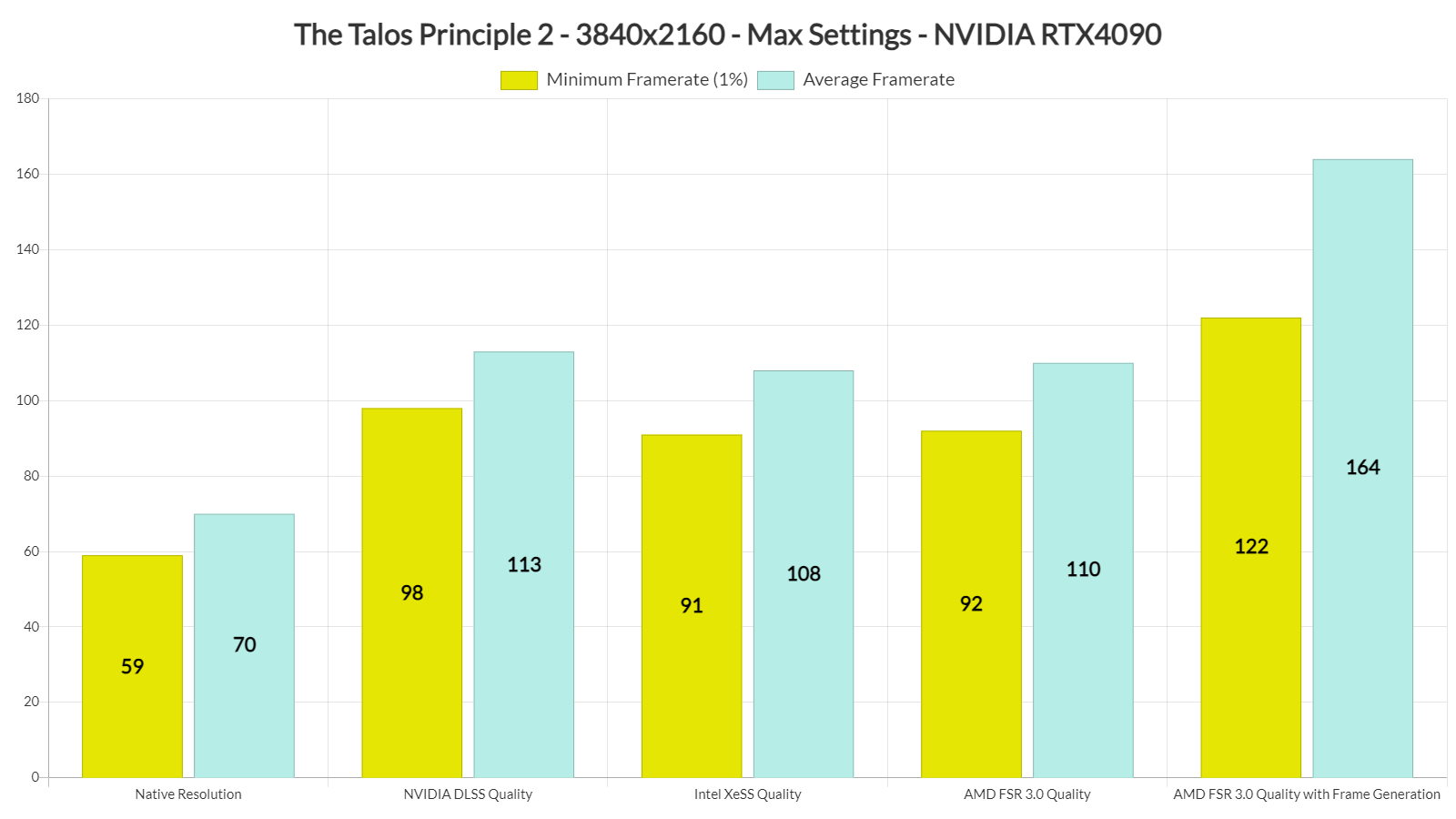
The good news here is that the AMD FSR 3.0 Frame Generation implementation is on par with what we saw in Like a Dragon: Infinite Wealth. Since the game cannot hit framerates higher than 165fps at 4K, we were constantly below our monitor’s refresh rate (LG 32GK850G-B). And, for those wondering, the game felt smooth. We also didn’t have to lock the framerate to 120fps or anything like that. AMD FSR 3.0 FG works great here.
The big issue with FSR 3.0 in this game is its Super Resolution. AMD FSR 3.0 Super Resolution introduces MAJOR visual artifacts while moving the camera. All the vegetation gets messed up the moment you move your viewpoint. It really looks awful. You can notice these artifacts even at Native FSR 3.0. Oh, and if your framerate without Frame Generation is 50fps, AMD FSR 3.0 will feel laggy. I was able to spot the extra input latency immediately. In order to get a somehow responsive gaming experience, you’ll need at least 60fps (without FG).
Intel XeSS provides better results than AMD FSR 3.0, and that’s the upscaling mode we suggest using for our non-RTX readers. So while AMD FSR 3.0 Frame Generation can boost performance, we suggest avoiding it if your GPU can hit 80-90fps with Intel XeSS. As for our RTX fans, they should stick to DLSS.
Finally, here’s a video showing our AMD FSR 3.0, NVIDIA DLSS 3 Super Resolution, Intel XeSS and Native 4K benchmarks!


John is the founder and Editor in Chief at DSOGaming. He is a PC gaming fan and highly supports the modding and indie communities. Before creating DSOGaming, John worked on numerous gaming websites. While he is a die-hard PC gamer, his gaming roots can be found on consoles. John loved – and still does – the 16-bit consoles, and considers SNES to be one of the best consoles. Still, the PC platform won him over consoles. That was mainly due to 3DFX and its iconic dedicated 3D accelerator graphics card, Voodoo 2. John has also written a higher degree thesis on the “The Evolution of PC graphics cards.”
Contact: Email

“For these benchmarks, I’ve used an AMD Ryzen 9 7950X3D, 32GB of DDR5 at 6000Mhz, and NVIDIA’s GeForce RTX 4090. I also used Windows 10 64-bit, and the GeForce 551.23 driver. Moreover, I’ve disabled the second CCD on our 7950X3D.”
That kind of hardware, yet running an outdated OS from 2015, and disabled part of the CPU. Why would anyone trust your benchmark results?
Why would anyone trust your comment when you don’t know the benefits of disabling the second CCD of the 7950X3D? 😉
I partially understand the decision to disable CCD-2 on the 7950X3D due to the way the die is configured, but I do not understand still using Windows 10 in 2024 to review 2023-24 game titles.
It wreaks of a constant “I hate the new version of Windows, I’m staying with the old version for as long as I can” mentality.
There isn’t any performance difference between Win10 and Win11. Also, all DX12 features work in Win10. In terms of gaming, Win11 brings nothing to the table. So, there is no point upgrading the OS (and then installing all the programs we use). If there was a meaningful performance difference, we would have upgraded to Win11.
(thanks for the exxagerated annoying anti-spam whatever system)
Yes, for performane. Maybe not for benchmarks when FSE is used, but everyone else who uses borderless window all the time (which is so much better, since convenient).
1) devblogs(.)microsoft(.)com/directx/dxgi-flip-model/
Optimizations for windowed games in Windows 11.
2) Auto-HDR (though Special K’s sdr- hdr injection and tone mapping looks way better)
Ye. I know PC “master race” isn’t exactly a master race, since majority are dumbo consumers wasting thousand for PC-hardware, but at the end still have an inferior experience because of shietty image quality, since they view on overpriced moniturds, ahem monitors, even worse on LCD-display trash, and thus don’t know how awesome gaming on a big premium W-Oled/QD-Oled TV + HDR looks today.
:-)))
If you care about the difference of Win 10 and 11 so much, do you have at least fully debloated the OS image (or after the installation), and removed all the NSA-/CIA-/Mossad-spyware & telemetry programs that Microshats ships in the default state?
This is what eats performance x10 times more than the OS difference (besides all the spying and surveillance).
If not, than I suggest you stop caring about that, because in default state, Win 11 is nothing more but an Win 10.2 with Microshats attempt to push the 1984-communism agenda and DRM onto everybody, by enforcing TPM 2.0 and secure boot. (In case you don’t understand that: That’s what tpm, pluton security chip (xbox) and secure boot is all about.
In case you don’t know it because you are too young or uneducated: The global elite, through Microshat and other software & hardware alliances, already tried that 20 years ago with Palladium, TCPA and the Fritz chip).
It never was about “security for the users”.
It’s about the NWO, control and manipulation (remove the brackets since the owner here is a dumbo with his exxagerated system)
blogs(.)microsoft(.)com/on-the-issues/2021/02/22/deepfakes-disinformation-c2pa-origin-cai/
secret(.)club/2021/06/28/windows11-tpms(.)html
linustechtips(.)com/topic/1350695-tpmpocalypse-microsoft-singlehandedly-destroys-the-tpm-market/page/5/?tab=comments#comment-14832144
Any software for w11 debloating?
Holy smokes!
I’m taking my free time and write that wall of text, and additionally already give most of the links, and you ask for software?
Do you even read it all?
Of course that’s not all there is too it. If you want to have the complete package and are clueless how to do it, you will have to start from scratch and spend at least 4 – 5 hours learning with
1) downloading all the needed software beforehand
2) debloating the iso before the installation
3) run all the needed programs (debloat after installation all Microshat programs and features, and remove/block the surveillance-/spying crap with programs) after installation
4) Install and make yourself compatible with all the software you now use instead of the Microshat crap. E.g. Windows photo viewer replaced for ImageGlass. Wordpad/and editor for notepad++. Microsoft paint for paint dot net etc. pp.
5) then update Winshat 11 23H2 through windows updates (or other tools)
6) then check with 3) again if the Microshat’s updates haven’t reverted anything back.
It takes time, but you basically get a Windows 11 23H2 LTSC. and on top of it a ton less spying & surveillance.
I could write a mini tutorial, but why should I do that for maybe 5 people who will read it?
Ask the website owner John Papadopoulos here.
If he publishes that mini-guide as an article, maybe I do.
Thanx for the reply.
Reinstallation of w11 is not really an option, but removing useless services and blocking telemetry, is more of what i had on mind.
Ah sorry, it’s the dumbo website owner with his exxagerated censorship and anti-spam whatever again.
quack 🙂
Ah sorry, it’s the dumbo website owner with his exxagerated censorship and anti-spam whatever again.
And I also didn’t mentioned some other stuff.
For example blocking all the tracking and spying from companies and services with the windows hosts list (hosts list blocks via DNS).
For example you can block all shiet from google, to the point not even youtube will work anymore.
1) Start by installing WindowsSpyblocker
crazymax(.)dev/WindowsSpyBlocker/
2) he has a short guide which goes a bit deeper
crazymax(.)dev/WindowsSpyBlocker/blocking-rules/hosts/
3) So you additionally install that program “HostMan” (in fact you don’t need to install, it’s a portable program.
4) than visit the links crazymax provided “Hosts blocklist links” github(.)com/crazy-max/WindowsSpyBlocker/tree/master/data/hosts
and add them all to your personal windows hosts file through the HostsMan programm
5) and now comes the google part:
gist(.)github(.)com/unixb0y/4973fece2d5099bd53143a18a54318f3
As you see some people made serious effort to check all google DNS to block.
But as said: You have to learn yourself what DNS to block and what not. I needed to tinker with it a bit to keep the things needed for youtube and gstatic(.)com or google(.)com, or else I couldn’t write comments here, since disqus uses gstatic(.)com java script for logging in.
That with the DNS is not only a internet browser things, but it also blocks connections for programs.
It’s obvious to tell besides from that, that connection to the internet should only be through VPN or whatever, browsing with firefox, NoScript, adblock plus whatever.
cheers
Then check all the links I provided.
Especially that one “Datenschutz skript” from “mcalex777” on github.
This is some serious stuff he did and lots of effort.
You won’t find any better programms/skripts than his on the internet for free.
The things he did (remove/block spying & surveillance etc.) are to some degree instructions from Germanies government (Germanies governtment payed money to a company to check “if Windows 10 is safe for companies to use”.
The result was: of course it isn’t; the OS spies & surveilles constantly).
There are two other programms you should install and make yourself comfortable with:
– ooshutup10. You likely know that, it’s easy to use.
– W10privacy. w10privacy(.)de/english-home/
Should take about 1 hour to check all the settings, what they’re doing etc.
As usual: Don’t click any settings you don’t undertand. Be it for W10privacy, Sophia Script, the iso-debloating programms (msmg toolkit, NTlite), or Datenschutz Skript from mcalexx777.
Especially the Datenschutzskript, be careful with the command “fwi export”. It can block all internet traffic, and it’s not easy to revert the changes.
The firewall commands to use should be:
– C:TempDatenschutzFirewall_Install.bat
– fwi
– fwi addjob
and then restart the PC.
As the guide says, check windows eventviewer if a task with the ID “888” is created on start.
(Sorry for the all the brackets again, the owner is just a serious dumbo with his exxagerated system, anti-spam whatever)
www.()cl(.)cam(.)ac(.)uk/~rja14/tcpa-faq).)html
It’s almost an in-joke. In the US Department of Defense, a `trusted system or component’ is defined as `one which can break the security policy’.
As said, you need to remove all Microshats built-in shipped programms; even MS notepad, photo viewer whatever nonsense, because they all spy/surveill/track telemetry.
So if you care about performance so much:
– msmgtoolkit(.)in/downloads(.)html
– forums(.)mydigitallife(.)net/threads/msmg-toolkit(.)50572/
(or NTLite; but it’s way to expensive and a subscription model, so I recommend debloat after installation)
This one is the best anti-spy/telemetry there is
– github(.)com/McAlex777/Datenschutz
majorgeeks(.)com/files/details/windows_11_debloater(.)html
– github(.)com/farag2/Sophia-Script-for-Windows
– github(.)com/Raphire/Win11Debloat
– github(.)com/cramaboule/Debloat_Windows11
Even dumbo msm channels from youtube as linustechtips, say they use a debloated Windows OS, in order to minimize the OS interfering with benchmarks all the time.
Windows 11 is necessary for certain thread scheduling features for Intel 12th, 13th, and 14th gen CPU’s that use Intel’s new hybrid core architecture where some cores are intentionally lower power than others (as far as I know Windows 10 was never updated to know how to schedule threads properly on these CPU’s). If you don’t have one of those processors, there is literally no point in Windows 11 (from a gaming standpoint at least).
If you watch the recent LTT video where they benchmarked 12 AMD Ryzen 7800X3D CPUs, you’ll see that even on a debloated Win11 there will be noticable variations from run to run, simply because Win11 likes to waste your PC resources whenever it feels like.
From fellow Linux colleagues working at Microsoft, I’ve heard that upcoming versions of Windows are going to be even more bloated, this time with the marketing slogan of “AI”.
Hope y’all are looking forward to that… :}
Because they haven’t debloated hard enough, and didn’t removed/bloked all the spying & surveillance crap (see comment above).
You do understand that Windows 10 will be updated (at least) until Q3 2025, right?
But anyway, keep on hardcore betatesting. We need people like you, so when Microsoft releases 12, Windows 11 is sorta ready for the jump.
Don’t disable your juicy telemetry, though!
Winshat 12 will be even more a NWO-1984-communism OS (everything goes according to the global elite, WEF, black rock, lizard, Juice, whoever runs the globe), since there will be 99 & likely no circumventing tpm/pluton chip/drm/secure boot (already inside amd’s mobile processors – bullshiet msm hardly has reported it-, and future intel/qualcom, designs; read my comment above what’s it all about), and with machine learning (AI) feature x20-times more spying & surveillance.
I give you and all other people a magic prophecy: :-)))
All who rightfully shiet on Win 11 right now, will beg Microshat to prolong support for it (which will likely come to a stop in 2027 or so), because Winshat 12 will be much worse.
You can basically run a Win 11 23H2 LTSC right now (read comment above) and have the advantages but with the same amount of crap and spying as Win 10.
Cheers
You do understand that Windows 10 will be updated (at least) until Q3 2025, right?
But anyway, keep on hardcore betatesting. We need people like you, so when Microsoft releases 12, Windows 11 is sorta ready for the jump.
Don’t disable your juicy telemetry, though!
As always, the only Quality option with FSR is OFF.
John could you please overlay the minimum fps over the average fps in a single bar? It would make the graphs way cleaner to read.
I was recommended this website by my cousin I am not sure whether this post is written by him as nobody else know such detailed about my trouble You are amazing Thanks
Takiple.com.tr, Spotify üzerinde müzik yayıncılığı yapanlar için çeşitli hizmetler sunmaktadır, bu da müzisyenlerin dinlenme ve takipçi sayılarını artırmalarına yardımcı olabilir.
This article is a valuable resource for anyone seeking a comprehensive overview of the topic.
The article’s use of relevant quotes and anecdotes adds depth and authenticity to the discussion.
Twitter’da, retweet satın alma gibi hizmetler sunan takiple.com.tr, hesabınızın etkileşimini artırmanıza ve mesajlarınızın daha geniş bir kitleye ulaşmasına yardımcı olabilir.
helloI like your writing very so much proportion we keep up a correspondence extra approximately your post on AOL I need an expert in this space to unravel my problem May be that is you Taking a look forward to see you
Hi i think that i saw you visited my web site thus i came to Return the favore I am attempting to find things to improve my web siteI suppose its ok to use some of your ideas