
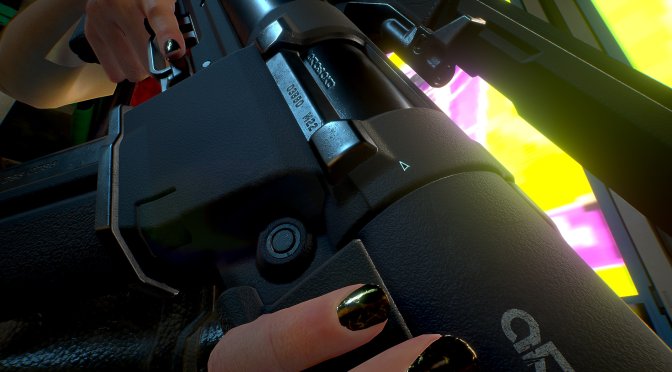
Modder ‘Amakesh’ has released a 4K Texture Pack for Cyberpunk 2077 that upscales the textures of all weapons. This is a must-have Texture Pack as it can noticeably improve the visuals of the weapons you’re holding.
According to the modder, this pack upscales around 500 textures. Unfortunately, Amakesh has not shared any before/after screenshots or videos. However, he did share the header image which showcases the quality of these new upscaled textures.
Those interested can download this 4K Texture Pack from here.
Lastly, and speaking of Cyberpunk 2077, we also suggest taking a look at these other mods. The Rebalance Megamod attempts to overhaul numerous aspects of the game, such as the AI, armors, perks, melee, player stats, weapons and more. There is also an enhanced Photo Mode Unlocker that you can download. Let’s also not forget the amazing Metro System Mod. Furthermore, this mod improves the game’s graphics by increasing the decoration LODs. You can also find some other 4K Texture Packs that upscale the textures for body skins, walls, roads, and vegetation, as well as player faces. And lastly, there is a mod that adds a flying mechanism to all cars, as well as these mods that unlock/introduce new explorable areas.
Have fun!

John is the founder and Editor in Chief at DSOGaming. He is a PC gaming fan and highly supports the modding and indie communities. Before creating DSOGaming, John worked on numerous gaming websites. While he is a die-hard PC gamer, his gaming roots can be found on consoles. John loved – and still does – the 16-bit consoles, and considers SNES to be one of the best consoles. Still, the PC platform won him over consoles. That was mainly due to 3DFX and its iconic dedicated 3D accelerator graphics card, Voodoo 2. John has also written a higher degree thesis on the “The Evolution of PC graphics cards.”
Contact: Email
That’s fine and all, but the game has such a heavy use of TAA that it frankly makes 4K textures look like they are from a 720p game.
You can use Cyber Engine Tweaks to turn off the TAA. I do this and then inject FXAA and NFAA with ReShade (plus lots of sharpening) to try to deal with the horrible dithered hair. I don’t know what the Hell game devs are thinking, but they really need to stop using Dither Temporal AA…
I also noticed some weird lighting bugs when you turn off both TAA and Screen Space Reflections (the latter being the culprit)
But yeah if I had a 4090ti the first game I would try is Cyberpunk 2077 with a mix of low and medium settings and turn off TAA, replace it with DLDSR 2.25x
Yeah, supersampling (real supersampling, not this fake DLSS/FSR/XeSS crap that’s just downsampling with a cheesy marketing name) does help minimize the appearance of the dithering and issues caused by deferred rendering.
Yup, I use DLDSR on a lot of older games and it minimizes dithering and eliminates Aliasing (I leave the smoothing at 30%).
Cyberpunk has so many barely functioning effects that are very grainy (like the Screen Space reflections) that it requires such high samples of TAA that it starts affecting the image quality: ghosting on cars and characters, blurring of textures. It’s not a good showing.
And all of that jittering and blending done by the TAA doesn’t even smooth out all of the dithering in the hair and beards. By default it might actually be worse than Marvel’s Avengers…
In some games I don’t even mind the TAA, or I’m sitting too far off to notice. Uncharted 4 TAA is good for example.
But man, they really need to give an option to turn TAA off in games like CBpunk 2077 and Marvel’s avengers. I’d rather have no AA than completely sh*t AA.
Marvel’s Avengers actually has SMAA and I think FXAA, in addition to an “Off” setting (which is so incredibly rare these days). The problem is the usage of Dither Temporal AA in the material properties means the transparencies for certain things (such as hair) are dithered, and thus hair is rendered as a series of little squares. TAA is used to blend the dithering to make it look normal, however as you can see in the beards even TAA doesn’t get everything…
Some people who play Cyberpunk 2077 use ReShade presets with FXAA and NFAA to minimize the appearance of the dithering, but the fact that this is even necessary is ridiculous.
Stop playing at 1080p in 2022, TAA is by far the best AA method available at 4k when it’s implemented well, and the only step up is DLSS/DLAA.
You are right but not everyone can afford to play at 1440 or 4k. Cyberpunk wasn’t designed for budget gaming so budget rigs struggle
Turn it off if you don’t like it… smh.
Your article made me suddenly realize that I am writing a thesis on gate.io. After reading your article, I have a different way of thinking, thank you. However, I still have some doubts, can you help me? Thanks.