

As you know AMD recently announced its Ryzen 5000-series Zen 3 Vermeer desktop CPU lineup. AMD released four SKUs based on Zen 3 arch, the Ryzen 5 5600X, Ryzen 7 5800X, Ryzen 9 5900X and the Ryzen 9 5950X, respectively. As of late, AMD has been dominating in the desktop processor space.
AMD initially issued an official statement in which the company made it very clear that the Ryzen 5000-series processors would only be compatible with the new A520, B550, X570 motherboard chipsets.
After few months AMD had a change of plan, and then decided to offer Zen 3 CPU support on the B450 and X470 chipset boards as well.
This actually came as a surprise because previously the company mentioned that next-gen ZEN3 CPUs won’t be backwards-compatible with the older 400-series, as well as the 300-series Motherboard chipsets. But now it appears that some Motherboard vendors are seemingly providing support for the 300-series models as well.
Some vendors are offering compatible BIOS for select A320 and X370 motherboard models, which enables proper support for the Ryzen 5000 Zen 3 Vermeer desktop CPU lineup.
ASRock has seemingly prepared a new BIOS firmware to support the Ryzen 5000 (codenamed as Vermeer) and Ryzen 4000 (codenamed as Renoir) series CPUs on budget 300-series motherboard chipsets.
According to one Chiphell forum member, the 300-series motherboards can support Ryzen 5000 series processors, like for example the ASRock A320M-HDV Model, which is a cheap entry-level Motherboard. The A320M-HDV R4.0 is a budget motherboard that retails for around $64.99, and features a rather modest six-phase power delivery subsystem.
Currently, only 500-series and certain 400-series motherboards officially support the new Zen 3 chips. Another Chiphell forum user has previously posted screenshots of a Ryzen 9 5900X CPU running on ASRock’s A320M-HDV R4.0 motherboard with a modified firmware.
Zen 3 with ASRock A320 mobo pic.twitter.com/QMZu6zzxva
— 포시포시 (@harukaze5719) November 6, 2020
One user has also successfully installed the Ryzen 9 5950X, the 16-core flagship Zen 3 chip, despite A320 motherboards not receiving official support from AMD. According to recent testing done by users AMD’s Ryzen 5000-series processors could run just fine on older AM4+ boards utilizing the A320 and X370 chipsets.
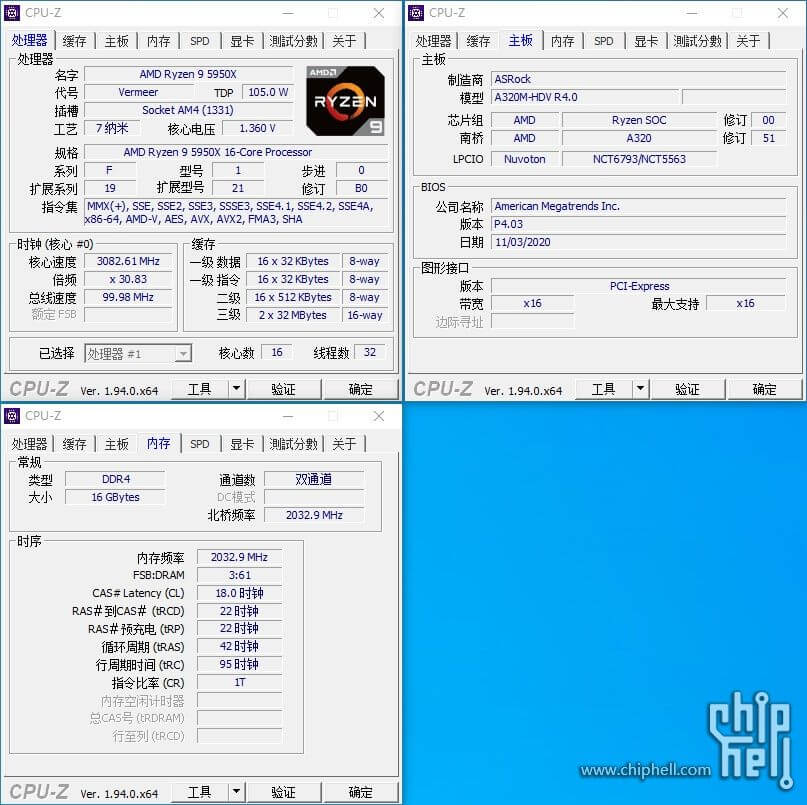
The A320M-HDV R4.0 board seems to support the Ryzen 5950X chip with the P4.03 firmware version, which was released on November 3. This could be an Alpha version of the BIOS since the latest available firmware version on ASRock’s website is P4.00.
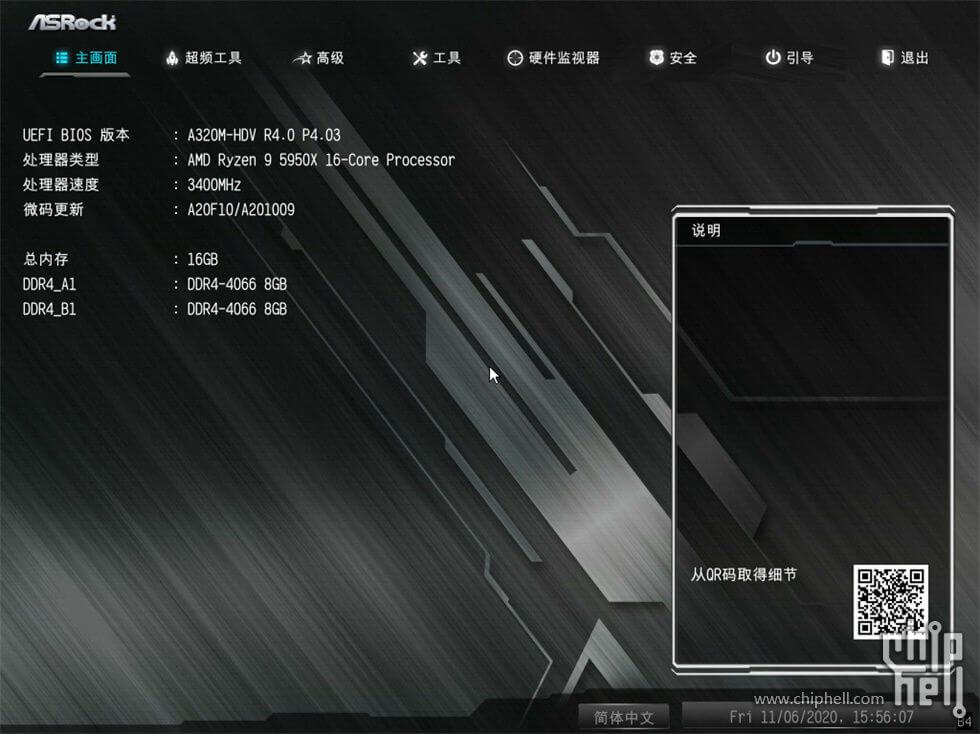
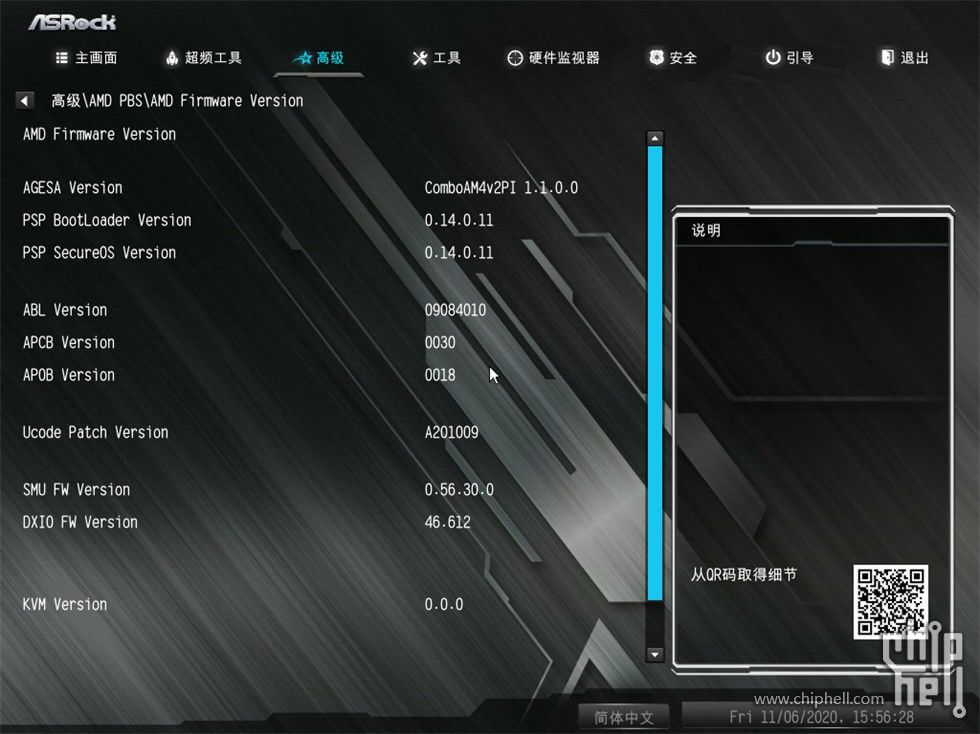
For what it’s worth, the P4.03 firmware also adds support for Renoir APUs as well. The Ryzen 7 Pro 4750G APU was also working fine on the A320M-HDV R4.0 board, with a staggering FCLK of up to 2,166 MHz.
The FCLK, or Fabric Clock, is the frequency at which the IF, or Infinity Fabric, operates at. The Infinity Fabric interconnects the core components of the system (CPU, RAM, etc.), facilitating data and control transmission across linked components.
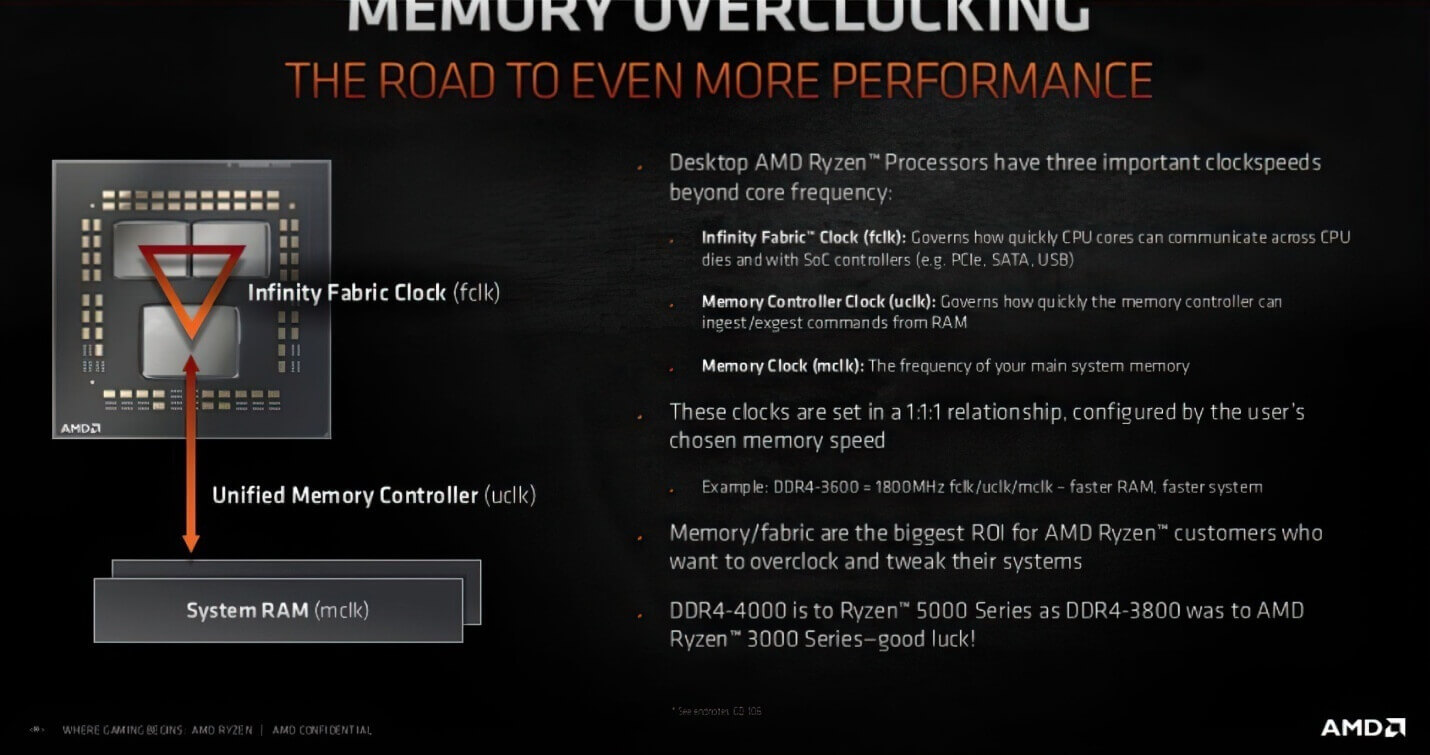
For context, we already know the three basic clock speeds which AMD Ryzen processors support. These are Infinity Fabric Clock (fclk), Memory Controller Clock (uclk) and lastly Memory Clock (mclk) itself. Infinity Fabric Clock (fclk) is the Fabric Clock. FCLK controls the speed of AMD’s Infinity Fabric, which handles communication across CPUs.
On Ryzen systems, the latency and available bandwidth for all connected components like the DRAM controller, PCIe bus, etc. is based off the Infinity Fabric speed (FCLK). All of this occurs in an interconnect AMD calls Infinity Fabric.
The Infinity Fabric clock speed (FCLK) is configurable and directly relates to the memory clock (MCLK). For example in Ryzen 3000 CPUs, most will run a 1:1 ratio between FCLK and MCLK, which can be considered synchronous operation, up to 1,800MHz.
There may be instances where the FCLK may be set to operate in an asynchronous mode (not a 1:1 ratio), which may introduce increased latency, thus negating any performance benefit. However, for extremely high MCLK values (>3,600MHz), asynchronous operation may actually increase overall performance, at the cost of stability.
UCLK on the other hand controls the speed of the memory controller itself. MEMCLK relates to the Memory clock on DDR4 memory, and is often referred to by the data rate, for example, 5000 MT/s kit is so called because at the advertised speed data is transferred 5000 million times per second.
The physical clock signal that governs this data transfer, however, is 2500 MHz at the advertised speed – the data rate is double the physical clock, hence the name Double Data Rate. In AMD’s language this physical clock is called MEMCLK, and often shows up in bios settings under this name. MEMCLK is important because of how FCLK and UCLK relate to it.
All three of these clocks are set in a 1:1:1 ratio and are configured based on the memory speeds of the given system, and it is up to the end user to configure these values for the best system performance.
Technically, all of these elements have always existed on all AMD’s Zen-based processors, back to 1st generation Ryzen and the enterprise equivalents, but FCLK and UCLK were always locked to MEMCLK making them effectively one and the same.
What differs with 3rd generation Ryzen and beyond is that rather than being tied to MEMCLK, FCLK can now be set totally independently and UCLK has a choice of two ratios to MEMCLK – 1:1 and 1:2 (UCLK:MEMCLK).
Although FCLK is now free to run at any speed, in practice there’s a performance bonus from running FCLK, UCLK and MEMCLK synchronized together.
Regarding future AMD ZEN CPU compatibility, most of the AMD motherboards are outfitted with 128 megabit (16 megabyte) BIOS chips. Since most motherboard models have 16 MB storage, and the CPUs can only address the first 16 MB of any BIOS chip, then there might an issue where some motherboard models are going to have two BIOSes.
Let’s suppose a motherboard vendor had a larger BIOS chip, say e.g. if ASUS had a 32 megabyte chip, then it would actually operate like two split “partitioned” BIOSes and this can also get very complicated.
But there is no other simple way to support every AM4 processor with a simple 16 MB BIOS.
Previously, according to AMD, the company said that it ran into some ROM size limitations, when trying to push the AGESA microcode for all the older CPUs. As per AMD, the flash memory chips that store the BIOS have capacity limitations, and not all AM4-based motherboards feature dual-BIOS chip design (mostly found on the more expensive and high-end boards).
AMD will give permission to ODM partners like ASUS, MSI, Gigabyte, Dell, HP, Lenovo, and others etc. to enable this feature; however, it will be up to the ODM partner to actually implement it.
It’s unclear whether the ASROCK A320M-HDV R4.0 board is an exception, or if ASRock is indeed working on new firmware to support the company’s other 300-series motherboard lineup.
Other Motherboard vendors might follow suit as well, because theoretically the 300-series chipsets can support the latest AMD Ryzen processors, albeit in a limited manner.
Do make a note that the capacity of the SPI ROM chip has been one of the major limiting factors that has prevented previous gen AM4 motherboards from supporting the latest Ryzen CPU chips. AMD launched the AM4 socket back in 2016. It has been a challenge for AMD to support every single Ryzen processor on the small SPI ROM chip.
Same applies to the 400-series motherboards as well, since vendors may have to compromise or disable some features to offer support for the latest Zen 3 5000-series CPUs, such as eliminating support for older Ryzen processors, and dropping some features of the GUI interface.
Even if the 300-series motherboards end up getting support, either officially or unofficially, you are likely going to face the same limitations as the 400-series Motherboards.
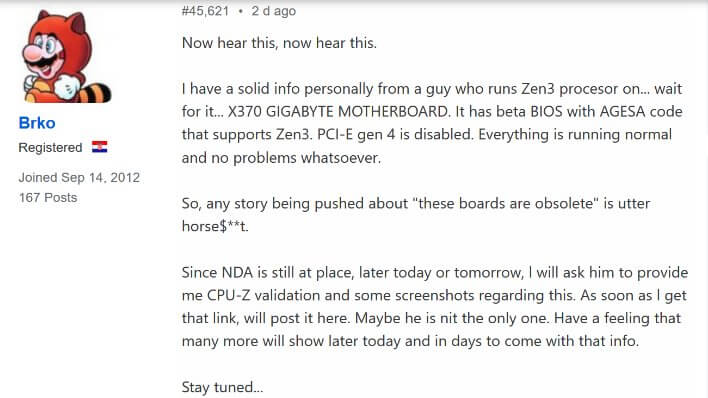
Few days ago one user from the Overclock.net forums claimed to have evidence of a Zen 3-based CPU properly working on a Gigabyte X370 motherboard. The motherboard was using a ‘beta firmware’ with the existing AGESA code that supports Zen 3. But since no proof or screenshot has been shared, we can’t take this for granted.
Though, he says other than the lack of PCIe 4.0 support, the motherboard was fully compatible with the Ryzen 5000 CPU.
On some other related news, both Gigabyte and ASUS are offering BIOS support for AMD Ryzen 5000 desktop CPUs. Gigabyte is offering BETA support for a total of 16 B450 chipset vendor motherboards, while ASUS offers BETA support on its 16 B450 ROG STRIX, PRIME and TUF Gaming motherboards.
Gigabyte BIOS has the version listed as F60c, whereas ASUS’s BIOS is listed as version 8501.
AMD may not officially support this ‘backwards compatibility’ feature; otherwise it already would have been announced out of the gate.
Stay tuned for more!

Hello, my name is NICK Richardson. I’m an avid PC and tech fan since the good old days of RIVA TNT2, and 3DFX interactive “Voodoo” gaming cards. I love playing mostly First-person shooters, and I’m a die-hard fan of this FPS genre, since the good ‘old Doom and Wolfenstein days.
MUSIC has always been my passion/roots, but I started gaming “casually” when I was young on Nvidia’s GeForce3 series of cards. I’m by no means an avid or a hardcore gamer though, but I just love stuff related to the PC, Games, and technology in general. I’ve been involved with many indie Metal bands worldwide, and have helped them promote their albums in record labels. I’m a very broad-minded down to earth guy. MUSIC is my inner expression, and soul.
Contact: Email