
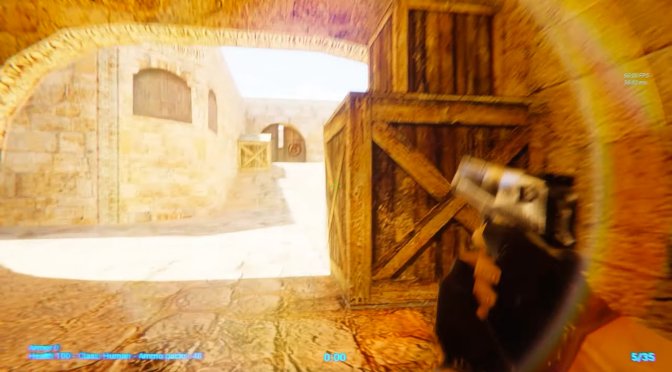
CS 1.6 UE5

Counter-Strike 1.6 gets an RTX fan remaster in Unreal Engine 5

YouTube’s ‘VISION’ has shared a video, showcasing what a remaster of Counter-Strike 1.6 could like like in Unreal Engine 5. Alongside the recreated maps, the YouTuber has also implemented basic gameplay mechanics.

Now we all know that Valve is working on Counter-Strike 2.0 in Source2 Engine. However, CS2 will pack numerous gameplay changes, tweaks and improvements. In other words, you can’t look at it as a remaster of CS 1.6.

To be honest, this fan-made remake looks really cool. From what we can see, VISION has used the original textures in order to maintain the game’s original art style. And, in a really weird retro way, it looks great. Basically, this fan remaster reminded me of Quake RTX and Doom RTX.

Needless to say that this is a concept video, and nothing more. So no, you can’t download and play it. Still, this is something that a lot of CS fans will find interesting.

Speaking of Unreal Engine 5, I also suggest taking a look at these other fan remakes. For instance, we have these faithful remasters of Dark Souls and Dark Souls 3. Then we have the Zelda: Ocarina of Time Fan Remake. Let’s also not forget this amazing fan remake of STALKER. And lastly, you can find fan remakes of Death StrandingARK: Survival Ascended, Fallout 4, Resident Evil’s Spencer Mansion and Skyrim’s Whiterun. All of them are cool, so make sure to watch them.

Enjoy!

CS 1.6 IN UNREAL ENGINE 5! | EXTREME GRAPHICS + RESHADE | RTX 3050 RAY-TRACED GLOBAL ILLUMINATION

18 thoughts on “Counter-Strike 1.6 gets an RTX fan remaster in Unreal Engine 5”

  1. Its not even ray traced, that’s just stupid SSR
    Also why is there rain inside buildings LMAO
    Seriously though
    Ray tracing isnt just reflections and post processing effects that blinds your eyes
    Ray tracing is much more than that

    1. Funny thing you say this, because the ray-traced global illumination is pretty evident even in the header image. Ironic, isn’t it?

      1. There is a huge lack of indirect shadowing behind the boxes in the header image.
        It does lack global illumination
        Btw if you want real path tracing in cs 1.6 there is the half life ray traced mod. You can add all cs 1.6 assets and get actual full path tracing there

        1. You’re referring to RTAO and not to RTGI. You really need to learn what these techniques actually do.

          RTGI is for illuminating the lighting to the environment (it’s basically the “bleeding” of color to nearby surfaces. When a light hits a red surface for example, it will illuminate the red-ish color to nearby surfaces)

          RTAO is for the indirect “fake” shadows.

          1. Global illumination is Global
            It takes care of all bouncing light

            Which includes ambient occlusion

            With RTAO it estimates indirect shadows with ray tracing, but doesn’t actually bounce light which is lighter on performance but less accurate

            But global illumination does bounce light and indirect lighting and shadows, as the name suggests, *Global*
            When light bounces it will hit an object and cast a shadow in the areas that light doesnt reach
            Global illumination uses much more rays which means higher performance penalty

          2. Again, you’ve completely mistaken what RTGI does (and I’d really like to know who told you that RTGI handles indirect shadows). It does NOT include indirect shadows. Here, from NVIDIA, if you brighten up the RTX Off image, you’ll see that all the shadows (and indirect shadows) are EXACTLY the same. The only difference is the “brightness” and “color bleeding”.

            https://developer.nvidia.com/rtx/ray-tracing/rtxgi

            If you want to learn more about Ray Tracing and its different methods, you can also read Unity’s manual. Again, RTAO is for more precise AO by tracing rays. RTGI is for a more natural lighting when it comes to “brightness” and “color bleeding”.

            https://docs.unity.cn/Packages/com.unity.render-pipelines.high-definition@7.1/manual/Ray-Tracing-Getting-Started.html

          3. Heres lumen doing indirect shadows through global illumination
            https://youtu.be/ygqN-yMl5ZA
            Global illumination handles direct and indirect lighting

            Maybe you are right about Ray tracing

            But path traced global illumination 100% handles ambient occlusion and indirect shadows

          4. Path tracing is a completely different thing. Path tracing handles everything, from reflections to lighting and shadows. It’s the ultimate goal, and it’s way, way, WAY more demanding than ray tracing.

            Regarding Lumen and the video you shared, Lumen only handles movable Sky Light shadows and ray-traced distance field shadows on Directional Lights. These shadows in the video are the result of that (directional light). In a shadowy scenes/areas, Lumen won’t provide indirect “fake” shadows. You can read more about Lumen here -> https://docs.unrealengine.com/5.0/en-US/lumen-global-illumination-and-reflections-in-unreal-engine/

  2. I’d rather John started include console news than these stupid “[insert random game name] fan remake in unreal engine”. WTF

Leave a Reply

Your email address will not be published. Required fields are marked *
