
Metal Gear Solid 5 screenshots header

Metal Gear Solid V: The Phantom Pain – Low versus Extra High Comparison Screenshots

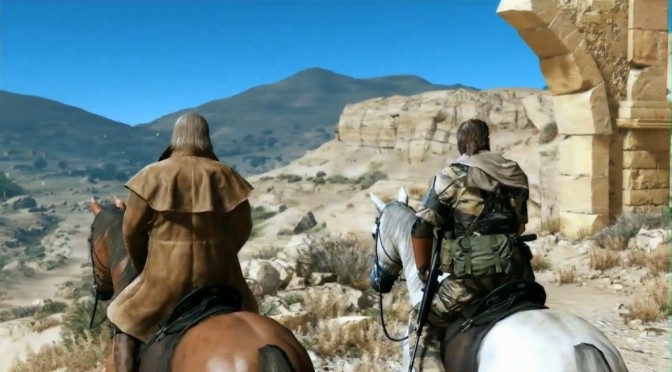
Green Man Gaming has provided us with a review code for Metal Gear Solid V: The Phantom Pain, and below you can view some comparison screenshots between the game’s Low and Extra High settings. And as we can see, there aren’t many noticeable differences between these two settings.

Sure thing, there are slightly better textures, higher quality shadows, ambient occlusion and better LOD in Extra High, however – and especially during night when there aren’t any nearby light sourecs – it’s really hard distinguishing them.

As always, Extra High is on the left whereas Low is on the right.

Enjoy and stay tuned for our PC Performance Analysis!


28 thoughts on “Metal Gear Solid V: The Phantom Pain – Low versus Extra High Comparison Screenshots”

      1. $98_per_hour special report!!!!……….After earning an average of 19952 Dollars monthly,I’m finally getting 98 Dollars an hour,just working 4-5 hours daily online….It’s time to take some action and you can join it too.It is simple,dedicated and easy way to get rich.Three weeks from now you will wishyou have started today – I promise!….HERE I STARTED-TAKE A LOOK AT….mwu…..
        ================= www.Jobs367.com ????????????????????????????????????????

  1. I set the AO to Quality in the NV control since Nvidia added a HBAO+ profile. Its not a huge difference in the overall visuals but its still better then PS4. Plus its a lot more optimized for being open world style then I thought it would be.

    1. Good point. The motion blur is done really well. Normally I always turn off motion blue in games. But it really works for me in Phantom Pain

  2. How is any of that low? Try putting low gfx on Far Cry to se what low gfx should look like. It should look like untextured sh*t. This is max gfx. It looks perfect. I cant even tell the difference. I looked hard for it too. Textures are THE SAME. Effects are the same.. like whats going on? I keep noticing this as of late.

    Are developers ashamed to add the real low gfx option cuz it will make their game look like poop? I thought the point was.. well.. you know.. to run on crappy PC’s under the low settings.

  3. Its the lack of higher quality models (more or less it just better textures, draw-distance, lighting/shadows), lack of tessellation or higher/more poly models.

  4. So they Finally fixed Batman: Arkham Knight. Official patch released:

    September 3rd Update and Patch Notes

    Good news – testing for the interim patch has been completed and it is now available for those who already have Batman: Arkham Knight for PC. As a reminder, below are some of the major fixes and improvements that will be addressed with this patch:

    Reduced frame rate hitches
    Optimizations for system memory and VRAM usage
    Improved performance on all GPUs (requires the latest drivers)
    More Comprehensive In-Game Settings
    Fixed low resolution texture bugs
    Fixed hitches when running on mechanical hard drives (HDD)

    In addition to the above, we’re continuing to work on the following for future updates:
    Adding support for SLI and Crossfire
    Adding support for the latest DLC & Season Pass content
    Adding support for additional updates such as Photo Mode
    Continued improvements and bug fixing for a Windows 7 specific memory issue that occurs on configurations with 8GB of system RAM and some NVIDIA GPUs during extended game play
    Continued improvements for Windows 10 specific issues on systems with some AMD GPUs

    As always, we will monitor for any additional issues that come up and will provide further optimizations and bug fixes along the way.

    We would like to thank everyone for their patience and invaluable feedback. We’ll provide ongoing updates here as they are made available. In the meantime, please enjoy the game with the latest patch.

    – Warner Bros. Interactive Entertainment

    1. See… I told you it had nothing to do with waiting on a Driver…. But all this time for a patch that is only 626 megs… Wow… Just Wow…

      1. The crashes were because of SweetFX. It was still crashing with this as well so I tried it without SweetFX and now there are absolutely no crashes and it runs perfectly All Max, All GameWorks, 1440p, Adaptive V-Sync, 90 fps, Gigabyte 980 Ti G1 Gaming overclocked to 1550 MHz.

        I had to enable SweetFX through RadeonPro just like MGS V: GZ & TPP.

        1. game still hitching. But like they said “reduced hitching” I am uploading a video right now on youtube maxed out at 1080p on a 970.

          But I would not say the games runs perfect because it don’t. But over two months for a 626 meg patch… WTF… But it seems like this is just a pre patch for what’s to come. And it has been reported as that on kotaku

          1. even people who don’t go over the vram limit are still hitching. And you should not need a 980 ti to play this game lol

          2. You don’t need a 980 Ti to play any game. I just like to crank things up as far as I can and maintain a constant 60 fps and 980 Ti helps a lot. My 980 was pretty good as well but a 980 Ti gave me that extra 40% more performance to achieve easy 1440p+ resolutions.

          3. Well yeah at 1080p with everything maxed out it only wants 4114. But like I said it still hitches. And I tested it out on my Mechanical Drive since that was one of the most problematic issues with the streaming textures.

            So now we just wait for the big patch and not this pre patch. But it is a very big improvement over launch that’s for sure. I will test SLI later.

  5. There could be a lower setting than that. Refer to the canyon/horse shot:

    1. The far away landscape is identical except fake depth of field blur. Of course it’s preferrable to render all that stuff in case the player uses binoculars or travels fast (pop-in). But it shouldn’t be mandatory. Why exclude people with weak hardware when you can obviously still improve performance?
    2. Indirect lighting is identical. It can’t be baked when there’s a day/night cycle and it’s not gameplay-relevant. Indirect lighting should be an on-off switch.
    3. The polycount on MC and horse are identical, even including hair. Probably the most expensive geometry in the whole scene.

      1. Look at the first two shots again. You can see reflections of the individual legs of the left chair. That’s not a cubemap.

  6. This statement, “As always, Extra High is on the left whereas Low is on the right.” its never as always !! LOL

Leave a Reply

Your email address will not be published. Required fields are marked *
