
A couple of days ago, Respawn released a new patch for Star Wars Jedi: Survivor that added support for DLSS 3 Super Resolution and DLSS 3 Frame Generation. As such, we’ve decided to re-benchmark the game with these new techniques and share our impressions.
For our Star Wars Jedi Survivor DLSS 3 benchmarks, we used an AMD Ryzen 9 7950X3D, 32GB of DDR5 at 6000Mhz, and NVIDIA’s RTX 4090. We also used Windows 10 64-bit and the GeForce 537.13 driver. Furthermore, we’ve disabled the second CCD on our 7950X3D.
Star Wars Jedi: Survivor does not feature any built-in benchmark tool. As such, we’ve decided to benchmark the Rambler’s Reach Outpost in Koboh. This is the most demanding area, so it should give us a pretty good idea of how the rest of the game will perform.
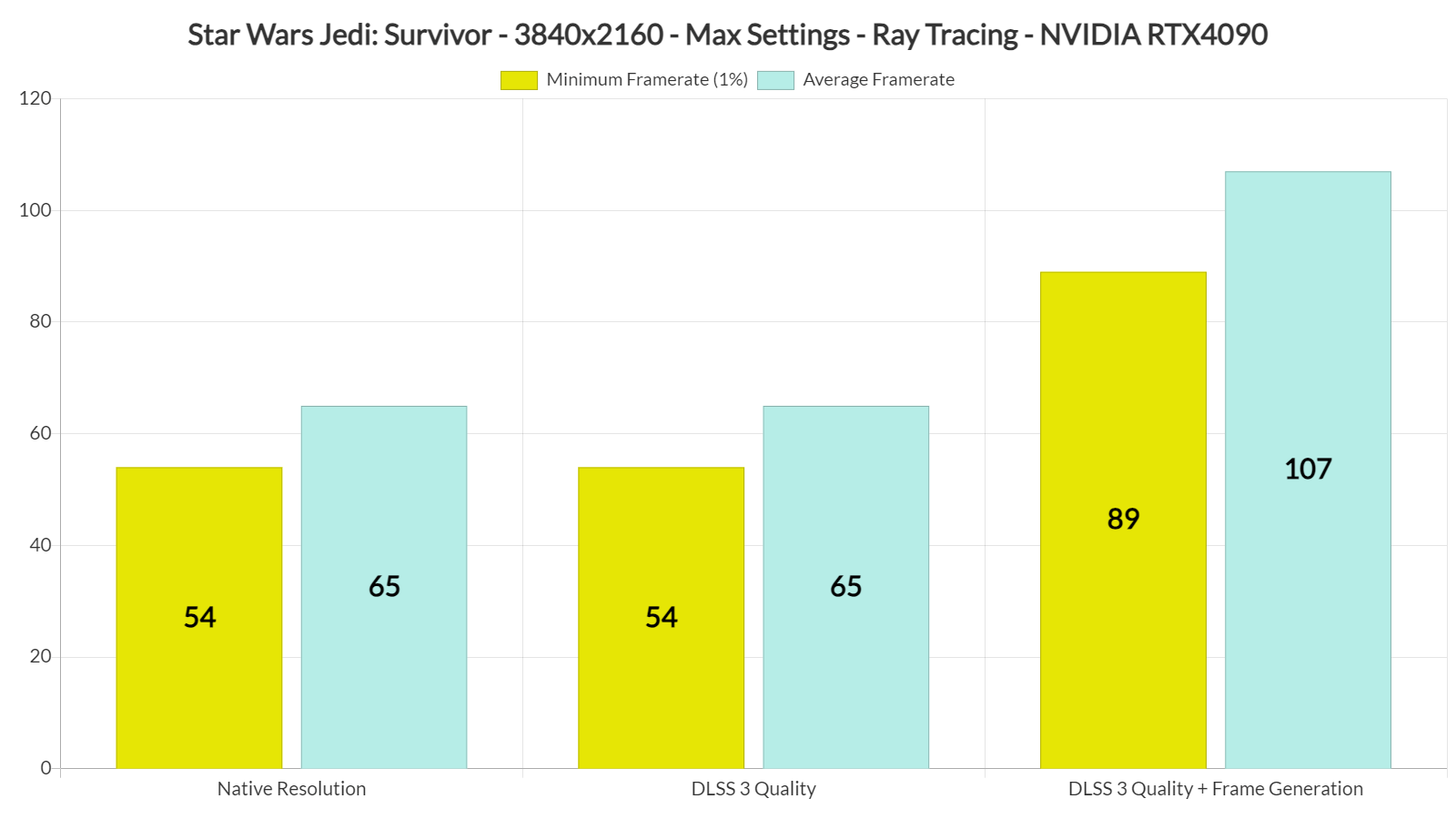
Unfortunately, DLSS 3 Super Resolution does not currently work. No matter what you choose, you won’t get any performance boost. DLSS 3 Super Resolution is simply broken, something that I find hilarious. I mean, didn’t anyone at Respawn test the game?

We’ve tried everything to make DLSS 3 Super Resolution work. From switching DLL files to enabling DLSS 3 Quality in the menu, quitting the game, and relaunching it.
On the other hand, here’s how the game runs with FSR 2.0 and DLSS 3 Frame Generation. Notice the performance boost in the average framerates when using FSR 2.0. If we were solely CPU-limited, both our minimum and average framerates would be similar.
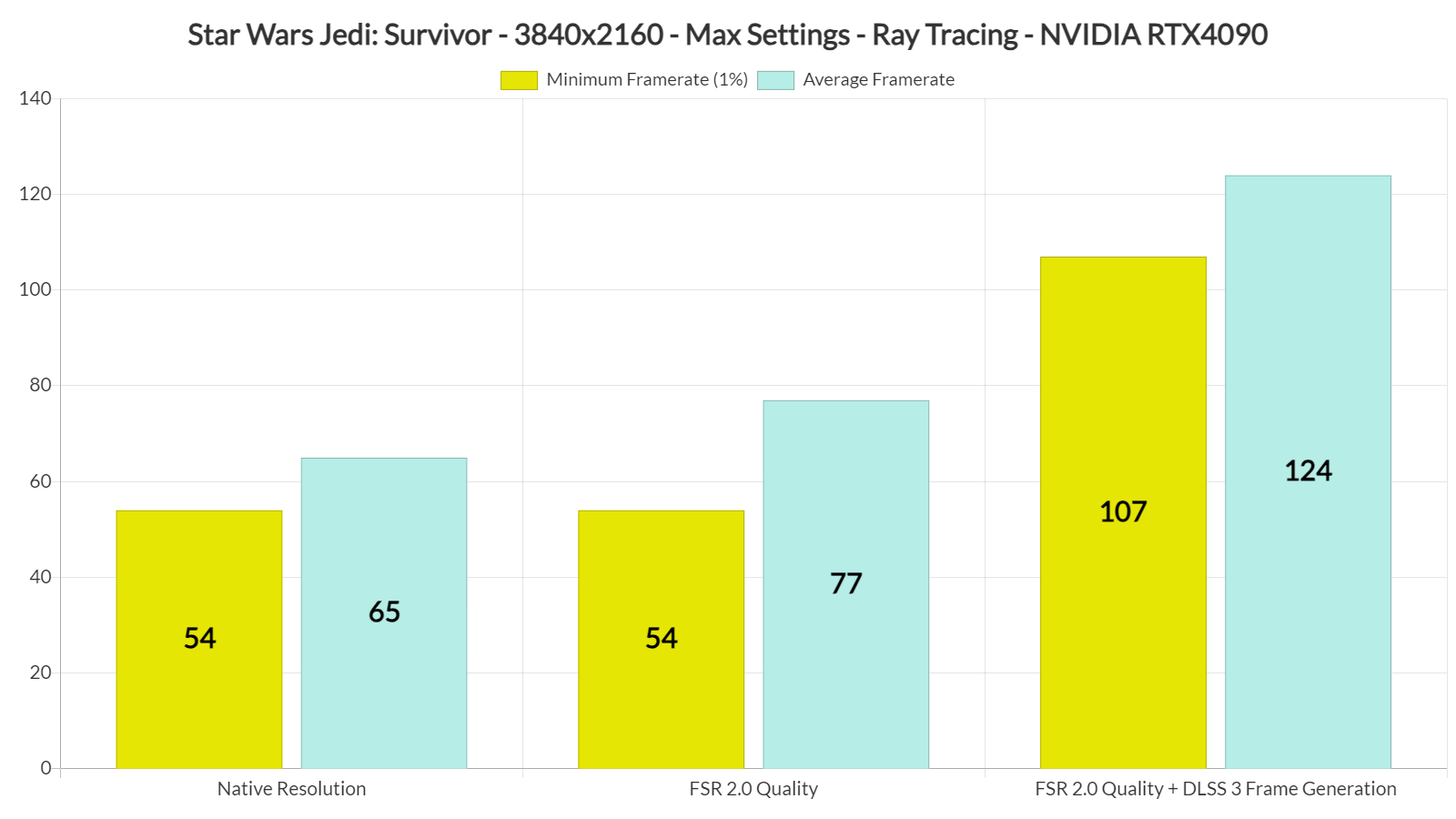
Now even though the performance boost is not that great when using FSR 2.0 (in theory DLSS 3 Super Resolution would provide similar results), most RTX owners want to use DLSS 3 Super Resolution for its superior image. As we’ve seen in numerous games, DLSS can look better than both native 4K and FSR 2.0. So yeah, this really sucks.
On the other hand, DLSS 3 Frame Generation is a game changer. Star Wars Jedi: Survivor is a game that greatly benefits from it. Not only do you get a better performance but we didn’t really experience any major latency issues. The game ran great, without any lag/delay when moving the mouse. And yes, I know that some users have reported ghosting issues with DLSS 3 Frame Generation. Thankfully, though, you can download Version 1.0.7.0 from TechpowerUp which resolves them.
For those wondering, the game still has its annoying traversal stutters. As we’ve reported, the only way you can fix these traversal stutters is by locking your framerate to 30fps. In theory, with DLSS 3 Frame Generation, you may be able to play it now at 60fps without any stutters. However, there will be noticeable input latency issues (as the “real” frames will be only 30).
Moreover, Jedha still crashes when using Ray Tracing. A modder was able to fix this issue, so fingers crossed that the mod is compatible with the game’s latest version. Not only that but the Ray Tracing issues that we’ve reported are still present.
In short, Respawn has not fixed anything at all. The game is still a mess, and it still suffers from all of its previous graphical and performance issues. And while DLSS 3 Frame Generation is a nice welcome, the fact that DLSS 3 Super Resolution does not work at all makes me scratch my head, wondering what Respawn has been smoking while adding support for it.
Great job Respawn!

John is the founder and Editor in Chief at DSOGaming. He is a PC gaming fan and highly supports the modding and indie communities. Before creating DSOGaming, John worked on numerous gaming websites. While he is a die-hard PC gamer, his gaming roots can be found on consoles. John loved – and still does – the 16-bit consoles, and considers SNES to be one of the best consoles. Still, the PC platform won him over consoles. That was mainly due to 3DFX and its iconic dedicated 3D accelerator graphics card, Voodoo 2. John has also written a higher degree thesis on the “The Evolution of PC graphics cards.”
Contact: Email