Earlier this week, Sony released Ratchet & Clank: Rift Apart on PC. Powered by Insomniac’s in-house engine and ported by Nixxes, it’s time to benchmark it and examine its performance on PC.
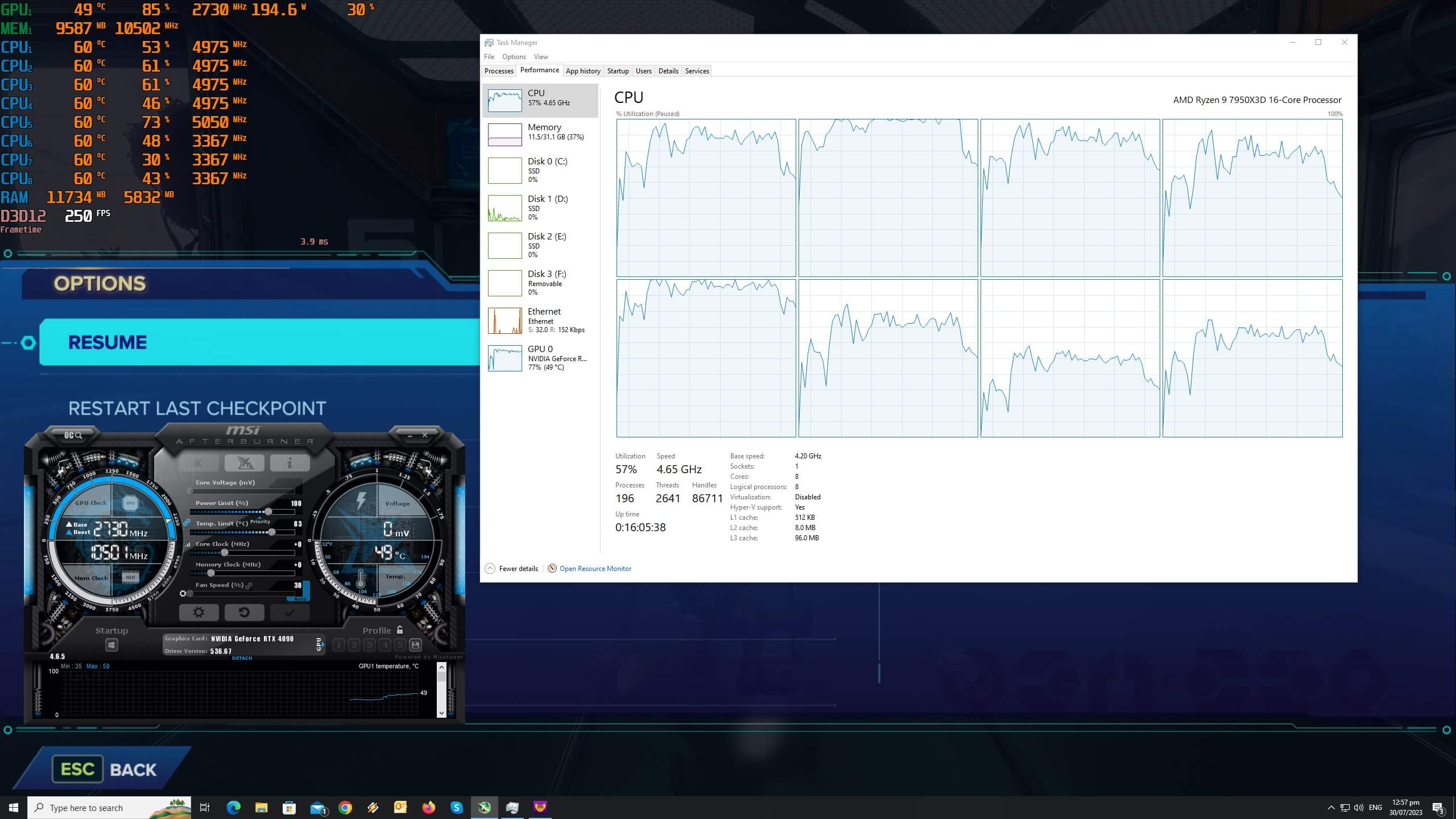
For our Ratchet & Clank Rift Apart PC Performance Analysis, we used an AMD Ryzen 9 7950X3D, 32GB of DDR5 at 6000Mhz, AMD’s Radeon RX580, RX Vega 64, RX 6900XT, RX 7900XTX, NVIDIA’s GTX980Ti, RTX 2080Ti, RTX 3080 and RTX 4090. We also used Windows 10 64-bit, the GeForce 536.67 and the Radeon Software Adrenalin 2020 Edition 23.7.1 drivers. Moreover, we’ve disabled the second CCD on our 7950X3D.
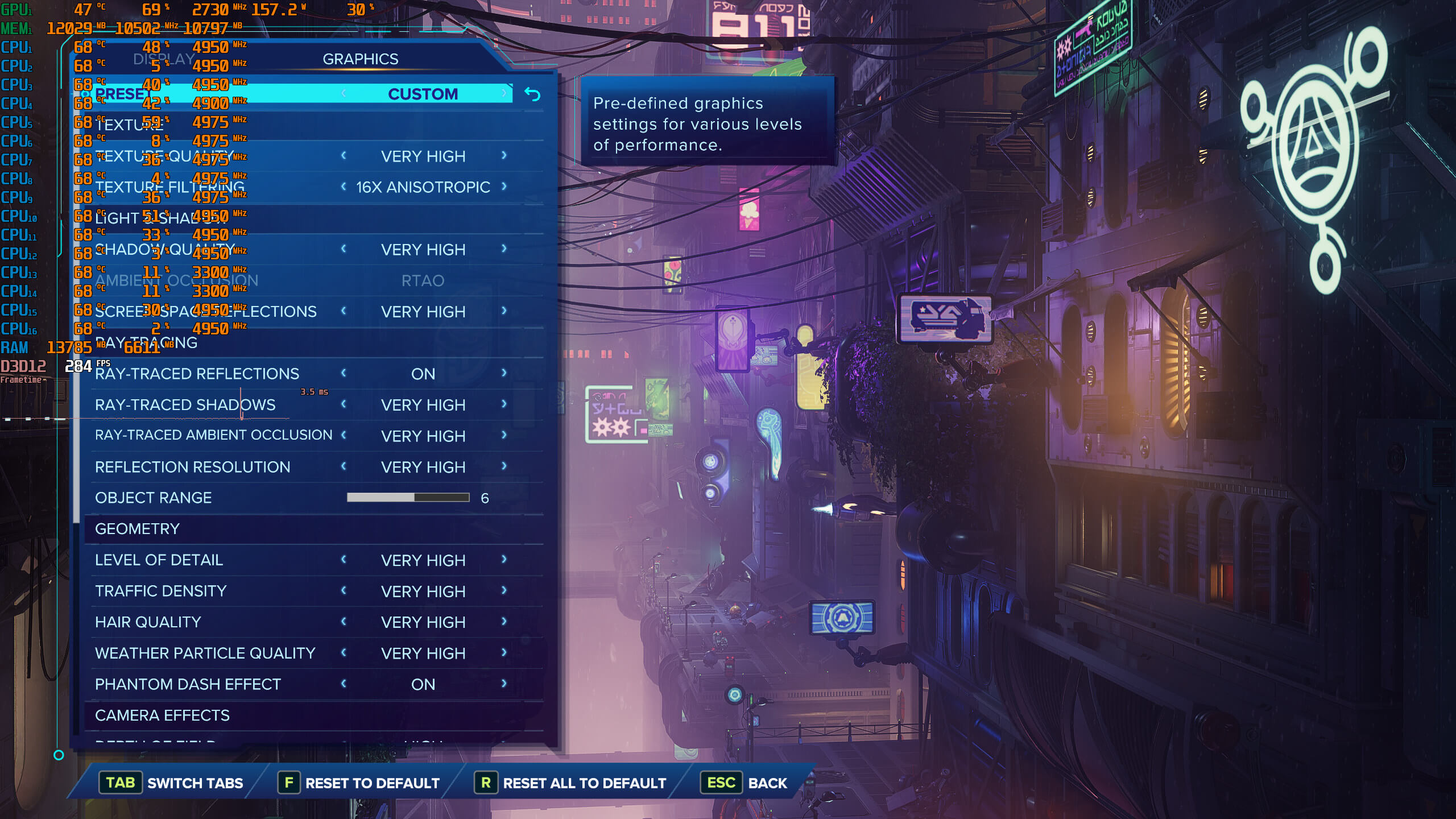
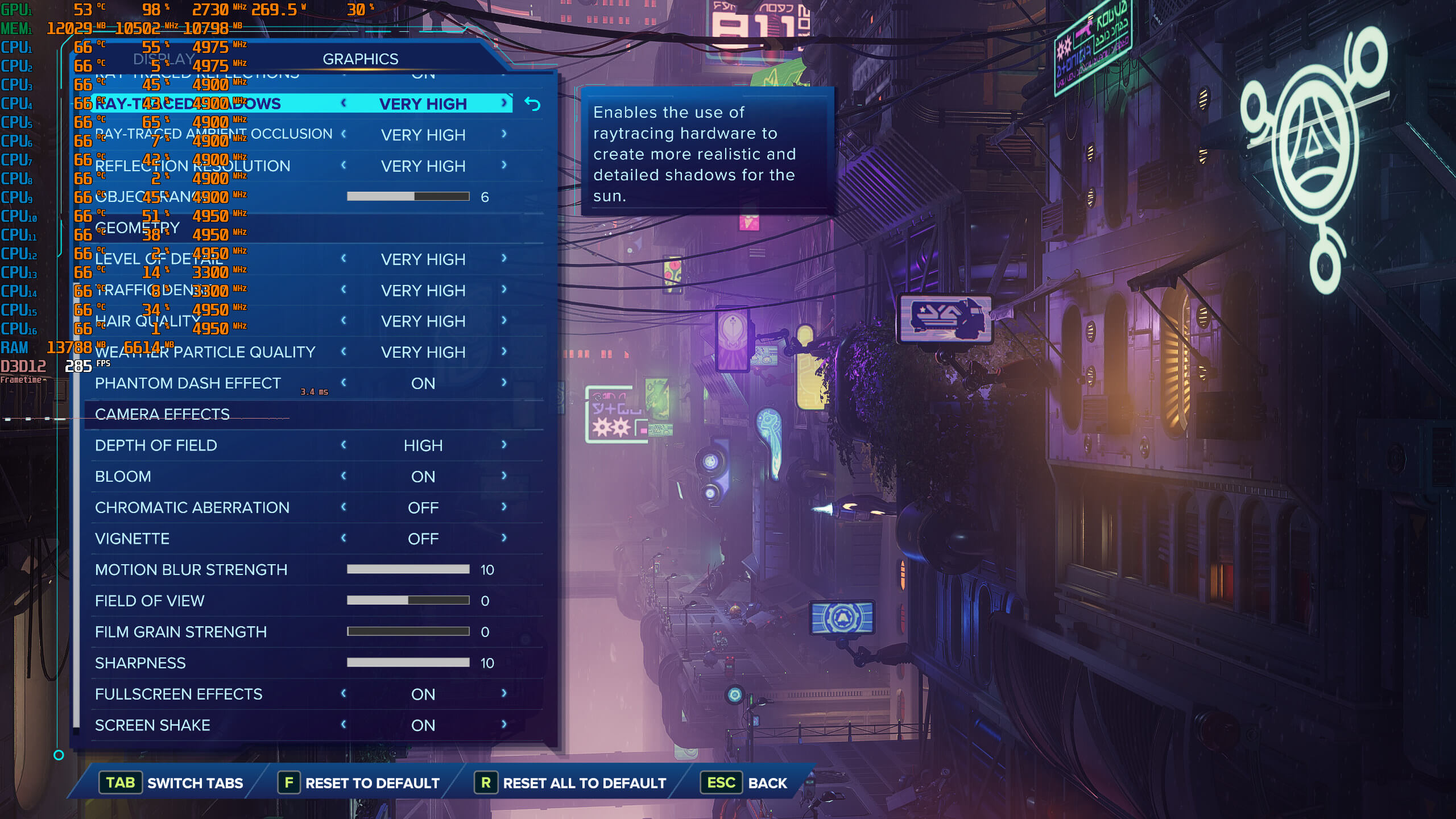
Nixxes has included a lot of graphics settings to tweak. PC gamers can adjust the quality of Textures, Shadows, Reflections, Hair, Level of Detail and more. As we’ve already reported, Rift Apart also supports Ray Tracing effects on PC. Nixxes has used Ray Tracing in order to enhance the game’s reflections, shadows and ambient occlusion. Additionally, Rift Apart supports all major PC upscaling techniques (DLSS 2/3, FSR 2 and XeSS).
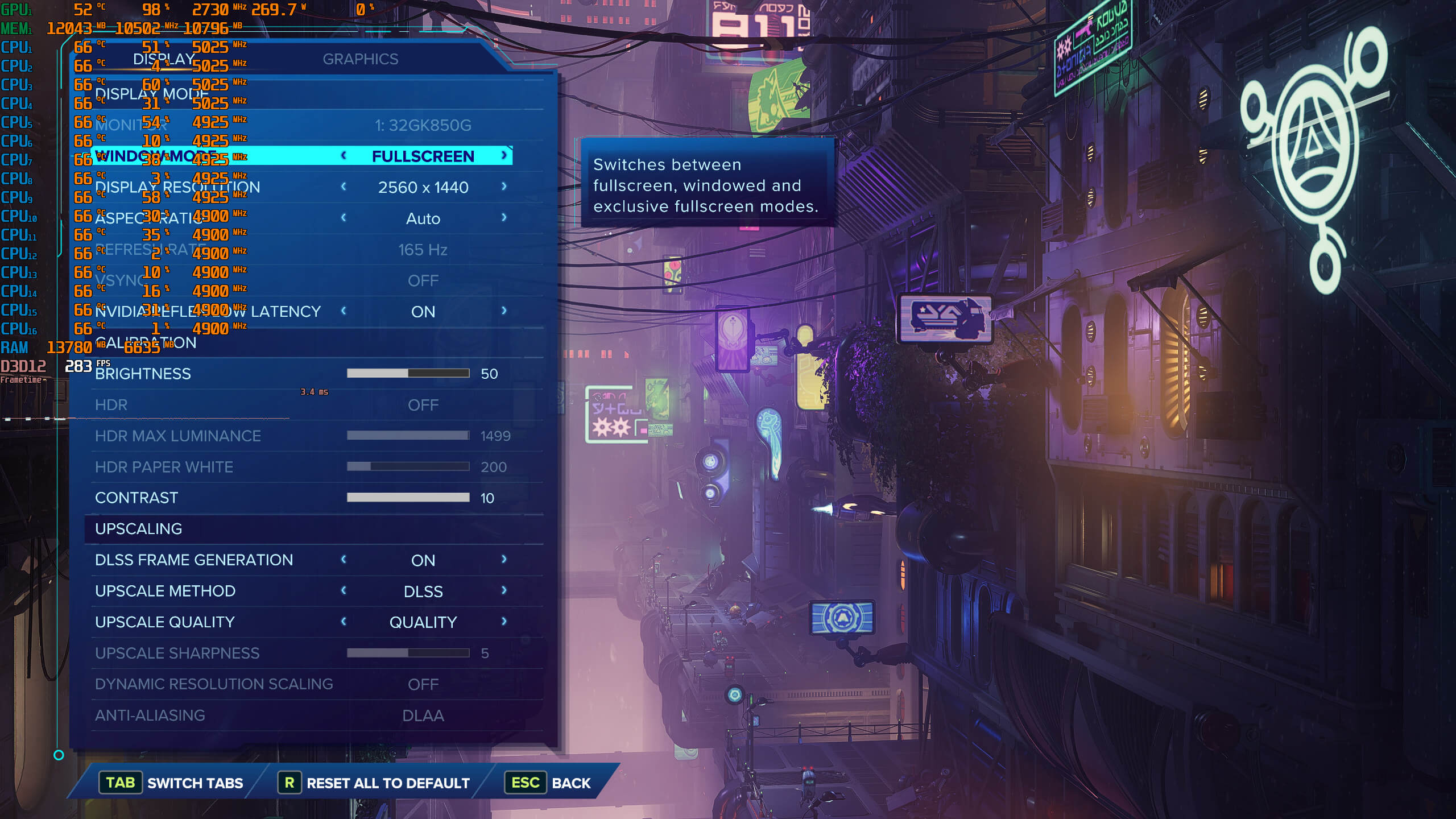
Ratchet & Clank: Rift Apart does not feature any built-in benchmark tool. As such, for both our CPU and GPU benchmarks, we used the following scene. This scene features a lot of NPCs and enemies on-screen, and it allows you to use some portals. Thus, it can give us a pretty good idea of how the rest of the game runs. We’ve also disabled the game’s RT effects (you can find our DLSS 3 and Ray Tracing benchmarks here). Additionally, we enabled DLSS 2 Quality for our CPU benchmarks (in order to avoid any possible GPU bottleneck).
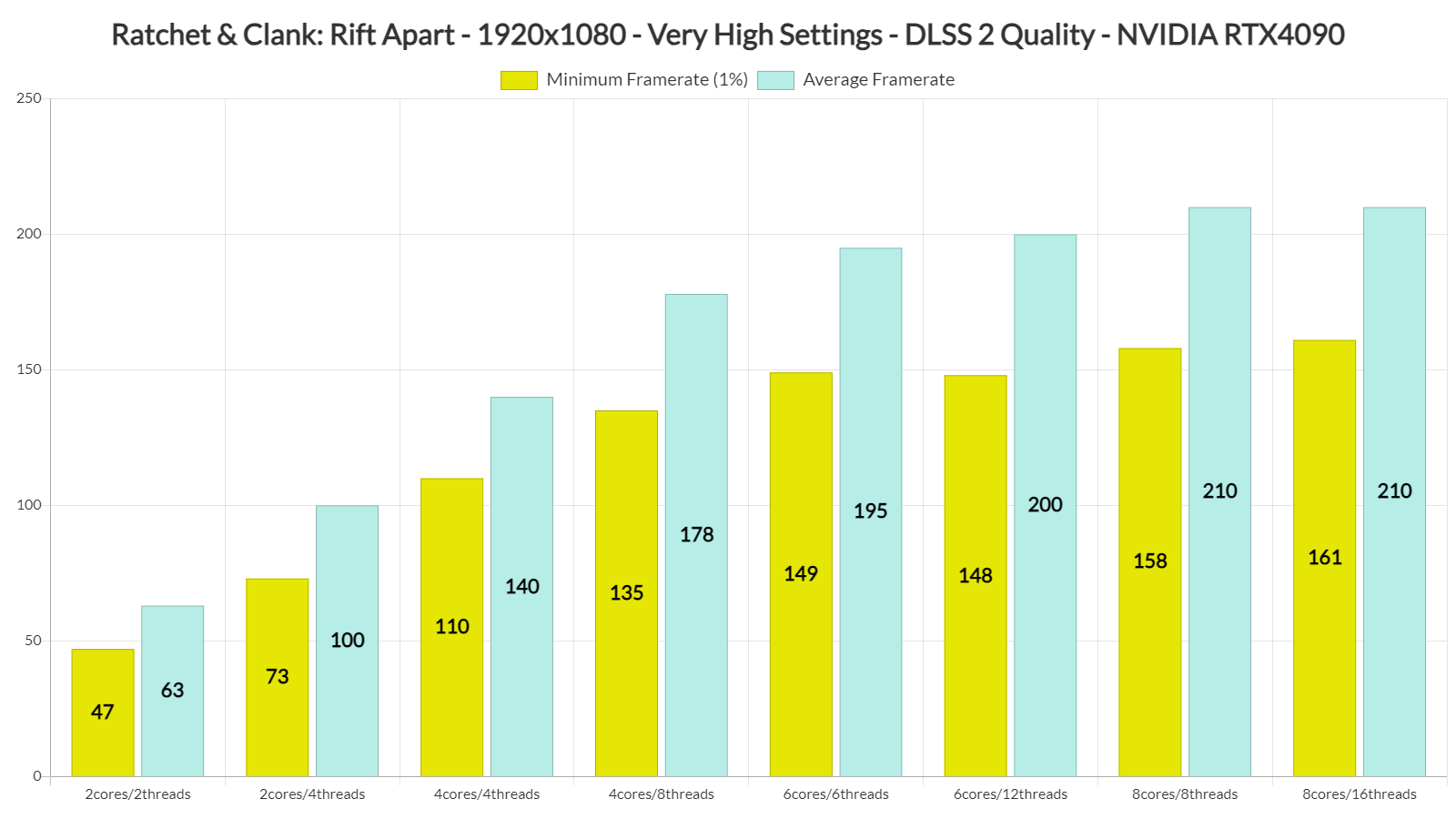
In order to find out how the game scales on multiple CPU threads, we simulated a dual-core, a quad-core and a hexa-core CPU. And, surprisingly enough, even our dual-core PC system was able to push an enjoyable experience at 1080p/Very High Settings/No Ray Tracing. That was with SMT/Hyper-Threading enabled. We can also see that the game can scale up to eight CPU cores.
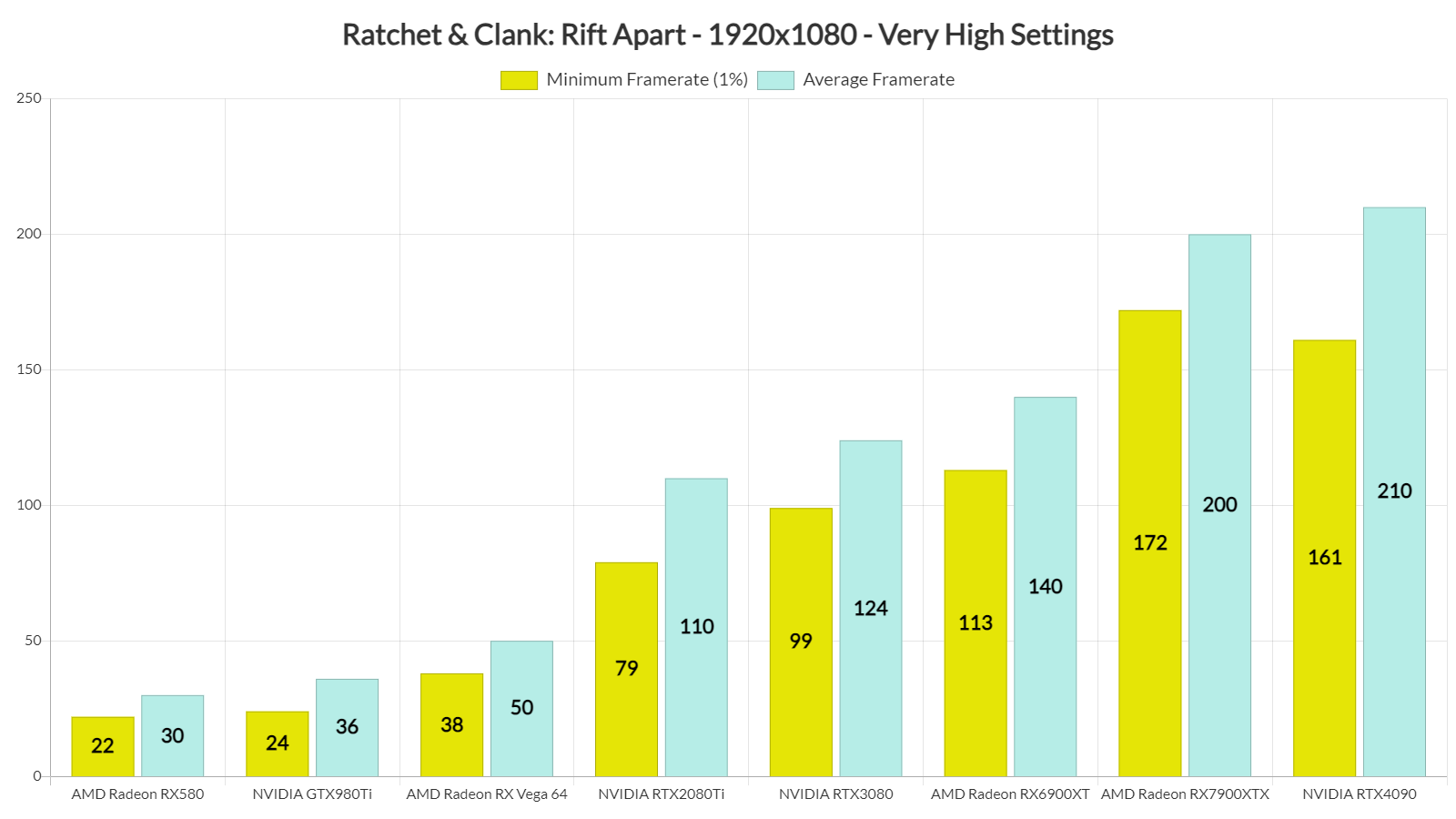
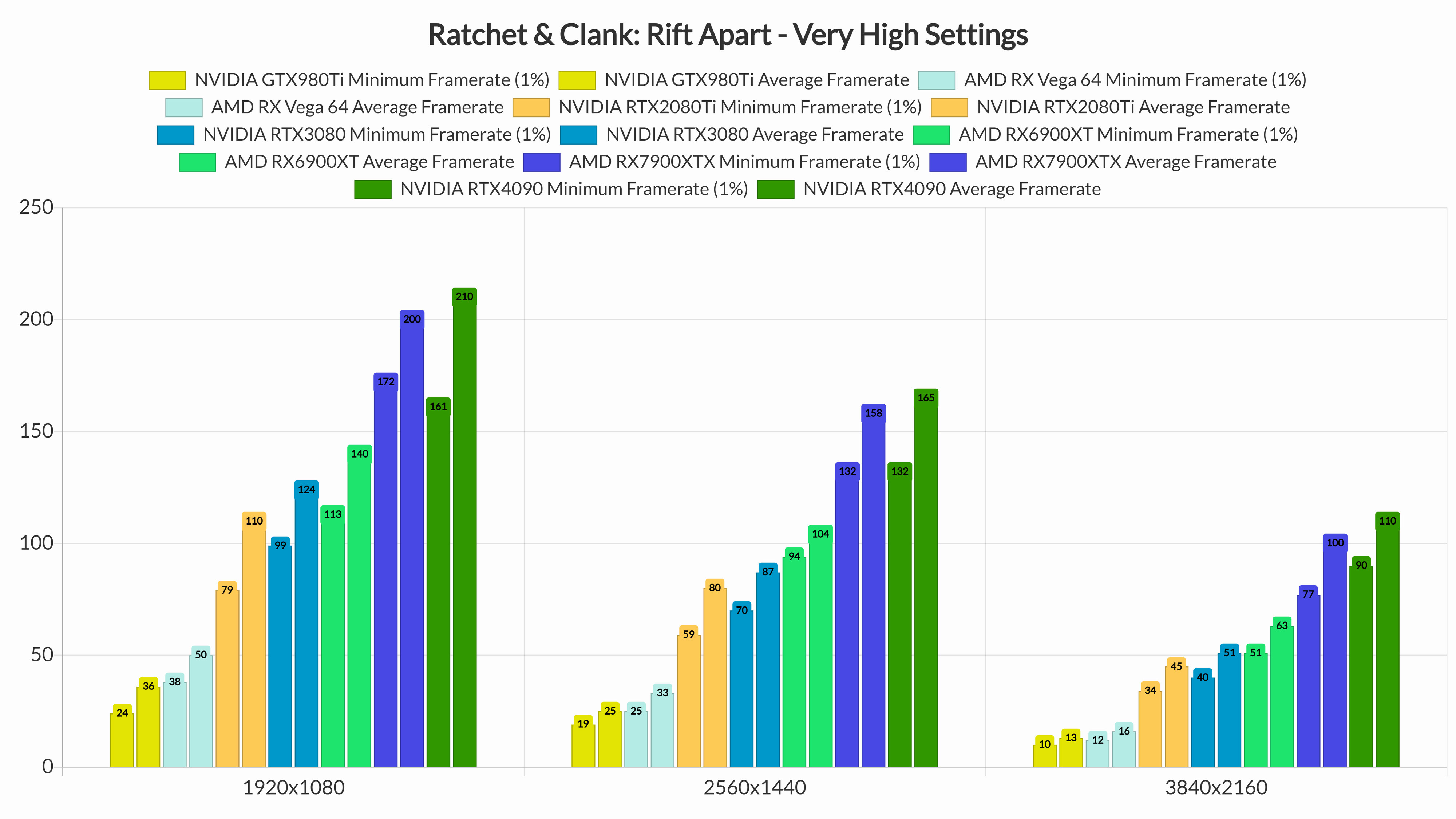
Our top five GPUs had no trouble pushing framerates higher than 60fps at 1080p/Very High Settings. As we can also see, Rift Apart performs incredibly well on AMD’s GPUs. And while our average framerate on the RTX 4090 was higher, the AMD RX 7900XTX was able to beat NVIDIA’s high-end GPU at minimum framerates.
At 1440p/Very High Settings, our top five GPUs were still capable of offering a smooth gaming experience. Again, it’s pretty incredible how close to the RTX4090 the RX7900XTX actually is. And as for native 4K/Very High, the only GPUs that could run the game with over 60fps were the NVIDIA RTX 4090 and the AMD RX 7900XTX.
Graphics-wise, even without its RT effects, Ratchet & Clank: Rift Apart looks great on PC. This is an incredibly good-looking game, pushing some highly detailed characters on screen. Players can also break a lot of objects, with debris and particles flying all over the screen. It’s also worth noting that Nixxes has fixed some graphical issues that were present in its launch version via a hotfix.
Overall, we are quite happy with the performance of Ratchet & Clank Rift Apart on PC. Is it a perfect port? Not quite as there is still room for improvement. For instance, the game does not appear to be taking full advantage of DirectStorage 1.2. Then there are the frame pacing/stutters we’ve mentioned when enabling RT and DLSS3.
Regardless of these nitpicks, though, the game can already run smoothly on a wide range of PC configurations. It also looks great on PC, especially with the RT improvements that Nixxes has brought to the table. The fact that you can also enable its upscaling options to further increase its performance is another big bonus. And yes, RTX 40 series owners can take advantage of DLSS 3 in order to enjoy Rift Apart’s Ray Tracing effects!

John is the founder and Editor in Chief at DSOGaming. He is a PC gaming fan and highly supports the modding and indie communities. Before creating DSOGaming, John worked on numerous gaming websites. While he is a die-hard PC gamer, his gaming roots can be found on consoles. John loved – and still does – the 16-bit consoles, and considers SNES to be one of the best consoles. Still, the PC platform won him over consoles. That was mainly due to 3DFX and its iconic dedicated 3D accelerator graphics card, Voodoo 2. John has also written a higher degree thesis on the “The Evolution of PC graphics cards.”
Contact: Email


Reflex is causing CTDs, so DLSS3 is unusable.
VRAM management is broken, so using texture quality above medium is broken.
When using V-Sync with DLSS3, the game starts with low GPU usage. Alt-tabbing fixes it.
More likely a lack of VRAM problem and when you change a setting it clears the allocated and cache. This is the same thing that happened in Diablo 4. Frame Generation and RT take VRAM and frame gen never reports VRAM usage correctly in Afterburner (though it can in task manager). Is a huge problem in Witcher 3 as well. On my 4070 I simply can’t run more than the PS5 RT options in a long play session without the game eventually breaking. On my 4090 that isn’t an issue.
RT Shadows ALWAYS Suck in games btw. Just turn that sh@^ off and save the VRAM. They can’t even do movement when a flag is moving in this game. The RTAO is also arguably worse because it completely changes scenes and mood.
Put textures as high as it will go, AF as high as it will go and use the PS5 settings per Digital Foundry. Medium to High for everything else, 9 samples on RT reflections.
DLAA is the game changer here (use DLSS Tweaks in game without official implementation). DLAA and some reshade cas.fx (turn off in game sharpening) at 1.8-2 makes this game look like a Pixar film compares to the PS5.
F@^! DLSS other than it allowing a DLAA hack via DLSS Tweaks. F@^$ all upscaling. F^#$ Temporal AA, which is a kind of upscaling. DLAA and cas.fx on top of it is where it’s at.
I have 4070 Ti. It’s not VRAM issue. Even if I set everything on the lowest settings and have 4 GB free VRAM, I still cannot set texture above medium. The same is being reported by 4090 users. So yeah, memory management is broken.
The RTAO argument is ridiculous. It’s not arguably worse, it’s subjectively worse. Subjectively for you specifically. Because you can use the same argument about and and every AO technology, since all of them do it differently and thus “completely changes scenes and mood”.
ROFLMAO, sharpening at 2.0? Dude, I cannot take you seriously after this claim. If you seriously think that an oversharpen vomit on screen looks like a Pixar movie, then you have a brain damage. The fact alone that you have to use such disgustingly amount of sharpening on DLAA only shows that it blurs just like TAA does, which only enforces the impression that you are a clueless buffoon.
On a 4070Ti it would 100 percent be a VRAM issue. 12 GB is not enough to run multiple RT features AND frame gen in a lot of games and as I said it’s never reported right in Afterburner. Same reason a 4070Ti can only run Witcher 3 RT PS5 features and can’t even run the highest textures unless you want to crash or have the game turn into a slide show after a couple fast travels when you saturate the VRAM. There are long reddit threads about this explaining this to people like you and I have a MITX 4070 12 GB and a desktop 4090 and have seen this happen over and over again.
Also reshade cas.fx values are not the same as AMD’s driver. AMD’s driver .80 is a lot higher in reshade.
BTW LOL at using subjective as an argument and then using that same logic to call someone a buffoon over sharpening. The funny thing is the first case isn’t even subjective. Inomniac never did that AO, nor did they design the game around it. It’s a blanket hack no different than a reshade filter and changing what is light and dark in a scene can completely change the mood in that scene. This isn’t a dynamic day and night/weather game like Witcher 3 where it’s never supposed to look the same and where RT global illumination is really awesome.
I suggest some rage management classes. Sorry you got a 12 GB GPU thinking you could run MULTIPLE RT technologies, max textures, resolution higher than the PS5 AND frame gen.
Do me a favor. Run the game at 1440p DLAA, which is what you should be running on that GPU. Look at the VRAM. Now add another 500 MINIMUM for each RT setting past console and for frame gen and for textures. Even with that conservative estimate you are over budget champ.
The PS5 prob runs this game at sub 1440p with lower textures, lower RT resolution, no frame gen, no RT AO and no RT Shadows. The Xbox SDK allows 10 GB VRAM, the PS5 allows more. Not much more, but more.
Also those 4090 users probably have a junk power supply or an unstable system. They mean nothing. Most people think a non RT stable clock or some dumb synthetic = stability when a card is really taxed. Same goes for the CPU which is usually taxed much harder in RT games.
But whatever. Run medium textures to run garbage RT afterthought shadows and AO. Sucker born every minute and you have a worse picture than a PS5. Better yet turn on upscaling instead of DLAA lol. Meanwhile people with an IQ over 75 and a cheaper 4070 have this game running at max textures DLAA, high for everything else, because the engine prob breaks past PS5 settings like most ports, better than in game trash Nvidia sharpening (sorry but this is the one thing Nvidia does really bad) and looking better than people with 4090s.
“I suggest some rage management classes”
Bro, DSOG comments section would be boring if people went to anger management classes, please don’t make suggestions that could take away the soul of the site.
Witcher 3’s problem is it does not thread properly and likely other parts of the DX12 implementation are broken
DX12’s CPU threading, memory management and shader pipelines are completely different than DX11. Since the latest update people are seeing the exact same crashing problem AC Valhalla has had for 2+ years. Valhalla is another example of a DX11 game engine poorly converted to DX12 …. But at least it does thread correctly
What do you mean you can’t set texture above Medium? I saw texture differences between Medium, High and Very High on 8 GB 5700 XT, lol.
They won’t load properly, or never. If I go from medium to high, some textures revert back to low setting. And the game starts stuttering like crazy. This behavior was reported even from people with 4090. Might be an nVidia issue.
I didn’t experience either of the 2 issues you mentioned with textures. On Windows or Linux.
Definitely Nvidia issue.
Here is the video: https://www.youtube.com/watch?v=W50PHSnvspk
You can also see broken LOD.
Yeah, I have neither of those issues on 5700 XT.
DLAA = TAA only using Tensor Cores to do some of the math
Only TAAU is upsampled/upscaled (and garbage)
If a game only has TAAU (Like Witcher 3 next gen) then you are better off using DLSS Quality which won’t actually gain you any frames but does a much better job of upscaling
I just wanna ask, how do u show the D3D12 FPS at the end of the Afterburner list? For me its in the middle, between the CPU and Ram… i dunno how to move the location, to go all the way down, at the bottom.
Somehow it changed for me awhile ago, and its been bugging me.
afterburner settings, monitoring tab, active hardware monitoring graphs in the scrolling list you can hold left click and drag to the order you want on overlay
Thanks guys! Joe/John ! ^^
What joe green said 😉
Thanks guys! Joe/John ;p
Warning from another benchmark there is an optimisation problem on this game on RX 6600/7600 and below. Performance severely drops compared to 6700, divided by 2 or 3.
I suspect it’s when the number of CUs is below 36 (number in PS5).
i also had low performance on my 6600xt. even with low setting i barely got 40 fps on prolog
Nothing to do with CUs. It’s just VRAM overhead that cripples 8 GB GPUs when using maxed raster settings.
Oof. I almost ended up with a 6650, but my brother upgraded to a 7900XT (he’s been a Radeon stan ever since the halcyon days of the 8000GT), and he gifted me a reference 6700XT.
The 6700XT is the current raster-master up to 1440p, namely because it is now properly priced for a card that lacks the advanced features of the 3000/4000 RTX cards and uses brute power with high power draw and operates on the edge of its thermal limit to reach 80+ fps maxed @1440p in pretty much any game. It’s a flawed card, and even the humble RTX 3050 I was gifted previously outdoes it in most RT workloads, but I think the 6700XT offers the best performance for its price range at the moment. Is it worth upgrading from a 6600 at this point? Probably not, but I would certainly consider it over any AMD card right now, again, simply because it is priced right.
Don’t bother it’s just one game, and the issue might be optimized away. RX 6600 is a very good GPU.
What do you mean by that, John?
If you are talking about the fact that all the game data needs to be loaded into system RAM first instead of being directly transferable from the NVMe SSD to the GPU’s VRAM, that’s a technical limitation of Windows which NVIDIA couldn’t work around, therefore that feature is only available for their Linux customers in the enterprise market.
NVIDIA themselves explicitly says so on the following page:
https://uploads.disquscdn.com/images/7c1b95871bdf7e7a2ca33f85b6cfd4b5d5eb5161a37a512744a7931ba55f08a3.png
Here is a comparison between DirectStorage On and Off. Minimum framerates are better without it (this comes as no surprise as GPU decompresion takes additional resources). The interesting thing here is that there aren’t any major visual differences between them, and the portal transitions last the exact same time. In short, the game does not take full advantage of GPU decompression as there aren’t any benefits from using it.
https://www.youtube.com/watch?v=c9Fj2j8j9Js
Thanks, didn’t know that!
And I already expected that the minimum framerates would be worse, however that there isn’t even a loading time advantage by using DirectStorage really makes me wonder why Nixxes even bothered in the first place…
Nixxes themselves said that they are using DS for specific assets only.
The game peaked at at less than 9000 concurrent users making it the 3rd worst release by Sony
They just don’t understand the target audience on PC. If they had released Ghost of Tsushima instead it would probably right up there with God or War, Spiderman Remastered and Horizon Zero Dawn
It also doesnt help they release games 4th in the serious without any previous ones.
It’s more like the 10th R&C entry or something like that lol
I think the steep price of $60 US for a 2 year old purely single-player game that’s 10 hours long and is targeted towards a younger audience is a big factor too. $40 US would’ve made it much more appealing. Maybe $50 AT MOST. PC’s got a pretty good selection of games in the same category that cost much less thanks to the independent development scene which is way bigger on PC than on consoles for obvious reasons.
That’s my point, the target audience on PC is more adult oriented. I don’t think it’s a bad game, it’s just not one that I and a lot of PC gamers are interested in. Ghost of Tsushima is at the top of the list of Sony games people want ported to PC. I really can’t understand how they missed that when it was so obvious
Even if you have kids who play on PC, or enjoy casual games, there are way better PC games out there.
A Hat in Time is much more fun than this. So is a lot of stuff from Microids.
Please, stop repeating the same story again and again. It follows the same trend of sales percentage in respect with the console version than other games. Ratchet and Clank wasn’t the best seller on PS5 and it is not on PC. This kind of games have an audience even on PC and I’m enjoying the game as hell. And I enjoyed Horizon and Spider-man too and more “adult” games to say the least.
Best best best..
Just like any port start with the console settings and work from there. Console listings below Anything past that is usually an afterthought, buggy outside of AF, Resolution, DLAA AI AA or superior upscaling. RT Shadows are always trash and can’t even replicate movement of things like flags. RTAO is a blanket hack that usually changes the entire mood of scenes, which makes it a sidegrade at best. In game sharpening usually sucks and just use reshade cas.fx (same as AMD driver sharpening). DLAA> stupidly better than native or any upscaling. Reflections usually look awful with upscaling anyways. If you can’t run native or DLAA don’t bother. Use Screen space reflections and don’t worry about RT. You are making 90 percent of the game look worse for pixelated reflections that look like sh@^. https://uploads.disquscdn.com/images/ef62461f0936b9a83f72227ed075378590236dcbaefa6f7979ea1550abb0e7aa.jpg
It’s amazing how you try to hype up AMD.
It’s amazing how you try to hype up Ukraine.
Don’t care about injected libtards
John, I can’t get an hour of play without at least 1-2 crashes to desktop with no errors popups and nothing reflected in Windows event logs.
You notice any issues like this in any extended play sessions?
13700k / 4090 / 32GB DDR5 @ 6200 / M2 NVME SSD.
Nope, we didn’t have any crashes or stability issues.
Thx
No crashes. Something isn’t stable. Try running stock, then put OC’s back one at a time. Just because you are stable in other things doesn’t mean you are really stable. RT heavy game can expose instability. RT usually means CPU heavy as well. Try CPU and GPU at stock and if that doesn’t work play with memory. If that doesn’t work consider it might be PSU. Try an undervolt on the GPU. I run mine well under 300 watts max using the De8auer power limit and the performance gained at stock wattage is no where near worth it.
I tried everything short of the undervolt. Think I’ll try this! Thanks.
I have an Intel i7 10700 I can confirm that performance is 10-20% better in many instances without Hyper Threading. GPU was dropping usage before deactivating it. Without HT, always 99%. Same behavior as Spider-man when first released. @@JohnDio:disqus what CPU you were using in the CPU testing?
He was using an AMD with with Windows 10. Windows 10 and Intel HT and cores don’t play nice sometimes and when Intel says you should be on Win 11 that is because they usually run better on it.
I have had zero problems on a 5600x and 5800x3D. The slower SSD is 5000 read in the MITX. PS5 is 5500. Both Windows 10 Pro. SSD speed does matter at higher settings, but only up to a point. Digital Foundry said 3000ish I think.
Do you have any links with that statement regarding HT and Windows 10? This is the first time I heard of that. And normally this is not a problem. This was with Spiderman and Nixxes had to release some patches for it. So if it was solved then by the developer I would’t say it’s Windows 10.
Sorry but this advice seems of the kind that makes someone update to Win 11 just to see the same performance because Windows is not responsible for the optimization for this game. The problems came with big LITTLE architectures and newer Zen processors, where 10’s scheduler wasn’t prepared. Windows 10 has been using HT since its release.
You can’t link on this site, only post pics. Intel straight up tells you to use Windows 11 on many CPU’s due to the scheduler. Win 10 just doesn’t play nice, ESPECIALLY with ecores. On a 10700? IDK. I would google it, windows 11, 10, cores and reddit and I’m sure you will see threads of people discussing that particular CPU. You can get around this with software probably as far as a bandaid fix. Project Lasso is what people used to use when their CPU played bad with the Windows Scheduler. Prob still around.
I just disable them via BIOS, its pretty fast. Probably John don’t notice it because that AMD CPU is really powerful. But on a 10700 you have just enough. As I said I don’t think, for 11, 10, 9… that Win 10 scheduler is the culprit. I didn’t test but as I said this isn’t new with this engine.
I have an Intel i7 10700 I can confirm that performance is 10-20% better in many instances without Hyper Threading. GPU was dropping usage before deactivating it. Without HT, always 99%. Same behavior as Spider-man when first released. @@JohnDio:disqus what CPU you were using in the CPU testing?
Who’s gonna tell John 8K is 7680×4320? Lol… JK, my Vizio display when using Nvidias DSR also chooses 8192×4320. It sucks, I would love to know how to trick the OS into not seeing the 4096×2160 res the TV defaults to… oh well.
It’s my first r&c and it’s really beautiful as f*k especially with RT but there’s a lot of stuttering…9900k 4070ti 32go 3600
Try disabling direct storage. Though your cpu may be the culprit tbh
I applied the last patch that’s correct