

The Division 2 PC players report a 100% CPU usage issue, Ubisoft is investigating

In our PC Performance Analysis article, we claimed that The Division 2 was a polished PC product. However, it appears that a number of gamers is currently reporting high CPU usage even on high-end CPUs.

As we’ve shown in our PC Performance Analysis, and that’s precisely why we are sharing images from Task Manager, The Division 2 benefits greatly from multiple CPU cores/threads and is one of the few games that sees a tremendous performance increase when Hyper Threading is activated. I hate repeating myself but this is one of the many reasons why we’ve been using our Intel i7 4930K CPU in our benchmarks.

During our tests, our simulated quad-core and six-core CPUs were pushed to their limits at 720p on Ultra settings (in other words, we had 100% CPU usage) when Hyper Threading was disabled. When we enabled Hyper Threading, we witnessed a noticeable performance increase and the CPU was not maxed out (though it was used around 80-90%).
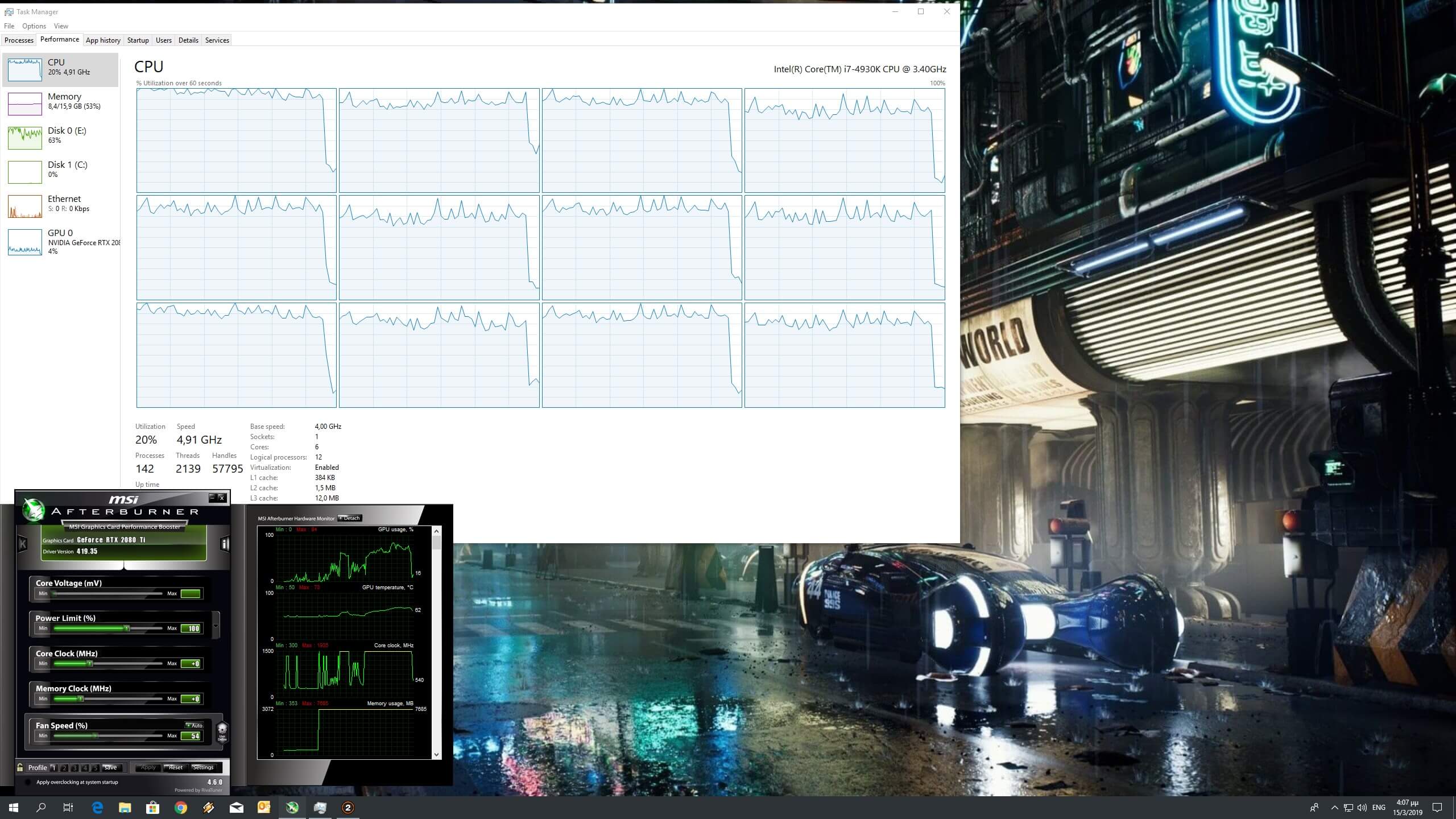
Naturally, our regular readers are full aware of the game’s somehow high CPU requirements. Still, and even on our simulated quad-core that did not have Hyper Threading enabled, we did not experience any major stuttering issues.

Ubisoft claimed that it is investigating this, however we are almost certain that there is nothing to fix here; this game, while it can run with 60fps even on modern-day quad-cores that are not equipped with Hyper Threading, will stress six, eight and even twelve CPU threads. The only way to somehow reduce this CPU usage is to bump up your graphics settings (so that the game will become GPU-bound) or lock your framerate to 60fps.

29 thoughts on “The Division 2 PC players report a 100% CPU usage issue, Ubisoft is investigating”

  1. I’m still surprised that people still support this company that melts they CPUs with Denuvo, VMP, or a classic Ubisoft bad CPU utilization.
    “Ubisoft is investigating”
    There is nothing to investigate, it’s that malware Denuvo and VMP
    Ubisoft motto:
    “oh game is running bad? buy second gpu or cpu boi”

    1. COULDN’T PUT IT BETTER MYSELF
      the staff of this site still don’t want to admit that Denuvo uses shady executable processes that eat up you CPU

  2. Limit the frame rate in setting to normal frame rate like 30-40fps. It will reduce the cpu usage

  3. “The only way to somehow reduce this CPU usage is to…”

    …not buy Ubisoft games.

    Especially so now they’ve gotten in to bed with the anti-consumer Epic Games Store and have also taken the shockingly anti-consumer step of barring this game from being sold by key vendors.

    1. It sucks yeah, but they got vast majority of the pc division customers use Uplay this way since they know people hate Epic. Players have started to accept Uplay for a few years now and this was perfect time for them to try get people on Uplay and it worked

    2. The box version gives you a Uplay activation code. and 6 discs !
      you never have to touch Epic Store

  4. My 8086k only stays around 40-60% since 1070ti is the bottleneck.
    I still enjoy mostly high 100fps at 1440p while i had 50-60fps in beta

  5. Probably Denuvo and VMP doing the same sh*t as always.
    The last game I bought from Ubisoft was Far Cry 3… from a Polish bargain bin deal via my friend there. 5 dollars. With postage.

    1. Anthem didn’t hose the CPU, it just required insane amounts of loading. If you don’t have an SSD it took 5 minutes to load and you have to load multiple times per mission.

  6. you only have a 4 core CPU ? well get a better CPU
    *buys 8 core CPU
    still 100% cpu usage ….
    GG poopisoft

  7. I noticed 90 – 100% CPU utilization with this game in Both DX11 & 12

    I also was having crashes every 20 – 30 minutes with an unknown file version error.

    I stripped Windows 10 off of my PC and went back to Windows 8.1. My CPU utilization dropped almost 30% and I have not crashed in game since. Take it for what it’s worth.

    My spec:

    i7 3770K CPU
    16 GB DDR3 RAM
    nVidia 1070 GPU
    Samsung SSD

    edit:

    I am currently reinstalling Windows 10 on my machine to see if anything has changed after the division patch. If it hasn’t, I will be going back to 8.1.

    update:

    As soon as I put Windows 10 (1809) back on my machine, the game jumped back to 100% CPU utilization (with directx 11 or 12). Tried running the game in Windows 7 compatibility mode and that didn’t help at all. Reinstalled Windows 8.1 and the CPU utilization dropped back down to 60-70% percent.

  8. Some advice. I’ve managed to stop the 100% CPU usage and got it down to about 15-20% (using i3 6100)

    – Set all graphics options to low
    – Set the monitor refresh rate to 60hz in the game
    – Lock the FPS to 55fps
    – Disable DX12
    – Disable input latency option
    – Disable Vsync

    This makes the game playable for me without the high CPU usage and it seems to have solved the crashes too.

    1. just locking the framerate to 60 improves performance on my i5 4570 and gtx 1060.
      I also set the streaming setting that use HDD to 0… I’m using an SSD so I don’t know if it helps or not…

  9. I recently switched to a Ryzen 7 3800x and all i get with my 8c/16t is around 30% usage but i do get 99% on my Msi 2080s Ventus xs oc,would be nice to have a bit more balance across my hardware, I know most companies favor console gamers but surely they need the balance too

Leave a Reply

Your email address will not be published. Required fields are marked *