GeForce RTX 2080Ti feature

Nvidia GeForce RTX 2080 Ti “Mining” GPU benchmarked in several AAA PC games, shows reduced performance

As you already know GPU Mining has been a common trend these days. Crypto mining or “cryptomining,” as some call it, is a very popular topic in the crypto space today. However, mining is nothing new, since it has obviously been around since Bitcoin was first launched in 2009.

GPU mining involves the use of a gaming computer’s graphics processing unit to solve complex math problems to verify electronic transactions on a blockchain. While there are a lot of different graphics cards in the markets, the cards used for crypto mining are those specially designed for gaming, not necessarily for video rendering.

Cryptocurrencies like Bitcoin (BTC), Ethereum (ETH), Monero (XMR), Litecoin (LTC) and Dogecoin (DOGE) are examples of coins that can be mined. Many miners build rigs using several graphics cards at a time to produce a powerful machine dedicated to mining crypto-currency, rather than gaming.

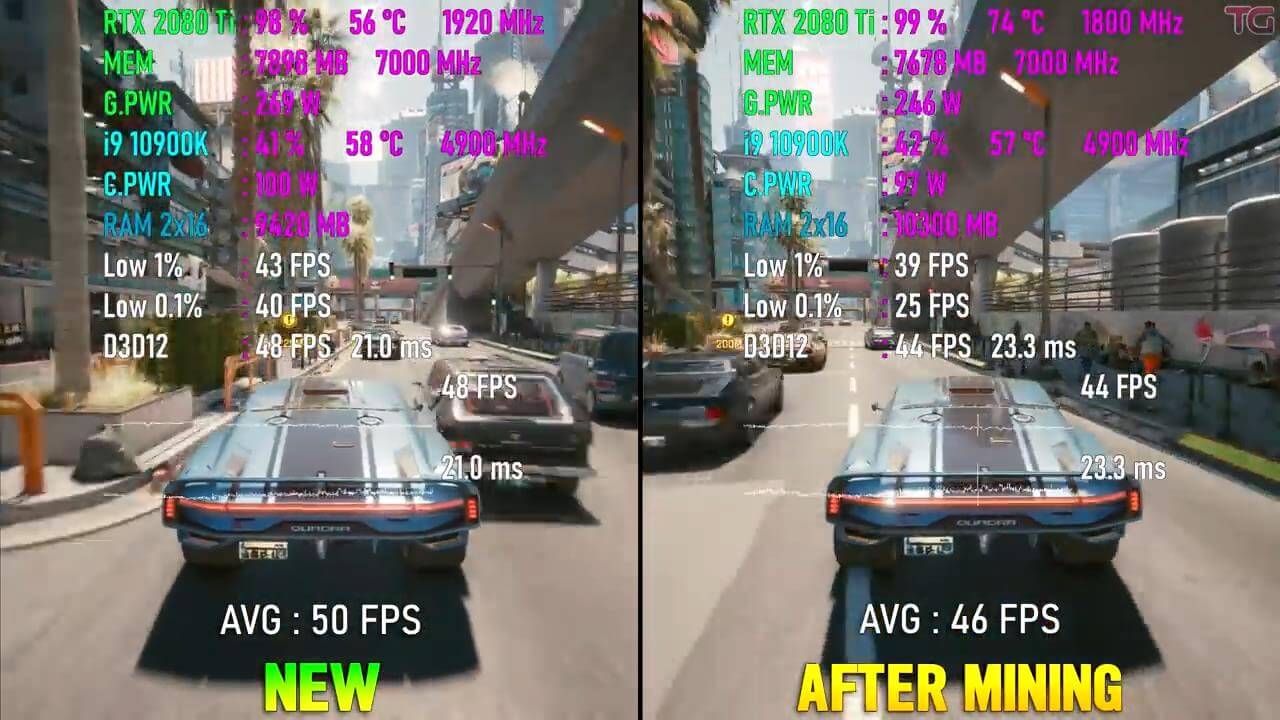
Recently a YouTube channel @Testing Games posted some gaming benchmarks of a used mining card, the Nvidia GeForce RTX 2080 Ti. The user has benchmarked an old RTX 2080 Ti GPU which was used solely for mining for almost 1.5 years, and compared the results with his brand new RTX 2080 Ti GPU.

It’s a known fact that if any GPU has been subjected to Mining for a long time there are chances of possible wear and tear of the graphics card, its components, and the cooling system/PCB as well. This can easily affect the performance of any GPU in the long run.

The YouTube channel @Testing Games has tried to demonstrate this performance drop effect on his heavily used mining GPU.

Several games were benchmarked on 2160p, such as Red Dead Redemption, CYBERPUNK 2077, Mafia Definitive Edition, Horizon Zero Dawn, Battlefield V, Forza Horizon 4, Kingdom Come Deliverance, and Assassin’s Creed Valhalla (Ultra Settings).

How Much Does Mining Spoil The Graphics Card?

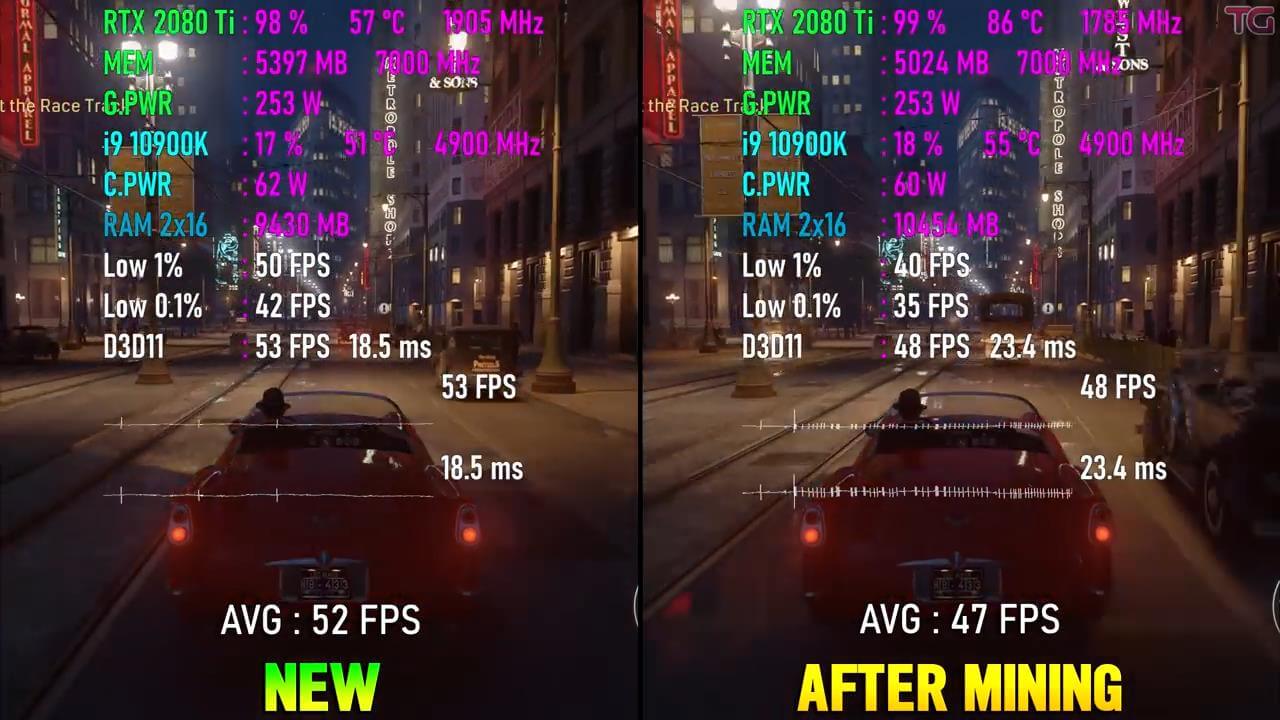
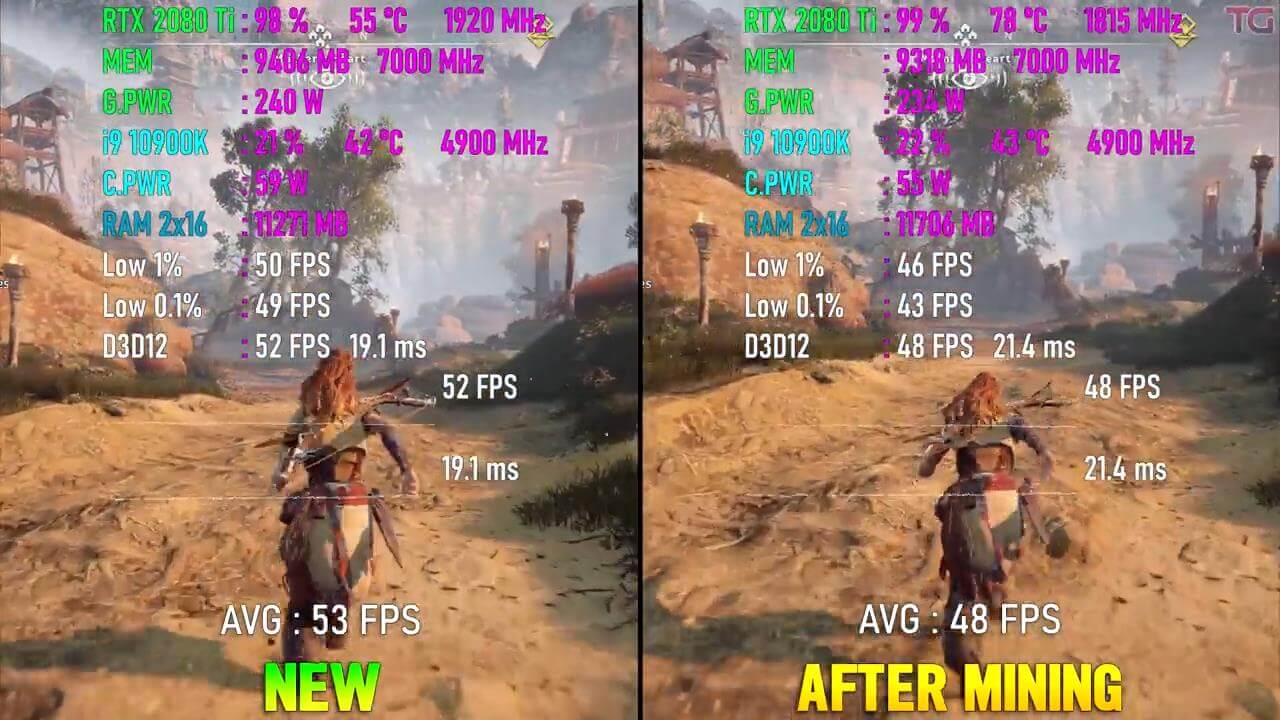
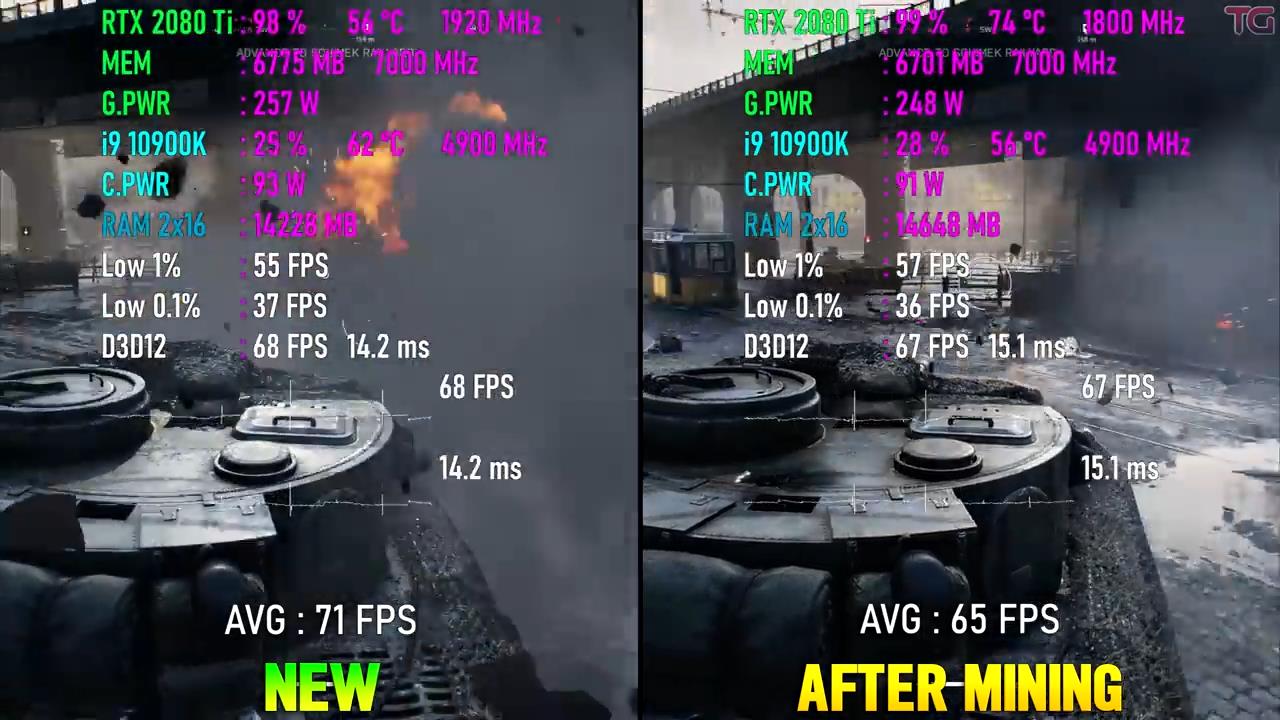
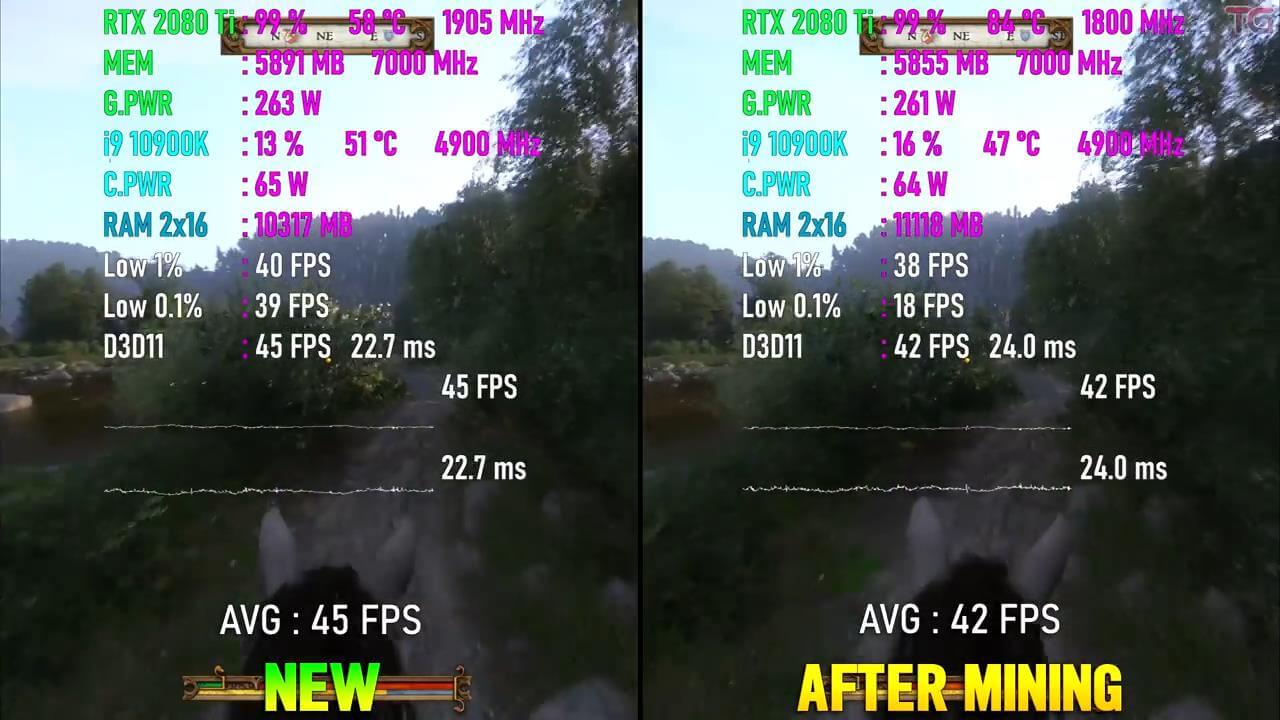
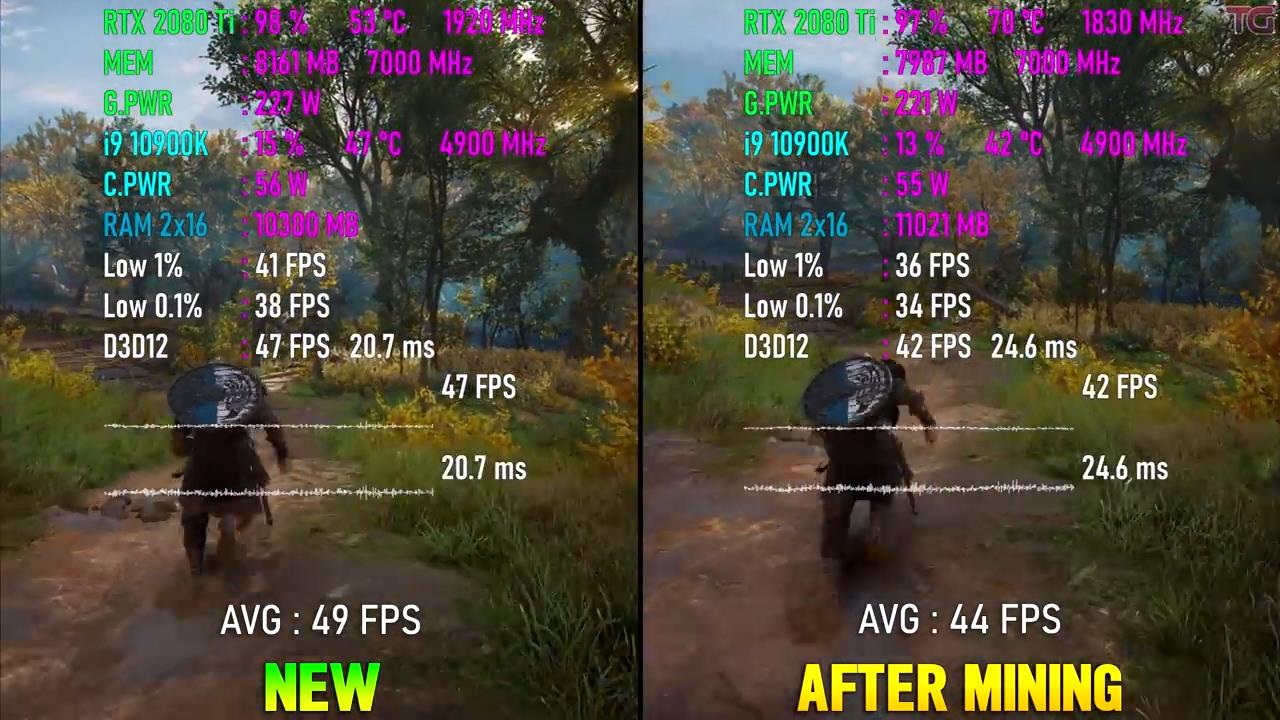
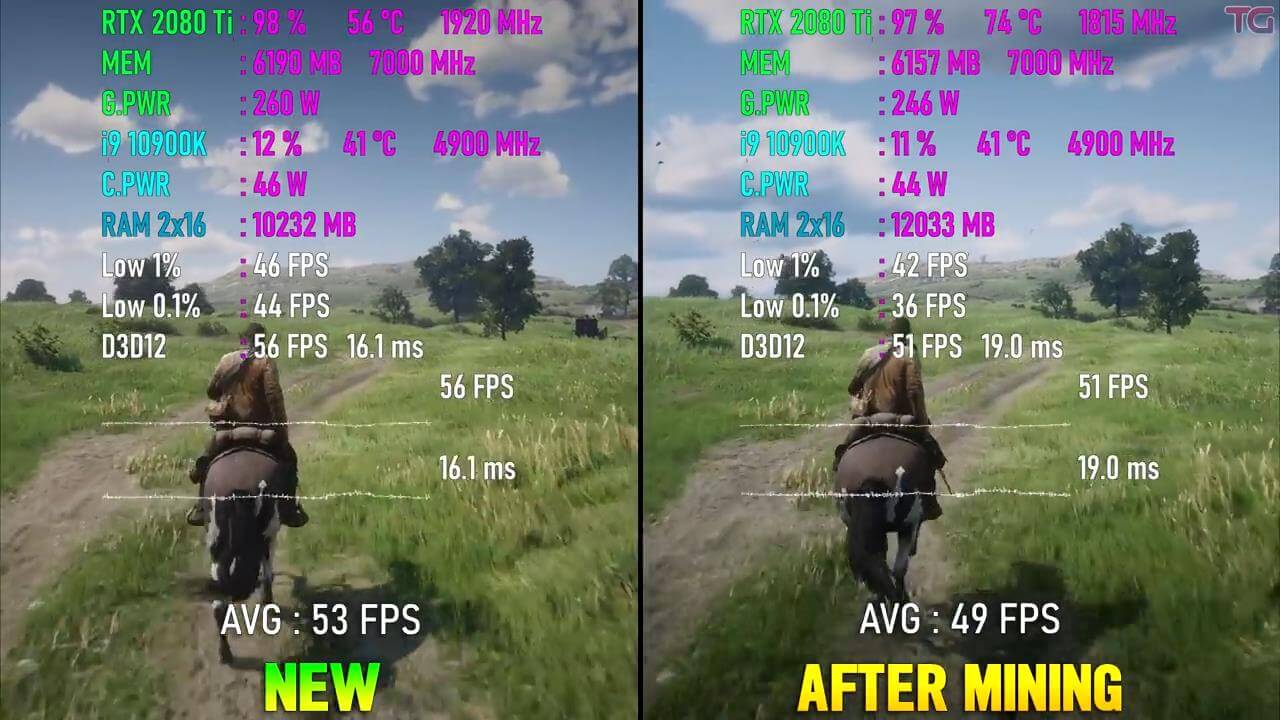
The Intel core i9 10900K 3.7GHz CPU was used for the testing. If we take the average score, the used mining 2080 Ti card was about 10% slower than the brand new 2080 Ti.

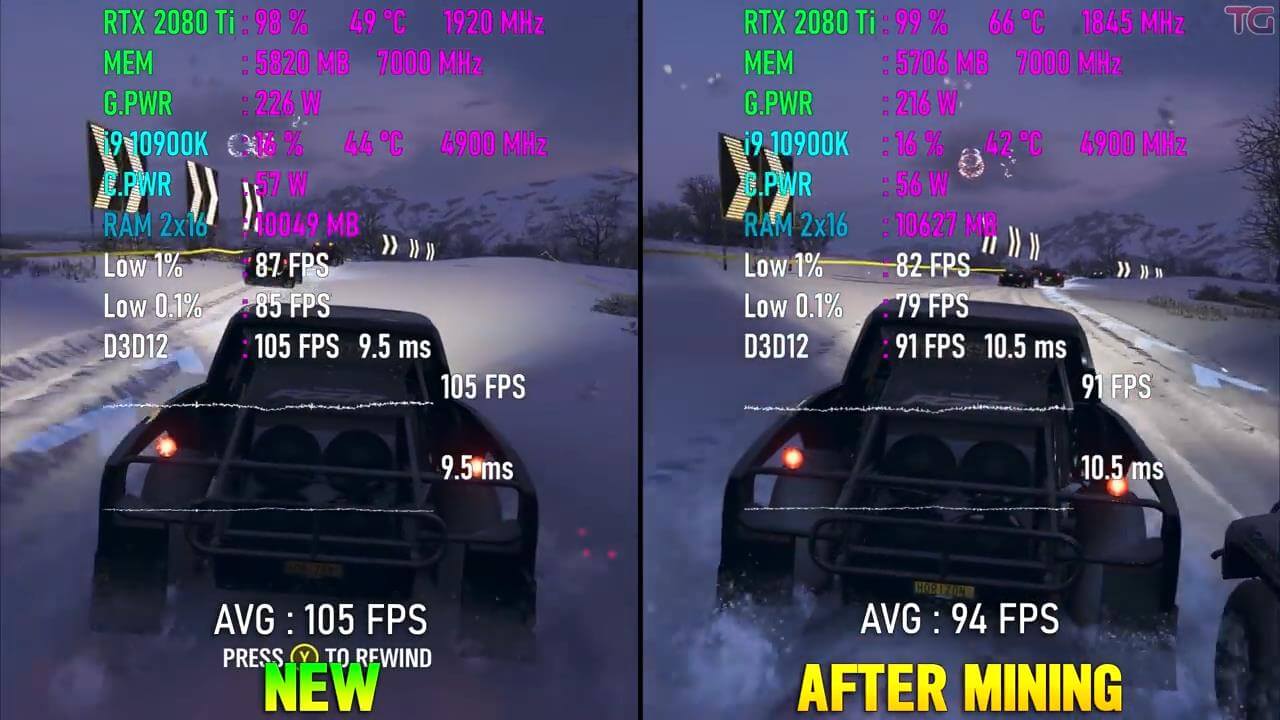
One exception was Forza Horizon 4 game, in which the mining card was actually 20% slower than the new card. So this does show that any GPU used for mining can deteriorate gaming performance, which seems obvious given how mining works. Though, there is still no hard and fast rule to this.

The main culprit for the loss in gaming performance can be attributed to the GPU clock speed and temperature of the Mining card. There was actually a 100MHz drop in boost frequency for the mining card, due to the fact that the mining card was almost 14-16C hotter than the brand new RTX 2080 Ti, which hindered the overall performance.

The correlation between the temp and the drop in GPU boost clock speed is obviously based on Nvidia’s GPU Boost 4.0 algorithm, which is known to be very sensitive to the GPU’s temperature value.

Apart from that, any dust buildup on a heavily mined GPU in the heat sink, or beneath the fans can also greatly affect the cooling performance of the card. This is why it’s always better to apply a fresh thermal paste to your GPU or CPU after several years of usage.

Thermal paste can easily get dry after years, which will reduce the GPU’s thermal and overall performance, especially if the card has been used for Mining purpose.

Below you can find some gaming benchmark screenshots taken from the video. As you can see the brand new GPU provides slightly better frame rates than the heavily used mining GPU. But again, there is still no hard and fast rule to this, since other cards used for mining might exhibit different behavior.

Nonetheless, have a peek.
RTX2080Ti mining GPU game benchmarks-1RTX2080Ti mining GPU game benchmarks-2 RTX2080Ti mining GPU game benchmarks-3 RTX2080Ti mining GPU game benchmarks-4 RTX2080Ti mining GPU game benchmarks-5 RTX2080Ti mining GPU game benchmarks-6 RTX2080Ti mining GPU game benchmarks-7 RTX2080Ti mining GPU game benchmarks-8

Stay tuned for more tech news!

33 thoughts on “Nvidia GeForce RTX 2080 Ti “Mining” GPU benchmarked in several AAA PC games, shows reduced performance”

  1. The old-timers taught me back in the 80s that there are 2 enemies to electronics. Dust and heat. Mining 24/7 produces both. I keep my rigs cleaned out with compressed air and don’t overclock when I don’t need to. I doubt miners bother with cleaning. I am right now typing this message on a 7 year old back up rig and it will probably last well over 10 years before I will need to replace any part if I even want to.

  2. He could have cleaned it and applied a new thermal paste, then ran one more test, with both cards on same clocks. Only then we would know if there was any performance degradation.

    1. Then that would totally nullify this test. Of course, if you apply thermal paste, then the GPU will perform better.

      But that’s not the Youtube user is trying to show or prove. Nope, it’s about testing the MINING GPU as it is, without any modifications, cleaning, or applying thermal paste.

        1. It’s an outright fact that applying a new application of something like Thermal Grizzly Kryonaut would make the GPU, of same condition, age, and usage thermally perform better, allowing GPU Boost 4 to make the core clock speeds higher. Comparing it of the same paste without any modification is the right and accurate way to test the GPU. Mining appears to produce a kind of wear and strain on the card that would degrade performance after long enough usage different to typical gaming rasterization.

          1. Nonsense. It might be 1 or 2 degrees difference. It’s not worth bothering with. Show me a legitimate test with benches where changing the paste made a big difference in temps. It’s just myths.

      1. The presentation of the article and test suggested mining cards are damaged and this was supposed to be the proof of that when all it really is a PSA to replace the trash stock paste.

  3. The fact its running so much hotter and therefore thermal throttling means its not a fair comparison. Once the card is cleaned out and new thermal paste, i’m pretty sure the card will run the same as a new one. Silly article really since lower clocks obviously mean lower performance.

    1. Then that would totally nullify this test. Of course, if you apply thermal paste, then the GPU will perform better.

      But that’s not the Youtube user is trying to show or prove. Nope, it’s about testing the MINING GPU as it is, without any modifications, cleaning, or applying thermal paste.

      Silly comment of yours, really. If you test the Mining card after applying thermal paste, then this whole testing is Moot. It will have NO meaning at all. Period.

      1. I disagree. All this proves is that time causes an unclean card, and an unclean card runs hotter, therefore ruining performance. This is an obvious point that didn’t need an article to discuss.

        What makes sense is to test whether there is any actual hardware degregation, not thermal limitations. The only way to test this would be to change only ONE variable – the chip. As it is, both the chip freshness AND thermals are variables.

  4. You guys that are saying that replacing the thermal paste would make a difference are missing something crucial. The average gamer doesn’t know how to do this or they are too intimidated to try it. In general you should never need to replace the paste during the lifetime of a card.

    The average gamer will buy the card. Install it and forget about it.

    I have seen all kinds of people seeking advice about this and I recall one gamer who tried it and couldn’t even get the shroud back on.

    1. the “average gamer” will use mommy and daddies creditcard and have a prebuilt delivered to their door, so I don’t think it’s a fair comparison. If you buy used anything you should be inspecting every aspect of it to verify you didn’t get scammed anyway, or at the very least take it to a repair shop and have them do it for you if you’re unable or unwilling to do it yourself.

      1. We are discussing used cards. Not pre-builts. The average used card buyer doesn’t look at anything under the shroud. They buy the card, install it and forget about it. Some will run a synthetic benchmark or Heaven to see if the card is within normal parameters.

    2. Shouldn’t that go against buying used GPUs at all then, not just a mining GPU since there is no guarantee that the previous owner has kept it clean or for you to know how much other wear (mostly cooler related) the old GPU has?

      1. I don’t buy used cards at all because I don’t know how the previous owner has treated the card. If anyone does want to buy a used card then bear in mind the risk involved. Another thing is that some companies don’t allow warranty transfer (assuming the card is still in warranty).

    3. Literally search the make and model of your card + thermal paste replacement on youtube. Its that simple noobs

  5. If the mining card is slower due to dry/old thermal paste and dust, you can’t claim it’s performance was just deteriorated.
    It’s like saying an air cooled GPU had its performance deteriorated in comparison to a liquid cooled one, for example.

  6. It appears that many here fail to realize that the user is trying to show the RAW performance of the card which has been used for mining, as it is, and NOT what would have happened to the GPU’s performance if it was tested after clearing and applying thermal paste.

    If that would have been the case, then there was no point in testing a mining GPU in the first place. Some folks really fail to understand this commons sense over here. It’s hilarious.

    Of course, if you apply thermal paste, then the GPU will perform better.

    But that’s not the Youtube user is trying to show or prove. Nope, it’s about testing the MINING GPU as it is, without any modifications, cleaning, or applying thermal paste.

  7. this video is clickbait garbage and the guy provides no meaningful data, he doesn’t show the bios of either card either or their set frequencies, power limit percentages, or fan curves (Hint: miners like to flash their own settings onto the bios), the power draw at the wall, nor photos of the condition of the cards so the entire video is just a giant waste of time.

    edit: and as others have pointed out, that temperature difference between the two is most likely tied to the thermal pads and paste being dried out which happens to all cards, not just ones used for mining.

    1. Thermal paste is supposed to dry up and that has no bearing on it’s effectiveness. Once the bond between the IHS and the cooler is made it’s permanent and will not deteriorate over time. Unless you do something to break the seal it will never wear out or need replacement. All that thermal paste does is to fill in the gaps between the IHS and cooler. Once that is done there is no need to bother with it again.

      People that advocate replacing thermal paste have no idea what they are talking about. Additionally there are so many tests that show that even between expensive thermal pastes and average thermal paste that there is only 1 or 2 degrees difference in temps. It’s pointless to bother with it at all.

      1. I agree to an extent, however not all thermal compound is created equally, and not all heatsinks have a perfect contact mount coming out of the assembly, some even pass QA tests while failing realworld use cases.

        Some pastes when they dry out do lose effectiveness due to the natural of the material used but usually its other factors, thermal pads on the other hand when dried out do lose almost all of their effectiveness, and that isn’t even scratching the surface of the cost-cutting methods employed by OEM’s to save a little.

        I’ve had highend MSI Lightning GPU’s where as soon as you threw OCCT at
        them they would reach 105c and turn off and even after reapplying paste
        it still happened so I wound up playing RMA roulette til I got one that
        stayed under 80c and hit the core clocks I wanted. I’ve also had Asus
        Strix cards that where if you used a support brace they would skyrocket
        by 30c until you shifted it a few MM inward which would indicate that
        their design has some problems with contact on the GPU’s IHS.

        1. If a cooler or IHS is warped then thermal compound won’t be as effective anyway. What you need is metal to metal as much as possible but that’s not possible hence we need thermal paste. The idea about thermal paste drying up and not being effective is a myth.

          It’s common for people to think that it needs to be moist always but that’s not true. It dries up almost immediately on using the card and still does the job.

          I have never seen a test that showed a noticeable improvement in temps when changing paste.

          When I do a new build I use Arctic MX-4 on the CPU IHS and have never encountered any issue with heat. I use the pea method but some prefer the spread it with a credit card method. I don’t because that introduces the possibility of an air bubble in the paste when mounting the cooler. Air is a horrible conductor of heat.

          1. my previous build with MX-4 from 6 years ago never dried up, also using the pea method, but again you have no idea how each OEM does things unless you tear it down and see. Some models are just built to fail.

          2. Of course it dried up. It’s supposed to. It probably dried up the first time you turned on your PC and started to use it.

            It has no bearing on the performance. When you removed the cooler you had to wiggle it a bit to break the seal and you found dried up paste as you should have.

          3. But it did. It’s supposed to. It dried up but was still effective just like every other PC on this planet.

          4. I can’t believe you’re even arguing this as if I’m some kind of moron unable to tell the difference in levels of viscosity. it depends on the heatsink plate being concave or not, etc. but a proper seal shouldn’t dry up nearly as fast.

          5. It drys up pretty much as quick as you turn on your PC and start to use it. Pull a cooler off from one of your new builds and inspect it if you want to learn something. You will find dried up paste just like every other person on this planet will. You will have to clean it up and re-paste it though.

            There are products made especially to remove the dried up paste but you can get by with rubbing alcohol and coffee filters just fine. The coffee filters are good because they don’t leave any lint behind. Lint is a no-no.

  8. I’m just going to address this thermal paste argument completely right here: The argument is dumb, the kind of factory applied thermal paste used for GPU shrouds & heatsinks is made for long term use, 1.5 years(18 months) is not necessarily sufficient enough to make the application bad enough to yield degraded thermal conduction and heat dissipation to the IHS or heatsink.

    Crypto miners typically undervolt their GPUs by such considerably amounts to make would-be 250+ watt, 300+ watt cards run at 100+ watts that the heat permeating from the heatsinks is dramatically reduced versus stock configuration and voltage/frequency curves. The heat from a sustained 18 months of use mining on a 2080Ti would not be enough to degrade the TIM compound paste beyond positive thermal performance either.

    This argument is dumb and it’s a desperate deflection from a rather obvious, but unsavory outcome for a certain demographic.

  9. The paste wore out from the mining and the temps were higher and the clocks lower because of it all he has to do is repaste it……

Leave a Reply

Your email address will not be published. Required fields are marked *