
The PC demo for Final Fantasy XV got released yesterday and while it features a nice amount of graphics settings to tweak, it appears that there is a hidden tool that allows players to adjust even more settings.
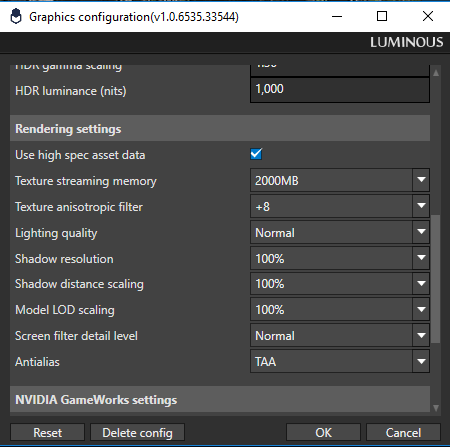
Spotted by Reddit’s member ‘Ryudo_Gaming‘, this tool is located at FFXV main directory -> tools -> GraphicsConfigurationTool. Inside that folder, you will find a program/tool called Luminous Engine tool.
PC gamers can adjust the memory allocated to texture streaming, and significantly increase the shadow resolution, shadow distance scaling and model LOD scaling. What’s really cool here is that you can increase the shadow resolution by up to 800%.
Naturally, this will have a big performance impact on your performance. However, we are pretty sure that PC gamers will now be able to adjust their settings to their likings better than before, especially those that want to keep the NVIDIA Turf Effects.
Have fun!

John is the founder and Editor in Chief at DSOGaming. He is a PC gaming fan and highly supports the modding and indie communities. Before creating DSOGaming, John worked on numerous gaming websites. While he is a die-hard PC gamer, his gaming roots can be found on consoles. John loved – and still does – the 16-bit consoles, and considers SNES to be one of the best consoles. Still, the PC platform won him over consoles. That was mainly due to 3DFX and its iconic dedicated 3D accelerator graphics card, Voodoo 2. John has also written a higher degree thesis on the “The Evolution of PC graphics cards.”
Contact: Email

Ill give SE credit for this title, they seemed to have done a pretty good job on the PC version. It runs well, looks beautiful and the settings to change are impressive. More PC versions need to be this well done. So glad this wasnt just a cheap port of the console release.
Remember watchgods
E3_GRAPHICS: TRUE
ahahha was that a actual setting?
Great to have the option and even more so when there’s a utility included rather than having to manually edit .ini files.
But will it impact performance?
LOL.
I’m more interested in what it’ll do performance wise.
It’s all looking good for the game from a PC gamers perspective for graphics options, but the game itself though, OMG, may as well Grind in Black Desert Online, at least there is something to do rather than looking for enemies to magically appear in a dead game world and at least that has a proper mouse and keyboard interface designed for PC. Scroll mouse for menus, no cursor at all. LOL, I guess the UI wasn’t included in “built from the ground up for PC”, clearly built from the ground up for controllers.
This is a great tool for NVidia Ansel Photography and future graphics cards.
Does this give you any methods to improve performance or just allow you to turn things up to graphics card melting degrees?
Don’t turn shadows up by 800 percent and say its “unoptimized” boize
Why don’t they have 2560x1440p resolution in this tool?
So I will buy it after turning everything up in these settings it looks great. I can believe they remade it at this point. I get about 70fps on a 1080TI at 1440p with all the goodies on and 200% to all the effects.
Wow, Square Enix is really hitting a home run with this release. Let’s hope it sells really well so we’ll get more awesome PC versions in the future.
Is this some kind of hoax? I don’t see any folder named “tools” in the game’s main directory, nor could I find any executable by the likes of this so-called graphics tool even after scanning all subfolders.
*Edit:* Never mind, it only ships with the demo version, how ridiculous that they’re removing it from the actual release…