
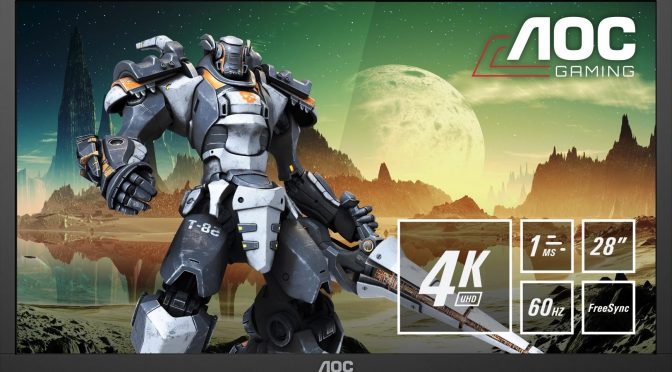
AOC announces G2868PQU; 28” TN panel 4K HDR gaming monitor with 1ms response time & AMD FreeSync

AOC announced today a brand-new gaming monitor, the 28” (71.1 cm) G2868PQU with Ultra HD / 4K (3840×2160 pixels) resolution. According to the press release, the display boasts a next-gen HDR-ready TN panel with 1 ms response time. The G2868PQU also supports AMD FreeSync which eliminates stutter and screen-tear caused by mismatched image frames between the graphics card and the monitor.

Going into more details, this HDR-ready display is said to be equipped with a new 28” TN panel, covering 102% of sRGB and 82% of AdobeRGB colour gamuts. Thus, the monitor promises to allow gamers to see 4X as many details as on a Full HD display, but experience vivid colours and popping visuals as well. Furthermore, it is said that the image on the G2868PQU is extremely sharp thanks to a density of 157.35 ppi (pixel per inch).

The AOC G2868PQU monitor is also equipped with the following gaming-specific features in its on-screen menu:

  • With AOC’s Game Color, users can adjust the colour saturation, oversaturating the image if the content is dull-looking, or under saturating for better grey levels.
  • With AOC’s Shadow Control, users can dial-in shadow levels to brighten dark areas and vice versa to better see details in dark or too bright/washed out areas without affecting the whole image.
  • AOC Game Modes, with specific adjustments for different game genres (FPS, Racing, RTS), plus three user customisable modes.
  • AOC Dial Point, where users can place an aiming indicator in FPS games which lacks an in-game crosshair, so they can still aim precisely and accurately.

AOC’s G2868PQU will be available as of March 2019 with an MSRP of €369,00 / £319,00.

36 thoughts on “AOC announces G2868PQU; 28” TN panel 4K HDR gaming monitor with 1ms response time & AMD FreeSync”

      1. No it’s just some people just don’t understand, they think TN is bad in every colour situation and TN has a really bad rep by PC enthusiasts because of it’s colour accuracy, preproduction and colour changes at angles. TN panels now days are much better(than they were), especially when calibrated properly.

          1. Never denied IPS isn’t better, also TVs have lots of post processing options which destroy the colour accuracy, so a badly setup IPS can be just as bad.

          2. Yep, but game mode fixes that 😛 Most of it at least, i cant even imagine using a TV as a monitor without that option turned on.

          3. Depends on the TV. Many TVs game modes leave on many features that still induce lag…

          4. Not to mention the insane high latency on top but yeah Gamemode is much better. haha.

          5. Yea, some Samsung TVs are like 15 MS, which is crazy fast in comparison to many other TVs that reach 80-100 (or more lol) 15 is almost good enough for competitive fps games. Well coming from 1, 2 and 5 ms monitors.. it still feels slow of course but nothing horrible. Some Sony TV’s are also pretty good with 20-30 ms, which is enough for casual gaming in game mode 😛

          6. I’m sticking with my TN, I have a feeling I got so used to the low latency, something higher would make me cry like my TV does, I think that has around 30ms+ in Gamemode.

          7. I made that transition and it took me a couple days just to not notice it ALL the time…
            In the end the higher contrast and better colors won me over…but I do miss being able to make things out when spinning around.

          8. Yeah I must say the colours on my monitor do look more washed out even when calibrated. Using my Oculus Rift which uses OLED lens I can see a big difference in colour that’s for sure on games like Elite Dangerous.

          9. I think you may be getting response times and input lag a bit mixed up. Input lag is how long until a button press is shown on the screen. Response time is how fast the monitor actually changes from say black to white on a per pixel basis.
            When a monitor says 1ms, that’s just the response time. You can still have input lag, based on the game, controller, etc.

          10. This is a good point. I have an IPS, even after calibrating, it crushes blacks. It’s not my gaming monitor, which is a 144hz IPS that has great constrast and colors, but I do miss those TN response times.
            It’s all a choose your feature situation and no panel does it all (except OLED but that burn in/cash money issue).

        1. They are still garbage. I’ve tried several of the newer gaming TN monitors and they are abysmal compared to IPS. They still look different at the top than they do at the bottom and can get washed out real easy in dark scenes and have more banding.

        2. I think it’s more to do with maximum brightness/contrast, which TN’s just don’t have (even the new wide-gamut panels).

          Personally I prefer TN because I have found even the fastest IPS gaming panels to streak too much in fast lateral motion for my taste, and the colours and contrast are fine for regular SDR use.

          But HDR? Yeah, like Drearier said: TN or HDR? Pick one.

        3. TN panels have horrible color shifting off angle which can make even the corners of the screen look different than the center or if the viewing angle is even slightly off. They are terrible for any kind of photo editing or rendering and do not even look good for games.

          HDR has the opposite problem: exaggerated brightness and contrast.

          IPS is still the best.

    1. Right? This is exactly what I was thinking. Is it HDR only because it is extremely overpoweringly bright? I mean, that’s the only way you’ll really get “contrast” with a TN panel.

  1. Going into more details, this HDR-ready display is said to be equipped
    with a new 28” TN panel, covering 102% of sRGB and 82% of AdobeRGB
    colour gamuts.

    That is wasted on a TN panel that has color shifting even slightly off angle (or even the corners if the screen is large enough relative to the viewer).

  2. Going into more details, this HDR-ready display is said to be equipped
    with a new 28” TN panel, covering 102% of sRGB and 82% of AdobeRGB
    colour gamuts.

    That is wasted on a TN panel that has color shifting even slightly off angle (or even the corners if the screen is large enough relative to the viewer).

    1. Never! It been 10 years since I quit 60Hz… I have buyed the Samsung 2233RZ at launch in Q1 2009 and never regret it… and it is still functional! (on my 2nd gaming PC)

  3. Some MONITOR related news, so I’m just posting it here. Lenovo Legion Y27gq 1440p 240Hz G-Sync Monitor.

    First Monitor to support 240Hz refresh rate on a 1440p screen resolution. Today, 240Hz monitors are primarily restricted to high-end 1080p gaming screens, with 1440p variants being relatively unheard of. This rarity is due to the screen’s DisplayPort 1.4 requirements, as 1440p at 240Hz sits well above the bandwidth capabilities of DisplayPort 1.2.

    https://www.lenovo.com/us/en/accessories-and-monitors/monitors/gaming/Lenovo-Legion-Y27gq-Monitor/p/DD116LPY27G

    https://www.overclock3d.net/news/gpu_displays/lenovo_legion_y27gq_1440p_240hz_g-sync_monitor_to_launch_this_spring/1,

    https://www.youtube.com/watch?time_continue=81&v=LIHRRTj7wuU

Leave a Reply

Your email address will not be published. Required fields are marked *