Microsoft has just released Forza Motorsport on PC. Powered by the ForzaTech Engine, it’s time now to benchmark it and examine its performance on PC.
For our Forza Motorsport PC Performance Analysis, we used an AMD Ryzen 9 7950X3D, 32GB of DDR5 at 6000Mhz, AMD’s Radeon RX580, RX Vega 64, RX 6900XT, RX 7900XTX, NVIDIA’s GTX980Ti, RTX 2080Ti, RTX 3080 and RTX 4090. We also used Windows 10 64-bit, the GeForce 537.58, the Radeon Software Adrenalin Edition 23.9.1 driver for RX580 and Vega 64, and the AMD Software: Adrenalin Edition Preview Driver for AMD Fluid Motion Frames for the RX 6900XT and the RX 7900XTX. Moreover, we’ve disabled the second CCD on our 7950X3D.
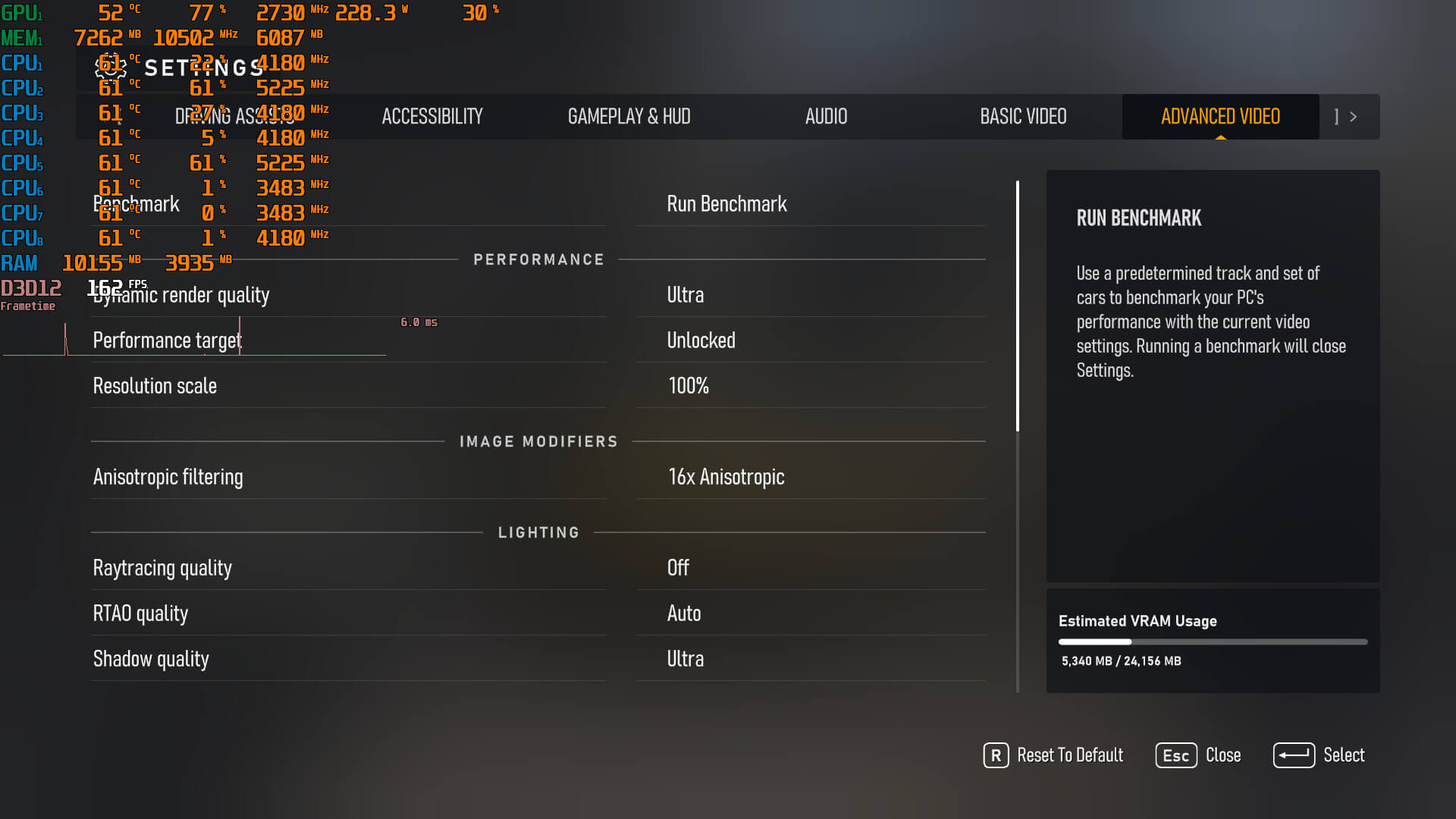
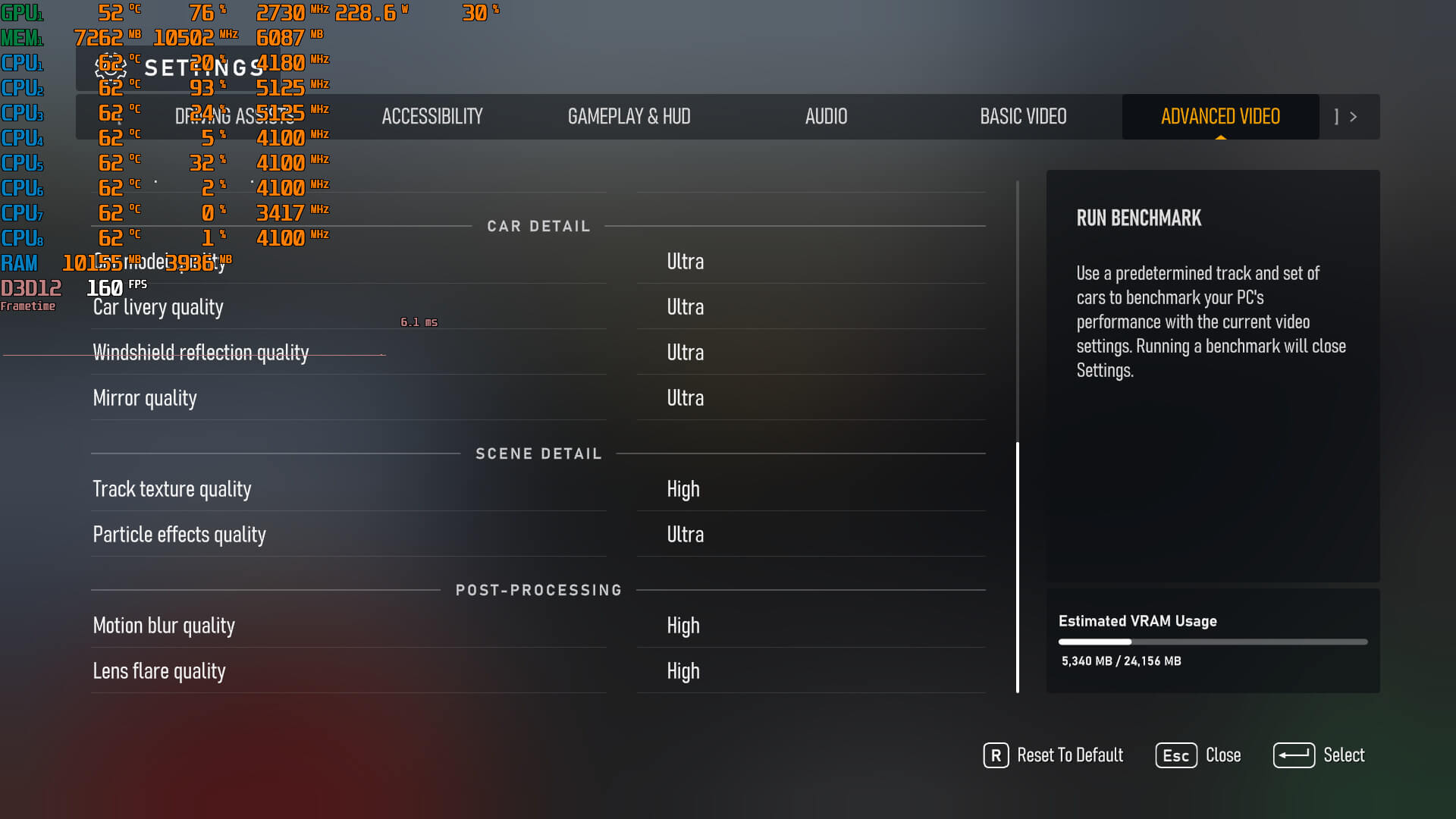
Turn10 has added a respectable amount of graphics settings to tweak. PC gamers can adjust the quality of Car Model, Car Livery, Track Textures, Particles Effects and more. The game also supports NVIDIA DLSS 2, AMD FSR 2.0 and Intel XeSS. However, Turn10 has locked these upscalers to their vendors. As such, you won’t be able to use Intel XeSS if you use an AMD Radeon GPU. Additionally, as we’ve already reported, there is support for ray-traced reflections and ambient occlusion, but no support for RTGI.
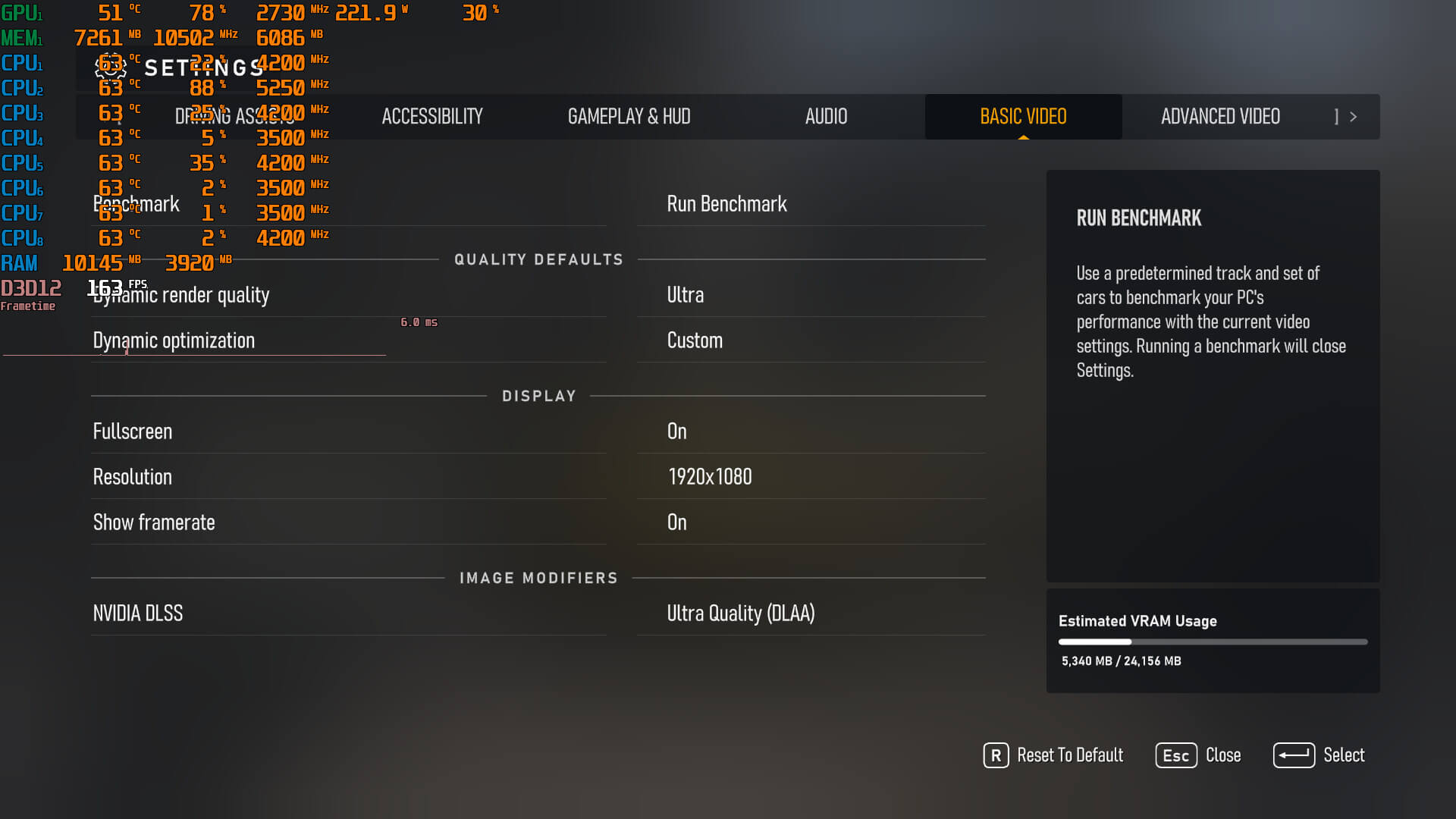
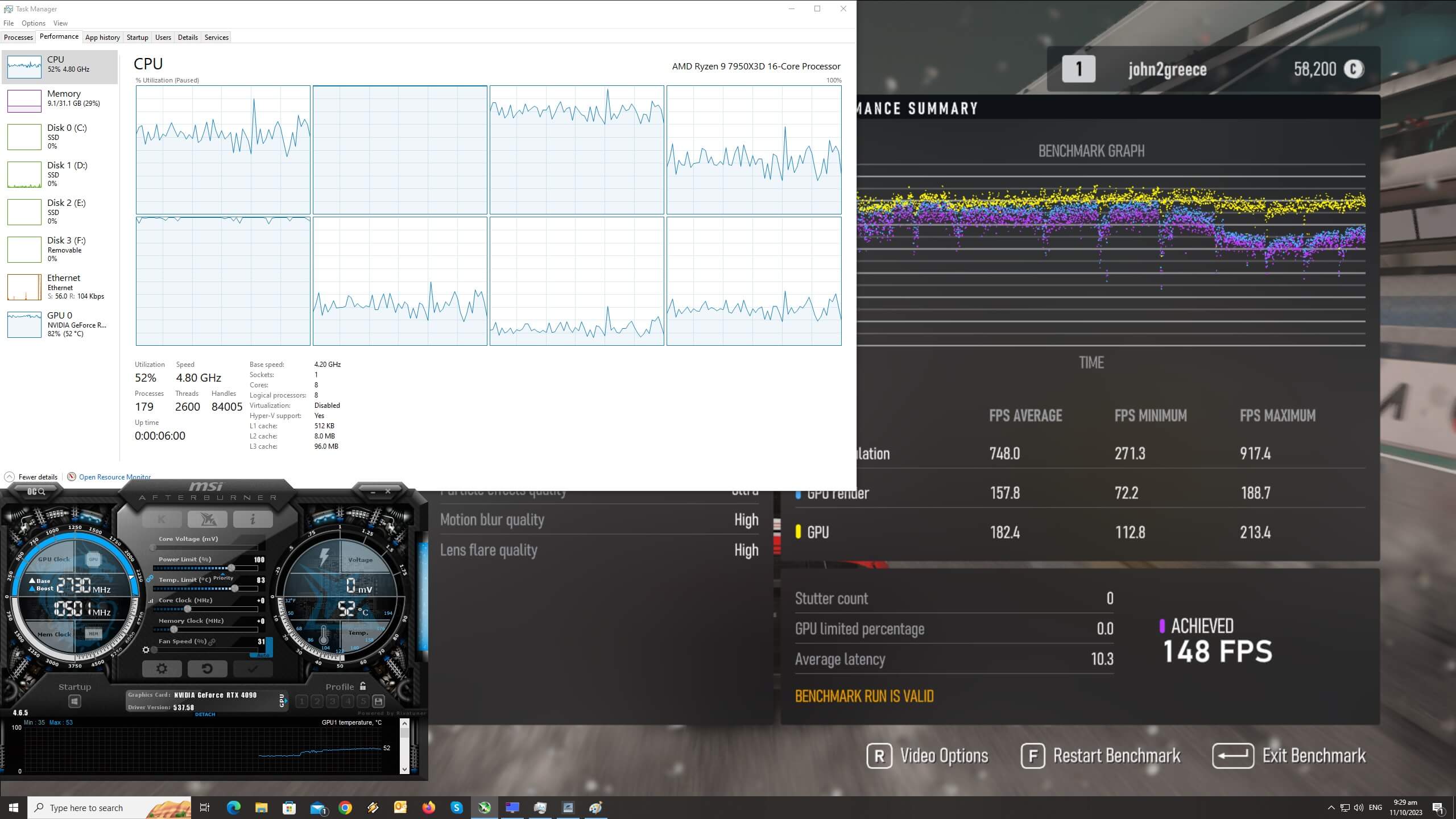
Forza Motorsport features a built-in benchmark tool, which is what we used for both our CPU and GPU benchmarks. The benchmark scene used is a stress test scenario, featuring a lot of cars in the rain at night.
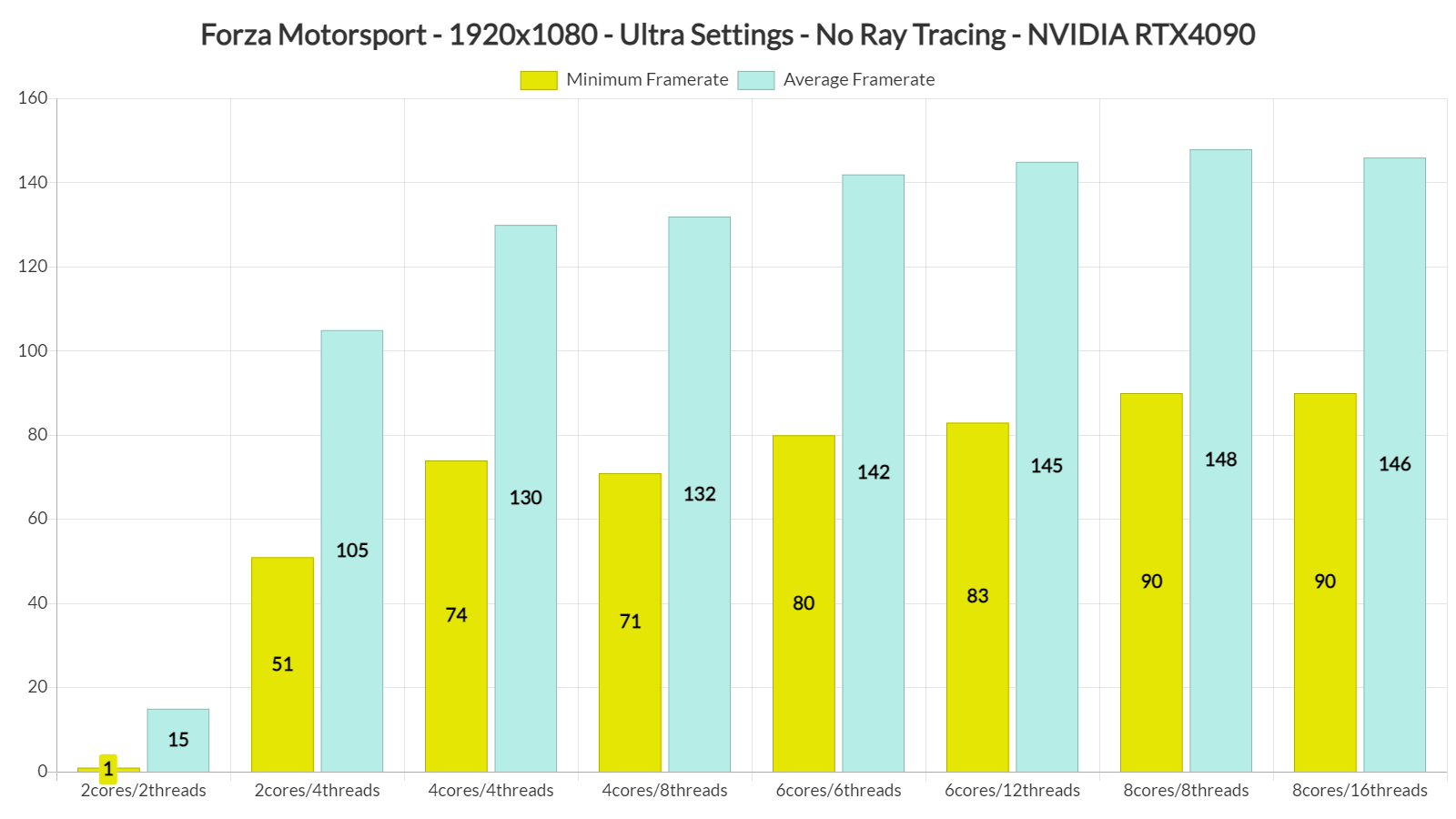
In order to find out how the game scales on multiple CPU threads, we simulated a dual-core, a quad-core and a hexa-core CPU. At 1080p/Ultra Settings/No RT, our simulated dual-core system, without SMT/Hyper-Threading, was simply unable to run the game. With SMT, we were able to significantly improve performance. And, from the looks of it, Forza Motorsport appears to be using effectively six CPU threads. So, if you have a modern-day CPU, you won’t encounter any major performance issues. We’ve seen some reports of poor performance on older CPUs. As such, we might install and test the game on our Intel Core i9 9900K system.
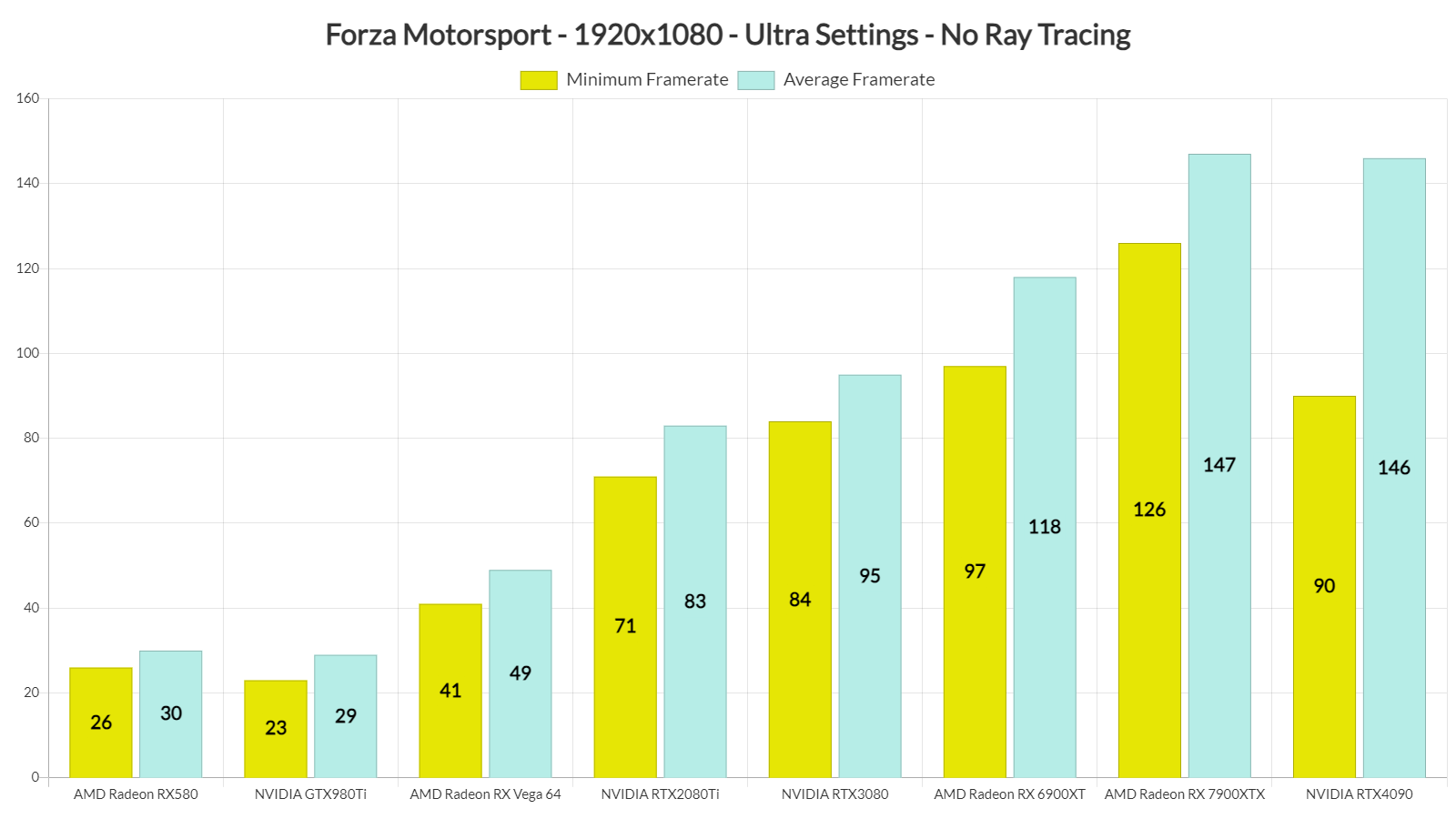
At 1080p/Ultra Settings/No Ray Tracing, you’ll need at least an NVIDIA GeForce RTX2080Ti GPU. Our AMD Radeon RX Vega 64 was nowhere close to a 60fps experience. What’s interesting here though is the game’s performance on the NVIDIA RTX4090 and the AMD Radeon RX 7900XTX. While these two GPUs have a similar average framerate, AMD’s GPU offers way better minimum framerates. This is with the latest NVIDIA driver which, according to the green team, is optimized for Forza Motorsport.
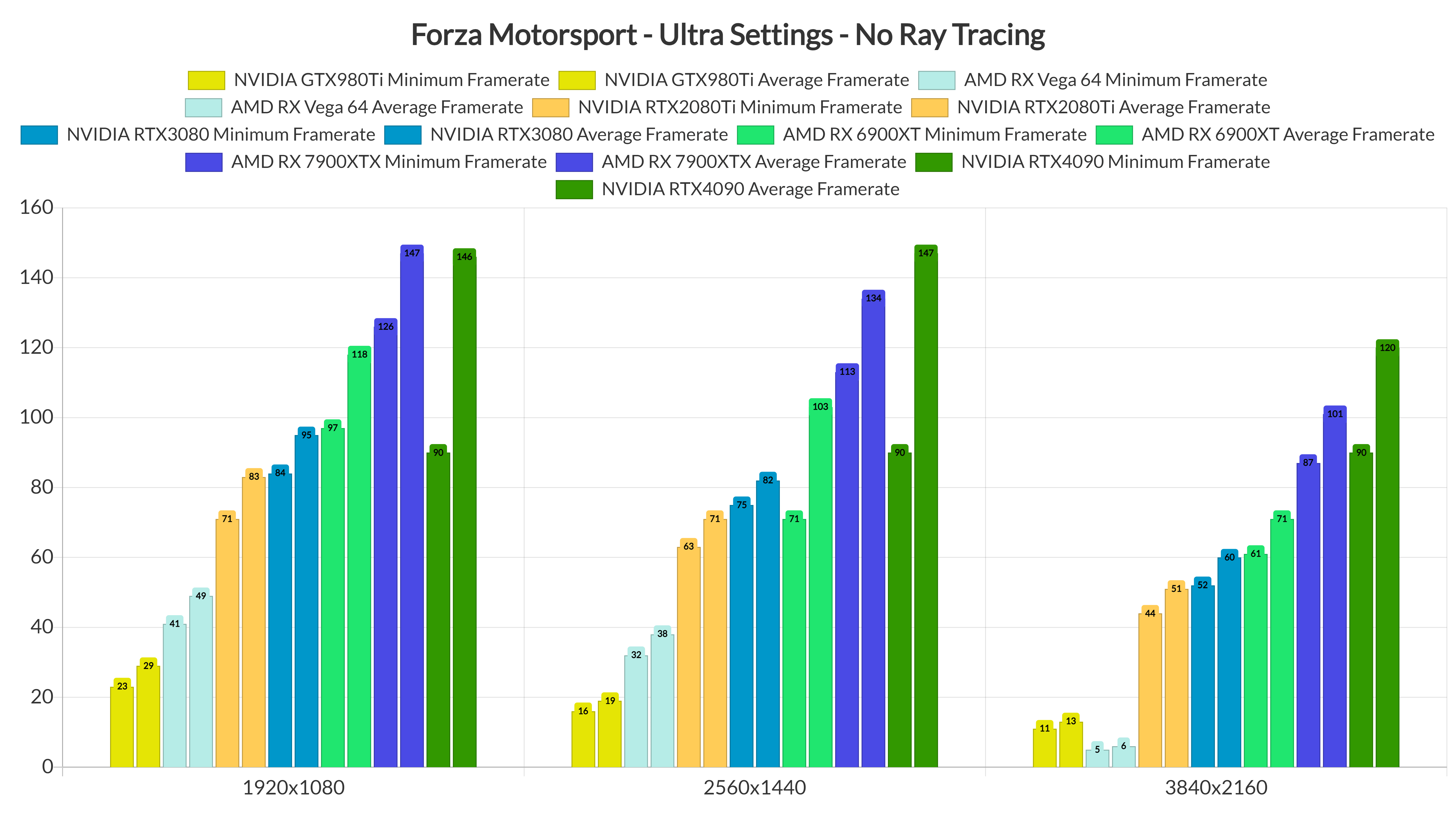
Now I’ve played a bit of the game’s Career Mode and did not experience any framerate stutters or hiccups on the RTX4090. Thus, I’m certain that most of you won’t be able to notice these minimum framerates. Still, according to the in-game benchmark tool, AMD’s high-end GPUs have a smaller discrepancy between the minimum and average framerates.
At 1440p/Ultra Settings/No RT, our top five GPUs were able to offer a constant 60fps experience. Again, the RX7900XTX was able to provide better minimum framerates than the RTX4090. However, at native 4K, the RTX 4090 was able to pull ahead.
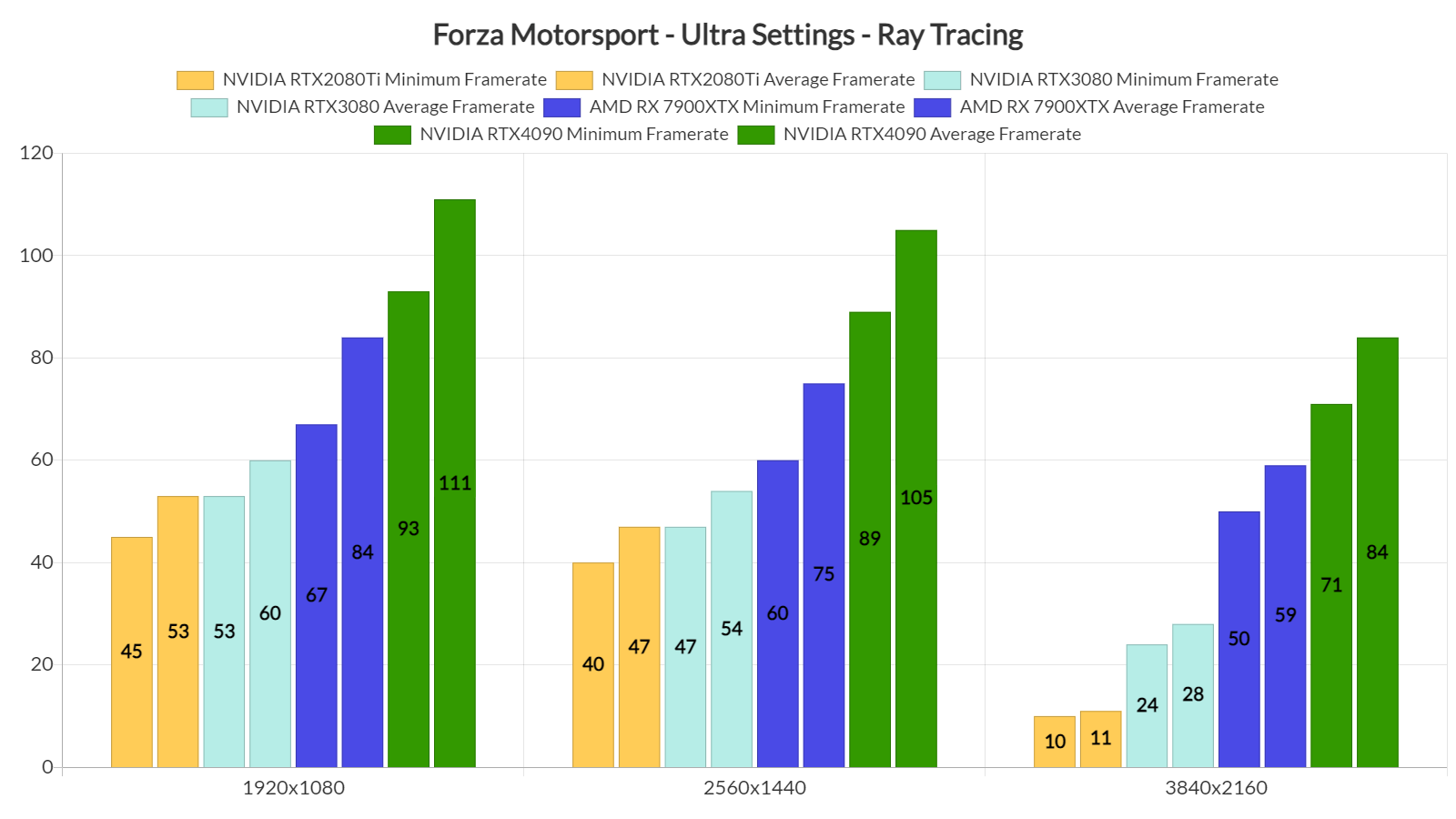
Now while the AMD Radeon RX7900XTX can compete with the NVIDIA RTX4090 in rasterized, it’s no match for it once you enable the game’s Ray Tracing effects. At native 1080p/Ultra Settings/Ray Tracing, the RTX4090 is noticeably faster than the RX 7900XTX. To its credit, AMD’s GPU can still offer a 60fps experience even at native 1440p. At native 4K, though, the only GPU capable of running the game smoothly is the NVIDIA RTX4090. Moreover, for some reason, our Vega 64 also underperformed at that resolution (and was actually slower than the GTX980Ti).
As we’ve reported, DLSS and FSR do not currently offer the expected performance boost in Forza Motorsport. This is something that Turn10 is currently looking into. And, since the DLSS and FSR implementations are not that great (performance-wise), we’ve not benchmarked them.
Graphics-wise, Forza Motorsport looks great. This is one of the best-looking racing games, there is no doubt about that. However, Turn10 has downgraded its visuals (compared to its 2022 gameplay reveal trailer). Not only that but while the team initially listed RTGI for the PC, it has decided to remove it. The Ray Tracing effects are also a bit underwhelming in this title, and I’m certain that most of you won’t even notice the ray-traced reflections while playing. The reason I’m saying this is because the track reflections use SSR and not Ray Tracing. The only RT reflections found here are those applied to the car. So yeah, good luck spotting them when racing.
All in all, Forza Motorsport appears to run well provided you have a modern-day CPU. Without its RT effects, the game can run great on numerous GPUs. However, mainly due to the bad implementation of DLSS and FSR, things get a bit tricky once you enable Ray Tracing. With Ray Tracing, you’ll need at least an RTX3080 with DLSS in order to hit 60fps at 1080p. Reportedly, the game also has issues on older CPUs, so that’s another thing to keep in mind.
In conclusion, Forza Motorsport is a mixed bag. While it can run great on numerous PC systems, there is still room for improvement. However, this is nowhere close to being described as a “mess” or “unoptimized“. So, let’s hope that Turn10 will improve CPU scaling and the DLSS/FSR/XeSS implementations via future patches.


John is the founder and Editor in Chief at DSOGaming. He is a PC gaming fan and highly supports the modding and indie communities. Before creating DSOGaming, John worked on numerous gaming websites. While he is a die-hard PC gamer, his gaming roots can be found on consoles. John loved – and still does – the 16-bit consoles, and considers SNES to be one of the best consoles. Still, the PC platform won him over consoles. That was mainly due to 3DFX and its iconic dedicated 3D accelerator graphics card, Voodoo 2. John has also written a higher degree thesis on the “The Evolution of PC graphics cards.”
Contact: Email


Did you restart the game after each changes in the graphics settings?
Obviously, this is another known issue that could affect performance in this game.
People are speaking up about memory leaks or widely inconsistent performance. Did you notice any of that?
I’ve played the Career Mode for one hour and haven’t encounter any inconsistent performance or memory leaks.
Problem is not gpu’s/cpu’s performance itself. Problem is how buggy it is, especially when fps decide to suddently cut in half for no reason (easy to achieve this changing some gfx settings, but it will happen too many times going back from a race to main menù and loading a new race, or depending by the things loaded on screen, there is not a precise path that create this bug, probably is caused by some ui elements that are loaded and cause leaks). Not only this, during game many times you can notice some strange behaviors, from texture flickering (not costantly, but will happen somehow from time to time), to strange TAA artifacts (again sometimes present, sometimes not, lol), to paint of cars shading that decide to bug casually too (and i have the feeling that it is not the only buggy shader right now). Then Dlss/fsr not working is just the cheers on the cake. Game itself can run pretty much decently among any gpu’s out there, even a 3050 will be enough for 1080p medium when dlss will be working.
Then even settings menù is wierd, leaving dynamic optimization option to control resolution too lol (high=1440p, ultra is 4k if leaved to auto for example, but this will bug it too if you dont set to 100% in some cases). Then grass, grass is even wierder, on pc maxed out there is much less 3d grass than serie x in rt performance mode (and RT perf is even less than his own quality mode), again a bug? for the most is similar to serie S in this aspect.
Rt then can tank hard older cpu’s, even if set to low (BTW, low is pretty much identical to ultra, it only changes precision and not even by a mile, at least for rtao, plus rt reflection is not user controllable in terms of quality, for example serie x use much lower internal res for rt reflections).
Add on this buggy or stupid IA when fight, bad career grinding or upgrading, many car models old as much as forza 1 (LOL), and an overall limited track selection and the situation is among one of the worst ever happened for a MS triple A game, somehow similar to what happened to starfield.
So, yes, for now game a total disaster with a good simcade handling (not perfect and with old faults, another sign that they reused even physics from fm6, just updating a bit tyre model)
Thanks for the detailed review. I’ve noticed the fps bug only one time, on the parked car screen before the race. After that it all went pretty smooth.
As we all know for generations, release date is just early access and the game will be finished in about a year. Sadly, that’s the state of this industry today, were mörons rush to pay extra in order to play 2 days before others.
definitly…i decided to wait at least 6 months before sign again gamepass.
No? I’m getting stable 60FPS at 1080p with a RX 6950 XT, without any sort of resolution scaling, is RT broken on NVidia?
Even the Xbox Series X is getting stable 60FPS at 1440p with RT, while using the equivalent of a RX 6700 XT.
Overall it seems like a piss poor port this time around from Turn 10 on PC.
https://i.pinimg.com/originals/a6/32/28/a63228ef51c4926080fa698785c4dbd1.gif
No? I’m getting stable 60FPS at 1080p with a RX 6950 XT, without any sort of resolution scaling, is RT broken on NVidia?
Even the Xbox Series X is getting stable 60FPS at 1440p with RT, while using the equivalent of a RX 6700 XT.
Are you really suggesting that AMD can handle RTRT better than NVidia?
Because no, they can’t, simply because they don’t dedicate the necessary die area inside their GPU chips to get comparable performance with NV’s hardware, where the area of the chip responsible for raytracing takes up considerably more space.
AMD most likely does this to keep the cost of raytracing as low as possible for the consoles of both Microsoft & Sony, their two largest customers in the Radeon graphics division.
Granted, AMD sticking their so-called ray-accelerators inside the GPU’s compute units means that even Valve’s Steam Deck technically has hardware support for raytracing, and in fact is even able to run Doom Eternal with RT reflections enabled at 1080p with more than 30 FPS, but only because Valve’s special Vulkan driver for SteamOS/Linux is better optimized than AMD’s official driver:
https://uploads.disquscdn.com/images/560c3df215902067ad4c19d6dbbf1c46b841f4fdb6a90c6dae5c649e6ea5cbd2.jpg
If John benchmarks are correct, is not even a suggestion, as stated I getting stable 60FPS with RT enabled, and I’m not even using FSR.
While John cannot reach 60FPS with RT enabled without DLSS with a RTX 3080.
Same applies to Xbox Series X that runs the game at stable 60FPS (no drops) with RT at 1440p (dynamic 4K).
Thanks, this got me digging deeper to find a possible explanation:
It looks like AMDGPUs actually can have an advantage over NVidia when coded specifically to target their specific implementation of RTRT, which is a given with a first-party Microsoft game, since they target the Xbox first & foremost and then just port the DX12 render path to PC.
Here’s a quote from the lead AMD developer working in the Radeon graphics division in Canada:
Correction, the Xbox Series X GPU is comparable to an RX 6600 XT, not an RX 6700 XT.
Please stop the misinformation, the RX 6600 XT reaches nowhere near the performance profile and specs of the Series X.
I suggest you do your homework better bud. Read the article below.
https://silentpcreview.com/xbox-series-gpu-equivalent/#:~:text=Xbox%20Series%20X%20GPU%20hardware%20equivalent,-Before%20getting%20into&text=Ther%20RX%206600%20XT%20and,necessarily%20the%20case%20with%20consoles.
And I suggest you learn about hardware before embarrassing yourself.
The only thing they have in common is being from the same NAVI II generation.
As already stated the RX 6600 XT reached nowhere near the specs and performance profile of the Series X GPU [1].
Your non-technical response doesn’t bode well. The Xbox Series X GPU is not Navi 22, it is Scarlett. Let me make it simple for you.
The Xbox Series X Scarlett GPU has more compute units than the 6700 XT, but if you take a look at the theoretical performance:
Xbox Series X GPU
Pixel Rate 116.8 GPixel/s
Texture Rate 379.6 GTexel/s
FP16 (half) 24.29 TFLOPS (2:1)
FP32 (float) 12.15 TFLOPS
FP64 (double) 759.2 GFLOPS (1:16)
RX 6700 XT
Pixel Rate 165.2 GPixel/s
Texture Rate 413.0 GTexel/s
FP16 (half) 26.43 TFLOPS (2:1)
FP32 (float) 13.21 TFLOPS
FP64 (double) 825.9 GFLOPS (1:16)
So clearly the RX 6700 XT is faster than the Xbox Series X GPU. In real world terms, the performance of the Xbox Series X GPU lies somewhere between the RX 6600 XT and RX 6700 XT (more closer to the RX 6600 XT).
I rest my case.
Your non-technical response doesn’t bode well. The Xbox Series X GPU is not Navi 22, it is Scarlett. Let me make it simple for you.
The Xbox Series X Scarlett GPU has more compute units than the 6700 XT, but if you take a look at the theoretical performance:
Xbox Series X GPU
Pixel Rate 116.8 GPixel/s
Texture Rate 379.6 GTexel/s
FP16 (half) 24.29 TFLOPS (2:1)
FP32 (float) 12.15 TFLOPS
FP64 (double) 759.2 GFLOPS (1:16)
RX 6700 XT
Pixel Rate 165.2 GPixel/s
Texture Rate 413.0 GTexel/s
FP16 (half) 26.43 TFLOPS (2:1)
FP32 (float) 13.21 TFLOPS
FP64 (double) 825.9 GFLOPS (1:16)
So clearly the RX 6700 XT is faster than the Xbox Series X GPU. In real world terms, the performance of the Xbox Series X GPU lies somewhere between the RX 6600 XT and RX 6700 XT (more closer to the RX 6600 XT).
I rest my case.
In practice, RX 6600 XT won’t perform as good as Series X in almost any title. Call it closed platform, call it custom chip, whatever. You will need at least an RX 6700 XT to reach Series X / PS5 performance levels. And taking into account API overhead and the usual lack of good optimization, you’ll probably need an RX 6800 / 3070.
True, but the principle of my comment is that the RX 6700 XT is faster than the Xbox Series X GPU.
The fact you comparing console and PC performance on TFlops alone, is enough to crumble your ridiculous case, now stop wasting my time with nonsense, is clear you have no idea of what you talking about.
And this is why Starfield is locked at 30FPS on the Xbox Series X, whilst it can run at 60 FPS on a 6700XT.
Hmm…let’s see how well Alan Wake 2 runs on the Series X.
I assume you missed the part where the Xbox Series X can run the game at 60FPS but not always, just like the RX 6700 XT.
Make an effort to research before posting again.
I also forgot to mention you don’t know the difference between NAVI II and NAVI 22.
Just like you don’t know the difference between Navi and Scarlett (which is the GPU Xbox uses). Having a look at your earlier posts, your grammar is terrible.
I can see that English isn’t your first language.
Make an effort to learn English (or use spellcheck) before posting again.
Oh and I almost forgot, you’re just another console peasant.
Your lack of arguments is duly noted, I highly suggest you hide at this point, cause even after sending you the spec sheet of the XBox GPU, you still manage to fail massively, cause Scarlet is indeed part of the Navi line-up.
Not only that, but you also associated second generation of Navi (namely Navi II as stated by AMD) with Navi 22, then you come crying saying I don’t know English, when it’s you who can’t keep up.
So I suggest you not only learn English, but also roman numbers, and don’t bother me until you are +18, cause is clear your brain is not fully developed.
I’d like to see those 9900k benchmarks. I am 0% cpu limited on my 3080 ti / 8700k rig at 4K. This game is in serious need of some decent cpu optimizations.
Turns out most of my woes were down to not doing an inf/ime mb drivers install with my fresh win 11 install. Much better cpu performance now (still can drop it to 0% with dlss quality). Still dipping into the 50’s no matter the setting though with vrr it’s not noticable. Could be better but I can live with what’s on offer.
I hate downgraded graphics..