

Marvel’s Spider-Man Miles Morales feature

Marvel’s Spider-Man: Miles Morales – Native 4K vs DLSS 2 vs DLSS 3 Benchmarks & Impressions

Sony has just released Marvel’s Spider-Man: Miles Morales on PC. Powered by Insomniac’s in-house engine, the game supports NVIDIA’s latest DLSS tech, DLSS 3, from the get-go. As such, we’ve decided to benchmark it and share our initial impressions.

For our benchmarks, we used an Intel i9 9900K with 16GB of DDR4 at 3800Mhz and NVIDIA’s RTX 4090. We also used Windows 10 64-bit, and the GeForce 526.86 driver. And, as always, we used the Quality Mode for both DLSS 2 and DLSS 3.

Marvel’s Spider-Man: Miles Morales does not feature any built-in benchmark tool. Therefore, we benchmarked a populated area after the game’s first/prologue mission. Our benchmarking scene appeared to be stressing both the CPU and the GPU, which is ideal for our tests. We’ve also enabled the game’s Ray Tracing effects, and maxed out all of its other graphics settings.

Marvel's Spider-Man Miles Morales - 4K/DLSS 2/DLSS 3 - Max Ray Tracing Settings - NVIDIA RTX 4090

At 4K/Max Ray Tracing Settings, we saw some dips at mid-40s, and had an average framerate of 52fps. By enabling DLSS 2 Quality, we were able to increase our average framerate to 62fps (though there were still some drops to 52fps).

Now as you will see, at both native 4K and with DLSS 2 Quality, we’re CPU-limited. Normally, in CPU-limited scenes, DLSS 2 wouldn’t be improving overall performance. However, the reason we see better framerates with DLSS 2 Quality in this game is because the rendering resolution actually affects the game’s RT reflections and RT shadows. By lowering the in-game resolution, you can minimize their CPU hit, which – obviously – brings a noticeable performance boost.
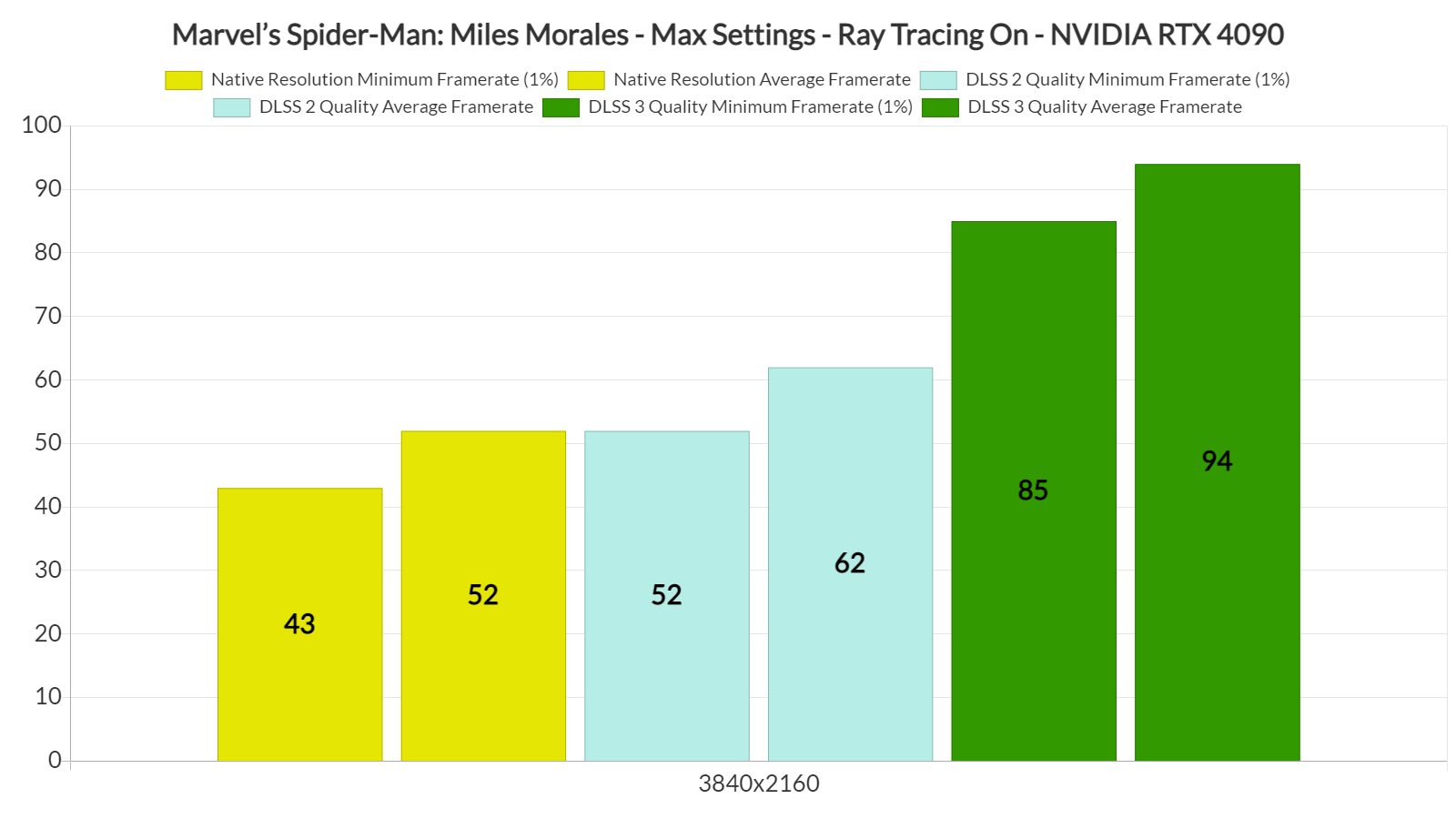
Marvel's Spider-Man Miles Morales - 4K vs DLSS 2 vs DLSS 3 benchmarks

In order to get a constant 60fps experience in Marvel’s Spider-Man: Miles Morales on our Intel i9 9900K, we had to enable DLSS 3. By doing so, we were able to get framerates higher than 85fps. Not only that, but we could not spot any visual artifacts, and the mouse movement felt great. Contrary to WRC Generations and F1 22, the additional input latency of DLSS 3 in Marvel’s Spider-Man: Miles Morales isn’t really noticeable. Thus, and if you own an RTX 40 series GPU, we highly recommend using DLSS 3.

Our PC Performance Analysis for this new Spider-Man game will go live later this weekend, so stay tuned for more!

18 thoughts on “Marvel’s Spider-Man: Miles Morales – Native 4K vs DLSS 2 vs DLSS 3 Benchmarks & Impressions”

  1. OMG an article using a 9900k as a cpu equals pointless. Please at least use Alder lake and DDR5 to be relevant.

    1. On the contrary. It’s PERFECT for showcasing what DLSS 3 can bring to the table, and how it can benefit even owners of older CPUs.

    2. Of course this article is relevant.

      First, as John said, it’s perfect to showcase DLSS 3 performance gains as they’re independent from the CPU.

      Second, average PC gamer doesn’t use 13700 and 4090. They use 9400, 9700, 9900, 10400, 11700, etc, or even older.

    3. That CPU It’s still a BEAST.
      People like you, and other blind fanboys of they lovely corporation, who think HW like that is trash are the problem.
      That stupid need and urge to have always newest HW on day 1 (or even day0) is bad is illness.
      Breaking news, 1080Ti is STILL a beast in RAW performance.

      Now, weeb clown, sit down.

    4. It’s great that you have the latest CPU and DDR5, bruh. Here’s a pro tip to save you some money: if you’re a gamer, upgrading your CPU/mobo/RAM every generation is just silly, especially if you’re playing at 4K. The 9000 series is still very capable. If you upgrade GPU every 2 gens and upgrade your cpu every 3-4 gens, you end up getting the best bang for your buck.

      https://m.youtube.com/watch?v=0_jfexkL03E

      And DDR5 overall doesn’t add much performance over DDR4. For example, the fastest Corsair Vengeance DDR5 kit for $200, 2×16 6000MHz gives you <10% performance gain (at 1080p, on higher res diff. is even smaller) than the slowest Corsair Vengeance DDR4 2×16 DDR4 2133 which is worth $80.

      https://uploads.disquscdn.com/images/977d0b4b808d57a797a7c0e810c2c328cd0495add3395395cd307f78e5990c35.jpg

      https://www.newegg.com/corsair-32gb/p/N82E16820236874

      https://www.newegg.com/corsair-32gb-288-pin-ddr4-sdram/p/N82E16820233924

  2. Looks like Nixxes once again forgot to do a Q&A, plenty of user reports about game crashing on:
    – Game start
    – Saving
    – Save load

    Game even corrupts save files or deletes them.
    So far only response from Nixxes is: We’ll look at that.

  3. No one who owns an rtx 4090 is using a 9900k jeez. DLSS 3 scales from the starting fps so will still be worse.

    1. Exactly, so when Using the 4090. They Should use a much better CPU for F*cs sake. This is totaly pointless, and makes the 4090 look like sh*te ?

    2. It happens in the real world…

      I myself used a 3080 at 1440p with a decade old 3770k for a year. I had a great time, especially with RT.

  4. “In order to get a constant 60fps experience in Marvel’s Spider-Man: Miles Morales on our Intel i9 9900K, we had to enable DLSS 3” Wait, what? DLSS 3 works on RTX 3080? I thought this was a 4000 series only feature?

  5. Can you still use rtx 3080 for rt and dlss testing?
    I know its time consuming but it can show how rt perform on lesser gpu than the 4090

  6. Very nice post. I just stumbled upon your blog and wanted to say that I’ve really enjoyed browsing your blog posts. In any case I’ll be subscribing to your feed and I hope you write again soon!

Leave a Reply

Your email address will not be published. Required fields are marked *