
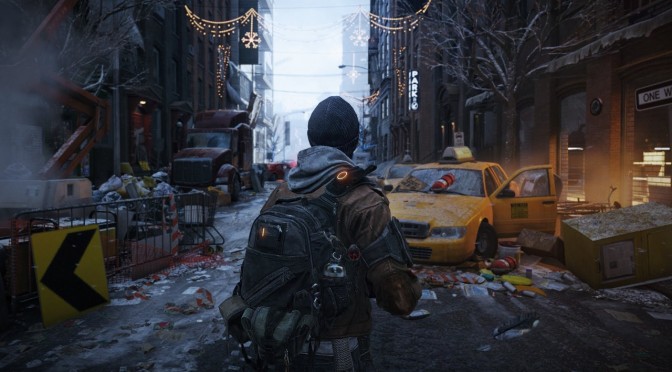
Reshade is a tool that can significantly improve the visuals of your games. Seriously, this is something that most PC gamers should be using. Why you may ask? But because it can make your current-gen games look like next-gen remasters.
MasterGames TV has shared three videos, showcasing Reshade (with Ray Tracing effects) in modern-day games like The Division, Just Cause 4 and Anthem. MasterGames TV used a lot of settings (not just Ray Tracing) and the end result is truly spectacular. So yeah, these visual enhancements are not just due to Ray/Path Tracing.
However, these visual improvements have a performance cost. While MasterGames TV has not included any FPS overlay tool, you can immediately notice the performance drops when Reshade is enabled. Still, the visual improvements are amazing, and show why you should be using this tool in your games.
In all three games, the colours pop-up, the image is not as blurry or flat as before, there are additional shading effects, there is light bounce thanks to Ray Tracing, a better ambient occlusion solution is implemented, and everything looks way better than before.
Thanks to these tweaks, The Division is actually a lot closer to its lovely E3 demo. Seriously, this may be what the first next-gen games will look like (or at least what the remasters of current-gen games will look like in PS5 and Project Scarlett).
Unfortunately, MasterGames TV has not shared the complete list of settings. Moreover, we don’t know the GPU that was used in order to capture these videos. Thus, you may never get close to these visuals with your Reshade mods. Still, we believe that some of you will find these videos interesting, so go ahead and take a look.
Enjoy!

John is the founder and Editor in Chief at DSOGaming. He is a PC gaming fan and highly supports the modding and indie communities. Before creating DSOGaming, John worked on numerous gaming websites. While he is a die-hard PC gamer, his gaming roots can be found on consoles. John loved – and still does – the 16-bit consoles, and considers SNES to be one of the best consoles. Still, the PC platform won him over consoles. That was mainly due to 3DFX and its iconic dedicated 3D accelerator graphics card, Voodoo 2. John has also written a higher degree thesis on the “The Evolution of PC graphics cards.”
Contact: Email
Sharpening set to max.
Saturation set to max.
Contrast set BEYOND max.
“LoOk aT mY rAy tRaCiNg mOd”
LMAO, Faxs!
LMAO, Jesus man you didn’t have to do him so bad. “Contrast set BEYOND max.” ROFL 🙂
lol
You have to admit though, there’s a huge difference in ambient lighting and shadowing quality because of the global illumination. That Division video is the best example.
Unfortunately this raytracing is limited to screen space, so in motion there will be lots of issues.
Took the words from me.
LOOKS LIKE GARBAGE
“look like next-gen games”
There is graphics effect that can help thos sh.t games
Coming from someone who actually knows how to use Reshade, I rather play PS2 Games over those over-coloured, over-everything, trashy loooking games .
Impressive stuff.
Cringe. Those videos in part reminded me of Xbox 360 insofar as the crushed blacks and oversaturated gamma levels.
something is wrong with his depth buffer for sure.
the division 2 reshade
video1 https://www.youtube.com/watch?v=1dyiGUQyaVU
video2 https://www.youtube.com/watch?v=3ajRmetFMXY
Haha, that first video is so bright it could fry a Vampire just from watching it. LMAO
search on youtube “4K The division 2 Reshade MOD v2.0 WITHOUT ray tracing path”
and
“4K The division 2 Reshade MOD v2.0 WITHOUT ray tracing path (1st OFF, 2nd ON)”
is that how you promote your youtube channel? that’s low man…
why? nothing special….it’s better the vanilla version!
really? you prefer the blueish sky at night ???
Not even GayTracying a.k.a Over saturation can save TurdTHEM…
Color saturation = Next Gen.
The lack of Blast Processing is total deal-breaker for me!
that’s mxao mixed with some saturated effects, i’m positive that he’s not using quint’s RT shader. or if he is, he’s not aware that his depth buffer is not working.
The contrast and motion blur in all of them is off the charts…
How are you supposed to show anything off with those two set to max?.
Also, choose more than one area to properly show off shadows and reflections. JC4 with rain all about the place and it’s sundown setting was a poor choice.
Nobodys going to talk about that horrendous image stretching in those super ultra wide resolutions. How can they think that looks good.
That stretching is a natural effect that you also get in wide angle photography. Displayed on a large screen and with your eyes close enough to the center it looks completely natural.
No it doesn’t. I had an Acer X34A 3440 x 1440 and it drove me nuts with the slight image stretching in most games at the sides. These super ultra wides are even worse.
Yes, it is natural. It’s a result of projecting onto a plane. If you noticed distortion in games while looking at the center of the screen then you were using too large a field of view / sitting too far from the monitor. Change one of those factors until you don’t notice the distortion anymore, problem solved. You have to understand that in a 2D projection there is a center to the image, the image only ever looks natural when you look at that center. If you pan your eyes around the monitor rather than panning the ingame camera around the world you will see distortion, no matter what. This is inevitable.
Utter nonsense. No it is not natural we do not see the world like that. In fact not all games stretch the image whilst playing 21:9. If you actually had a 21:9 monitor you would already know this.
If you’re not seeing stretching in a widescreen application then there’s a reprojection happening. There are many different ways to do this but the NATURAL way is with increasing stretch the further you get from the center because that would look correct if you sat at the correct distance away from your monitor.
BS comparison due to the low contrast on the original. Just increase the contrast with zero performance impact and you’ve got 90% of the improvement. Then cut the framerate in half to get another 10%? I don’t think so.
Firing up the game with those settings feels something like this to my eyes:
https://media2.giphy.com/media/OjZJW6xiyg9y/giphy.gif
I despise saturation like a disease, not sure why someone would love to play like that to be honest, unless you take 5 minutes sessions per day with one game only.
https://uploads.disquscdn.com/images/3f8260b4772be1f30fd8b400ecd21192da8e8523de5e132f68018f80c43a18f3.jpg
