
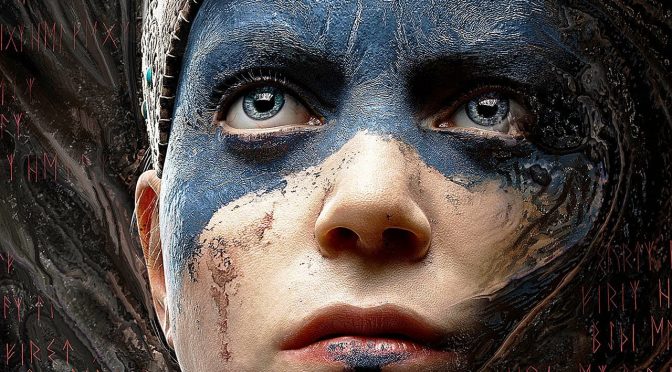
YouTube’s ‘Cycu1’ has shared a video graphics comparison between Hellblade: Senua’s Sacrifice’s gameplay footage that was featured in its dev diaries and its retail/final version. And as you may have guessed, there are some slight differences between them.
From the looks of it, these differences are mainly due to artistic choices. For example, Senua’s eyebrows in the final game are painted (alongside most of her face) whereas in the dev diaries they are not. And while we can’t comment on the quality of textures (since these scenes are taken from dev diaries that were already affected by YouTube’s compression), we can slightly comment about its lighting.
In the first scene, for example, we see stronger lighting effects than those featured in the final version. However, it appears that the bright light source is “fake” as there is nothing in that scene that casts it (you can easily notice it when the camera pans). Our guess is that it was used in order to make the scene ‘cooler‘ in the dev diaries.
On the other hand, in the second scene we see additional reflection effects on Senua’s knee in the final version (that were absent from the dev diaries).
In the third and fourth scene we see a better – or more accurate if you prefer – lighting system in the final version.
Again, as we’ve already said, these seem like artistic differences and nothing more. Still, it’s cool witnessing how the game has evolved during its development cycle.
Enjoy!


John is the founder and Editor in Chief at DSOGaming. He is a PC gaming fan and highly supports the modding and indie communities. Before creating DSOGaming, John worked on numerous gaming websites. While he is a die-hard PC gamer, his gaming roots can be found on consoles. John loved – and still does – the 16-bit consoles, and considers SNES to be one of the best consoles. Still, the PC platform won him over consoles. That was mainly due to 3DFX and its iconic dedicated 3D accelerator graphics card, Voodoo 2. John has also written a higher degree thesis on the “The Evolution of PC graphics cards.”
Contact: Email
Looks to me like they toned down certain effects in order to keep a steady frame rate on consoles. I know devs these days love using “artistic differences” as a means to not admit that they had to scale their game back. Some devs back in the day would just flat out tell you what they could fit within the then current spec of hw at the time.
I liked the lighting from the diary compared to retail, which seems to be next to non existent.
Also note the lack of shadows on her face on the retail version at 29s. She basically has hardly any light shining upon her face and no shadow being cast on it either. The eyes in the retail version give of a slight uncanny valley as well.
I watched some parts and the retail version had better visuals at some points. It’s potato quality to can’t say much about details.
They fixed her teeth. I wonder if anyone else noticed that as well. before in the old E3 build she had too much teeth exposed. now it looks more natural.
I found a really annoying thing. If you enable Ansel, you get super sharp crisp textures (where available, like Senuas face, some of the rock and logs are still fairly low res), while in-game there is an obnoxious blur over the whole screen. I hope someone figures out a way to disable that blur (looks like heavy FXAA blur). Some .ini tweaking anyone? Please? Durante? Help?
You can’t disable it unless you lower the post process setting, which also controls a lot of the lighting and AO.
Hence the “Please? Durante? Help?” 😛 I’m sure Durante could fix it. 😉
I just read some of the UE4 documentation
[AntiAliasingQuality@3]
r.PostProcessAAQuality=0
[AntiAliasingQuality@Cine] (cutscenes)
r.PostProcessAAQuality=0
might work if you enter it in the same place i mentioned above.
Will give it whirl when I get home.
Edited comment with the correct commands.
Well, it worked. The blur is gone. Crisp textures ahoy. Unfortunately, any anti-aliasing used is also gone, creating some nasty shimmering around vegetation, fur, and Senua’s hair. So, as far as I can tell, the only way to fix this is if Ninja Theory decide to add proper anti aliasing techniques instead of the stupid FXAA used. I appreciate the help though, Putin.
It is not FXAA, value of 1 is FXAA.
You can also try to use the value of 6, it’s the highest quality for the TAA, I just started using that, combined with Reshade FXAA + Lumasharpening and I got much better results than the default TAA, with it off there was too much shimmer, this is a fault of UE4 rendering, not NinjaTheory.
If there are multiple types of AA available than why the hell are they not included in the options? Seems silly. I will try 6. See whats what.
Update: Tried a value of 6, doesnt do anything, same as default.
But it’s one of one a female employee at the studio that is the main character. Watch the dev diaries
German “Aryan goddess”? lol. So then why does the in-game character look like a preteen transgender William Wallace?
In-game character looks fuglier than the pic you’ve linked and is, again, a major downgrade from the same studio’s Enslaved: Odyssey to the West in this regard.
Are fugly female characters who look like young boys going to be the future of gaming? Ever since Bioshock Infinite, it seems, we’ve been getting more and more of ’em 🙁
Dude, the in-game character is a perfect facial scan.
Guess what, it’s very difficult to properly render photorealistic faces, it’s all about the lighting and shading, in certain conditions it looks bad, this happens in every game that uses scanned actors.
The game character is also a warrior, she has face paint, she’s dirty, bloddy, etc…
Your rant is absurd, it’s impossible to take you seriously when you complain even when a game actually has a good looking female.
It’s the uncanny valley effect. Like Putin said, it’s a perfect facial scan. But because it’s a digitally rendered image that’s trying to simulate a real person it’s not quite the same so it looks “disturbing” to some people.
“a preteen transgender William Wallace”
Comedy gold!
Aside from the textures which could be better, the game looks amazing so no complaints here.
i cant stand the camera angle of this game.