
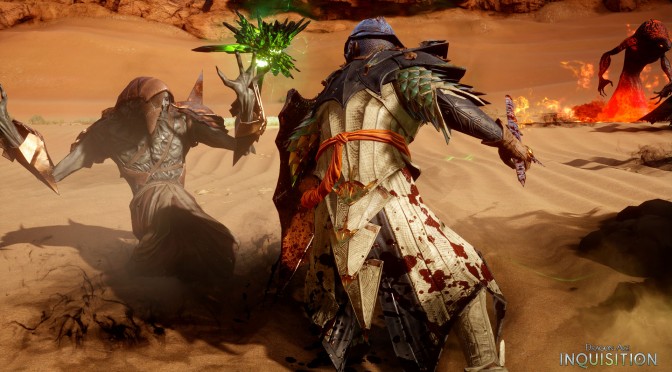
Dragon Age: Inquisition – Ultra Versus Low Comparison Screenshots

After trying – unsuccessfully – to secure a review code for Dragon Age: Inquisition for the past two weeks, we decided to simply go ahead and purchase this latest RPG title ourselves. We are a bit puzzled as to why EA refused to send us a review code, especially when a number of PC review codes were sent to various websites prior to the game’s release. Guess we are not good enough for EA.

Nevertheless, below you can find some comparison screenshots between the game’s Ultra and Low settings.

In order for all graphical settings to take effect, we had to restart our game (which explains some slight differences to the angles).

Ironically enough, the game’s post AA solution – while it does a great job at eliminating some jaggies – brings noticeable blurriness. In the last comparison – for instance – the floor looks crisper on Low settings.

What’s also really funny here is that there is almost 1GB of VRAM difference between these two presets. And to be honest, the actual visual difference does not justify this tremendous VRAM difference.

In short, and as we can clearly see, the biggest differences between these two presets are the complete lack of tessellation and ambient occlusion, as well as the lower shadow quality and the lower view distance.

As always, Ultra is on the left whereas Low is on the right. Make also sure to open the images in a new tab (in order to spot the differences easier).

Enjoy and stay tuned for our Performance Analysis!


32 thoughts on “Dragon Age: Inquisition – Ultra Versus Low Comparison Screenshots”

  1. IGN needs to take notes since they gimped the PC version on it’s settings with their console vs PC comparison. This game is amazing on Ultra and I am glad I purchased it. Runs well on both my 750ti setup and my 970 and it’s not gimped on performance ether with the fact that I have Nvidia cards now. Unlike the TWIMTBP games running on AMD cards

      1. He means that while AMD-based games run great on both Nvidia and AMD, TWIMTBP games run quite bad on AMD.

          1. I honestly haven’t had any problems with TWIMTBP titles on my R9 270X except for AC Unity but based on the benches, that games runs just as bad on the 660 which is the closest nVidia equivalent. I know many people with AMD GPUs complain about poor performance in TWIMTBP titles.

    1. Have you actually played the game on ultra? Cause i’m sure nobody would be saying that if they actually played the game on ultra because these screenshots doesn’t do the game justice, as it looks way better when you actually playing it.

  2. Not surprising they refused to give you review code, they are currently in full lockdown, based on outcry re: the pc controls. Unbelievably lazy port.

    The PC Community Concerns thread is up to 180 pages with no official feedback since before Thanksgiving.

    They basically copy/pasted the key binding of the controller’s 14 buttons and assigned them to W/A/S/D/Space/LM/RM/SPACE/P/R.

    -You can’t natively remap to any buttons on a 5 button mouse (!)
    -There’s no Walk toggle on pc (console versions have it).
    -Menus and Inventory screens are clearly designed for consoles
    -“Tac Cam’ was designed purely for consoles, but left in for pc. The result? 2 mouse cursors in Tac Cam! And the camera controls are wasd now and 100% useless.

    Not to mention tons of bugs, and so many crashes. It’s just a baaaad game.

    1. I agree with PC controles, but other than that game is flawless to me – no framedrops, stuttering, crashes or quest bugs.

      1. I refuse to play a game further if I can’t use thumb buttons on my mouse, which is something that’s been natively recognized by games since the calender had a 1 and 9 in it…

        Bioware didn’t even test the pc ui. Outright negligence.

  3. Man, i was hoping to see more of a difference between low and ultra. Oh and IMO bitching about not getting a review code just make you look kind of unprofessional. I understand the frustration but you could be subtle about it.

  4. I think the best looking part of this game are the tessellated ground effects in some of the zones. Go to Storm Coast with tessellation and terrain detail on ultra and you’ll be amazed at the amount and variety of rocks and debris all over the ground.

    By the way you don’t have to restart the game for the settings to take effect. You can either load to a different zone through the world map, or go back to the main menu and then reload your save.

    1. Its too bad, i loved the days when PC gaming was about game play and not just selling GPUs…….DOOM and the rest…..

      1. I’ve been playing DOOM lately through GZDoom (with DHTP and DOOM Metal Vol. 4, and Brutal DOOM on occasion) and Doomsday (with a ton of texture, music, and model packs).

        It’s still a great game.

  5. Curious that DSOgaming is having trouble “getting review copies” with the games that have Denuvo protection….

    Just saying… 😀

  6. Could not tell which was which, not by the screenshots anyway, this is good for me though as Ill be playing it on my aging pc.

  7. Heh you thought EA would give it to you for free ?! You are nothing but a walking 50 Euros sign to them. There are good reasons why they always are rated worst American company in the world you know!

Leave a Reply

Your email address will not be published. Required fields are marked *
