

Godfall header screenshot 2

Godfall PC Performance Analysis

Godfall is the first next-gen only game that has just been released on the PC. Powered by Unreal Engine 4, it’s time to benchmark it and see how it performs on the PC platform.

For this PC Performance Analysis, we used an Intel i9 9900K with 16GB of DDR4 at 3600Mhz, AMD’s Radeon RX580 and RX Vega 64, NVIDIA’s RTX 2080Ti, GTX980Ti and GTX690. We also used Windows 10 64-bit, the GeForce driver 457.30 and the Radeon Software Adrenalin 2020 Edition 20.11.1 drivers. NVIDIA has not added any SLI profile for this game, meaning that our GTX690 behaved similarly to a single GTX680.
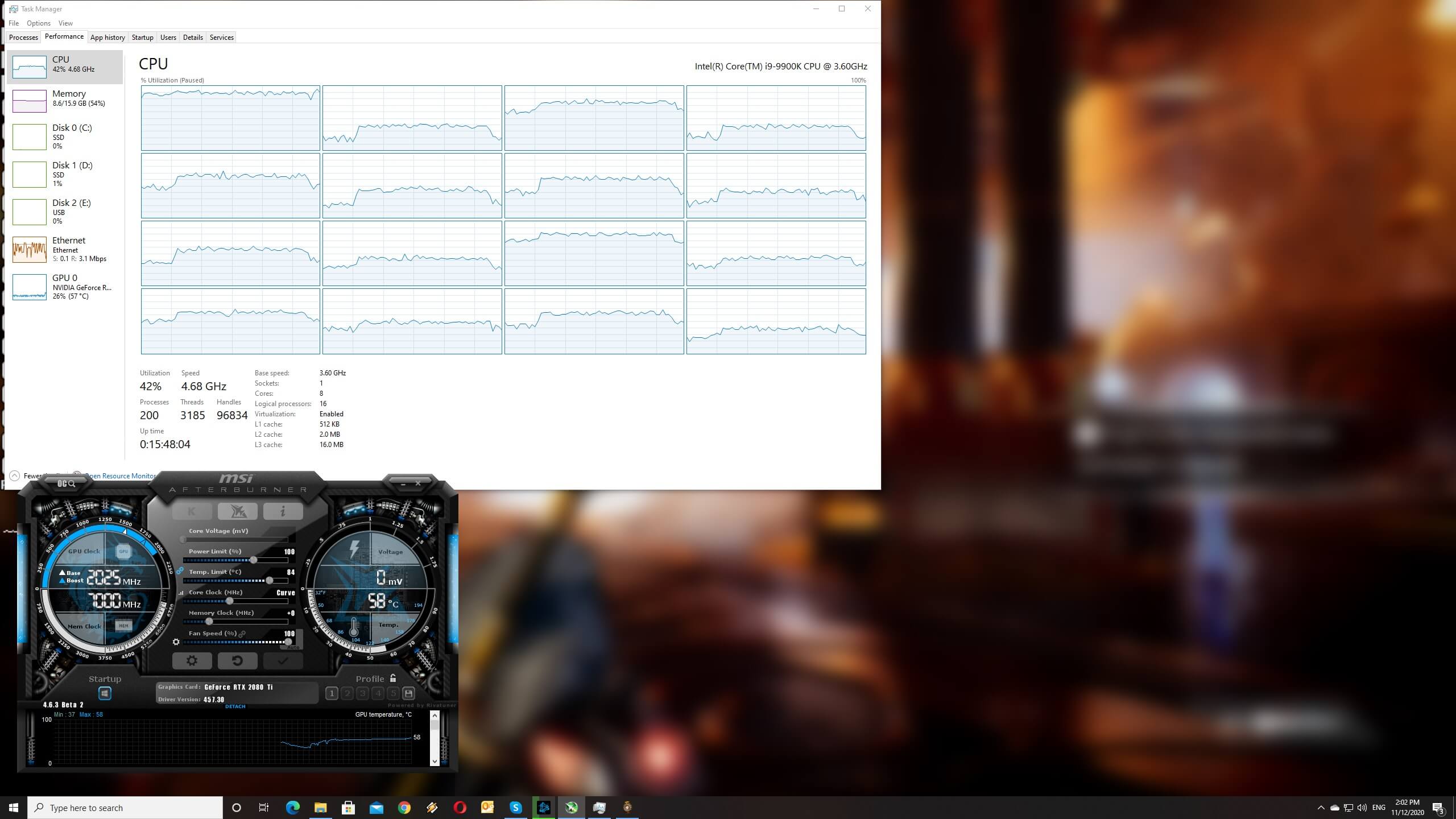
Godfall CPU scaling

Counterplay Games has implemented a respectable amount of graphics settings to tweak. PC gamers can adjust the quality of View Distance, Shadows, Textures, Anti-aliasing, Post-process, and Foliage. There are also options for Motion Blur, Lens Flares, and Bloom. Additionally, the game supports AMD’s FidelityFX LPM tech. Counterplay Games has also stated that it will add support for ray-traced shadows via a future patch.

Godfall PC graphics settings

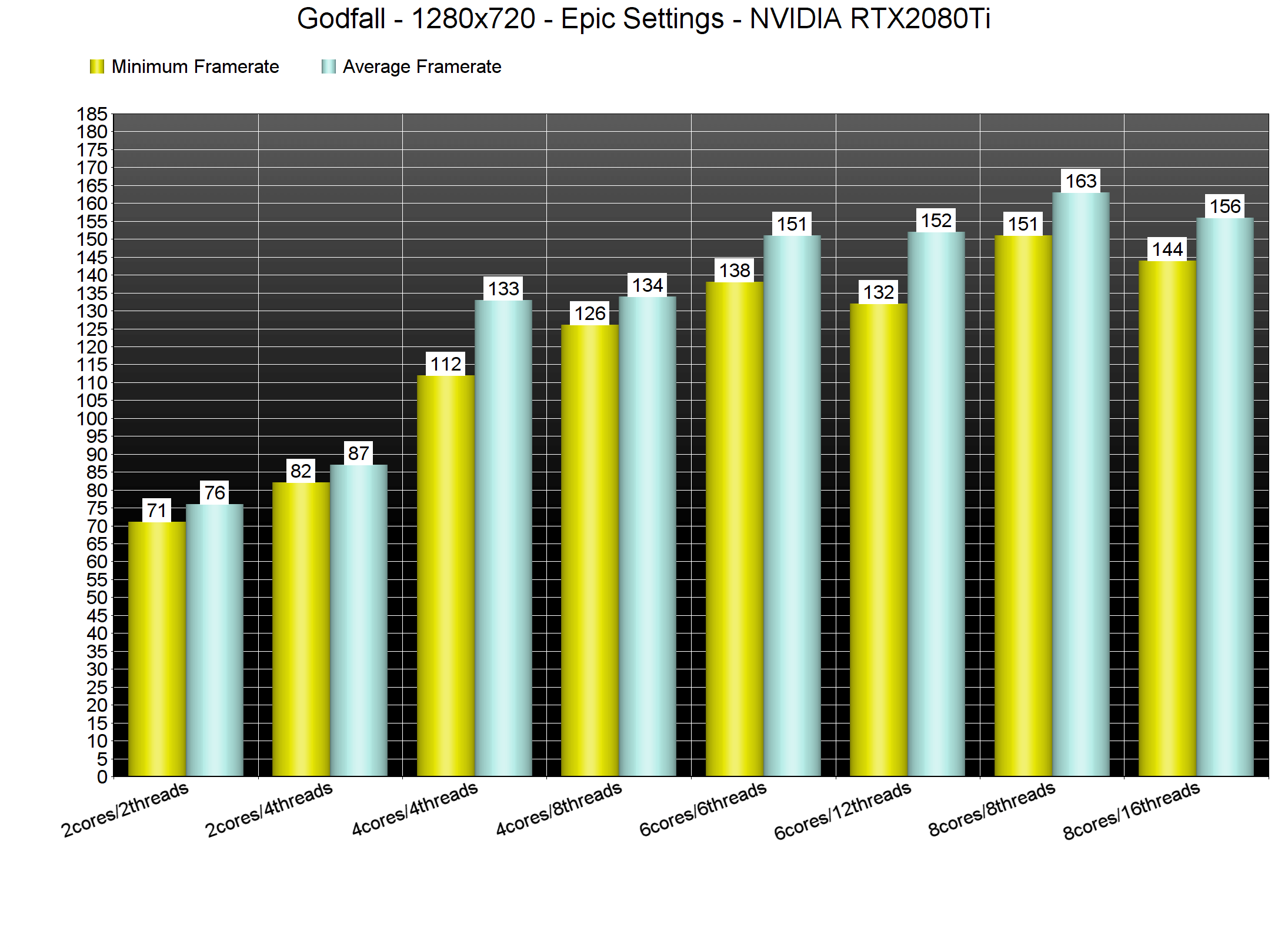
At launch, the game does not feature any built-in benchmark tool. As such, we’ve decided to benchmark the entire second mission (which appears to be more demanding than the first mission). We’ve also lowered our resolution to 1280×720 for our CPU benchmarks.

In order to find out how the game scales on multiple CPU threads, we simulated a dual-core, a quad-core and a hexa-core CPU. And, we are happy to report, that Godfall can run smoothly even on a modern-day dual-core system. Even without Hyper Threading, we were getting more than 60fps on Epic settings. We did notice some framepacing issues that were resolved the moment we enabled Hyper Threading.
Godfall CPU benchmarks-1

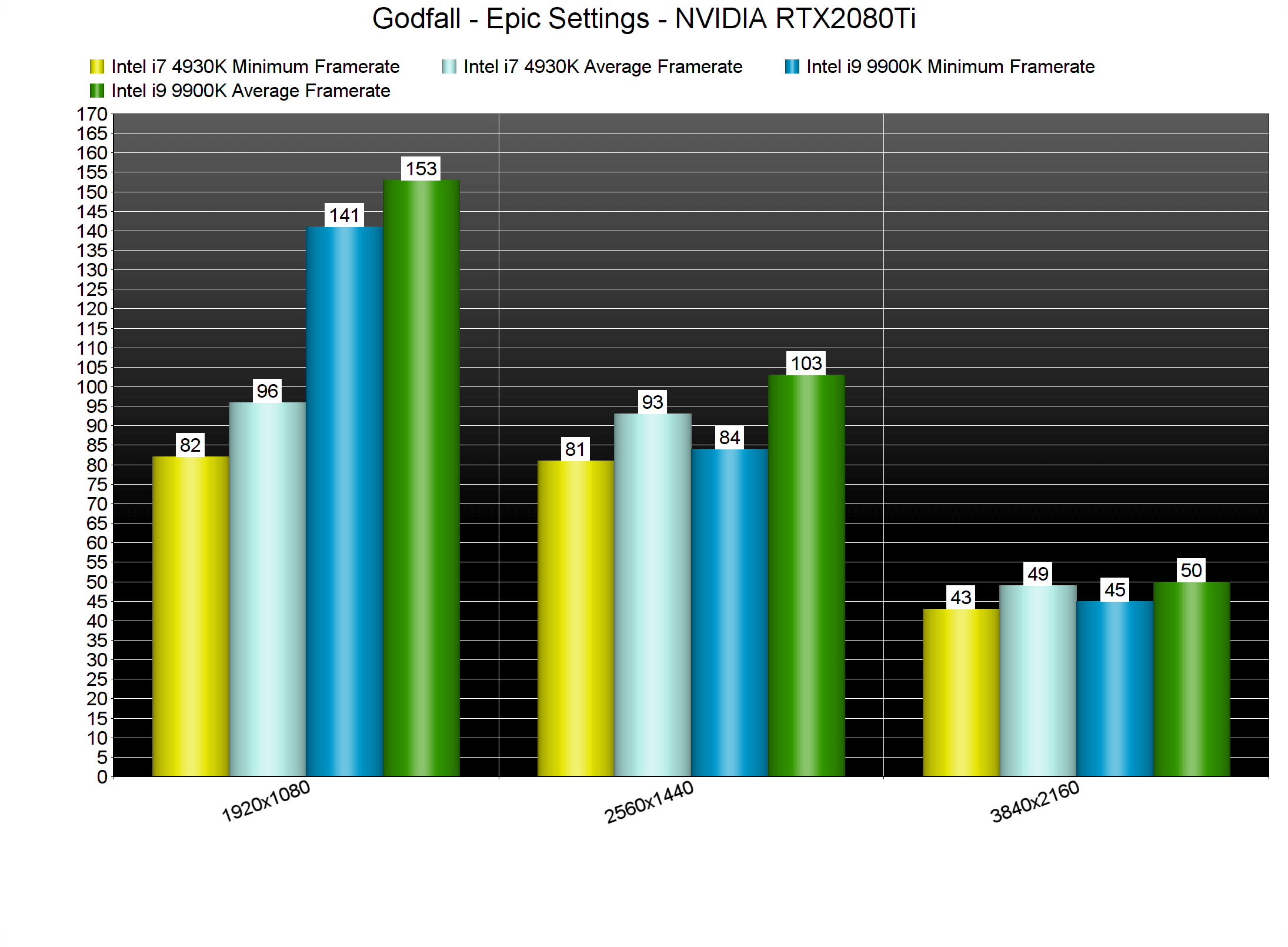
Godfall can also run smoothly on older generation CPUs. While there is a huge performance difference, our Intel i7 4930K was able to provide a constant 60fps experience at both 1080p and 1440p.
Godfall CPU benchmarks-2

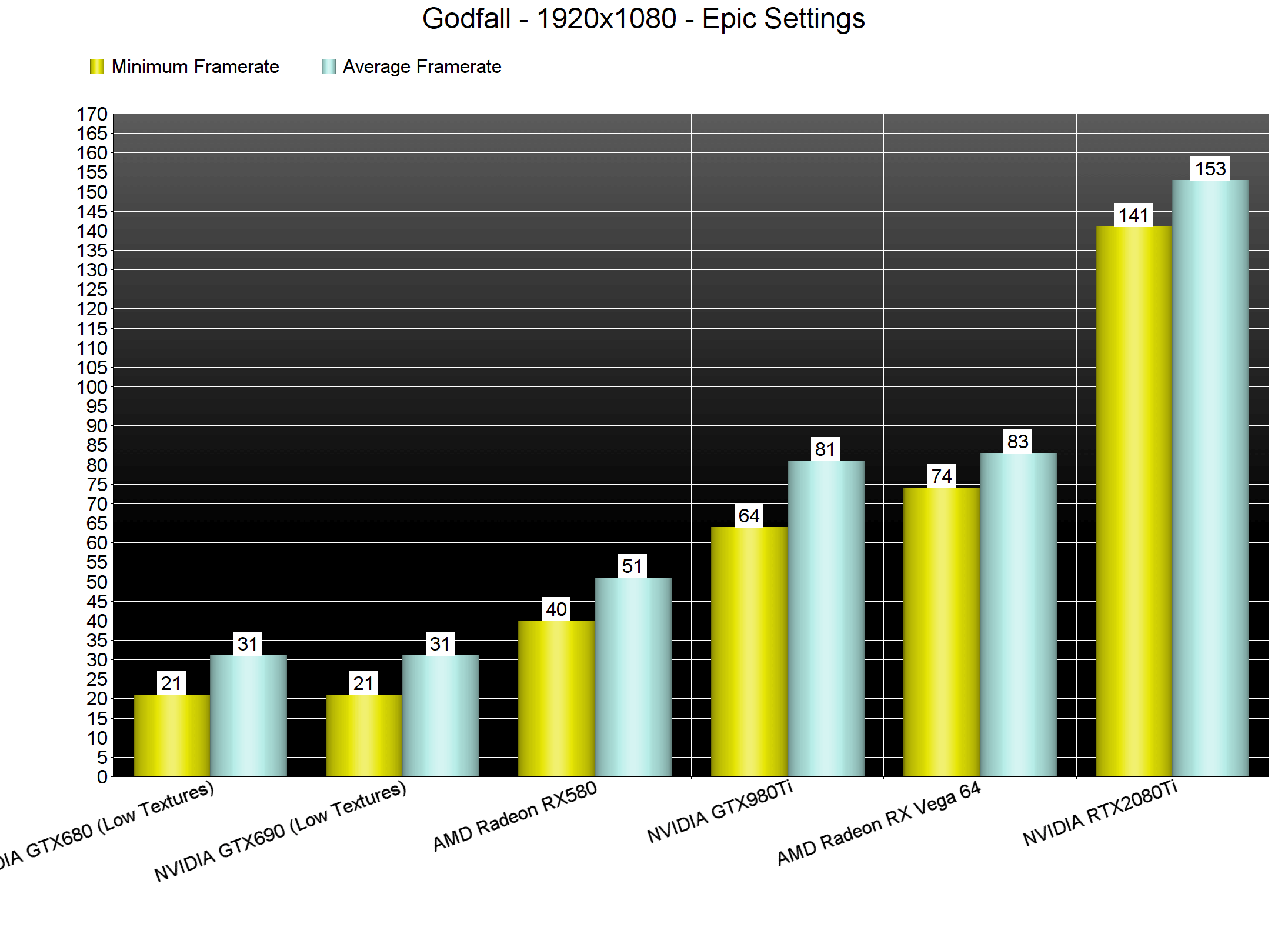
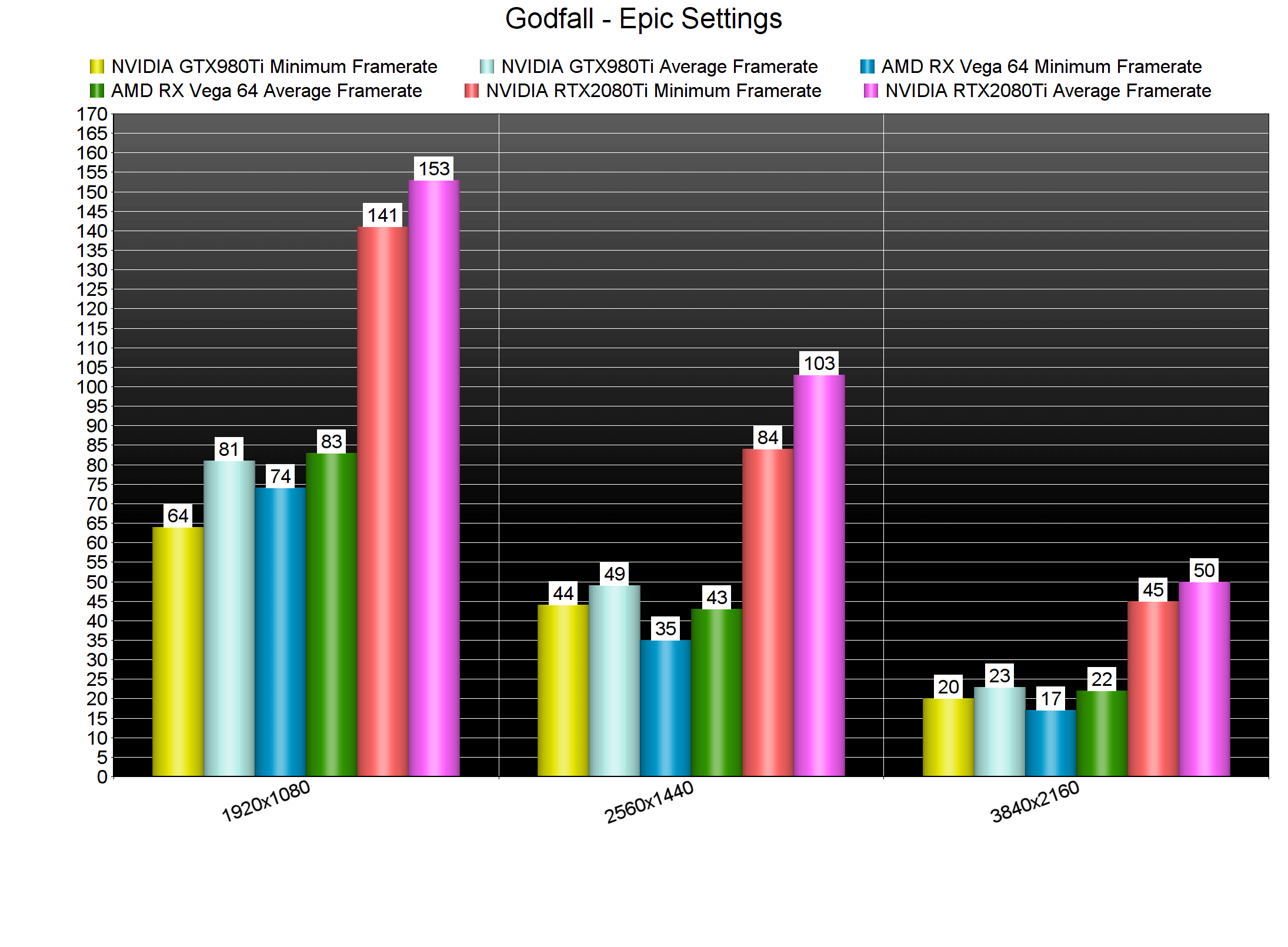
Like most recent PC games, Godfall is mostly a GPU-bound title. At 1080p/Epic settings, you’ll need at least an NVIDIA GTX980Ti or an AMD Radeon RX Vega 64. Since this game is using Unreal Engine 4, it also favors NVIDIA over AMD GPUs.
Godfall GPU benchmarks-1

At 1440p/Epic Settings, our GTX980Ti was able to surpass the AMD Radeon RX Vega 64. Both of these GPUs were unable to provide a smooth gaming experience. Thus, the only GPU (from those we have) that was able to run the game with constant 60fps was our RTX2080Ti. At 4K, the RTX2080Ti was unable to provide a smooth gaming experience.
Godfall GPU benchmarks-2

Graphics-wise, Godfall looks gorgeous. While this game does not take advantage of Ray Tracing, it can push amazing visuals. There are a lot of reflective surfaces, a lot of particles effects, and some truly amazing lighting effects. Furthermore, Counterplay Games has used a lot of high-resolution textures, making everything look crisp and sharp. Speaking of textures, the game did not require more than 8GB of VRAM at 4K/Epic settings. So yeah, despite Counterplay’s claims, Godfall can run smoothly on GPUs that have 10GB of VRAM.

In conclusion, Godfall can run smoothly on a wide range of PC configurations. Not only that, but Godfall is a really beautiful game. Our only gripe with this game is some annoying stutters that occur randomly. We don’t know the cause behind those stutters, however, that’s something that Counterplay Games will have to fix. Other than that, Godfall runs incredibly well on the PC.

Enjoy!

 

41 thoughts on “Godfall PC Performance Analysis”

  1. Isn’t this supposed to have ray traced shadows? Is that coming with an update?

    anyway “Since this game is using Unreal Engine 4, it also favors NVIDIA over AMD GPUs” is only true for old GCN cards, not RDNA1/2 cards.

  2. i watched some gameplay of this game, i cant believe that some smoothbrain crayon eater actually green light this borring trash. The entire game is moving down a linear corridors and slash enemies while getting xp, its one of the most generic games i have ever seen.

      1. hmm, yeah i would describe it as that, the way the gameplay is so generic and repetitive, how low production and “throwaway” the intro is, yes its a mobile game with rtx.

      2. hmm, yeah i would describe it as that, the way the gameplay is so generic and repetitive, how low production and “throwaway” the intro is, yes its a mobile game with rtx.

    1. now god of soy has a worse camera, its so damn close to the character’s shoulder that it puts arrows in the hud to show you being attacked from the sides, because you know the original camera that god of war had that was pulled back did not address that issue at all. That game is so stupid.

  3. Looking forward to the inevitable DF PS5 comparison and what represents ‘PS5 settings’. I suspect a 2080 ti will be more than a match for it—next gen consoles seem more in the rtx 2080 territory.

  4. you guys need to test on newer cpus now, the numbers you have and video benchmarks by players are way off. my friend is using a 1660ti and a 3600x and getting 70ish fps at 1440p so if hes getting those kinds of numbers on a 1660ti at 1440p, you guys need to update the cpu badly.

    my bad i thought i saw theyre still using the older 4930k, yes i see theyre using the 9900k which leads to more questions as to why they have such low numbers. before anyone says “hes lying to you about his numbers” I was at his house using the pc and saw his settings. I have no idea how dsog is getting 40-50 with a 980ti and my friends pc is getting 70+ on a 1660ti

      1. yea that was on me, i somehow skipped the first passage of the article and saw the 4930k being used and thought thats what they tested with. my fault

        1. I haven’t marked anything as spam btw. Disqus automaticaly filtered that comment. It happens sometimes to some members (don’t know why). Make sure to mention me in a comment, if it ever happens again, so I can fix it.

          As for the performance numbers, the first tutorial area is not that demanding. The second mission is WAY more demanding, and that was the one we used for our benchmarks.

          1. would this still be playable on amd fx6300 overclocked to 4.00 even though it’s below system requirements?? have a 1070 ftw but old processor.

          2. Unlikely, as it may not even run on it (some games don’t run on older AMD CPUs). We don’t have an FX6300 so we don’t really know. If it’s below the minimum system requirements, though, you should avoid purchasing it.

          3. thanks for your feedback, I went ahead and bought the game to give it a try and it runs surprisingly well. It was very playable even with epic settings to begin with. After the intro level I had to drop my resolution down to 1920 by 1080 but other than that it’s very playable. I tweak my nvidia drivers for optimal performance but I’m impressed. Love the game so far but would be best on ps5 with ray tracing but great to have it on pc since it’s hard to get get a ps5. 🙂

  5. U get stutters even with an i9 ? 8 cores 16threads and still stuttering? What now? 10 cores will be the new baseline for gaming?

  6. In surprised it run this well after they released the required specs i was expecting this to run like crap…still the game dont interest me at all.

  7. – Next-gen Game only
    – Running on UE4
    – Not using any new visual effects

    Are this guys dumb and want to avoid more than 150Millions potential players?

  8. According with a youtuber that make a video of the game with various GPUs, the game get a lot more demanding after the tutorial area. So, I don’t know if this numbers reflect the entire game or only the intro level.

  9. Not interested in this one at all, but i heard only the prologue runs pretty nice, then the performance plummets once you reach the open world.

  10. I bought the game, expecting nothing and it’s quite good. It’s closer to Warframe than it is to Destiny ( Hub + missions ) . The game is a bit grindy, but that’s okay because the gameplay is really nice. The combat is really tactical, if you spam light attacks you’re gonna get rekt. I’d rate it 7.5/10 now after 5 hours. I had some stutters in the tutorial, and after 10min it was gone.

Leave a Reply

Your email address will not be published. Required fields are marked *