
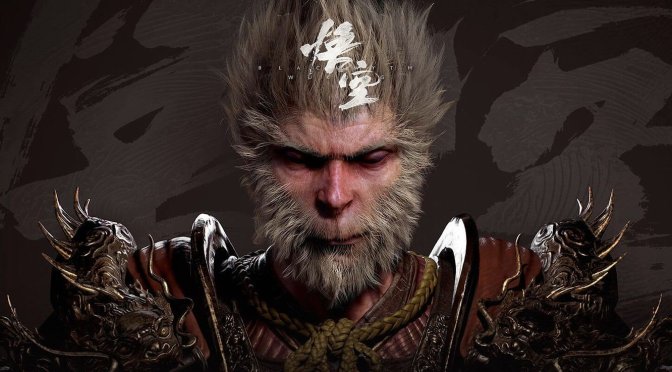
Black Myth: Wukong is one of the most highly anticipated games of 2024. Powered by Unreal Engine 5, this game promises to be quite demanding on Max Settings. And, surprisingly enough, Game Science has released a PC benchmark tool that you can download from Steam.
Game Science has worked hard to make sure the benchmark results are a good match for how the game will actually run. However, because games can be complex and vary a lot, the test results might not always show exactly how the game will feel when you play it.
To be honest, I really miss these PC benchmark tools. Back in the 90s and 00s, we’d be constantly getting them for a lot of triple-A games. I just now hope that more devs will include these built-in benchmarks in their games.
Game Science is not the only company that has created a PC benchmark tool for its title. Square Enix and Ubisoft have also included benchmark tools in their games.
You can download the PC benchmark tool for Black Myth: Wukong from this link.
I’m currently downloading it, so I’ll be sure to update this story with some results. Until then, here are from Compusemble.
Compusemble used an AMD Ryzen 7 7700X with 32GB of RAM and an NVIDIA GeForce RTX 4090. At 4K with DLAA, the game pushed an average of 22fps with a minimum of 19fps. To get framerates higher than 60fps, Compusemble had to resort to DLSS at 25%.
Now the good news here is that Black Myth: Wukong will also support DLSS 3 Frame Generation. Thanks to it, the NVIDIA RTX 4090 was able to run the game with 60fps when using DLSS at 75%. Still, there were some dips below 60fps in some scenes. So, for the optimal experience, RTX 4090 owners will have to use DLSS 3 at 50% with Frame Generation. That is of course if they want to play on Max Settings. With this combo, you’ll get an average of 90fps.
Game Science will release Black Myth: Wukong on August 20th. Some media outlets have already received their review codes, and the review embargo will be lifted on August 16th. In case you’re wondering, no. We haven’t received one. Naturally, though, we’ll purchase it so that we can test it.
Finally, Black Myth: Wukong will be using Denuvo. Oh, and you can find its official PC system requirements here.
Enjoy and stay tuned for more!
UPDATE:
So we’ve been able to finally launch the benchmark, and we have some things to say. When you first launch it, it will – supposedly – compile its shaders. That’s great, right? However, we did experience numerous shader stutters in our first run. We know they were shader compilation stutters because they were nowhere to be found in the second run. Not only that but there are some traversal stutters.
Our performance was identical to what Compusemble reported. At 4K/DLSS 75%/Max Settings, we were always above 60fps. Our minimum framerate was 61fps. That was with DLSS 3 Frame Generation. Still, this isn’t ideal as the base framerate was around 30fps. This means that there will be some input lag while playing it. So, as I said, I believe the best way to experience the game – at least for RTX4090 owners – is at 4K/DLSS 50% with FG/Max Settings.
Another thing to note is that the game does not have a Fullscreen Mode. Instead, like many UE5 titles, it offers Borderless and Window. So, if you want to use a higher resolution than your native, you’ll have to set your desktop resolution at that rest. For instance, owners of a 1440p monitor must set their desktop res to 4K, and then launch the game. By doing this, you’ll be able to run the game at 4K.
In case the PC benchmark tool crashes on your PC, we have a solution. When you first launch it, you MUST allow it to connect to the Internet. Otherwise, it will be constantly crashing. We’ve been able to replicate this multiple times. And, in case you have not seen the pop-up window from Windows Defender when you first launched the benchmark, you’ll have to manually enable it.
We’ll have more to share when the game comes out. Until then, go ahead and give this benchmark tool a go.

John is the founder and Editor in Chief at DSOGaming. He is a PC gaming fan and highly supports the modding and indie communities. Before creating DSOGaming, John worked on numerous gaming websites. While he is a die-hard PC gamer, his gaming roots can be found on consoles. John loved – and still does – the 16-bit consoles, and considers SNES to be one of the best consoles. Still, the PC platform won him over consoles. That was mainly due to 3DFX and its iconic dedicated 3D accelerator graphics card, Voodoo 2. John has also written a higher degree thesis on the “The Evolution of PC graphics cards.”
Contact: Email
with 4070ti super i get an average of 50fps with this tool all maxed out with ray tracing at 1440p dlss at 75%, enabling frame generation gets me an average of 84fps.
so it runs better than i expected.
On a laptop 4080, I am getting 65fps average at 1600p, DLSS 67%, Frame Gen ON, cinematic settings and full ray tracing set to very high.
There are a lot of stutters though, especially towards the end of the benchmark.
under 30 fps on a 4090 should be be a thing.
Max settings + DLAA. 7800x3D@5GHz, 64GB RAM 6000MHz, RTX 4090.
Some objects like rocks look ROUGH. Other objects can look blurry.
DLSS had too much sharpening.
https://uploads.disquscdn.com/images/1314cf9aac47b9e65fc9c634b25dfe37b450443c80ff9ed0530e52898b341c75.png
Game on LOW looks MEH. A lot of popping, lod, flickering problems.
These aren't maxed-out settings because you're not running RT (full RT is set to off on your benchmark summary screenshot). You will need to restart the game (benchmark) to apply the maximum settings.
I get 34fps at 1440p max settings (7800X3D + 4080S) and 51fps at 1080p. DLSS is a must in this game if you want to get over 60fps. The game looks and runs better on the recommended settings though, I get 78fps at 4K DLSS performance + FG.
Edit- I think the resolution scale in this game isnt working correctly. I got 148fps at 1440p DLSS 75% resolution scale and maxed out settings plus FG, but then I started testing different resolution scale settings and now I only have 102fps with the same settings instead of 148fps.
The game use excessive oversharpening filter regardles of which DLSS / TSR / FSR settings you will use. 4K + DLSS performance downscaled (DLDSR 80% smoothing filter) looks wayyy better but I can still see that oversharpening. I absolutely hate oversharpening because it gives the image the look of oil paint.
Imagine paying $60 to play communist China garbage with Denuvo.
Steam is the cesspool of gaming.
the game is also available on epic crap store so….
On russian store its rather cheap
It's not my kind of game, but I got it for free, so I'm going to play it.
After the events of the year 2020, it seems that the whole world is under the control of the communists, just like China is.
Most parts of the western world are being controlled by zionists aka israelis.
Pedo worshiper detected!
Seems like this site is a cesspool of hatred. Where is the moderators here doing their job? People can just wish death on people or call people the n word at will and everyone is agreeing? Wild.
Yes, libfag, its called freedom of speech, something resetera rejects like you never heard of
Yep without any question. Globalist pigs are Neo Marxists, that needs to be wiped out!
🤣
Chinese dont like story or graphical detail, they like it to look shiny thats it, this game is prime example.
Even running the benchmarks the enemies look the same and have no facial expressions, they just walk here and there and looks like they just used expensive texture packs to make it look shiny
woo wong ping pong, china and tencent bring you game, you give money now
https://uploads.disquscdn.com/images/84a6763ff7d66bf79ee2e472e74456fad3540626417f38487990f0960b3c6a36.jpg
Man this is going to be dope to get on sale
Meh! no native res benchmark ? how down is the standard nowdays.
Most demanding game ever?
Who’s gonna be the first badass who runs the benchmark at 4K with DLDSR 2.25x and DLSS Quality with full RT? Can’t do it until later tonight.
I can’t game without DLDSR anymore.
Good luck running it at 60fps 99% of the time
If the visuals were significantly improved with RT on I’d play at sub-60 in a non-FPS game. Played Cyberpunk at 45-50fps when it first came out. But I’ve been looking at comparison videos and barely see a difference between RT and no RT. It seems even with RT OFF it still uses lumen. So it looks mostly the same.
I was just curious to see what the performance would be like. Will find out for myself in a few hours when I’m home I guess.
first game and they use Denuvo crap , Hypocrite POS when you know China is the country with the largest amount of Pirates and scammers ever in the world , F*k this game , F*k Tencent , F*k China and F*k Xi …
Can I be part of the Kool Kids Klub now
https://uploads.disquscdn.com/images/b90da152ab36c1e62a3ef52a4c80a86978fb8d9bf41785743fd018942954b959.jpg
Unreal Stink F*king Sh*t Engine !!!!!!!!!
Boycott NVIDIA
Boycott Epic Games UE5 !! 0/5 Optimization
The problem with this benchmark is it doesn't have any NPC crowds in it so it doesn't adequately test the CPU threading for bottlenecks.
It also doesn't test how the game works with all the goofy lighting affects Asian devs love to put in their games during combat.
I can see how performance in this game could fall on it's face in areas with a lot of NPCs and during intense battle scenes that (over)use lighting effects
Just ran benchmark at 4K with DLDSR 2.25x and DLSS Quality just for shoots and googles. RTX On vs. Off. And…it's not pretty. Not just performance numbers, but the game itself looks ugly. Bad art style. Crap textures. The visuals don't justify the performance cost. To me, the graphics look like they're at least 5 years old. Ghost of Tsushima for example, due to its art style, looks significantly better. I definitely would not use this game as any sort of graphical showcase.
Also side note: The game calls 62% scaling DLSS Quality for some reason, though it's supposed to be 66.6%. Secondly, every time you save the settings, it actually drops the scaling percent by 1. So if you set 66% and run benchmark, you'll see at the end that it's 65%. And will be 65% if you go back into the settings page again. So I had to set it to 67% to get an actual 66%. https://uploads.disquscdn.com/images/e5a829b5e4b2a4a0d53a02b313910146c2fb8a97a0159cdf9185fb92da795577.jpg https://uploads.disquscdn.com/images/324d1568977fbcf5dd3cafa10254e926357df38663d2db9de54a811bf53fd24c.jpg
over 70 fps on high/ultra 1080p 100% quality
runs better than i expected
RTX 4090, a 1700$ top of the line GPU, will do 30FPS on max settings at upscalled 4k?
and we're ok with this? especially when the game looks like how it does.
4090, DLSS 70%, Cinematic Mode, no Frame Gen, RTX ON
https://uploads.disquscdn.com/images/d748d21cabee90d7760a75d373eac3dc918fe4d06829b537a0b92ed33474e1cd.jpg
4090, DLSS 70%, Cinematic Mode, no Frame Gen, no RTX
https://uploads.disquscdn.com/images/9bcc743ada2c38adde3bcb3af6265e4b64d0c7a5207a48aff744c5fde384e64e.jpg