
Alan Wake 2 feature-2

Alan Wake 2 – DLSS 3.5, Ray Tracing & Path Tracing Benchmarks

Remedy has lifted the review embargo for Alan Wake 2, and we can finally share our initial tech impressions of it. In this article, we’ll be benchmarking DLSS 3.5, Ray Tracing and Path Tracing on a variety of NVIDIA GPUs.

For these first Alan Wake 2 benchmarks, we used an AMD Ryzen 9 7950X3D, 32GB of DDR5 at 6000Mhz, NVIDIA’s RTX 2080Ti, RTX 3080 and RTX 4090. We also used Windows 10 64-bit, as well as the GeForce 545.92 driver.

Alan Wake 2 does not feature any built-in benchmark tool. So, for our benchmarks, we used the starting area from the Invitation Chapter. This area should give you a pretty good idea of how the rest of the game will run.

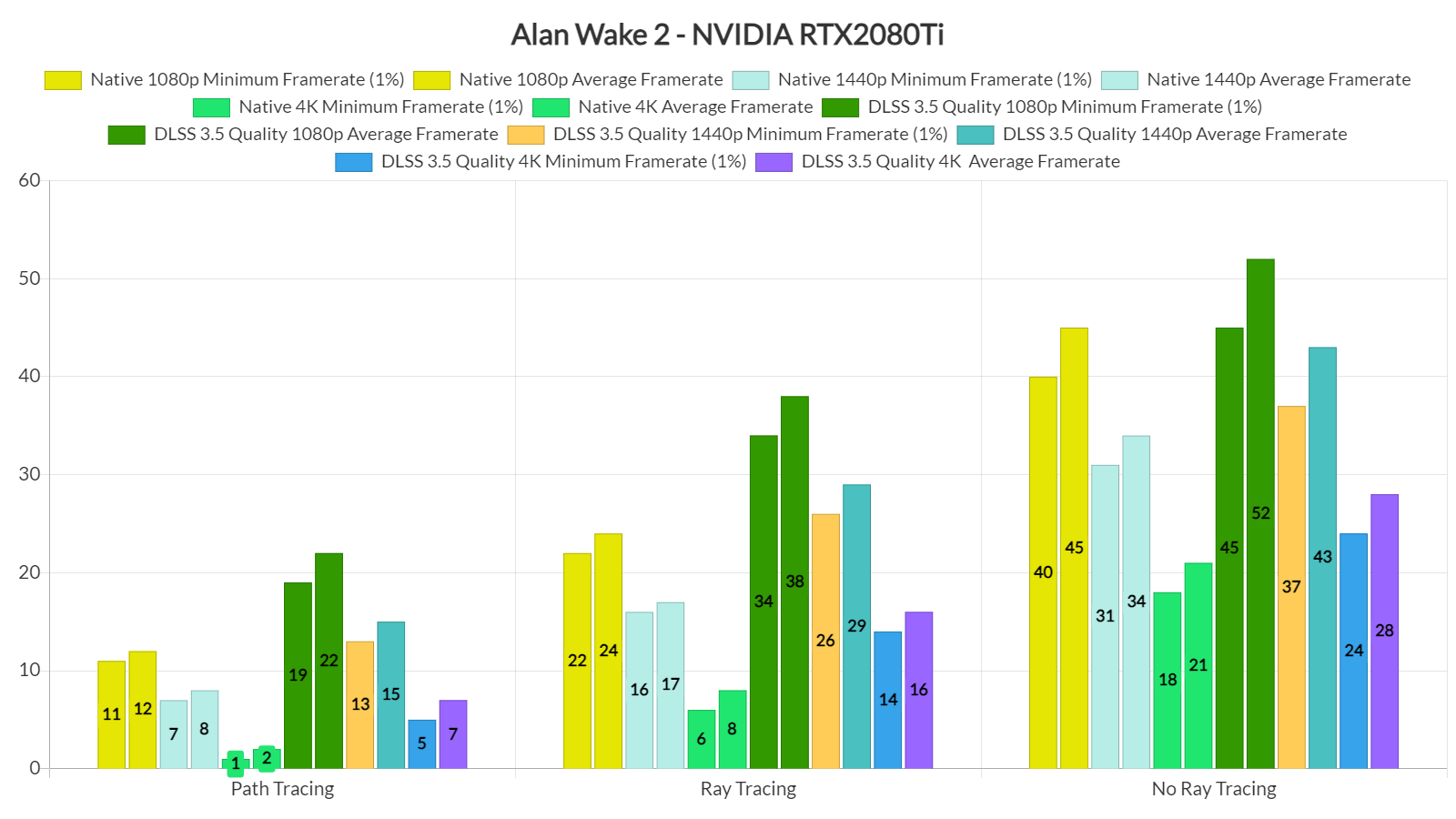
Let’s start with the NVIDIA RTX2080Ti. This GPU was the first high-end graphics card to support DLSS and hardware-accelerated Ray Tracing. Unfortunately, though, it cannot provide a playable experience at native resolutions. Even without any Ray Tracing effects at 1080p/Max Settings and with DLSS 3.5 Quality Mode, the RTX 2080Ti cannot come close to 60fps. So yeah, don’t really bother enabling any of the game’s Ray Tracing or Path Tracing effects.
Alan Wake 2 NVIDIA RTX2080Ti benchmarks

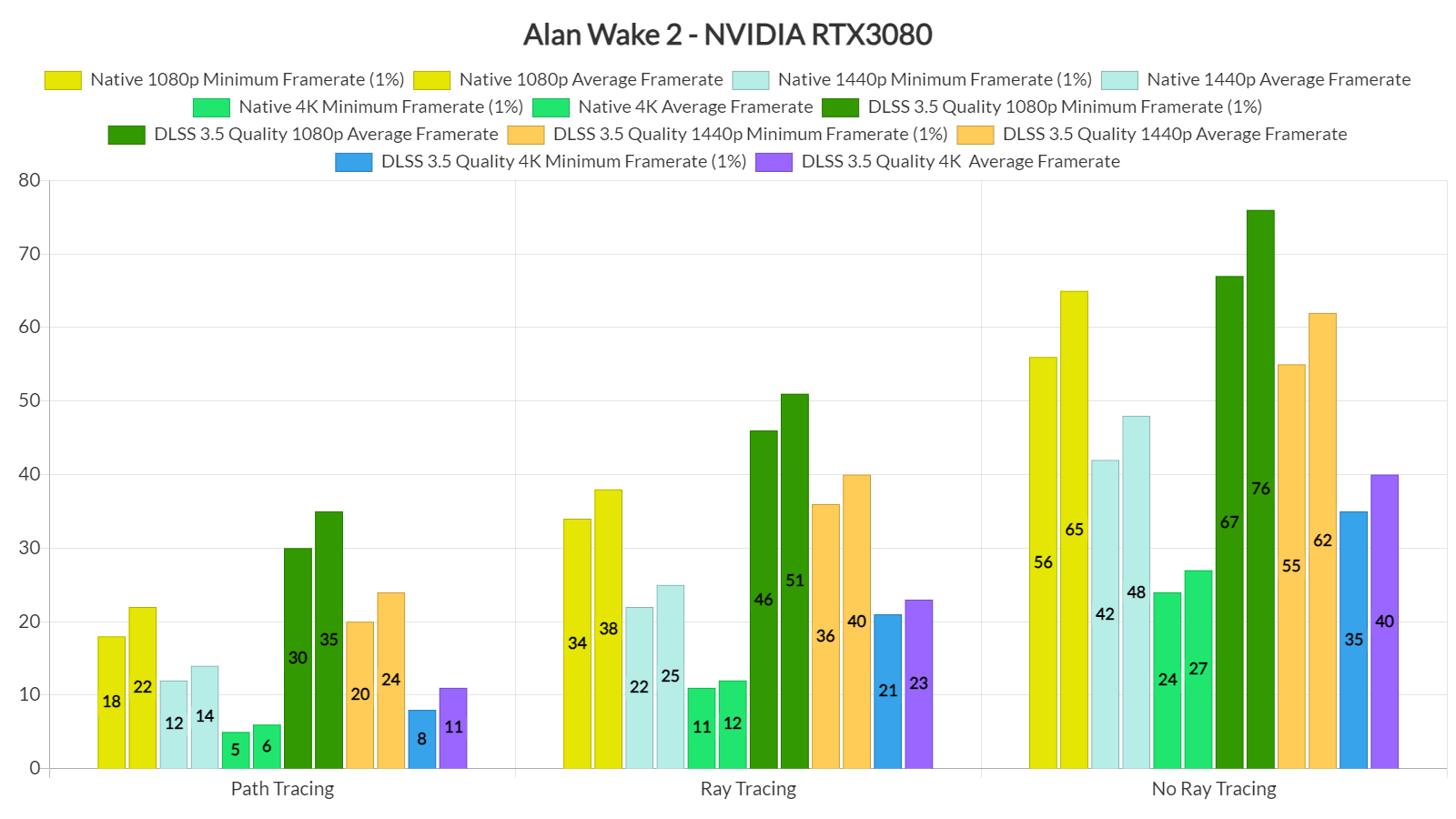
On the other hand, the RTX3080 can offer a smooth gaming experience at Native 1080p/Max Settings/No Ray Tracing, provided you have a G-Sync monitor. With DLSS 3.5 Quality, you can also get a smooth experience at 1440p/Max Settings/No Ray Tracing. With Ray Tracing or Path Tracing, you won’t be able to come close to 60fps, even with DLSS 3.5 Quality at 1080p.
So, the only GPU that could offer a great gaming experience in Alan Wake 2 was the NVIDIA GeForce RTX 4090. Without Ray Tracing/Path Tracing, the RTX4090 was able to offer framerates over 60fps at both Native 1080p and Native 1440p. With DLSS 3.5 Super Resolution Quality, we were able to hit over 60fps at 4K.
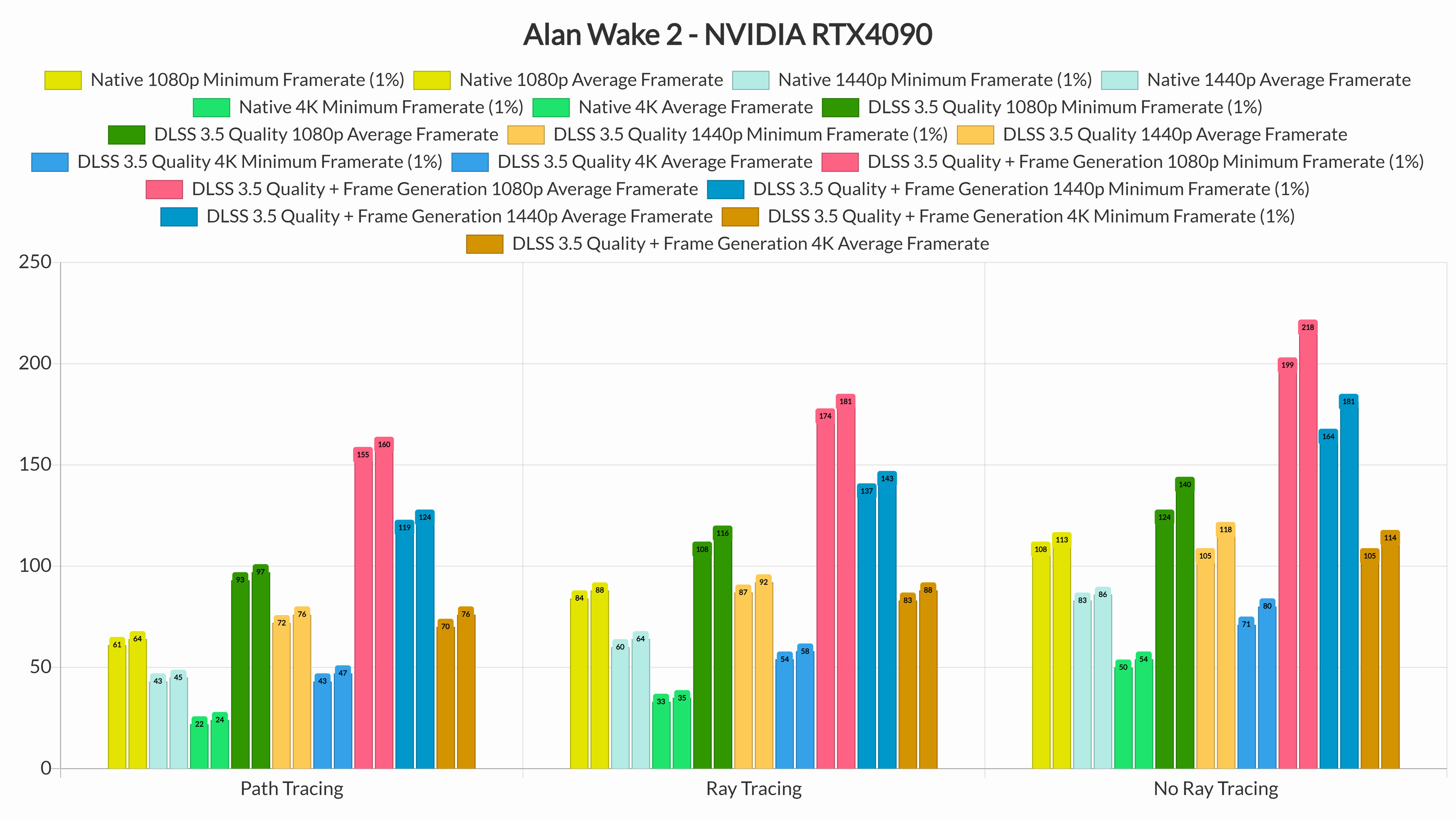
With Ray Tracing and Path Tracing, we highly recommend enabling DLSS 3.5 Frame Generation. Since Alan Wake 2 is really demanding, NVIDIA’s frame generation technique can significantly boost your performance.

Speaking of DLSS 3.5 Frame Generation, you’ll need framerates around 50fps to get responsive controls. When we enabled it at 4K/Path Tracing, the game felt laggy in quick camera movements.  That’s because, without Frame Generation, the game runs with 43/47fps. It’s definitely playable, but it’s not the ideal way to play it (at least in our opinion).

We were also a bit underwhelmed by the game’s Path Tracing effects. Remedy has used Path Tracing only for its indirect lighting. However, its current implementation introduces some shadow issues.

Below you can find a comparison screenshot between Path Tracing Off (left) and Path Tracing On (right). As you can clearly see, the leaves no longer cast in sort of shadows. They appear like they are glued to the floor. They look horrendous.
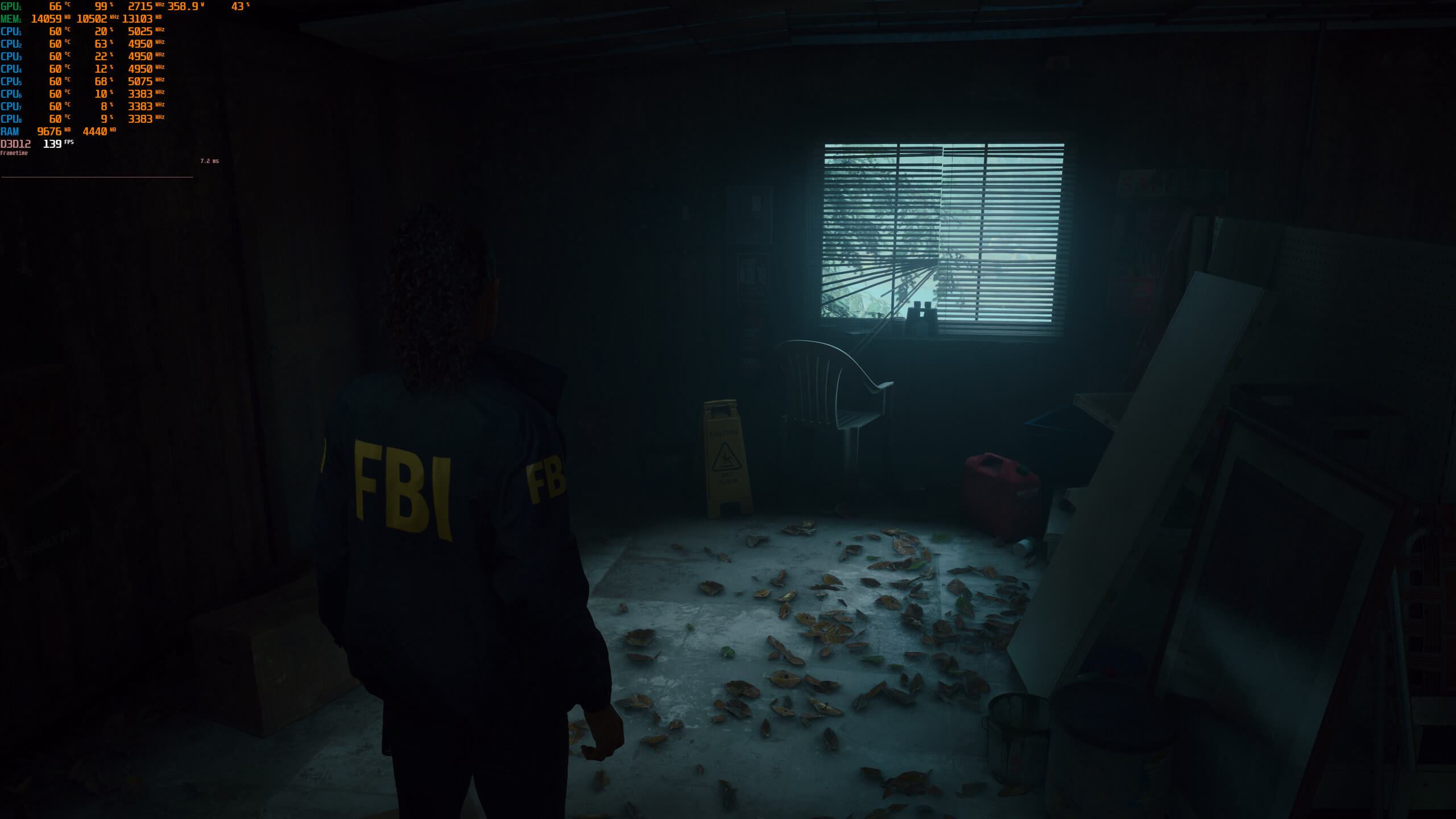
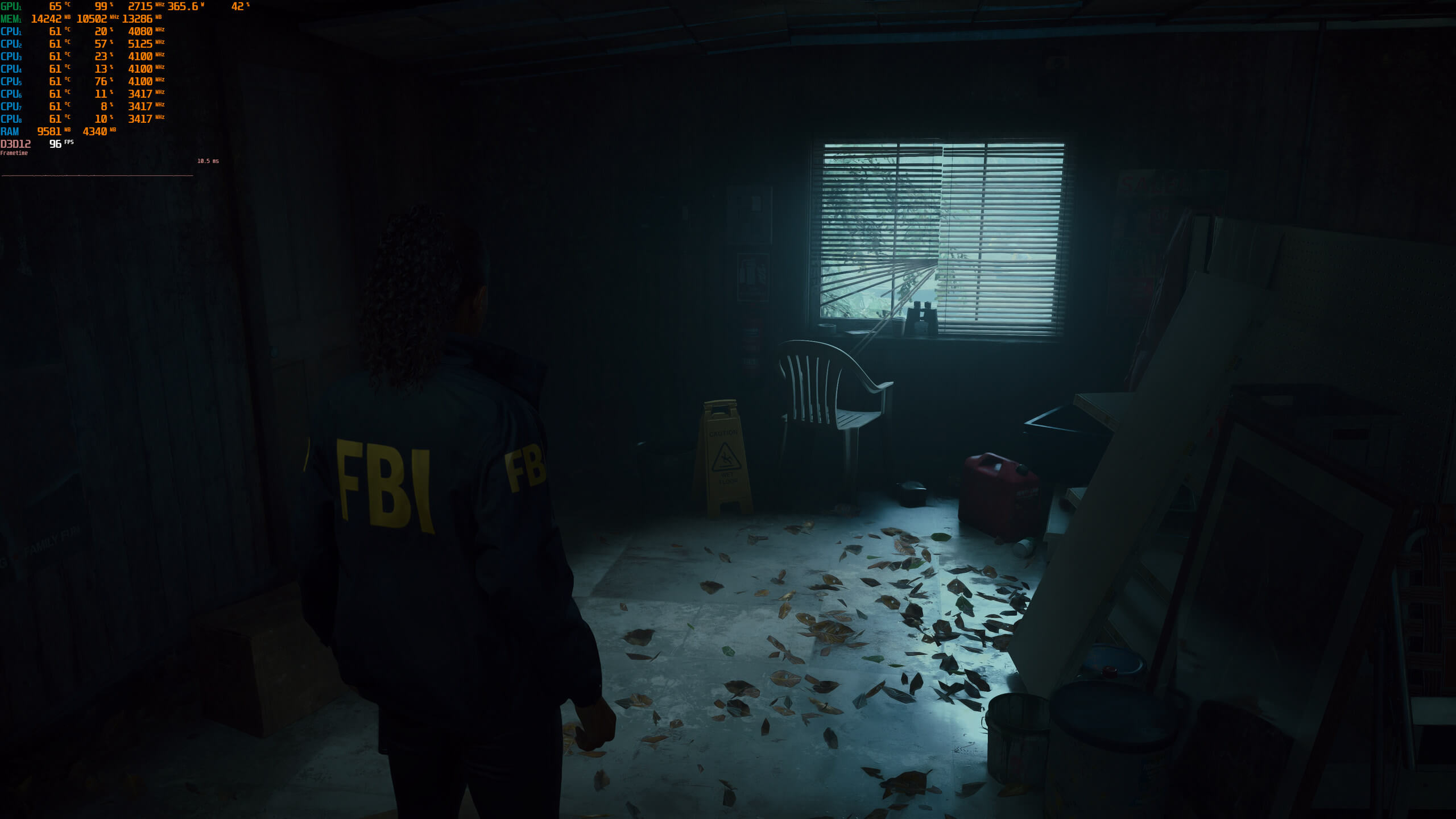
Without Path TracingWith Path Tracing

Here is another comparison between Ray Tracing (left) and Path Tracing (right). You can clearly see that Path Tracing completely removes all shadows.
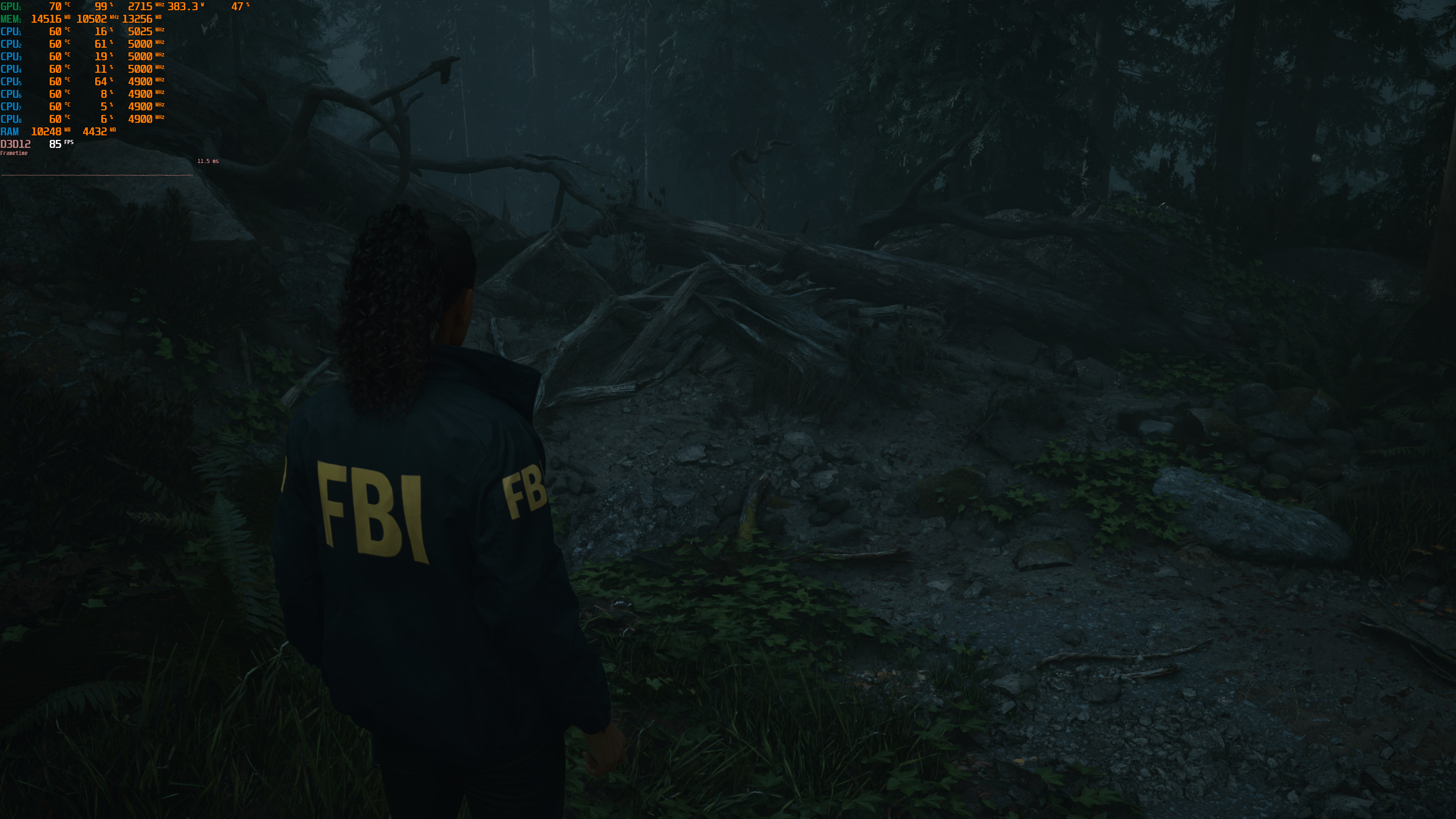
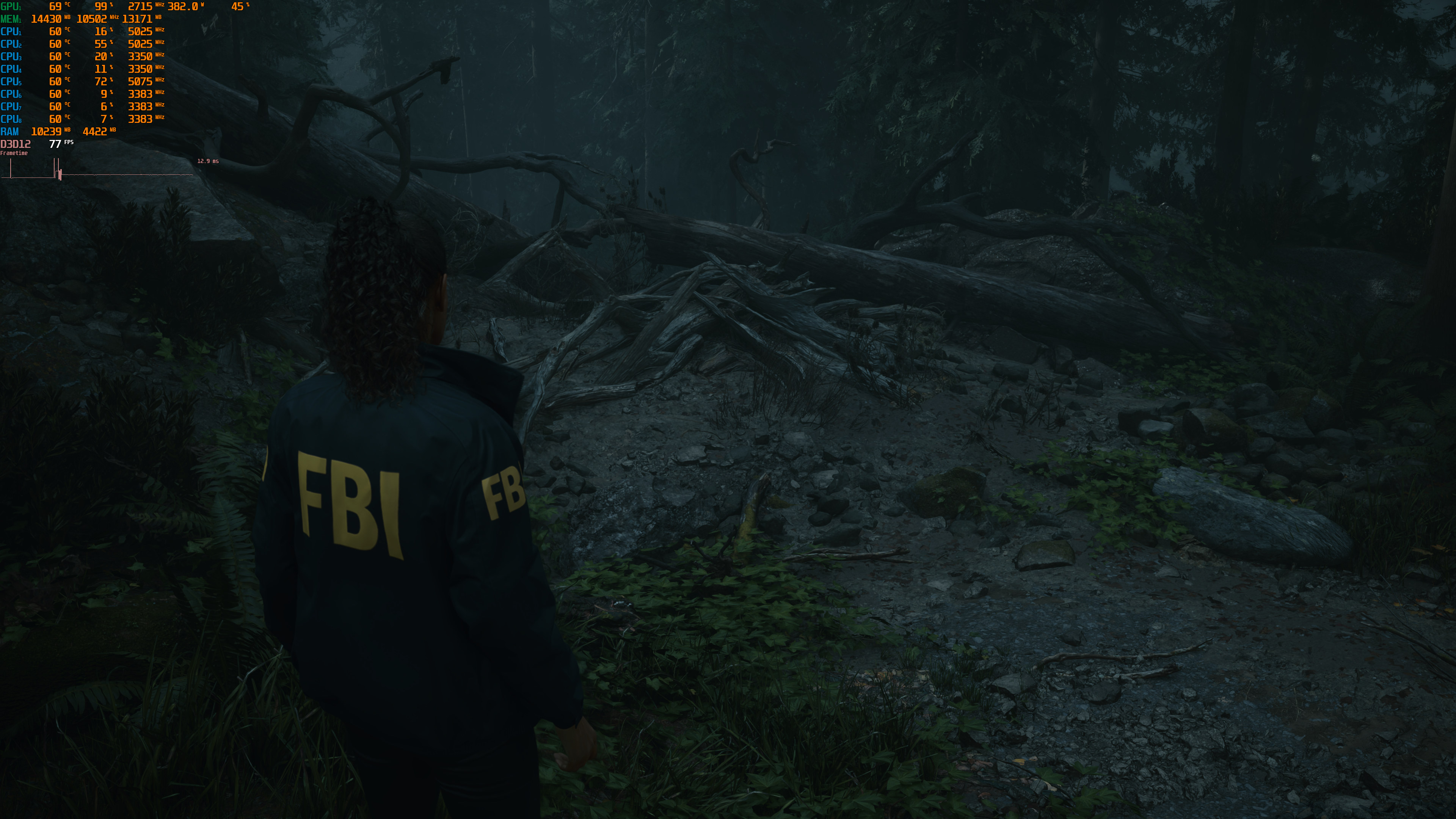
Ray TracingPath Tracing

Now before someone says that this is how lighting works in real life, here is a real image under the same overcast conditions. You can clearly see the shadows of the leaves. Even the really small leaves (which I’ve circled) have soft shadows.

real life image

We’ve already informed NVIDIA about this issue and they are looking into it. So, until Remedy and NVIDIA resolve these Path Tracing shadow issues, we suggest using the Ray Tracing Mode. And, honestly, you won’t be missing much. Yes, the indirect Path Tracing lighting can improve image quality at times. However, in Alan Wake 2, Path Tracing is not as transformative as in Portal RTX or Quake 2 RTX (which had full Path Tracing for everything).

Before closing, I should note that Alan Wake 2 is one of the first games that support DLSS 3.5 Ray Reconstruction. During our tests, Ray Reconstruction performed exceptionally well. Not only does it improve overall performance but it also improves the game’s Path Tracing/Ray Tracing effects. Yes, you read that right. You can use DLSS 3.5 Ray Reconstruction with both DLAA and Ray Tracing. I couldn’t also notice any visual issues with it, so I highly recommend using it.

Our PC Performance Analysis for the non-RT version will go live tomorrow. In that article, we’ll be also testing AMD’s GPUs, so stay tuned for more!


Alan Wake 2 - Path Tracing On vs Off - DLSS 3 vs Native 4K

71 thoughts on “Alan Wake 2 – DLSS 3.5, Ray Tracing & Path Tracing Benchmarks”

  1. Any vram related stutter on the rtx 3080?
    I might try the 1440p dlss quality with ray tracing 40fps seems reasonable as long as it does not stutter

    1. Dunno, looks pretty optimized to me. It looks stunning so it’s demanding. I bet it looks great even on low settings.

      1. Consoles will likely use mostly low and some medium settings with some form of upscaling for 60 FPS and medium with some form of upscaling for 30 FPS

        Console GPUs are weaker than a 6700XT and just slightly better than a 5700XT because of TDP limitations. The CPU is slightly weaker than a 3700x again because of TDP limitations

        However you really should start considering the 6700XT and 3700X or equivalent to be minimum requirements now that the PS5/Series X are 3 years old. The downside to these moderately powered consoles is they raise the minimum requirement bar for PC

    2. Yeah it’s another crap game, like many others this year, unoptimize disaster. 2080Ti you can’t play 60+fps on a damn 1080p. I call it trash, I will not pirated this sh*t.

  2. So we are looking at the most demanding pc game off all time then? I wonder how these cards compare to the console versions. That’ll give us a better idea of the optimization / lack thereof present on hand.

      1. Well said, and we know all those who B*tch about it, are just salty that they dont have it!

        Typical human – Childish – behaviour!

        1. Either that, or they don’t know how light works and actually think that rasterisation with its screen space limitations, light leakage through objects, and lack of true indirect illumination is somehow ‘better’.

        2. Either that, or they don’t know how light works and actually think that rasterisation with its screen space limitations, light leakage through objects, and lack of true indirect illumination is somehow ‘better’.

          1. its indeed better due to how game performance barely impacted. Our brain also wont said that it looks weird or inappropriate until we at least spent time looking for the flaw rather than playing the d*mn game…

          2. Totaly agree 👍
            These days, so many -so called – pc gamers, dont know jack sh*te. It’s really bad!!

      1. How is full path tracing in Cyberpunk 2077 “fake?” It’s literally full path tracing. The entire scene. All lights, shadows, reflections, etc…

        1. Go learn. Sure it is real! That’s why it is as realistic as movies like avengers, oh wait,it is NOT because it is crappy fully faked gimped tracing.

          1. It’s a physically accurate simulation of light with emission, absorbtion, reflection and refraction. There’s no faking of lighting effects like you get in rasterisation.

          2. Are you….comparing path tracing at 60 frames per second in a game….to path tracing at 36000 seconds per frame in a movie?

          3. I think you’re fighting against something you don’t even understand. Cyberpunk 2077 is fully path traced. There are areas that aren’t even properly lit (full black) anymore since the original game wasn’t designed with path tracing in mind and **everything** in it relies on path tracing now.

            The only limitations are number of bounces (which you can edit in config file), the rate at which rays are cast since obviously you’re going to be very limited when doing live render. As well as image loss due to denoisers/ray reconstruction. But nothing about the path tracing is fake. Fake path tracing is called prebaked lighting/shadows and AO.

    1. It’s not a gimmick anymore. BUT, it has to be implemented properly, and the game environments should take advantage of it properly. Then, it looks quite good, and noticeably better.

      1. For me , until it become integral part of gameplay , it will always be a gimmick. When enemy could aware about your presence when they saw your shadow through light source or your reflection in a puddle or mirror or vice versa, then it will stop as a gimmick, expensive unnecessary gimmick that have bad performance impact.

    2. Seen Metro Exodus Enhanced Edition or Cyberpunk 2077 in Overdrive mode? Ray tracing is the opposite of ‘gimmick’.

      1. Its still a gimmick because its barely have any real impact on gameplay. For example enemy could aware about your presence when they saw your shadop through light source or your reflection in a puddle or mirror or vice versa(but looking at it, even MGS2 already able to do it without RT.). In my Opinion, until that become a reality ray tracing will still always be a gimmick, unnecessary one due to performance impact it have.

        1. Well, then this logic can be applied to every graphics setting since these don’t alter gameplay or AI behaviour in any way. But if we start to ask whether at least one of the graphics settings that exists in every game is “nice to have” the whole argument falls apart.

          Of course it would be great for the games to take advantage of light and reflections behaving in a realistic manner to affect gameplay and AI, but the technology needs to exist first in order to derive gameplay from it, not the other way around.

          1. Except the tech already exists as far as I remember, enemy in MGS 2 could realise your position from your shadows in the floor, its even way before RT become viable. And im talking specifically about RT effect as a gimmick because how demanding it is while many raster trick could achieve the same effect with smaller impact in performance while keeping the graphical fidelity intact except if we actively looking for the flaws.

          2. It doesn’t exist because what MGS 2 uses are static shadow maps and static planar reflections.

            The idea exists, but shadows and reflections behave wildly different in RT and programming the AI to detect and react to those correctly will be a field of work on it’s own.

    3. the way RT has been implemented in games is a gimmick
      Full on Path tracing is the real deal
      RT is just a stop gap until the hardware capable of running full game path tracing is mainstream

  3. I’m assuming the tests were run at max settings yes?
    If that’s the case then the RTX 2080ti can run the game at 52 fps at 1080p max settings with DLSS set to quality according to the graph. I think dropping down DLSS to balanced, should hit 60fps.

    Now the RTX 2080ti and the RTX 3070 perform about the same. So in essence, the RTX 3070 should be able to hit 60 fps at 1080p max settings with DLSS set to balanced mode.

    So why on the earth would they state that the RTX 3070 is recommended for 60fps at 1080p medium settings with DLSS set to performance? Unless the game’s image quality settings scale horribly, I don’t think this is the case.

    1. You’d be better off finding which settings affect the FPS the most and turning them down a notch and leaving DLSS at Quality

      So many people fail to take advantage of one the the main features of PC gaming, the ability to optimize the graphics yourselves for your particular hardware …. If all you are going to do is use presets (for other than testing like John does) you may as well just buy a console.

      Testing with everything maxed out is Worst Case performance and should be used as a starting point for optimization. Sadly having no built-in benchmark makes optimization harder and take longer.

  4. I think you need to consider breaking down some of these graphs or at least altering the presentation. It’s not your fault there are now so many various ray tracing and DLSS tests to be done but that third graph is too much.

    The key at the top is so long and misaligned with so many individual bars of different colours it is not visually easy to see what’s going on!

    Rearrange the key under each set of bars? Split off the resolutions?

    1. Yeah, in future articles I may break the graphs to resolutions. At first I was planning on only including specific tests. Then I added DLSS 3.5 and Frame Generation for everything and we got to this graph mess.

      On one hand, you have everything in one single graph (so some will like it). On the other hand, it may overwhelm some by just looking at it.

      1. I recommend also using a consistent colour theme to help with chart reading. E.g. blue for 1080p, green for 1440p and red for 2160p. And maybe use a lighter shade of the colours for the minimum FPS. Something as simple as this can go a long way.

        And instead of having the legend at the top, you can probably label the X-axis with some descriptions. One third of that last graph is just your legend. Makes it hard to follow.

  5. The average gamer will think this is a boring slogfest and will not understand the very complex storyline.

    Some story-driven games are great, but you need to be able to jump in and out of the game, like Life is Strange, and still be able to follow the plot.

    But Alan Wake 2 has a confusing complex story, constant back-and-forth between the TV show content and game, lots of puzzle solving, and the very sporadic actual gameplay is a slow slogfest.

    This game is going to piss off most gamers. The plots are solved by dei ex machina, which is going to piss off even the people who grasped the story.

    Some enjoy dei ex machina plot devices, but for many it also symbols a badly written story.

  6. I’m sure certain people elsewhere will cry realism, but honestly in real life that forest shot would be all black because the moon wouldn’t light it up that well. At the end of the day realism is kind of a carrot on a stick you don’t actually want to catch anyway. What matters is style, and the “normal” shot looks cooler.

    1. It isn’t in the night. It’s in a cloudy/overcast day so there will be light. It’s pretty similar to the real photo I took (I took it under the same conditions, cloudy/overcast day).

      1. Fair enough. For me though it’s just purely about aesthetics and I think the non-PT shots look nicer visually. But we’ll see if it’s a bug. The Digital Foundry guy says it isn’t and looks amazing, but he’d say that no matter what.

    2. Few people have seen how bright a moon can be. A supermoon in a far away place with little pollution and no clouds, is pretty bright.

      supermoon + no atmospheric pollution will outcompete a regular streetlight

      In cities moonlight is greatly diminished by pollution.

    3. Im afraid chase of Realism will make all the game look the same. Game that able to be remember usually not because of how realistic it looks like, but because of the gameplay, AI, physic, or the game simulation. I dont care if enemy in a game have unrealistic glows from a far so player could see them and prepared for the fight, I dont care if some place unrealistically brighter than other to show the way you need to pass through, as long as it help the game to be more fun to play, so be it …

  7. I refuse to buy any game from Epic or Steam.

    They’re big US tech companies with outrageous prices in the rest of the world.

    GoG or gtfo

    1. I wish people that said they sould have a choice to buy game at Steam when a game exclusively sold on Epic Game Store buy at GOG instead, Steam and Epic even barely a choice at all, both are great place to donate but real place to ‘buy’ a game is GOG

    1. No, I think that dishonour belongs to starfield. That game surpasses AW2 both in terms of pozz and in terms of poor optimization. At least AW2 has some visually impressive things going for it. Slopfield on the other hand looks like a PS3 game, maybe a polished PS4 game in some areas at best.

  8. I was looking at Metacritic and it seems to have become a useless mess. The user score was already a mess since anyone can basically review there, even spambots.

    But even the “critic” review section is a mess.

    The latest critic score added to Alan Wake 2 is from a site called “Carole Quintaine”. It’s literally a one-woman-show, where she alone runs the site where she sells t-shirts, and a Youtube channel where she uploads videos.

    Her videos gather about 10k views, the Alan Wake 2 review just 9k.

    She is a social media butterly, with lots of followers because she is pregnant, etc. None of that relates to gaming. She has no particular history in gaming, no history in game development, she has no journalism degree, she’s just a random Youtube person.

    Maybe she is a great reviewer, I don’t know. But if all it takes is to have a Youtube channel, at that point you can start adding hundreds of reviewers to Metacrtic. Many who have far less integrity still than the likes of IGN and Gamespot.

    https://uploads.disquscdn.com/images/61fd995d1ab33bed2b79222e4a63a062cd3d10abefd5c76756b3182f558497f9.png

  9. John Papadopoulos Another interesting tidbit…look at the 3rd picture with the fence on techpowerup. It’s missing shadows with Path Tracing, AS WELL AS with Ray Tracing….but only when using Ray Reconstruction. So Ray Tracing + No Ray Reconstruction = Proper chain link fence shadows. But Ray Tracing + Ray Reconstruction or Path Tracing both = NO chain link fence shadows. Possibly due to Ray Reconstruction being forced on when Path Tracing is enabled.

    https://www.techpowerup.com/review/alan-wake-2-performance-benchmark/5.html

    Definitely some weird/broken shenanigans.

    1. If you zoom in, you’ll see that the fence shadows are there but they gradually get softer. It’s not that realistic, but at least there are some shadows (compared to the scenes we showcased in which there are no shadows).

  10. John, these posts are amazing! Thank you for doing such, wouldn’t say challenging, but tiresome tests for us! Really worth disabling the adblock (not me, tho).

    Cheers.

  11. You mention the AMD card but show no results only Nvidia. I take it the rumors are true its really a NVidia only game.

  12. Performance has been worse than expected. FPS varies wildly depending on area. In one scene I could be 80fps and in another I dropped to around 38-42fps (scene where you’re chasing the “first dude” through the forest with the lit up red trees. And this is with 4K with DLSS Quality on a 4090 running at over 3000MHz, and frame generation active. GPU at 99% usage on unlocked bios so not hitting any caps/throttling either.

    Game does look fantastic with HDR on OLED when brightness is properly calibrated. Interestingly despite the game saying to enable HGIG, I saw no change in scene brightness when switching tone mapping from OFF to HGIG. Switching to ON did a great job of brightening up the scene though.

  13. Does anyone know if there is a walkthrough of the game with Alan’s campaign only? im trying to watch on YouTube but i dont wanna watch Saga’s campaign, im just here for Alan.

Leave a Reply

Your email address will not be published. Required fields are marked *