
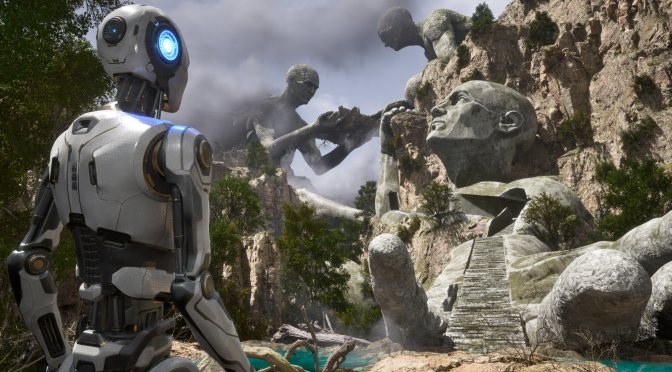
Croteam has released Patch 1.1.0 for The Talos Principle 2 which adds support for AMD FSR 3 Frame Generation. The Talos Principle 2 initially supported DLSS 3, but it had major visual issues with it. As such, I’m downloading the game to compare FSR 3.0 against DLSS 3.
Moreover, this update fixes a lot of instances where the light was abruptly changing when not using Lumen. It also resolves a lot of shadow and AO artifacts both in Lumen and Non-Lumen configurations. These were two issues I raised in my PC Performance Analysis. So yeah, I’m curious to see whether Croteam has indeed addressed them.
And that’s not all. Title Update 1.1.0 aims to also improve landscape LODs. It also promises to reduce pop-ins of distant objects. Plus, it will reduce performance degradation when moving.
But wait, there is more. Croteam has added a new built-in benchmark tool that PC gamers can use to measure their PC performance. The team has also changed the shader compression algorithm to eliminate crashes on certain system configurations, and added progress bar for shaders precaching. Oh, and they have reworked the audio engine for better surround support.
Naturally, this update also comes with some bug fixes for puzzles. It also packs a number of gameplay tweaks and improvements. You can find all of these changes below.
As always, Steam will download this latest update the next time you launch its client. Below you can also find its complete changelog.
The Talos Principle 2 Patch 1.1.0 Release Notes
Visual changes:
- Added AMD FSR 3 (with Frame Generation).
- Added water ripples.
- Added extra decorations to the Lost Labs areas.
- Added visual effect for locked elevator beam.
- Toned down sky occlusion on some levels to avoid shimmering of DFAO effect and adjusted non-Lumen color to better match Lumen.
- Reduced performance degradation when moving.
- Fixed some of the ghost audio logs using incorrect models.
- Fixed incorrect numbers on some of the character appearances in Photomode.
- Fixed incorrect lighting on supported integrated GPUs from AMD.
- Fixed the issue where Laser Beams were affecting the background when using TSR upscaling and Lumen.
- Fixed a lot of instances where light was abruptly changing when not using Lumen.
- Fixed a lot of shadow and AO artifacts both in Lumen and Non-Lumen configurations.
- Fixed a lot of instances of premature Landscape LODing when using extreme FOV values.
- Fixed a lot of instances of inconsistent pop-in of far-away structures across all levels.
- Fixed “crazy-swaying” trees and grass across all levels.
- Fixed visual issues with volumetric fog in the Prometheus Sequence level when GI quality is set to ultra.
- Fixed an issue where long triangles on certain meshes were sometimes not rendered on AMD cards.
- Various minor environment visual fixes related to crumbs, foliage distribution, missing terrain and holes in cliffs
Gameplay:
- Players can now sprint when moving backwards.
- Left mouse button can now consistently be used to interact with objects.
- A player is no longer required to press the Use button to use the elevator beam, instead it triggers automatically upon entering.
- Dialogue options can now be navigated with keyboard arrows.
- Most menus can now be closed by clicking the right mouse button.
- Improved Guided Jump reliability.
- Posters in the Chamber of the First Companions now display translatable text when aimed.
- Most of the travel sequences are now skippable as long as story events related to those travel sequences have been experienced at least once (e.g. in another playthrough).
- Increased the number of last stored Dialogue Logs from 10 to 20.
- Added a slider that controls the Photomode window’s opacity.
- Added HUD hints when using the Gravshifter.
- Fixed the bug where third-person animations and camera were not working correctly after using Fast Travel.
- Fixed the issue where photomode would sometimes be invoked with the field of view being set to zero and impossible to change.
- Fixed the issue where the objectives panel would appear in a puzzle if the player restarts checkpoint while being inside one.
- Fixed the issue where the character rotation slider in Photomode was not accounting for changed gravity.
- Fixed an issue where using keyboard or gamepad to navigate in settings menu would not play respective sounds.
- Fixed QR codes in the museum being readable from the backside of their panels.
- Fixed the bug where the player could softlock themselves by falling out of the elevator with the help of the Photomode.
Options:
- Added controller vibration (can be switched off in Controls settings).
- Terminal font size option will now affect content in palm reader terminals.
- Photomode inputs can now be remapped.
- Sprint toggle option now behaves as sprint lock.
- Added “Player Speed” setting. Does not affect sprint speed.
- Added a setting to switch audio output devices.
- Added a setting to change the third person camera’s relative position behind the player.
- Added a setting that allows instantly teleporting to a gravity surface, instead of smoothly transitioning to it.
- Added a setting to switch camera behavior when transferring to another body.
- Added a setting to change subtitles size.
- Added a setting to change compass size.
- Added a setting to toggle developer console.
- Added video previews for motion sickness settings and image previews for color blindness settings.
- Enabled ambient occlusion in high GI quality preset.
- Improved accuracy of auto-detection of GPU performance.
- Limited texture and shadow quality options based on graphics card video memory size.
- Fixed the bug where Video Settings auto-detect would set upscaling method and/or preset incorrectly.
- Fixed an issue with sRGB gamma setting not saving between game sessions.
Puzzles
- Moved S3 Sphinx puzzle element to the correct location as indicated by the map.
- Improved S3 Pandora secret setup.
- Fixed a number of easy exploits where the player could enter a puzzle in an unintended way and/or finish the puzzle without solving it.
- Fixed a number of errors related to collisions and item placements inside puzzles which were making puzzles too hard/too easy when encountered.
- Fixed the bug where Avatar monuments statues didn’t have proper collision, which enabled the player to target Pandora receiver from any position.
- Fixed the bug where some metal fence doors wouldn’t stay open in solved puzzles after restarting the game or checkpoint.
- It is no longer possible to connect devices through one side of the plasma door which had collisions set up improperly.
- In E2 “Loop” puzzle it is no longer possible to place drill hole and place it on pressure plate
- In N2-5 puzzle it is now possible to turn off the fan instead of jumping into it to remove the cube from bouncing fans.
- It is no longer possible to connect to the emitter in puzzle N2-1 from N2-3.
- It should no longer be possible to connect to blue receivers before plasma doors are open on the N2-Lost1 “Field of View” puzzle.
- S2-Gold “Out of the box” cannot be cheesed by putting a gravity beam over the plasma door and jumping into it anymore.
- In W1-2 It is no longer possible to place the Connector on top of the Rail Drone + Cube using a metal beam which the player could climb on.
- It is no longer possible to cheese E2-Gold puzzle by simply putting Connector onto the cube.
Other:
- Changed shader compression algorithm to eliminate crashes on certain system configurations.
- Reworked audio engine for better surround support.
- Added progress bar for shaders precaching.
- Added benchmark.

John is the founder and Editor in Chief at DSOGaming. He is a PC gaming fan and highly supports the modding and indie communities. Before creating DSOGaming, John worked on numerous gaming websites. While he is a die-hard PC gamer, his gaming roots can be found on consoles. John loved – and still does – the 16-bit consoles, and considers SNES to be one of the best consoles. Still, the PC platform won him over consoles. That was mainly due to 3DFX and its iconic dedicated 3D accelerator graphics card, Voodoo 2. John has also written a higher degree thesis on the “The Evolution of PC graphics cards.”
Contact: Email