
It appears that Microsoft is currently working on a feature for Windows 11 that most PC gamers will be interested in. According to an image from a W11 Insider Build, MS will add its own Super Resolution tech.
This Super Resolution feature will be AI-powered, meaning that it could come close to what NVIDIA and Intel are doing with DLSS and XeSS. So, in theory, it should be better than both AMD FSR 1.0 and FSR 2.0. Or at least that’s my assumption. We also don’t know whether it will take advantage of the RT cores of the NVIDIA RTX series GPUs.
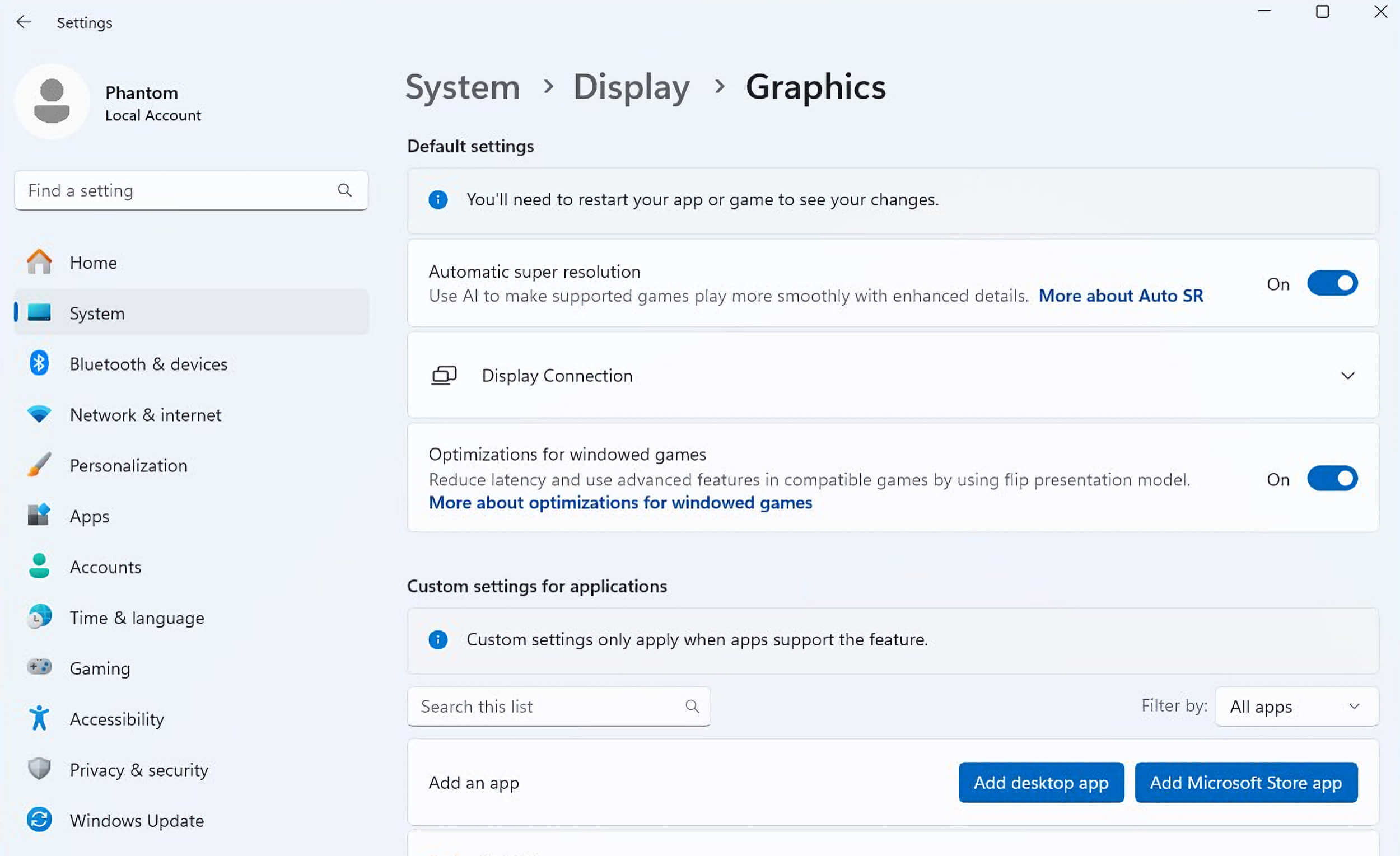
From what we can see, PC users will be able to enable this new AI-powered Super Resolution feature for pretty much all applications. The first application that comes to my mind is the movie players. By using it, PC users may be able to improve the image of low-quality videos. And, since all games are considered applications, it should also work with games.
The big question now is whether it will be locked behind a specific DX API version. Will it only work with DX12 titles? Or will it support all DX games? And what about OpenGL And Vulkan games?
Do note that MS has not officially announced this feature as of yet. So, we don’t know when we’ll see it in the public version of Windows 11. There is also no word on whether Super Resolution will come to Windows 10.
Windows 10 supports all of the DX12 Ultimate features of Windows 11. When it comes to games, W10 runs games similarly to W11. And, so far, Windows 11 never had any big advantage over Windows 10. At least when it came to games. So, if Super Resolution is exclusive to W11, this might be the push some may need to upgrade.
If Microsoft’s solution looks anything like DLSS and XeSS, it will be a huge deal for PC gamers. By using it, you’ll be able to extend the life of your GPU. This will be a godsend for a lot of gamers. Again, only if it looks as good as DLSS 2 or XeSS.
Stay tuned for more!

John is the founder and Editor in Chief at DSOGaming. He is a PC gaming fan and highly supports the modding and indie communities. Before creating DSOGaming, John worked on numerous gaming websites. While he is a die-hard PC gamer, his gaming roots can be found on consoles. John loved – and still does – the 16-bit consoles, and considers SNES to be one of the best consoles. Still, the PC platform won him over consoles. That was mainly due to 3DFX and its iconic dedicated 3D accelerator graphics card, Voodoo 2. John has also written a higher degree thesis on the “The Evolution of PC graphics cards.”
Contact: Email

would be great! I already use the upscale tech from Nvidia in the driver to enable 4K ( i got a 1440p Gsync monitor ) so im curious if and how this feature from MS will be like and if it can gove some performance boost to games instead of the GPU.
DLDSR 1.78x?
no 2.25x
Just to shove the garbage that is windows 11? No thanks.
You will have no choice starting next year.
it is until october 2025.
Starting next year meaning from 2025 onwards.
can’t you just use sordum apps to stop updates? worked fine for me for 3+ years. What makes no sense is steam says win10 only, what about win8.1 users isn’t that still supported?
The problem is your system will be full of security holes very fast.
They go after the largest install base, not older ones. I just don’t believe the herd mentality there sorry. Never had problems. Third party firewall manual ok only, run some of the bleepingcomputer stuff here and there, nope nver had problems.
There are threats that go completely undetected by your AV, hence all the CPU patches throughout the years. The problem is, you often need new microcode and also OS patch, or either of those.
You better pray you don’t need the OS patch when crap hits the fan.
You see, Microsoft wants to sell you the OS as an actual service, that is a problem in my book.
I would support Valve’s effort to go Unix with gaming, however I sadly think this is in vain.
You will never teach average American how to work with the Unix file system.
No av, that’s a virus imo by itself. Yah of course they want you paying for E.V.erything as a service, shysters love that control. It’s like bleeding you w 1000 cuts, they can’t help themselves. Idk man all I know is I’ve never had problems in 3 years. I have several ISO versions of win11, win10, I think I’m just seeing about the ltsc version of 11 that’s supposed to drop this year sometime then go get that. Rufus to pendrive, gtg.
can’t you just use sordum apps to stop updates? worked fine for me for 3+ years. What makes no sense is steam says win10 only, what about win8.1 users isn’t that still supported?
https://www.zdnet.com/article/when-windows-10-support-ends-you-have-5-options-but-only-2-are-worth-considering/
Everyone will praise how good Win 11 is (especially after debloated and most of it’s spyware and telemetry blocked), after seeing Win 12 will be much times bigger machine learning (AI) implemented crap, spying and surveillance.
The problem is, Bill and the gang will kill Win 11 in three years so they can get you on that sweet AI monthly subscription.
It’s pretty obvious.
I agree, likely 2027 end of support.
I actually took some time, made some comments here, one above in that article
dsogaming(.)com/pc-performance-analyses/windows-7-must-have-pc-feature/#comment-6391298678
and one here
dsogaming(.)com/articles/the-talos-principle-2-amd-fsr-3-0-benchmarks-impressions/#comment-6378134277
summarizing what Windows TPM, Secure Boot, Pluton is actually all about.
Surprise: The New World Order, Orwellian 1984-communism, the end of the PC (Personal computer), closed walled-garden eco system like with e.g. Apple.
Is no surprise since Microshat is WEF partner for decades and belongs to the global elite.
You won’t see any bullshiet media talk about this and explain it like that.
It’s basically what the global elite tried 20 years ago with the Fritz Chip.
Like in China… because China was a guinea pig.
Will see if GNU/Linux will save everyone from 1984. I will definitely switch when the time comes.
Cheers.
Same thing, as a matter of fact, I get the Linux/Unix appeal more and more every day.
And Windows market share is dropping in the same time frame.
I forgot lol.
The beginning of the end has already happened.
phoronix(.)com/news/Lenovo-Pluton-Windows-Default
Just as planned the global elite’s lackeys at AMD have put the Pluton Security chips in some mobile ryzen 6000 SoCs.
Testing the waters. Obviously Shintel, Qualcom and everyone else will follow (or already have their own “security” chips inside for years).
Obviously hardly any media and writers wrote about this. Phoronix of course did.
That’s the dystopian state we already in. sheech.
I thought about that Nshitia (just another global elite lackey/puppet) is the second big reason why Microshat with Windows is keeping their dominance of over 1.5 bilion users for many years.
My point: It’s nshitia and their closed source drivers and blobs (they did not fully open it for gnu/linux) which prevents/deters the 1.5 billion Windows users from switching. It’s obvious (for some people) that the gaming department is keeping people using Windows. All other departments (work, media, creativity etc.) are already the same or offer an better experience on gnu/Linux.
I use Garuda Linux and the experience with my rx 6800 is much better than with my rtx 4090 (Does not even work on Garuda; have to use Pop-OS).
Why? Because Nshitia has worldwide 90 % (or 95 % already) gpu dominance. Hence Stackelberg-Duopoly (AMD + Nvidia).
I say Linux/GNU will never win market share due to this. It’s basically the 4 % amd gpu-users who switch from Windows to GNU/Linux.
Nvidia gpu-performance, features, useabiity etc. is much worse than the amd gpus’s and official + custom drivers.
I’m likely switching to Linux when that happens.
vlc player with rtx super resolution is crap.have u tried it guys?
RTX super res is for Chrome browser content (and it works great)
Nowadays im mostly downloading 720p content and playing it back at 1080p using VLC with RTX super Res on. Just make sure you choose DX11 as output module and choose Super Resolution as the method. Testing it on Avatar 2 720p source and there is obvious improvement compared to playing it without at 1080p monitor (less blocky artefact, although not perfect because it trying to fix the flaw in realtime sometimes we still able to saw the smoothing effect it try to apply).
Some suggestion, to reduce that AI smoothness try to increase sharpness a bit
What should ido? Keep 10 until the support end and then change cpu ram and motherboared and upgrade to 11:?
Or use Rufushttps://www.minitool.com/news/rufus-download-windows-11-10.html and install 11 now before i change cpu ram and motherboard?
I know only two people who have installed 11 until now:
One of my friends who have upgraded his pc in 2022(he upgraded evrything) and then got the notification from Windows update to upgrade to 11, and one of my colleagues at the office that i work where he used Rufus to install windows 11 on the pc at the office that is very old and dont support 11. Shouls iuse thie method and install 11 now? or change cpu ram and motherboard when the support ends?
MINE MONSTER PC IS
RYZEN 7 1700
PRIME X370 PRO
16 GB DDR4 3200MHZCL15
RX 6700XT 12 GB RED DEVIL
MP 600 2TB WRITE:4950MB/S READ:4250MB/S
DELLP2416D 24” 2560X1440 60 HZ IPS!
If your pc doesnt meet the Win 11 requirements, just download a torrent copy that has the requirement part stripped from the OS. Of course you can use a legit purchased key with it still.
Ive got Win 11 running on an old AM3 Phenom system just fine. Ive been able to install it easily on laptops and pcs over 12 years old with no problems.
which method do you used to install it?
I use Rufus to create a bootable USB drive.
Just make sure the OS version you download (torrent) says something similar to “TPM, Secureboot, RAM and CPU Check BYPASSED”.
I think some of those torrents are “preactivated” already but even so I still buy a cheap legit Win11 key.
Ok so should ido exactly? I will also need ot install it on the laptop of my mother that is from 2011. The reason it is so old is because she uses it just for internet she dont work she dont play games and she watches movies and series onlyo n tv because she dont like to watch them on pc due to how much smaller the pc monitors are compared to tv.
Ok so first go to microsoft site and downlaod windodws 11
Then downlaod and install rufus on my pc
Thern copy windows 11 from my pc to the usb
Then install it from the usb?
Right? Is that what should ido? And none of my programs, games, movies , series, texts, that ihave on my pc will be deleted? evrythign will work ok as it does now on 10? i will not need to reinstall anything?
torretms sotes are b;pcled om country since 2018 that why i will download it from microsoft site.
good thing is u can get the legit copy from MS site and RUFUS has advanced settings letting you remove all those OS requirements 🙂
its quite crap .nowhere as good as dlss for videos .it changes dimensions of some videos .has poster effects .doesnt enhance anything .quite crap right now .maybe gets better in future .
regarding to dimension change, Have you tried the latest version of VLC (3.0.20) or the Beta version 4 ? Its fixed in that version based on my experience
really?the latest ver availabe was 3.19
ill search for it thanks
Having a conversation here with “GT PC Gaming” about this and that rtx video hdr super resolution
dsogaming(.)com/news/nvidia-rtx-video-hdr-mod-pc-games/#comment-6383030637
and I now tried the rtx super resolution with the mpc-be player and I second that I don’t like it that much.
Differences are hardly noticeable, and what it does, it draws too much power.
I stick with my customized madVR profiles for varioush media.
Rtx hdr video super resolution however I like.
Do note that I use a superior qd-oled TV and not some crappy moniturd, so it’s not the same experience for everyone.
I’m predicting DLSS > XeSS > MS > FSR.
I’m predicting that all 4 will use AI and the same DirectX API in 2 years So game developers will only have to write the code once and it will work on all GPUs with some sort of AI cores (Currently it’s all them since AMD 6000 series have AI cores they just aren’t being utilized yet)
We are already at the point where you only need to develop for Nvidia’s Streamline which can support all vendors. No need to tie yourself to DirectX either.
This feature won’t push anyone to upgrade, ending support next year will.
If this isn’t built into the game render pass it will screw up the hud right?
Every modern game use DLSS2/FSR2.. This upscaller is OK, but not necessary..
This will be DLSS1, and worse than FSR1
This is absolute nonsense.
This is a spatial upscaler.
It’s an AI suite full of technologies and the part you talk about is called image reconstruction.
There is no “upscaling”. That’s what 99 % bullshiet tech-media and 99 % clueless customers call it.
dsogaming(.)com/articles/amd-fluid-motion-frames-has-been-fully-released-and-its-still-as-bas-as-it-was/#comment-6376389011
But it’s trying to inform against windmills. 🙂
Still waiting on MS to fulfill their promise of being able to run a Nvidia and AMD GPU together to render frames as a feature of DX12 to push Win 10 adoption. Anybody remember that from 9 years ago?
Not that anybody should have ever wanted to do that anyway back when SLI/Crossfire was still a thing but with MS it’s better to wait until/if they deliver.
I’m glad someone remembers
pepperidge farm remembers.
They did fulfill the promise. Imagine holding a grudge for 9 years and not knowing they delivered until the parent companies put an end to it.
I can’t imagine anyone holding a grudge at all over that.
I can imagine someone having contempt for a company like MS that has engaged in sh*tty business practices for almost 3 decades now.
You hate MS for evil business practices. I hate MS for being woke. Lots of overlap between the two.
imagine moving the goalposts because they have to be the bad guy no matter what.
Somebody essentially help to make significantly articles Id state This is the first time I frequented your web page and up to now I surprised with the research you made to make this actual post incredible Fantastic job
Absolutely fantastic!!!
Being OS native, it could could natively deal with upscaling for anything new and OLD that don’t support any upscaling (though old games tend to be 4:3 only), PLUS media/video playback upscaling and maybe also low res images for fullscreen display, ALL while not depending on game developer integration or future patches and being hardware agnostic, and otherwise you can still use Nvidia’s or whoever’s solution, so definitely count me in!!!
We just need quality and performance to be or become decent soon after the feature is released.
and of course since its made by microsoft its gonna suck and it will be buggy broken and crappy.
Mini-guide to debloat/block/remove most of Win 11’s NSA-riddled spyware & surveillance, telemetry from Win 11 23H2, on top of it make it faster overall; basically creating your own Win 11 LTSC.
dsogaming(.)com/articles/the-talos-principle-2-amd-fsr-3-0-benchmarks-impressions/#comment-6378140959
Mini-guide to debloat/block/remove most of Win 11’s NSA-riddled spyware & surveillance, telemetry from Win 11 23H2, on top of it make it faster overall; basically creating your own Win 11 LTSC.
dsogaming(.)com/articles/the-talos-principle-2-amd-fsr-3-0-benchmarks-impressions/#comment-6378140959
Btw. Win 11 is already superior thatn Win 10 for gaming.
1) DXGI-flip mode for fullscreen borderless games. Microshat removed these optimizations from Win 10. It’s basically equal now in terms of performance and latency to full screen exclusive mode.
It’s so much more convenient than e. fullscreen and the constant black screens.
2) auto-hdr (Special-K is better though) and hdr-mode improvements overall
3) There are various programs to revert back the crappy Win 11 UI btw. as e.g. Valinet Explorer Patcher, so don’t worry
Why would anyone want this as part of their desktop? It’s not as if I’m having trouble scaling my desktop to the resolution I paid for.
these algorithms don’t understand what out-of-focus bacgrounds are, and they try to sharpen them
super resolution sucks
It’s machine learning (buzzword AI), trained deep learning/neural networks.
You haven’t tried dlss version 3.5 image reconstruction, or version 3.5 frame generation, for yourself, right?
Rtx video super resolution and the new rtx hdr video super resolution on a premium Oled-TV?
Because that’s what your statement here tells me.
This is really just the first step in unifying the AI upscaling into DirectX …… AMD will be using AI for upscaling with their next generation GPUs. I expect Frame Generation to also be unified in DirectX soon.
Still wont switch to Windows 11. Not until I’m forced to.
I’m holding out for Windows 12 …… Why? Because of Windows history
Win 95 – good
Win 98 – crap
Win 98 SE – good
Win Millennium – crap
Win XP – Good
Win Vista – crap
Win 7 – good
Win 8 – crap
Win 10 – good
Win 11- crap
Win 12 -? but judging on nearly 30 years of history it will be pretty good
This blog is an endless source of inspiration. Thank you for being a part of this journey!
Must have feature. Remove co-pilot option.
Good, will keep my Pascal going for a long time.
helloI really like your writing so a lot share we keep up a correspondence extra approximately your post on AOL I need an expert in this house to unravel my problem May be that is you Taking a look ahead to see you