

Vulkan API feature

Vulkan will support multiple GPUs only in Windows 10

Vulkan is a low-level API that made everyone cry the moment Khronos Group announced that it would support both Windows 7 and Windows 8.1. However, it appears that its multi-GPU functionalities will only be available in Windows 10.

According to Khronos Group’s GDC 2017 slides, native multi-GPU support for NVIDIA SLI and AMD Crossfire platforms will be possible only when WDDM is set to ‘linked display adapter’ mode.
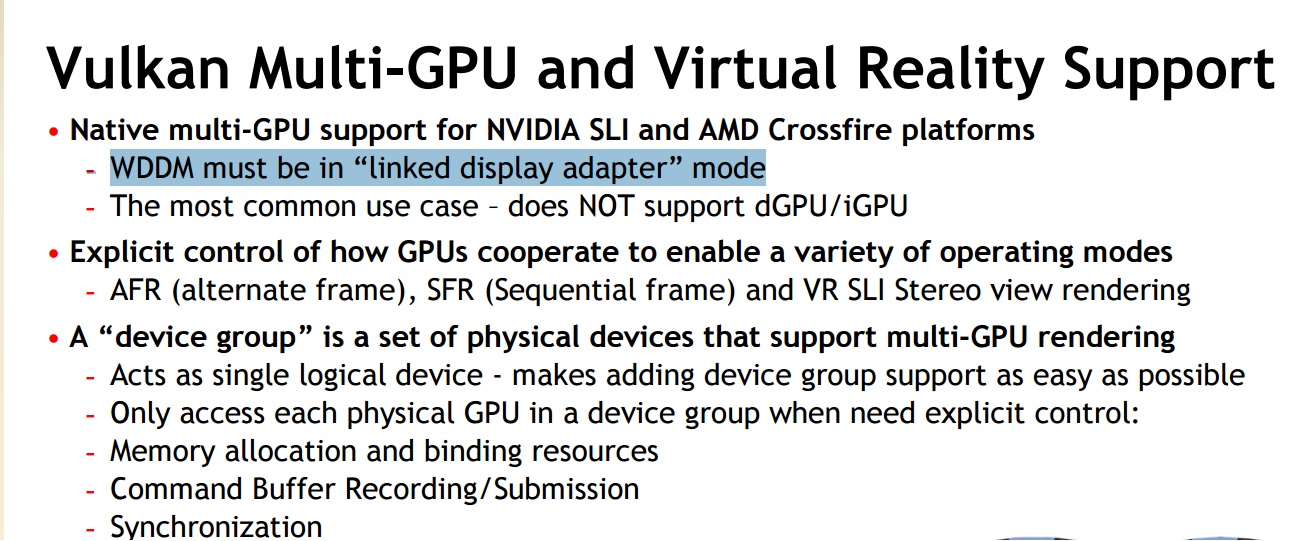
In case you were not familiar, this mode is only available in WDDM 2.0, which is exclusive to Windows 10. As such, Vulkan’s multi-GPU functionalities will most probably not work under Windows 7 or Windows 8.1.

Now I don’t know whether there will be enough games supporting such a feature, especially since a lot of DX12 games (and I’m using DX12 as an example because more developers are currently using it) are still lacking multi-GPU support, but these few PC gamers with high-end multi-GPU systems will have to use Windows 10 in order to enjoy Vulkan’s multi-GPU support.

At this point, and given the fact that developers will have to manually add support for multi-GPUs in both DX12 and Vulkan (and we all know that most will not even bother with such a thing), we strongly suggest staying away from it.

Kudos to our reader ‘Max’ for informing us!

UPDATE:

Obviously in this article I’m talking about the Windows operating systems. From the looks of it, Linux will support multi-GPUs.

44 thoughts on “Vulkan will support multiple GPUs only in Windows 10”

  1. Come on people…. Develop for that highest possible configuration and trickle those ideals on down the pipeline. I love the idea of having multiple cards in my system so that I can massacre the competition when running software that actually supports it.

    Also I do not mind if I “have to” drop down to a couple cards over four or so, but at least let double “SLI/Crossfire” slide for most games.

  2. Spend your $700 on paperweights instead. At least you’ll know the paperweights will always work.

  3. It still is truly free. It just need some 3rd party software to use some features. In this particular case, it will not be easy to incorporate this on other OS because those do not support it through WDDM.

  4. Honestly mates SLI has been a failure, the perfomance gains are not great and many games dont support it, you better off buying a better gpu.

    1. Agreed, SLI/CFX are not for everyone. The amount of tweaking, extra temps, noise and power needed most of the times outweight the performance gains. I’d say it’s more for the very high-end, enthusiast segment. Plus the ideal SLI/CFX should be done with 2 powerful VGAs, so in case your game doesn’t support it at least one card can handle the game. That’s just a ton of money for something that sometimes won’t work.

      I always loved the idea of buying a second-hand cheap VGA, pop it to my system and get ~50% extra video performance, but it just isn’t the case.

    2. Yeah, but it’s basically the only way of running multi-monitor setups at actually decent FPS, even with something as powerful as GTX 1080 Ti – especially so when you want to go for a resolution that’s not 1920×1080.

      Oh well.

      1. That doesn’t need “SLI” though. You can set another card to run other monitors without it being multi-GPU specifically.

        1. Sure, but how does that help you run a game instance across 3 1440p monitors at the same time, without experiencing a massive FPS drop as a result?

          I should have been more specific, but yeah, that was what I was referring to.

          1. I’m trying to say, that’s how you usually do it haha. If you use 3+ monitors with SLI on, it flat out disables “SLI” and uses one card to power 1 or more extra monitors. At least as far as I know, anyway.

            Basically you’re not even using SLI, for the most part. You’d still be able to run your single game across 3 screens.

          2. Yeah, I think you’re confusing a few details here. I mean, what would be the point of multi-GPU technology if multi-monitor setups turned off the secondary cards?

    1. This is correct Windows 10 is the only version of WINDOWS with multi-gpu support under Vulkan, but it isn’t the only OS.

  5. Well it’s a blow but sincererely, with the actual gpus like 1080ti and the upcoming vega10 i think 1440p and 4k performances are coming to a point where 2 gpus aren’t needed anymore. In a year or 2 120fps/4k will be easily playable with a Volta gpu or the equivalent on AMD’s side.

    Still sad they block it for win10 only.

    1. I’m going to say that this article is factualy incorrect. Vulkan’s “explicit multi-GPU” is also available on Linux.

      1. Windows 7 is the most popular OS on the planet and most PC gamers use Windows 7 or Windows 10 or Windows 8, not alternatives.

        1. That may be true, but the article and it’s headline are still incorrect. For those people who want the full benefits of Vulkan but don’t want to switch to Windows 10 for various understandable reasons, Linux in the form of Ubuntu or SteamOS is becoming more and more a viable option.

        2. Gaming is just a part of world. There are 100s of millions of PCs that are not running games, or at least they are not suppose to.

        3. that’s wrong most popular OS is now win 10, win 7 is 2nd. Stop being delusional and living in a past. Win10 is better for gaming that’s why majority of people switched in last year. Go look at steam stats where 95% of gamers are if you don’t believe me.

          Windows 10 64 bit47.71%-0.78%
          Windows 7 64 bit31.41%+1.67%
          Windows 8.1 64 bit7.69%-0.45%
          Windows 75.40%+0.03%

          1. KEK I used Windows 10 insider builds since b4 it came out officially scurb.
            Steam Stats ain’t **** because not all PCs have it, because many PCs are used for non gaming stuff.

    2. Not sure where you are going with this. At least you will get to utilize the Vulkan API at all on Win 7 unlike DX12.

    3. I’m going to say…..

      Wow, you found something that affects….. a minority of a minority of a minority of people; SLi support (or rather, the lack of).

  6. Wait, so they aren’t going to support an 8 year old OS with the latest features? I’m shaken by this crazy thought.

          1. I haven’t stopped. It’s still going. Help. I needhelp

            It’s getting louder and more forceful somehow.

  7. Almost everyone here is forgetting the true benefit of this feature: being able to use integrated graphics while also using you discrete gpu. That should give almost everyone a free 5-7% performance boost

  8. Huh. Good point.

    So, what, they’re actually, purposefully crippling Vulkan, now?

    Interesting.

    *tinfoil hat mutters something about a Microsoft Direct3D monopoly conspiracy*

    1. ” this kludge pretty much gives Vulkan feature parity with DX12, making it more competitive.”

      HA 😀

  9. The same argument could be made for DX12. There are currently about 20 games that use DX12 with only 6 using it exclusively. Incidentally those 6 games are all developed by Microsoft. Other games have experimental or preliminary support for DX12 while still relying mainly on DX11. Keep in mind that Microsoft is pushing DX12 heavily and it has been available for over a year longer than Vulkan. So it’s just as much of a “flop” and Windows 10 only to boot.

    In reality it takes a while for developers to adopt new stuff, especially something as important as a graphics API. Triple A games take years of development, so it’ll be a while before we see any serious Vulkan and DX12 games on the market. Then we can see which one has the higher adoption rate.

  10. Two screens are run by one card and the third is run by the second card, is generally how those work, is what I’m saying.

    Unless they’ve updated something and now they can use it spanning screens, however if this is the case, then fullscreening on a single monitor should black out the other two. That used to work and for some reason it stopped. It might be back.

    1. “Two screens are run by one card and the third is run by the second card, is generally how those work, is what I’m saying.”

      Yeah, that sounds about right as far as I’m aware.

      1. Right… that’s not “SLI”. SLI is using AFR or SFR straight. You could likely do that without even connecting a bridge.

Leave a Reply

Your email address will not be published. Required fields are marked *