
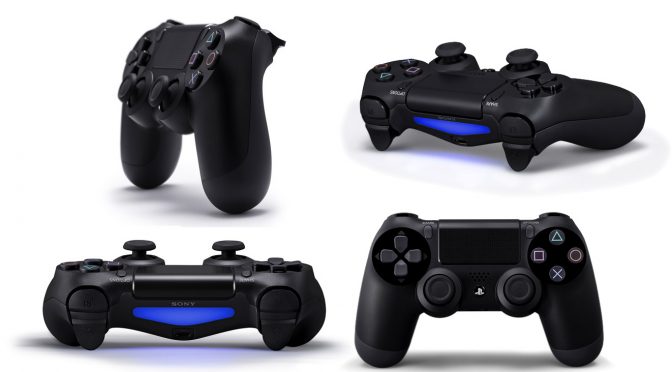
Steam client beta finally adds native support for the Playstation 4 DualShock 4 controller

Last month, we informed you about Valve’s plans to add native support on Steam for the Playstation 4 DualShock 4 controller. And today, Valve released a beta client for Steam that does exactly that. Yeap, PC gamers can now use the Playstation 4 DualShock 4 controller on Steam.

According to the release notes, this new beta client for Steam adds Steam Configurator support for PS4 DualShock 4 controller. When enabled, PS4 controllers will have access to the same sort of customization/configuration support as Steam Controllers, including native API support.

Players can enable this feature in Big Picture settings (Add/Test Controller settings). Do note that this feature is still in beta phase.

Using this system, the PS4 DualShock 4 controllers can map the trackpad, gyro, buttons, etc. to keyboard, mouse, or x-input outputs and can make use of action sets, touch menus, radial menus, and so forth.

In addition, this new beta comes with default PS4 templates, adds higher bandwidth options for 4K streaming and improves the error when trying to run a 64-bit game on a 32-bit OS.

In order to opt in to Steam’s beta client, you’ll have to follow this guide:

  • Check the client beta participation box on the Settings page to opt-in to the latest beta.
  • Once you’ve checked the box you can select the “check for updates” button to begin downloading the latest Steam client beta if available.

Here is the complete changelog for the new beta build of Steam:

General

  • Updated web control to CEF v54.0.2840. This version requires Windows 7 or macOS 10.9 and above, users on older OS versions will continue running the existing version.
  • Fixed third-party mods showing up as the incorrect game name in friends lists
  • Improved the error message shown when trying to run a 64-bit game on a 32-bit OS
  • Improved download and patching speeds when games are installed to a traditional non-SSD hard drive

Controller

  • Added Steam Configurator support for PS4 Dual Shock Controller. Note that this is a beta release. Enable in Big Picture settings Add/Test Controller settings. When enabled, PS4 controllers will have access to the same sort of customization/configuration support as Steam Controllers, including native API support.
  • PS4 Controllers using this system can map the trackpad, gyro, buttons, etc. to keyboard, mouse, or x-input outputs and can make use of action sets, touch menus, radial menus, and so forth.
  • Added New Mode – Joystick Mouse. This is a joystick based mouse control useful for stick based controllers.
  • Added default PS4 templates.
  • Added software calibration for non-Steam controller based IMUs to counter for gyro drift.
  • Configuration Browser can now be toggled to show all available controller types rather than the default of the in-use controller type.
  • Configurations can now be marked as “Unique” to a specific controller. This configuration will only be applied to that controller for that user’s account. By default, all controllers of a specific type will share a configuration unless marked as Unique.
  • Big Picture now supports PS4 controller glyphs when using Steam Configurator support.

Streaming

  • Automatically restart Steam if it crashes while streaming a game
  • Added higher bandwidth options for 4K streaming

macOS

  • Fixed a bug that caused the client to freeze when generating internal error reports

Linux

  • Fixed issues when installing games into filesystems such as ZFS which report an abnormally large sector size

25 thoughts on “Steam client beta finally adds native support for the Playstation 4 DualShock 4 controller”

  1. If it works through Big Picture, you still need Steamworks integration for it to work natively, though, right?

    Also, to state the semi-obvious; this won’t affect older games (without a patch), only upcoming titles, so if you’re currently using DS4Windows or whatnot, don’t be too gung-ho with that uninstall button.

  2. Noice, now get to working more on your own gamepad as well as selling it directly from the client in the UK (because god forbid me for wanting to buy the damn thing from Steam and not Amazon UK).

  3. Flawed controller and always will be until they move the analogue sticks higher up, or at least swap over the D-pad and left analogue stick placements.

    The PS1 controller lacked any analogue sticks.
    Then with PS2, instead of making a effort to redesign the controller, which ALL other console makers did, Sony took the quick cheap route and literally kept the *exact* same PS1 controller and stuck analogues on the bottom as a afterthought, in a unnatural position that’s too low. The D-pad still took the natural priority placement. I say “natural” because it’s natural resting state of the human hand when you pick up a controller. In order to reach the analogues you need to stretch and lower your thumbs.
    PS3 kept this flawed designed and now here we are with the PS4 controller still using it.

    But now Sony may never fix this undeniable technical flaw because the fanboys will complain as they’re so used to this layout and too many people hate change, even when a change is a clear improvement.

    1. You are making it unnecessarily complicated. It’s all about preference. I use a 360 pad on PC at the moment but when I still had a PS2, I couldn’t have imagined playing a game using a controller with asymmetrical sticks. You just start to adapt to the controllers and that’s really all there is to it.

    2. “at least swap over the D-pad and left analogue stick placements.”

      So….. you want an Xbox Controller, basically?

      Why not just use an Xbox Controller, then? Let Sony do their own thing, & Microsoft do theirs. Now that there’s official support for both controllers on the PC, we can easily choose which one we want to use.

      Sure, you stretch your thumbs a little to reach the joysticks on the Dualshocks, & the older Dualshocks were clunkier than the Microsoft equivalent, but so what. Especially with the new DS4 design, which is far more ergonomic than the DS1-3 designs, & as a byproduct, has also (finally) become superior to Microsoft’s near-copy/paste controller.

    3. I can’t play on controller with asymmetrical thumbs-sticks and for me ds4 is very close to ideal.
      “The D-pad still took the natural priority placement. I say “natural” because it’s natural resting state of the human hand when you pick up a controller.”

      Really? Even if that would have any sense, I can pick controller with my left or right hand and don’t tell me my ‘natural’ resting state is different for my hands.

      “this undeniable technical flaw”
      Nah, it’s only your opinion, nothing is ‘undeniable’ there.

    4. Dualshock 4 is far better for 2D games because of the DPad placement though. And we can choose between DS4 and XB1/XB360 controllers on PC.

  4. I am not sure i inderstand well… I’ve playing rocket league with a ps4 controller for months… Isn’t it the job of game devs to implement controller support ? Also, what valve has done, is it supposed to give 100% ps4 controller support to all games or it is just for big pictures etc ?!.

    1. What valve has done is to give 100% support for all games released on steam. The only exception are EA games since they are only on origin

    2. They’ve integrated support for DualShock 4 Controllers directly into Steam, so instead of getting wonky DS4 support through DS4Windows or whatnot, you can get it directly through Steam, natively, assuming the game in question uses Steamworks, I believe.

      Ever tried to use an X360 controller on PC? Remember how you need to download all those drivers & sh*t? Well, they’ve integrated “all those drivers” directly into Steam, courtesy of Sony themselves.

      1. Well i’ve been using a X360 for windows 7 and Xbone controller for windows 10 and never had a single issue. Don’t know what you mean by shyte drivers and stuff. On the other hand, good for valve to do this, many prefer the DS4 controller. I for 1 love it.

        1. Not sh*t drivers, just drivers & associated sh*t 😛

          But yeah, it’s been easier with an Xbox controller due to Microsoft’s native support for them on Windows, unlike Sony, until now.

          Agreed.

  5. Eh, I’ll still probably stick with Input Mapper since that’s what I’m used, unless there’s some major advantage I don’t know about.

  6. Thats good, for those who have a PS4 and a PC, but for those who doesnt and still want a button layout to be like the PS2/PS3, logitech F series are good enough.

Leave a Reply

Your email address will not be published. Required fields are marked *