
Nvidia has just released its highly anticipated new beta driver for its GPUs that is said to be coming with key DirectX optimizations which result in reduced game-loading times and significant performance increases across a wide variety of games.
In addition, the green team released the first official benchmarks for this new driver, showcasing the performance gap between AMD’s R9 290X running under Mantle and Nvidia’s 780Ti running with these latest drivers.

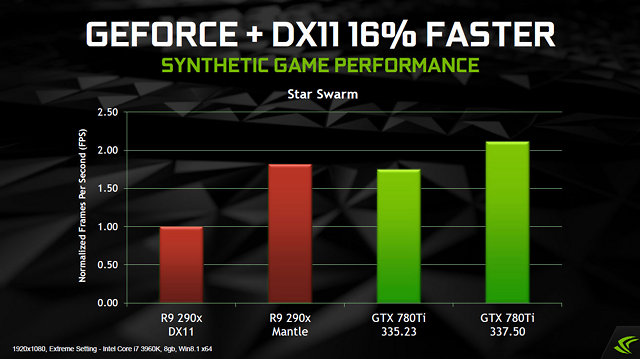
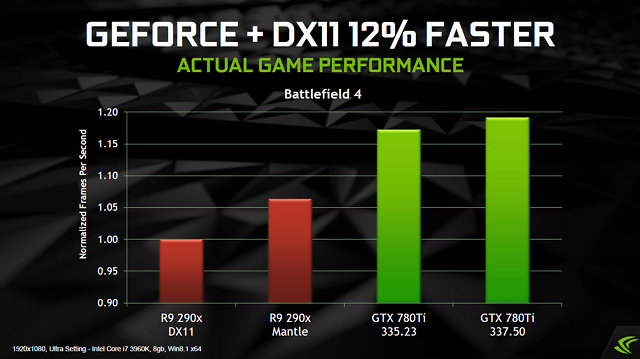

We’ll be sure to post an article with our findings later today as we’ll compare this driver with an older one, so keep an eye for it.
Those interested can download these new drivers from here and here.
Enjoy!

John is the founder and Editor in Chief at DSOGaming. He is a PC gaming fan and highly supports the modding and indie communities. Before creating DSOGaming, John worked on numerous gaming websites. While he is a die-hard PC gamer, his gaming roots can be found on consoles. John loved – and still does – the 16-bit consoles, and considers SNES to be one of the best consoles. Still, the PC platform won him over consoles. That was mainly due to 3DFX and its iconic dedicated 3D accelerator graphics card, Voodoo 2. John has also written a higher degree thesis on the “The Evolution of PC graphics cards.”
Contact: Email
Finally!
Sounds too good to be true almost. Will probably wait for official release, not too fond of beta stuff.
Neat, looking forward to checking this out with Skyrim later!
Yeah lets hear about that later, seems pretty awesome these drivers. To good to be true 🙂
Have justd/l and installed em but dont have Skyrim!
DX9 games can benefit as well.
Where is it? I want it now! It’s 7th of April already.
uhhh…link in the article?
John please see if these new drivers bring any performance increases to Black Flag if you can
I am working on it right now XD.
Thumbs up for the 750ti ^^
ha thanks I figure most big name sites always show the big money gpu’s while they forgot about the cheaper cards that your average pc gamer on a budget will buy.
Saving up for that 4k monitor (:
+1 i have the 750 Ti also and love it!
That’s pretty sweet considering how demanding Black Flag is maxed out with the NVIDIA features on.
yeah I just wanted to max everything out with games for my test just to go crazy and see what kinda gains I get.
http://www.forum-3dcenter.org/vbulletin/showpost.php?p=10170731&postcount=24
An accurate summary of what these drivers do. This is truly a wonder driver.
Really disappointed in these drivers…
How so?
Spent all morning Benching 6 different games, using 3 different drivers and switch between single and SLI and there was only a significant performance increase in one game….
2 of them ( Bioshock infinite and Batman O ) saw a drop in performance…
Yet Warframe saw a STUPID increase in performance. I have no idea why. lol
yeah what can we expect it’s still “beta” Hitman absolution I went fro low 22, high 36, average of 26. to now low 40, high 88? and average 47. Sleeping dogs 14, 22, average 17 to 21, 34, average of 30 on just a 750ti…. All games set on Ultra max AA everything. 1080p
Arkham origins seems to be running worse for me as well.
Will this be a benefit if you are already using a beefy CPU?
It more benefits people who have a CPU bottleneck, i.e the CPU can’t process the GPU data given to it fast enough which pretty much puts me in that category with my Intel Q8400@3.2Ghz/GTX 660.
I went on the Geforce forums and one of the reps said that it supposedly benefits DX11 games. Based on what people are saying, the jump does indeed benefit people with weaker CPUs. That is a strange combination you have there but you did say you are getting a FX 6300 soon so it will be nicely balanced 🙂
Yeah, not had the money to upgrade the CPU because it requires mobo and memory as well. Memory prices have gone up as well and I’d go Intel but an i5 setup costs considerably more and that’s using H87 chipset only.
AMD FX 6300/970/8GB(1866Mhz memory) setup – £230
Intel i5 4440/H87/8GB(1600Mhz memory) setup – £284
Basically I could go SLI on the AMD setup for £250.
780ti performance already better than r290 even with mantle
this benchmark doesnt really prove anything
if this was showdown between mantle and nvidia’s optimize version directx 11,then nvidia should provide benchmark using same gpu
And will be vanishing Obcjects in nV opt. like always and blurry downgraded textures 😉 lol
The point is that this driver beats R290+ Mantle in BF4, it didn’t before.
Official NVIDIA GeForce.com story is online: http://www.geforce.com/whats-new/articles/nvidia-geforce-337-50-beta-performance-driver
Includes benchmarks galore.
Also, GeForce Experience 2.0 is out: http://www.geforce.com/whats-new/articles/geforce-experience-2-0 Introduces the long-awaited desktop capture mode for ShadowPlay.
Alright, just finished testing these drivers on Battlefield 4. Surprisingly, there is a noticable difference in texture loading times. With these new drivers textures of the soldier model in loadout menu now load a lot faster (<1 sec), with previous drivers it took around 1-1,5 seconds to fully load. This is the most important thing that I've noticed so far.
Maybe there is actually a little framerate increase but I'm not completely sure about that.
I’m seeing gains as well in BF4, it’s now keeping above 30fps on High/1080p in stressful areas like getting past the BMP towards the town. My Q8400 is weak so I can tell the difference in the high CPU areas.
Wow, just got a big boost in Sleeping Dogs benchmark.:
335.23: 61FPS
337.50: 76FPS
That is a sweet increase for that card!
Pretty much getting that gain because my CPU is weak and the game is CPU bound.
So, in essence, this driver is relieving pressure off the CPU and sending those instructions ( or certain instructions ) to the GPU? or is that more API-ish?
Yes, using shader cache to do it.
I may have to reinstall AC Black Flag (after I get tired of Titanfall) to see how these drivers perform.
Just got done trying out BLOPS II seeing as it was one of the games mentioned in the official benchmarks. with everything maxed ( even FXAA, even though it makes it blurry ) I was getting 240 -270 FPS with the old drivers and now just hit 320! Not like it makes a bunch of real world difference, lol, but it is cool to look at the numbers. Here are my rig stats for full disclosure sake:
4770k ( Stock)
16 gigs Mushkin Blackline 2133
ADATA 256 gig SSD
1TB WD Caviar Black
128 gig Kingston V300 SSD
2 EVGA GTX 770s
Corsair H100 cooler
Corsair HX 1050 PSU
Windows 8.1
Asus VG248QE @ 144hrz
Ok, so I have been having some fun with this driver. lol I am not sure how healthy it is to switch back and forth between drivers but, I just had to see the difference. As I expand the amount of games / benchmarks that I do, the numbers become more impressive. Also, the first time I installed the drivers, for some reason Physx did not install properly so I went back and reinstalled. Both Batman O and Bioshock Infinite saw a 5 and 7 FPS frame increase from the first time I installed the driver. So I guess I have to eat some crow and withdraw my complaining about the driver. lol Just finished the Resident Evil Benchmark. Yeah I know it is DX9c but this driver is like a kid with a new BB gun, you just got to shoot everything. lol To my surprise, there was a sharp increase in performance.
335.23: 15,642
337.50: 20,821
That is just nutty to me.
Star Swarm Average FPS 70.17
Just tried out AVP. Another homerun. Plays amazing maxed out!
Nice! I’m not big on video capture, but that’s what I like about ShadowPlay- I don’t have to be to do it, and I don’t even notice a performance hit. Also the name of one of Joy Division’s best songs…
When I installed this driver, every game got a big hit in FPS. Even the Unreal Engine Editor went shaky and like this for me:
http://i.imgur.com/RHgorMh.png?1
http://i.imgur.com/ugicqHA.png?1
So I went back to old driver. Sorry nVidia , I love your drivers, but this is by far the worst and the most dangerous update I ever had 5 I even thought my PC was dead because everything went crazy). I hope you solve those problems and especially the UE4 edito problem.
It’s a “beta”, report it and hope it gets fixed.
Please where to report to nVidia, there are so many sections there.
http://surveys.nvidia.com/index.jsp?pi=6e7ea6bb4a02641fa8f07694a40f8ac6