
NVIDIA GeForce header image

NVIDIA DLSS 2 tested in 24 games with shocking results

DLSS, or Deep Learning Super Resolution, renders a game at a lower resolution, and then uses AI techniques in order to reconstruct it at a higher resolution (while also offering better performance). However, everyone was kind of disappointed when NVIDIA first launched it. You see, DLSS 1 was blurry as hell and looked way worse than native resolutions. NVIDIA was quick to react and then released DLSS 2, which impressed all of us.

So, Hardware Unboxed has decided to test NVIDIA’s DLSS 2 tech in 24 games. The purpose of its video was to see whether DLSS 2 could be as good (or better) as the native 4K or native 1440p. And the results are truly shocking.
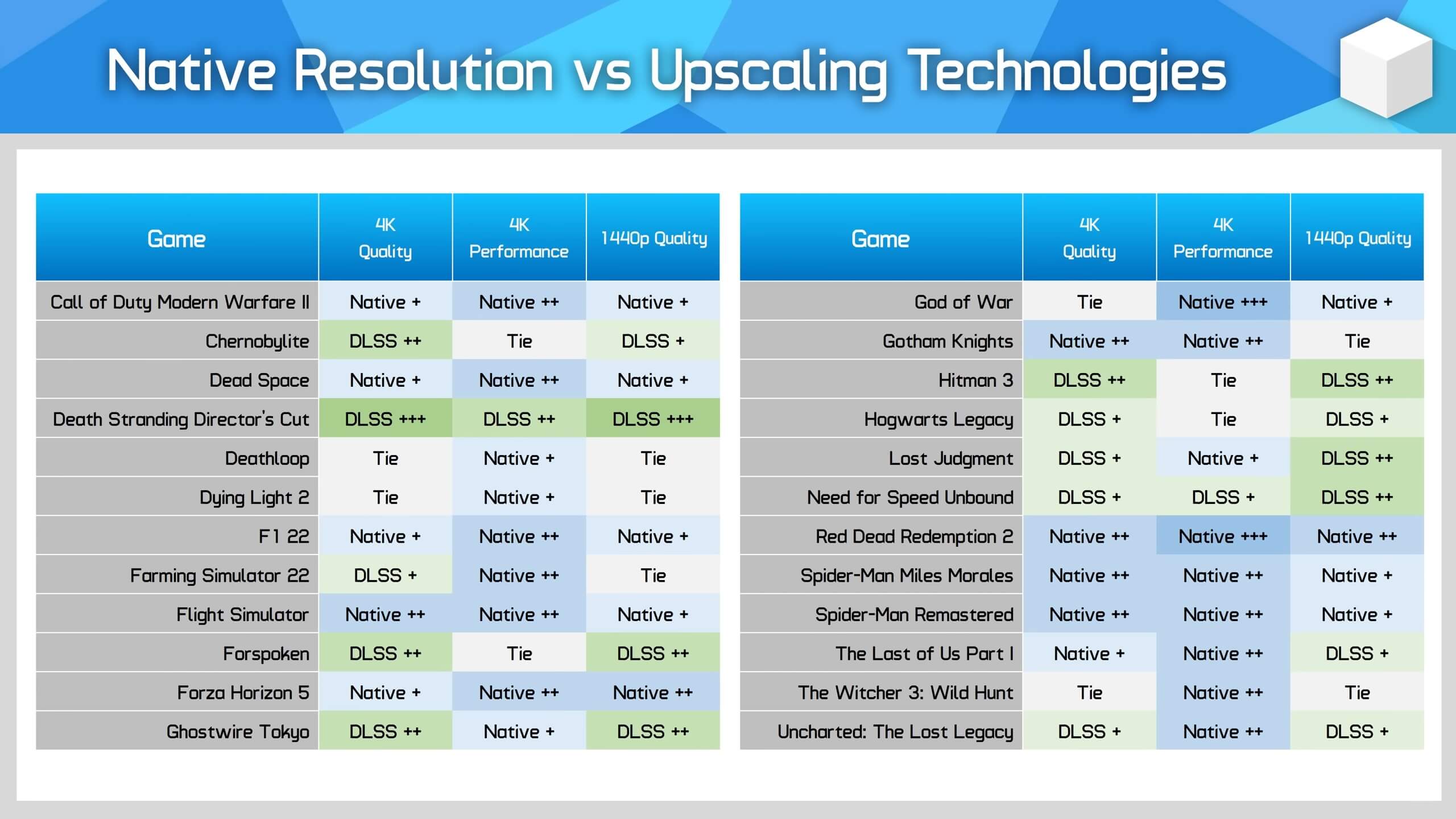
Native Resolutions vs DLSS 2

In the 24 games that HU tested, DLSS 2 was able to match the quality of native 4K in 4 games. That’s of course in its Quality Mode. And, as you may have noticed in our articles, that’s the only mode we suggest using. Moreover, in five games, DLSS 2 looked slightly better than native 4K. Not only that, but DLSS 2 looked noticeably better than native 4K in six games. And then, native 4K looked slightly and noticeably better than DLSS 2 in ten games.

Let’s start with the obvious. NVIDIA never claimed that DLSS 2 could provide better image quality than native 4K or native 1440p. Thus, the fact that DLSS 2 can look better than native 4K in five games is incredible. For the most part, DLSS 2 can match the quality of native 4K and native 1440p, which is why we always suggest enabling it. Furthermore, players can use newer DLLs in order to resolve some issues that were present in older games (in which DLSS 2 looked noticeably worse than native resolution).

All in all, DLSS 2 is an impressive reconstruction tech. We’ve been saying this for a while, and the following video backs up our claims.

Enjoy!

Is DLSS Really "Better Than Native"? - 24 Game Comparison, DLSS 2 vs FSR 2 vs Native

71 thoughts on “NVIDIA DLSS 2 tested in 24 games with shocking results”

        1. Nvidia renamed DLSS2 to DLSS Super Resolution and it’s included by default in DLSS3. The only defining feature of DLSS3 is Frame Generation.

          1. This is partially marketing talk, partially true. Any game with DLSS3 will implictely support DLSS2. But that still means they’re separate.

        2. https://uploads.disquscdn.com/images/a197a0547a26d200008cd4431aab3b96cdae5580c37ec8e4b1ff830f3f7dd0cb.png

          “DLSS 3 games are backwards compatible with DLSS 2 technology. DLSS 3 technology is supported on GeForce RTX 40 Series GPUs. It includes 3 features: our new Frame Generation tech, Super Resolution (the key innovation of DLSS 2), and Reflex. Developers simply integrate DLSS 3, and DLSS 2 is supported by default. NVIDIA continues to improve DLSS 2 by researching and training the AI for DLSS Super Resolution, and will provide model updates for all GeForce RTX gamers, as we’ve been doing since the initial release of DLSS.”

          But I’m sure you won’t be able to handle the cognitive dissonance and end up arguing with Nvidia themselves.

          1. Every game with DLSS3 will also have DLSS2. That doesn’t mean inherently DLSS2 is part of DLSS3.

        1. It’s all confused because DLSS is now on version 3.11.1 or something. Nvidia really f*ked up with the branding.

    1. Are we sure they’re not optimizing because of DLSS, or because that’s how most developers seem to have always worked? Because I think there are still plenty of GPUs out there that don’t support DLSS. I guess FSR could be the real cause for devs getting even more lazy at optimization because FSR isn’t limited to Nvidia/AMD cards.

      1. The only time I see people scrambling for dlss is when Ray tracing kicks in. This isn’t new and if we didn’t have dlss we probably would not be as nearly excited about raytracing in games as we are now. Raytracing is great but it’s a kick in the nuts for performance.

        1. Yeah, developers are probably not focusing making raytracing performance as good as possible because of DLSS, but lack of general optimization is not really a new thing. But I guess for small developers that don’t have enough resources, DLSS is a good thing that they can implement to get around some of the performance issues?

          1. Again though, I don’t think you can look at dls saving raytracing as unoptimized raytracing. Ray tracing will always and forever require a significant chunk of performance to output any worthwhile effects. However the public perception demands that framestes be maintained or increase as visual quality increases and that isn’t possible. So with dlss we don’t get an observable quality loss but we do get an observable fps gain.

        2. ? Did you not read the article? DLSS look better than native in a lot of cases because of the quality of it’s antialiasing. It’s results are better than TAA and less blurry. Especially at 4k. This should only improve over time since that is the nature of machine learning.

    2. So here’s the thing, this isn’t new and it is not a dlss thing. Devs have had poorly optimized games for decades. The PS3/360 erra suffered for it and the reason it kind of went away was the next gen consoles using dynamic resolutions. A one trick pony to hide your optimization failings. It was also no surprise when the pc port lacked this and we end up seeing just how bad it really is.

    3. DLSS should be considered as when optimizing. Otherwise you would have games that look worse for no reason. There is no need to use native resolution if you plan your game with DLSS in mind. Call of Duty’s DLSS looks like dogshit for instance while other games look incredible.

      Why make a game look worse for no reason when you can just have it all with DLSS?

      1. Yeah I noticed this on COD the other day. I’ve had DLSS on since day 1 but decided to see how much fps I’d get with it off… the game all of sudden looked 1000 times better with DLSS turned off. I was shocked to how much to be honest.

  1. every single dlss/fsr2 screenshot comparision with a slider I have seen clearly showed that fsr2 looks better. but when nvidia releases new cards, cohencidentally a sellout dlss hype appears and every paid shill pushes it like its reveleation itself

      1. It’s not the screenshots per se it’s YouTube’s crappy encoders blur everything …… One way around that (somewhat) is to bump up the bitrate 10 mbps or on AMD which uses a lower default bitrate than Nvidia 20 – 30 mbps …. The downside is the recordings take up more drive space and take longer to upload but it does help with things like grasses from being a blurry blocky mess

    1. Of course you are entitled to your opinions. However Digital foundry videos have shown time and time again that dlss is still superior.

  2. John, have you tested yourself if DLSS in Quality Mode looks as good as or even better than native 4K in Red Dead Redemption 2?

    It would be interesting to hear your personal opinion on the matter if you feel like checking it out. Thanks!

    1. if you replace the DLL with 2.5.1 it looks better or at least more stable imo. I’m playing at 4k quality

    2. Because dlss is also a good aa, I fine using the quality mode great for securing rock solid frame rates on max settings while getting that sweet sweet free AA.

    3. For games where it looks worse you just have to enable sharpening using nvidia freestyle or reshade or even nvidias driver version via the control panel. It fixes basically all the issues with it.

  3. Very nice for the site to include some very extensive analyses done by 3rd parties that couldn’t be provided 1st party and give valuable information.
    Valuable approach, keep at it.

  4. If the game looks better in dlss, then I’d say the developers have problem with what/how they are doing. Looking at Callisto above DLSS seems like a bandaid on top of poorly functioning engine.

    Recollecting Control I played briefly some time a go, dlss had quite a hard time making signs readable (vs. native 2k) – but that was a lot of time ago.

    Also, considering that DLSS dlls can be swapped easily (and even tools like DLSS Swapper exist) – WHY did hardware unboxed test them with games’ default versions’ …

    1. Probably cause YouTube channels like those want to focus on the general audience in addition to the geeks, so they don’t go into stuff like changing DLSS files etc.

    2. Dlss isn’t just a reconstructive scaler, it also doubled as a form of AA. This is probably what is causing things to look better. Just recently nvidia released the option to use dlss code without the lower resolutions as an AA option.

    3. Control’s issue wasn’t DLSS at all it was an issue with how they streamed textures. There is a mod out there that fixes it. You just have to make the initial texture size 2048 instead of 500 mb. It’s crazy the devs never fixed this because it makes the whole game look like dogshit if you don’t use it.

    4. I asked him the same thing when he was doing his DLSS vs FSR testing ….. To me saying you are going to use the DLSS version that came with the game for testing is like saying I’m only going to test the game with the GPU drivers that came out with the game instead of the latest drivers ….. Or I’m only going to test a motherboard with the BIOS version it originally released with instead of the latest ….. It makes no sense. It’s just not proper test procedure.

      Several of us got on CDPR for releasing Witcher 3 Next Gen with a DLSS version from March 2022 instead of the then latest 2.5.0 which made a noticeable difference when dropped in and now they release Witcher 3 and Cyberpunk updates with the latest version of DLSS. There is really no reason for a developer to not include the latest DLSS 2 version in an update other than being too damned lazy to grab it and add it to the update package.

      1. The common person understands updating GPU drivers. Hot swapping DLLs for a better trained temporal AA reconstruction model is quite a bit beyond nomie reach or comprehension.

  5. It’s unfortunate that DLSS isn’t available to owners of the various handheld gaming PCs including Steam Deck. AMD’s equivalent isn’t as good. It’ll be interesting to see if DLSS is featured in Nintendo’s successor to Switch as I’m presuming they’ll be sticking with Nvidia.

    1. I believe DLSS is pretty much a necessity at this point for the Switch-next if they hope to at least somewhat compete with current-gen consoles.

      That being said, there’s still a fair bit of performance which can and will be squeezed out of the Steam Deck by Valve…

      1. We have actually seen it, Xenoblade 3 uses a form of fsr2, a reconstructive dynamic resolution scaler. The game is a painfully lower resolution but hides it well with it.

        1. It’s still TAA with dynamic resolution. If it would’ve used FSR 2.x, it would’ve looked significantly better.

          1. I’m actually failing to understand the difference of fsr 2.0 and temporal up sampling. Both use previous frame data to reconstruct the current frame. Dlss uses ai cores but fsr 2.0 does not.

          2. TAA uses frame accumulation of the same resolution. FSR2/DLSS also do temporal accumulation when upscaling.

      2. I think you can mod the FSR2 game to use DLSS instead, RE Village is the example. But of course you need NVIDIA GPU that Steam Deck didnt have

    2. I am happy to see amd doubled down on fsr and made 2.0. it may not go toe to toe but it is damn close and offers a resolution reconstruction option that is sorely needed. Raytracing offers leaps in graphical effects but will always suffer in performance, so we need it to recover that performance loss.

  6. Based on my experience with many of the games tested, I agree with their assessment basically 100%. I wonder if they did blind testing (haven’t watched the video yet). Glad they were objective as I don’t think they ever have said dlss can look better than native.

  7. I only use DLAA in games anymore, that means I’ll only get DLSS games.
    Sorry Jedi Survivor and Dead Island 2, but you chose to only offer sh**ty, worse than TAA looking, FSR.

    1. FSR2 doesn’t look worse than TAA, don’t be silly.

      Plus, if you really dislike FSR2, that much, you can use Unreal’s TSR instead.

      1. FSR looks worse than TAA in RE4 remake. Also hardware unboxed claims fsr looks worse than TAA in many other games.

        1. And I’ll agree with the RE4R take. Looks like a poor implementation. A lot of games unfortunately have poor or outdated implementations.

          It’s honestly ridiculous how FSR2 modded in often looks better than native solutions.

          So it’s not that the technology is poor, it’s that a lot of implementations are poor.

  8. DLSS can only get better over time. Remember when it first launched with games like Battlefield V? They have come a long way in only a few years, imagine the next couple of years.

    1. That’s the big advantage of AI, the more training and data you throw at it the better it gets although there is sure to be a point of Diminishing Returns

  9. Welcome to a world where every game uses TAA, which blurs out the detail so badly that upscaled lower resolution video looks better…

    Just give me a way to turn that sh*t off. Or better yet, go back to using forward rendering and MSAA with a CMAA2 post processing pass to take care of the aliasing the MSAA doesn’t get. It’ll perform better, and it will look significantly better.

    1. MSAA never performs better than TAA and with a proper DLSS2/FSR2 implementation, it doesn’t look better than either, given these temporal uspcalers reconstruct, MSAA doesn’t.

      1. MSAA is always better than TAA, 100% of the time. It doesn’t blur things out, and it doesn’t add ghosting to the rendered image like TAA does.

        As for DLSS and FSR2, they have to reconstruct details because they are upscaling from a lower resolution. MSAA doesn’t have to do that because the game is normally running at native resolution. Since forward rendered games with MSAA usually perform much better than deferred rendered games with TAA, there’s usually no need at all for downsampling technologies such as DLSS, FSR, and XeSS because a forward rendered game will run at native resolution at much higher framerates.

        In addition CMAA2 (Intel’s Conservative Morphological Anti-Aliasing 2.0) can enhance MSAA and make it look better while helping to deal with aliasing that MSAA can’t touch. Add to that the fact that most screen space effects can be used with forward rendering these days and the number of light sources that can be used with forward rendering is nowhere near as limited as it used to be, and deferred rendering doesn’t seem to be necessary at all anymore.

        BTW: The only reason anyone thinks TAA is necessary is due to the fact that aliasing is considerably worse when a game is using a deferred renderer and because game developers do stupid stuff like dithered rendering of transparencies (aka. DitherTemporalAA) in things like hair, shadows, and other transparencies. If game devs would go back to using forward rendering there would be significantly less aliasing, and if they would also just stop dithering everything in sight then games would look a lot better without needing horrible technologies like TAA.

    2. Finally an intellectual who speaks common sense.

      Sadly there’s nothing much we can do anymore considering how the entire industry has been swayed into utilizing TAA and deferred rendering thanks to NVIDIA’s pseudo garbage architectures from Kepler to Pascal being computational lemons and their sheer market dominance allowing NVIDIA to push developers into utilizing TXAA (Deferred Rendering) with their GameWorks SDK.

      Now we can enjoy garbage games with washed out blurred textures and be amazed when BS regressive upscaling technologies such as FSR / DLSS are considered “better than native”.

  10. One thing he doesn’t mention is some games don’t actually use native TAA but are using TAAU (Temporal Anti Aliasing Upsampled) which works kind of like FSR. Witcher 3 Next Gen and Cyberpunk 2077 are two notable games that are using TAAU and look better with DLSS 2 Quality (less ghosting) I also suspect that some games that have TAA baked in like God of War are also using TAAU which is why DLSS 2 Quality looks better there also.

  11. Seems to me, DLSS was supposed to take a normal game youre playing at 1/2/4K and upscale it to like 4/8/16K… without any loss in performance… funny how that never happened.

Leave a Reply

Your email address will not be published. Required fields are marked *
