
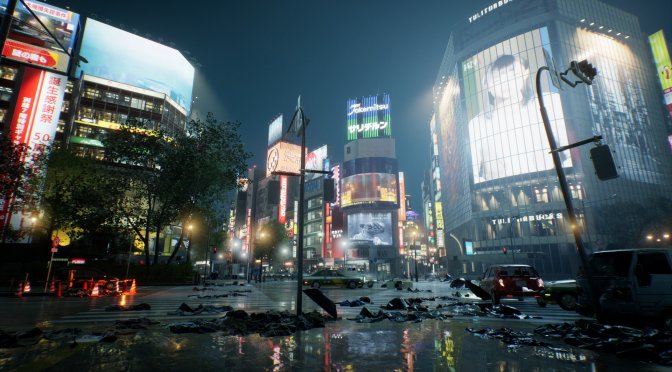
Tango Gameworks has revealed the PC and Ray Tracing requirements for its upcoming game, Ghostwire: Tokyo. Ghostwire: Tokyo uses Unreal Engine 4 and releases on March 25th.
According to the devs, PC gamers will at least need an Intel Core i7 4770K or AMD Ryzen 5 2600 with 12GB of RAM and an NVIDIA GTX 1060 or AMD RX 5500 XT. The game will also require 20GB of free hard-disk space.
For enabling the game’s Ray Tracing effects, PC gamers will at least need an NVIDIA RTX 2060 or AMD RX 6700 XT. As we’ve already reported, the game will support NVIDIA’s DLSS tech. Thankfully for AMD gamers, Ghostwire: Tokyo will also support AMD FSR 1.0.
Bethesda has not provided us with a review code, so don’t expect a day-1 PC Performance Analysis. Nevertheless, we’ve already purchased the game and will have one a few days after release.
Stay tuned for more!
Ghostwire: Tokyo PC Requirements
MINIMUM SPECS: UP TO 1280P WITH LOW SETTINGS
- OS: 64-BIT WINDOWS 10 VERSION 1909 OR HIGHER
- PROCESSOR: CORE i7 4770K @ 3.5GHZ OR AMD RYZEN 5 2600
- MEMORY: 12 GB
- GRAPHICS: NVIDIA GTX 1060 OR AMD RX 5500 XT (VRAM 6 GB+)
- STORAGE: 20 GB AVAILABLE SPACE (SSD RECOMMENDED)
- DIRECTX: VERSION 12
RECOMMENDED SPECS: UP TO 1920P WITH HIGH SETTINGS
- OS: 64-BIT WINDOWS 10 VERSION 1909 OR HIGHER
- PROCESSOR: CORE i7 6700 @ 3.4GHZ OR AMD RYZEN 5 2600
- MEMORY: 16GB
- GRAPHICS: NVIDIA GTX 1080 OR AMD RX 5600 XT (VRAM 6 GB+)
- STORAGE: 20 GB AVAILABLE SPACE (SSD)
- DIRECTX: VERSION 12
HIGHEST SPECS: UP TO 2160P WITH HIGHEST SETTINGS
- OS: 64-BIT WINDOWS 10 VERSION 1909 OR HIGHER
- PROCESSOR: CORE i7 8700 OR AMD RYZEN 5 5600X
- MEMORY: 16 GB
- GRAPHICS: NVIDIA RTX 2080S/ RTX 3070 OR AMD RX 6800 XT (VRAM 8 GB+)
- STORAGE: 20 GB AVAILABLE SPACE (SSD)
- DIRECTX: VERSION 12
RAY TRACING (RT) SPECIFICATIONS
RT MINIMUM SPECS: UP TO 1080P WITH LOW SETTINGS
- OS: 64-BIT WINDOWS 10 VERSION 1909 OR HIGHER
- PROCESSOR: CORE i7 8700 OR AMD RYZEN 5 3600
- MEMORY: 16 GB
- GRAPHICS: NVIDIA RTX 2060 (VRAM 6 GB+) OR AMD RX 6700 XT (VRAM 8 GB+)
- STORAGE: 20 GB AVAILABLE SPACE (SSD)
- DIRECTX: VERSION 12
- DLSS (NVIDIA): DISABLED/ FSR 1.0 (AMD): DISABLED
RT RECOMMENDED SPECS: UP TO 1440P WITH HIGH SETTINGS
- OS: 64-BIT WINDOWS 10 VERSION 1909 OR HIGHER
- PROCESSOR: CORE i7 8700 OR AMD RYZEN 5 5600X
- MEMORY: 16 GB
- GRAPHICS: NVIDIA RTX 3070 (VRAM 8 GB+) OR AMD RX 6800 (VRAM 12 GB+)
- STORAGE: 20 GB AVAILABLE SPACE (SSD)
- DIRECTX: VERSION 12
- DLSS (NVIDIA): DISABLED/ FSR 1.0 (AMD): DISABLED
RT HIGHEST SPECS: UP TO 2140P WITH HIGHEST SETTINGS
- OS: 64-BIT WINDOWS 10 VERSION 1909 OR HIGHER
- PROCESSOR: CORE i7 8700 OR AMD RYZEN 5 5600X
- MEMORY: 16 GB
- GRAPHICS: NVIDIA RTX 3080 (VRAM 10 GB+) OR AMD RX 6900 XT (VRAM 12 GB+)
- STORAGE: 20 GB AVAILABLE SPACE (SSD)
- DIRECTX: VERSION 12
- DLSS (NVIDIA): QUALITY/ FSR 1.0 (AMD): BALANCED

John is the founder and Editor in Chief at DSOGaming. He is a PC gaming fan and highly supports the modding and indie communities. Before creating DSOGaming, John worked on numerous gaming websites. While he is a die-hard PC gamer, his gaming roots can be found on consoles. John loved – and still does – the 16-bit consoles, and considers SNES to be one of the best consoles. Still, the PC platform won him over consoles. That was mainly due to 3DFX and its iconic dedicated 3D accelerator graphics card, Voodoo 2. John has also written a higher degree thesis on the “The Evolution of PC graphics cards.”
Contact: Email