
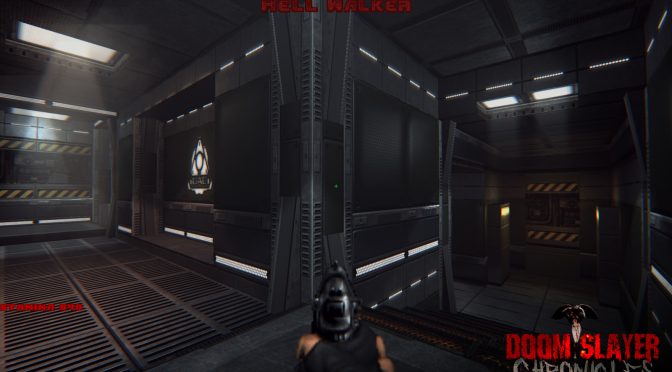
Modder ‘bifurcator_x’ is currently working on the most beautiful and technologically advanced mappack for Doom2 singleplayer, Doom Slayer Chronicles. In order to showcase its amazing visuals, the modder released some screenshots that you can find below.
Doom Slayer Chronicles will take advantage of the newest features of GZDoom, such as hardware shaders, full-screen post-processing, PBR textures (normals and specular maps, also often called “bump mapping”), high-resolution textures, and dynamic lighting.
This is unquestionably the most advanced mappack I’ve seen for GZDoom. The modder aims to release Doom Slayer Chronicles later this Summer so stay tuned for more. Until then, enjoy the following screenshots!

John is the founder and Editor in Chief at DSOGaming. He is a PC gaming fan and highly supports the modding and indie communities. Before creating DSOGaming, John worked on numerous gaming websites. While he is a die-hard PC gamer, his gaming roots can be found on consoles. John loved – and still does – the 16-bit consoles, and considers SNES to be one of the best consoles. Still, the PC platform won him over consoles. That was mainly due to 3DFX and its iconic dedicated 3D accelerator graphics card, Voodoo 2. John has also written a higher degree thesis on the “The Evolution of PC graphics cards.”
Contact: Email


This insanely AMAZING. https://uploads.disquscdn.com/images/3257245ea85020cd83cfd863941361aefbd0599d58ee07c1572b5d89986a0bda.png
Freaking insane!!!!! Damn doe sit look good hey ?
Do Heretic/Hexen with this engine.
GZDoom means no space ants!
Backgrounds looks great but character model and hud icons looks still pixelated and lame…
CORRECTION:
PBR textures do not simply mean specular + normal maps (bump maps). PBR means that the renderer has to shade materials according to a physically based bidirectional reflectance distribution function (BRDF) like GGX instead of the old Blinn-Phong. This ensures that physically accurate features like energy conservation are implemented.
PBR in practice typically includes a normal map, albedo map (diffuse with NO extra shadow information liek baked AO. Micro Occlusion can be acceptable sometimes), specular/metalness map (very different from old specular map, defines how much light is reflected, can also have a color value for metals) and a gloss /roughness map (how wide and scattered the reflection is.)
Only if the BRDF and texture implementation exists can a renderer be considered PBR.
Gzdoom Supports PBR since 3.3.0, and it only works if dynamic lights are present on the map.You can implement it via GLDEFS like this:
material texture "models/weapons/ImperialBlaster/ImperialBlaster.png" {normal "materials/weapon-blaster/Blaster_n.png"
metallic "materials/weapon-blaster/Blaster_m.png"
roughness "materials/weapon-blaster/Blaster_r.png"
ao "materials/weapon-blaster/Blaster_a.png"
//specular "materials/weapon-blaster/Blaster_s.png"
//glossiness 10
//specularlevel 10
//disablefullbright
}
Huh, that’s interesting. I see that it supports it and is mentioned in the forum posts but they don’t have it in the main zdoom webpage.
Try it 🙂 It’s awesome.I’m using it for my mods.You can have 2 workflows, PBR or Legacy. For PBR Workflow normal, metallic, roughness& ao maps are required. For Legacy Gloss/Specular workflow only Normal and Specular maps (green in code) are required. Dynamic Lights must be present on the map!
zdoom(dot)org/wiki/GLDEFS
One more thing. Model curavture (Phong) will affect how the light will bounce of the model. Have that in mind when creating models.
Oh , yeah, be sure to upgrade to latest Gzdoom version.
PBR is supported since 3.3.0, latest is 3.4.1
Awesome, thanks for the info! I’ll definitely try it out. I’m used to a spec/gloss PBR workflow but there’s easy converters that go from spec/gloss to metal/rough so I should be fine. Can’t wait to test this out.
If you want to convert from existing Legacy texture maps, You can easily bake AO from Normal map,and you can create roughness map if you invert the Gloss map. For Metalllic, you will have to create it from scratch. For Albedo, just wash out the black colors in PS.
Or load legacy into Substance painter tweak and export as full PBR
Yup, I’m just following Marmoset’s guide on converting from workflows and using substance painter to export and review.
Here is the PBR Imperial Blaster from the example up in the comments, under a Green/Red Dynamic Light.
https://uploads.disquscdn.com/images/fbbc033148a0fdf0556f2a2df6ba2e2be1aa1090d9fec3d533fbb37479860c87.jpg
Why is he crawling?
