
Are you using a 3rd Gen Ryzen CPU paired with an X570 motherboard, or even any other chipset ? If yes, then kindly go through this finding by HWiNFO, and the newly introduced feature and sensor known as Power Reporting Deviation.
This new feature reveals whether your 3rd Gen Ryzen processor is being tricked by your motherboard into thinking that its power consumption is within normal range and parameter. Some motherboard vendors are sending more power to the CPU, in order to sustain better and higher boost clocks, or to offer support for overclocking. At this time we don’t know the full list of Ryzen Models and Motherboard SKUs which exhibit this behavior though.
Without your knowledge and consent your current motherboard might be ‘silently’ killing the Ryzen processor. Some motherboard manufacturers are intentionally declaring an incorrect motherboard specific reference value in AGESA. They are being called out for misreporting key measurement values on AMD’s Ryzen processors, thus boosting performance in the end. AMD Ryzen processors rely on the motherboard’s VRM controller for power-consumption remote sensing.
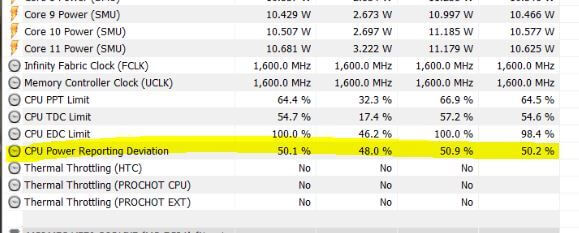
Some Motherboard vendors have found out a way to trick and bypass the processor into thinking that the power consumption is within the normal parameters. But as a matter of fact, it is not, and HWInfo’s developer has found a way to calculate the difference between the power consumption value as reported to the CPU, against the VRM controller’s measured value.
This sensor is called Power Reporting Deviation. A 95-105% integer percentage value deviation can be considered as a normal behavior. But anything outside this range might indicate the Motherboard vendor is deploying a power enhancement trick designed to maximize the performance of the Ryzen CPU, even for those processors running at default stock speeds. This method can reduce their lifespan in the end.
This also results in a higher power draw and more heat production, thus reducing the Ryzen CPU chip’s lifespan, but without the user’s knowledge. To squeeze out more performance some Motherboard vendors adjust the chip’s stock power limits.
According to overclocking expert The Stilt, the method which is being used by motherboard vendors to boost performance on some X570 motherboards consists of willfully misrepresenting power consumption of Ryzen processors which are assigned to operate at normal stock settings. The use of this exploit is not something AMD condones with, let alone promotes.
This method or practice isn’t supported by AMD and could even kill your chip sooner than you might have expected. AM4 Ryzen CPUs rely on telemetry sourced from the motherboard VRM to determine their power consumption, so showing an incorrect reference value will alter the power consumption seen by the CPU.
If suppose the motherboard vendor declares 50% of the correct value, then the CPU would think it consumes half the power than it actually does. But in this particular case the CPU will consume twice the power of the limit set even at stock. Since the power limit is lifted, it allows the CPU to clock higher, thus making it run hotter. This will affect the life-span. This is similar to overclocking or using AMD’s PBO, but it is being done ‘without’ the consent of the end user in the background.
Any value over 100% means your motherboard is over reporting your CPU’s power usage, which would cause it to throttle earlier, hence affecting the performance. But, most motherboard manufacturers wouldn’t do this because it means that their CPU benchmark and Gaming scores will be lower.
A score of less than 100% means that your motherboard is under reporting the power consumption, which will make the CPU speed up, thus increasing the voltage and temperature in the end.
Those interested can download the latest beta version of HWiNFO from here.

Hello, my name is NICK Richardson. I’m an avid PC and tech fan since the good old days of RIVA TNT2, and 3DFX interactive “Voodoo” gaming cards. I love playing mostly First-person shooters, and I’m a die-hard fan of this FPS genre, since the good ‘old Doom and Wolfenstein days.
MUSIC has always been my passion/roots, but I started gaming “casually” when I was young on Nvidia’s GeForce3 series of cards. I’m by no means an avid or a hardcore gamer though, but I just love stuff related to the PC, Games, and technology in general. I’ve been involved with many indie Metal bands worldwide, and have helped them promote their albums in record labels. I’m a very broad-minded down to earth guy. MUSIC is my inner expression, and soul.
Contact: Email