
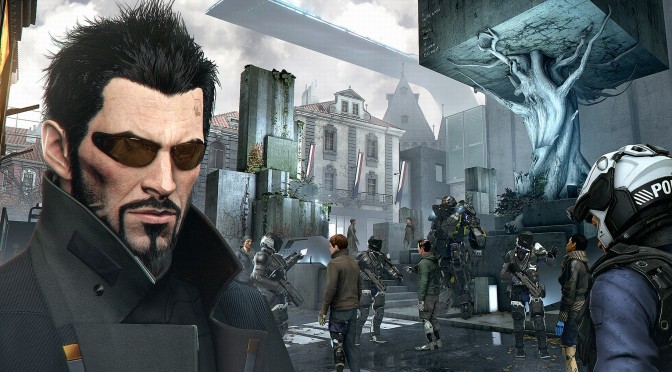
Deus Ex: Mankind Divided – Final Build Will Look Similar To The E3 2015 Demo

In a lengthy interview with Eurogamer, Deus Ex: Mankind Divided’s producer, Oliver Proulx, said that the final build of the game will look similar to the E3 2015 demo. As Oliver said, instead of presenting a demo at E3 that was impossible to achieve in the final version, the team decided to present something that can be considered really close to the overall graphical quality of the final product.

In terms of the graphical fidelity we’re very mindful of what we wanted to show at E3 that we don’t show something that’s impossible to achieve later down the road, and it was really discussed with the team.” said Oliver and continued.

“We’re confident what we showed, what you’ll see when the game comes out, is going to be very consistent in terms of graphical quality. Obviously the game goes through iteration and the debugging phase, so you can pick up some differences there – some improvements, maybe some other compromises – but it’s going to be pretty much what we’ve got.”

Deus Ex: Mankind Divided is coming to current-gen platforms in 2016.

Do note that as Oliver said, even though EIDOS Montreal aims to offer a game with the overall graphics quality of the E3 2015 demo, there might be some compromises here and there. Our guess is that this reference was for the console version, so it will be interesting to see whether the PC version will offer visuals similar to those of the Dawn Tech Demo video (that can be viewed below).


Deus Ex: Mankind Divided - Dawn Engine Tech Demo

43 thoughts on “Deus Ex: Mankind Divided – Final Build Will Look Similar To The E3 2015 Demo”

  1. I’ll believe it when i’ll see it. I’m not hopping in any graphical hype bandwagon anymore after being deceived countless times

  2. Its a an AMD Gaming Evolved title so we know that the game will definitely be optimised for everyone. Its ironic as an Nvidia user I much rather games be AMD Gaming Evolved title than a Nvidia GameWorks title. GameWorks has done more harm than good for PC Gaming.

    1. No it hasn’t, it’s just that NVIDIA have picked bad games, Gameworks itself works well and runs well. Check out the performance with TressFX and HDAO, it’s just as expensive on the GPU as Hairworks and HBAO.

      1. AMD Gaming Evolved = Highly optimised games that look amazing and run well on all systems.

        Nvidia The Way Its Meant To Be Played = Highly unoptimsed and downgraded games, stuffed with GameWorks that cripples the perfomance on all AMD cards and older generation Nvidia cards.

          1. And guess what it has no GameWorks cancer this time around. Instead they are focusing on 4K/60fps to show off the PC version, which is how it should have always been for their NTWIMTBP titles.

          2. The games with Gameoworks would run just as bad without Gameworks because they where badly optimised anyway. BF4, Bioshock Infinite had bad performance issues and bugs

          3. BF4 was a rushed game to meet the current gen console launch but the Single-Player portion was still extremely optimised for how amazing it looks. There is difference between a demanding game and an unoptimised game.

            BioShock Infinite was ported by Iron Galaxy (the same guys behind Batman: Arkham Knight’s PC port) so not that surprised it had some issues at launch but still it is considered one of the most optimised PC games of all time.

          4. Now you are just making excuses for developers. It don’t matter if a game uses Radeon SDK or Nvidia SDK. If the game is not optimized then it will make AMD or Nvidia look like they are to blame.

            It’s just not that simple. GTA V on PC uses both Radeon SDK and Nvidia SDK yet it runs pretty darn great. It’s not fully optimized but its a lot better then what people expected.

            I mean look at Batman Arkham knight. The gameworks features that are allowed to be on are the only things that fully work in the game. Period. And now Nvidia has to step in and fix what Rocksteady/Iron Galaxy never should of have a problem with. And that’s the game in general.

          5. Bioshock Infinite has a lot of low quality baked shadows, if it’s not moving it’s a baked shadow, same with Batman Origins.

        1. Hey , why dont you go F’ yourself.

          Or go join console land and get the F’ out of pc gaming, as you obviously dont have a F’ING clue about what your saying!

      2. Exactly, where does all those retarded dumbf*cks crawl out from.

        GameWorks is fantastic, only an IDIOT that gets a better looking games for FREE, would bi*ch about it.

        If you have a gpu form 1889 then disable those effects, stupid F*CKRS!

    2. SDK has nothing to do with it. Look at Alien isolation. It uses HDAO and sure it’s a fairly optimized game. But at the cost of the AA sucking in the game which is just beyond crazy for a closed off area game… I have to play the game at 2K just to make up for it’s lack of use of AA.

      Just because a game is not pushing graphical limits and running good does not make it a well optimized game.

      Nvidia’s problem is many of their partners have been garbage. I mean you look at a game like Titanfall. Sure it’s not popular but it uses Gameworks and runs better then the Xboxone’s version on the highest settings with gameworks on with just a 750 Ti.

      Witcher 3 is very well optimized. Sure it got downgraded from what was shown but it’s still a well optimized game.

      Farcry4 runs better on AMD hardware… ACU is one of the best looking games in it’s class of a game. Just Ubisoft is garbage for optimization. Even the Xbox1/PS4 version of ACU ran at 18/22fps…

      Blaming gameworks in general is outright stupid. I mean I play Warfame and it’s freaking amazing using PhysX which is the core of gameworks. As well as I been playing Killing Floor 2 and it very well optimized and runs great on AMD hardware as well.

      Don’t let garbage developers make Gameworks a “cancer” as you call it of games.

      1. You have to play the game at 2K (name given to resolutions with roughly 2000 horizontal pixels) to get rid of AA? Excuse me?

        1. He’s jacking up the resolution to kill jaggies because the in-game AA options are ineffective at actually reducing jaggies properly (for that game).

          1. Not sure what you’re having trouble with here. He never said he turned the resolution up to get rid of AA. And it’s pretty obvious that by 2K he means 1440p…

          2. I’m not having trouble with anything, but you seem to be getting dimmer by the comment. 2K refers to resolutions in the order of 2000 horizontal pixels, 1920×1080 would be the closest standard to it.

          3. “2K refers to resolutions in the order of 2000 horizontal pixels, 1920×1080 would be the closest standard to it.”

            And how do you know the user isn’t referring actually to 1080? Think about the situation and you’ll realise that what the user meant by 2K isn’t actually important in the first place, and was never specified clearly enough that you could pick fault with it.

            The sentiment intended by the original statement stands: The user had to resort to increasing resolution over to smooth over jagged edges because the in-game AA options didn’t work.

            It doesn’t matter if the resolution they moved up to was 1080, 1440 or even something considerably lower like 1600 x 900. Or whatever else they may have meant. That’s besides the point.

            At the moment the only one seemingly confused here is you:

            “You have to play the game at [insert resolution] to get rid of AA? Excuse me?”

            This is categorically the exact opposite of what they said. The user stated they had to raise their resolution to get rid of aliasing (reducing jagged edges), not anti-aliasing (which would increase them).

          4. Alright instead of insulting each other’s intelligence in a slog fest invariably leading to an inevitably retarded conclusion lets go through logically. Rereading your comments I think I get the gist. Let me say however that resolutions are rather arbitrarily named. 1080p is the resolution you are calling almost 2k. In most circumstances when I see 2k referenced it is in fact 1440p as the other poster pointed out- that resolution is also named for the vertical pixels much as 1080p before it. 4k on the other hand is referencing the horizontal pixels- which ironically are actually less than 4096 squared which would be true 4k. Most resolutions however are named from the vertical- not horizontal resolution.

            Examples of resolution named for the vertical pixel count 480p, 720p, 1080p (marketed as “HD”), 1440p (marketed as “2k”), 2170p (marketed as “4k”).

            On the subject of the original post, I use downsampling myself- which means I’ve pushed my poor machine and my sad little “HD” Monitor to render games at 3712x 2088 resolution. It really does do away with a lot of the aliasing- better than any other technique I’ve ever tried.

          5. No one markets 2K as 1440p….It’s marketed as QHD. Quad HD.

            And i’m talking about calling resolutions by their horizontal pixel count, xK meaning x thousands horizontal pixels, and it’s not used exactly, it’s for numbers that are roughly X. Both 3840 and 4096 are 4K, both are close to 4 thousand, the latter is used in the movie industry.

          6. We can agree to disagree on this one. I get the impression the guy who said 2k meant it as 1440, however unless they comment we’ll never know. Maybe it’s a regional difference but here in the U.S. 1440 is marketed as 2k. There are a ton of new monitors for instance advertising “2k”. I’ve never seen anything marketed as QHD. As someone very familiar with the movie industry I’ll also point out that actually true 4k- which btw I’m not disagreeing with your definition, is rarely ever used. Many movies end up with an arbitrary resolution that falls somewhere around 3k- 5k. Again the only time I’ve seen companies use the horizontal pixel count is in the case of 4k. They don’t call HD 1920p.

          7. Again I get that. My point is- what you are talking about and the standard, at least here, are two different things. I’m very familiar with how numbers work oddly enough. I make textures for games a hobby and it drives me up a wall when people call a texture which is 4 times larger than the source, twice the resolution. 2k is four times larger than 1k, and so it goes. In terms of computer monitors however that is not how it goes. It might be more logical if they were counted from the horizontal pixel count- or by the actual pixel count- but logic does not play a role as far as marketing is concerned.

          8. Dude she just owned you hard… You should of let it go after you called him/her dim…

        2. yeah 1440p DSR. Deal with it. I can call it 2K because it is 2K. Anicuno76 made you look like a real dip this time around. or should I have said QHD 2560×1440 so you could feel better?

  3. Any dev that tells you a polished marketing preview version will be topped by the final release is lying, good for Eidos telling the truth. Personally I hope they get their metal shaders / reflections for distant objects working, the outdoor scenes looked very odd in the (in-engine) trailer. As long as the gorgeous screenspace reflections are still present in the final version I’m okay with a few downgrades here and there. What I’m more worried about is how they never fixed HR’s stuttering completely. What if that’s still in the engine? The horror.

Leave a Reply

Your email address will not be published. Required fields are marked *