
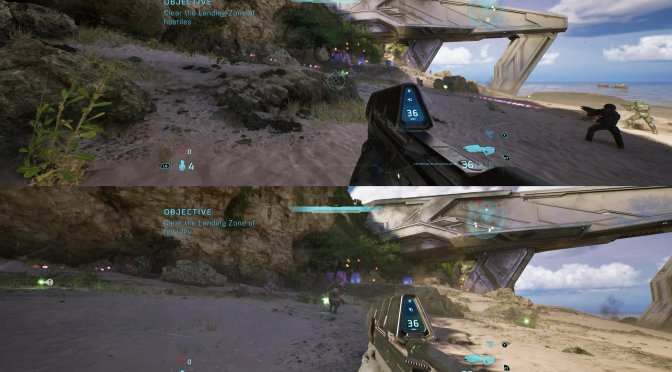
Halo: Campaign Evolved has just been released. And while its console version has local split-screen co-op, the PC version does not. However, in less than a day, modders have enabled it, allowing all PC gamers to enjoy local split-screen co-op with their friends.
There are currently two split-screen co-op mods you can download. So, it’s really up to you to decide which one you prefer. Both of them do the exact same thing.
What’s really funny here is that Halo: Campaign Evolved launched with this mode fully implemented on PC. The devs have not simply enabled it.
The split-screen was already enabled in config. All the split-screen HUD layouts, the sign-in UI, the split-screen VFX variants, and the audio parameters were all still cooked into the game files. So, the co-op mode simply wasn’t exposed in the menus. And that’s where the first mod comes in. It just calls the code that is already sitting there.
The second mod attempts to make some improvements. For instance, it adds independent Player 2 armor and weapon customization. It also introduces settings and customization for Player 2. Furthermore, it adds keyboard/mouse plus controller split-screen mode. It fixes the pause menu and Player 2 UI issues, and it adds an editable Player 2 name.
It’s really ironic that the devs have not enabled the local split-screen co-op mode on PC. This mode has already been implemented, so there is no excuse for not adding an in-game option for it. This is also a great example of why the PC modding community is so valuable. Modders can often unlock features that already exist but are not available to players.
You can find our PC Performance Analysis for Halo: Campaign Evolved here.
Stay tuned for more!


John is the founder and Editor in Chief at DSOGaming. He is a PC gaming fan and highly supports the modding and indie communities. Before creating DSOGaming, John worked on numerous gaming websites. While he is a die-hard PC gamer, his gaming roots can be found on consoles. John loved – and still does – the 16-bit consoles, and considers SNES to be one of the best consoles. Still, the PC platform won him over consoles. That was mainly due to 3DFX and its iconic dedicated 3D accelerator graphics card, Voodoo 2. John has also written a higher degree thesis on the “The Evolution of PC graphics cards.”
Contact: Email