
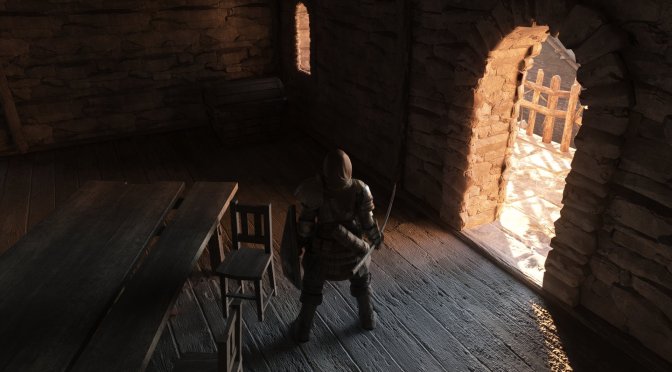
Modder ‘Ganaboy’ has released a brand new beta version of DS2LightingEngine, which adds support for real-time Path Tracing in Dark Souls 2. This new version adds directional Texture AO to everything. Moreover, it fixes some visual issues on AMD and Intel GPUs. So, let’s take a closer look at it.
The May 1st Beta Version fixes the pink/glow issues that could appear on AMD/Linux Machines and Intel GPUs. It also fixes some saturation issues that could occur on AMD GPUs.
As said, this new version adds directional Texture AO to everything. According to the modder, DS2 has texture AO baked into many textures. So, these are now applied in PT Resolve. This should give a ton of depth to many surfaces.
And that’s not all. This new update fixes multiple BVH Issues in Brume/Shulva. Static Clothes are now correctly added in the BVH. The mod also adds a lot of new color grading LUTs. You can access them from F1->LightingPreset->PostProcess->LDR LUT.
All in all, this is a must-have update for everyone who wants to play Dark Souls 2 with Path Tracing. You can download it from its official Discord server.
It’s also worth noting that modder ‘AnemoiaWorks’ is working on a brand new version of his Renewal Mod that will be compatible with this path-traced version of DS2LightingEngine. Renewal 2.0 will overhaul all of the game’s textures. It also aims to bring full PBR materials. With these new PBR materials, the path-traced version should look even better.
Now, if you can’t wait until then, you can use this HD Texture Pack. Created by Trivia Vanille, this HD Texture Pack aims to overhaul all of the game’s textures. The vanilla version of DS2 has some really low-res textures. So, this HD Texture Pack is a must. Alternatively, you can download fromsoftserve’s Second Sin Mod. Its latest version, which is based on the DS2LightingEngine, has Path Tracing. It also comes with higher-quality textures, as well as some other visual changes.
Speaking of Dark Souls 2, you may also want to take a look at the Firelink Edition Mod. Dark Souls 2 Firelink Edition adds new weapons, shields, armor pieces, and two whole new miracles. It also allows players to sell the Soul items at their actual soul value. Soul items display their soul value in the descriptions, and we get some buffed ring effects.
Dark Souls 2 DS2LightingEngine Path Tracing Beta May 1st Update Release Notes
- Fixed pink/glow issue on AMD/Linux Machines and Intel gpus. (NRD Update). Huge thanks to @Aeternitae
- Fixed saturation issues occurring on AMD GPU’s (Red, Yellow, white) – Some light values were wrong.
- BLAS BVH Compaction failures are attempted max for 5 times before stopping. This will stop log flood. Seems to happen on AMD cards on very few meshes in-game
- Directional Texture AO is now applied to everything. DS2 has texture AO baked in many textures these are now applied in PT Resolve.
- Fixed multiple BVH Issues in Brume/Shulva. Shulva/Brume tower access fix also included
- Static Cloth are now correctly added in BVH. LostSinner’s arena, Aldia Keep, Bastille.
- Heide Tower configuration tweaked to have some more blue, orange sun, similar to OG Vanilla.
- Betwixt areas tweaked. Slightly more blue/green hue sun, slight contrast increase. Tiny bit brighter. To help new players
- 2 new atmospheres added. Shulva Robbers(level_shulva associated) and Aldia 4(Aldia levels associated).
- Added a lot of new color grading LUTs. They can be accessed F1->LightingPreset->PostProcess->LDR LUT. You can select any and press “save all atmospheres”. Note these are not 16bit but 8bit LUTS so HDR users may not wanna use them
- Updated Dynamic Emissive list – FullList(Moonlight Greatsword, Bluemoon greatsword, Sorcerer staff, Puzzling Stone sword, Crystal lizards)
- BVH Statistics are now present in F1->PerformanceStatistics->LightingEngineRendererStats
- Compatibility fix included. If you face assertion errors. Please use PCSS for sun shadows
- HWRT Water setting to control SkyCubeIntenstiy, This is used if planar was not rendered only.
- [Recommended] – You can use any texture pack of your choice.
- [Reocmmended] – Use Default LE preset, Until other modders can come up with new ones which are PT compatible. All settings to change contrast/saturation are in F1->LightingTab->PostProcess. Or just use the Global monitor level settings.

John is the founder and Editor in Chief at DSOGaming. He is a PC gaming fan and highly supports the modding and indie communities. Before creating DSOGaming, John worked on numerous gaming websites. While he is a die-hard PC gamer, his gaming roots can be found on consoles. John loved – and still does – the 16-bit consoles, and considers SNES to be one of the best consoles. Still, the PC platform won him over consoles. That was mainly due to 3DFX and its iconic dedicated 3D accelerator graphics card, Voodoo 2. John has also written a higher degree thesis on the “The Evolution of PC graphics cards.”
Contact: Email