
STAR WARS Jedi Survivor new feature

Can you finally get a stutter-free experience in Star Wars Jedi: Survivor?

A couple of days ago, Respawn released Title Update 9 for the PC version of Star Wars Jedi: Survivor. This patch attempted to fix the stuttering issues that plagued the PC version. So, can you finally get a stutter-free experience in this Star Wars game? Time to find out.

For our tests, we used an AMD Ryzen 9 7950X3D, 32GB of DDR5 at 6000Mhz, and NVIDIA’s GeForce RTX 4090. I also used Windows 10 64-bit, and the GeForce 560.94 WHQL driver. Moreover, I’ve disabled the second CCD on our 7950X3D.

Let’s start without any Ray Tracing effects. At 4K with DLSS 3 Frame Generation, you can get a pretty smooth gaming experience. There will still be some minor stutters but as you will see in the following video, the game is finally enjoyable on a high-end CPU.

What’s interesting now is what happens when you lower the resolution to 1440p or 1080p. At 1080p/Max Settings/No Ray Tracing, there are more stutters than at 4K/Max Settings/No RT. This is to be expected, so let me explain what’s happening.

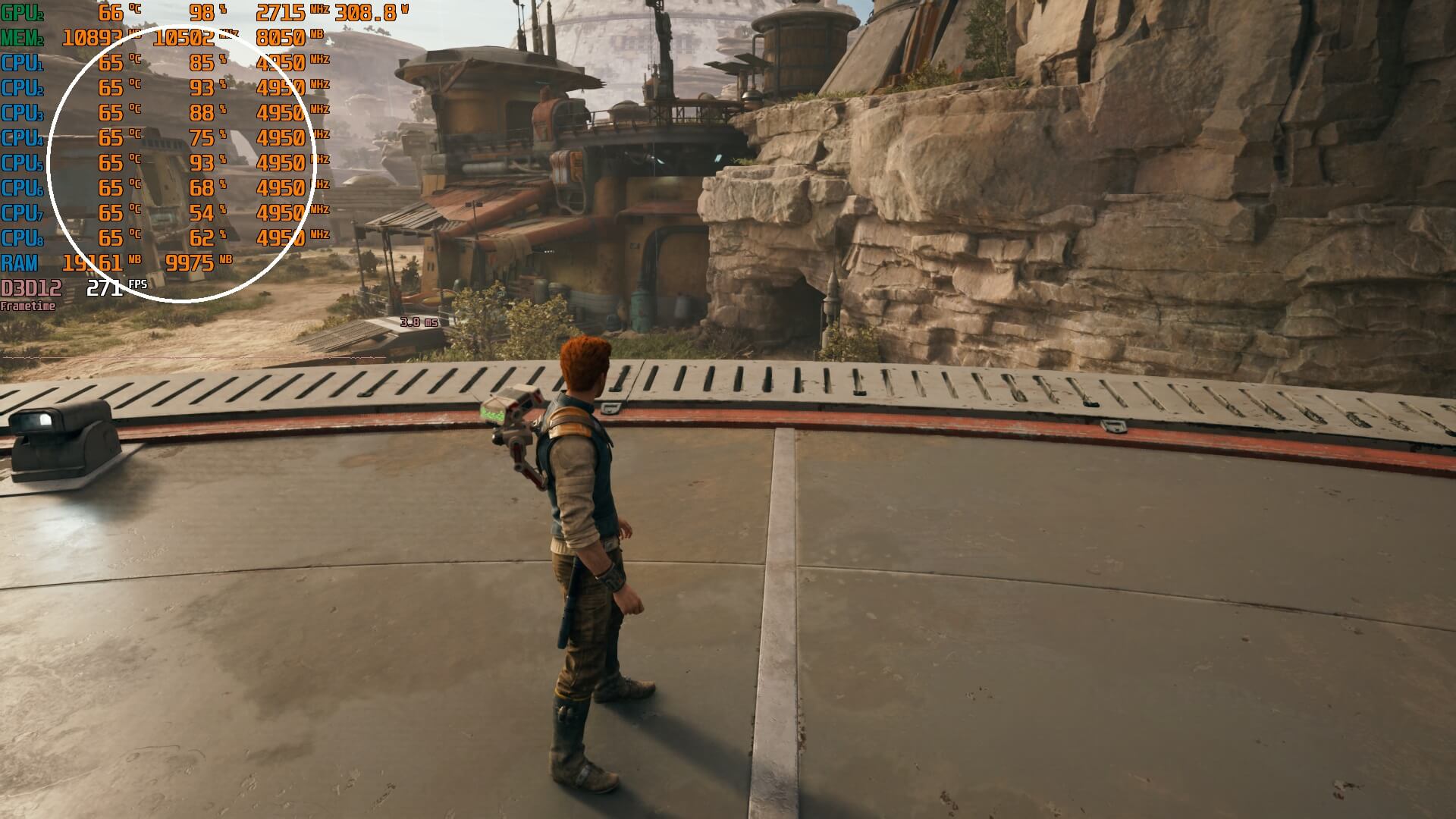
At 4K resolution, the game runs at about 110fps, meaning the GPU sends a new frame every 9ms. This gives the 7950X3D CPU enough time to handle most of the game’s data streaming (though not always). However, at 1080p, the game jumps at 255fps, so the GPU sends a new frame every 4ms. That’s less than half the time it had before. As a result, the CPU has to work much harder, using almost all its cores, which you can see in the following screenshot. Since 4ms isn’t enough time for the 7950X3D to manage all the streaming data while exploring the game world, it causes stuttering.
SW Jedi Survivor CPU bottleneck

Now a solution to this problem is a framerate lock. So, I tried Rivatunner and it appears you can get pretty good results with it. I could spot some “jumpy” frames when I locked the framerate at 120fps but the overall experience was way better than when I had an unlocked framerate.

So, without any Ray Tracing, the game does appear to have fewer stutters right now. As I said, though, there are still some traversal stutters. These are nowhere close to what we had previously. Still, you should not expect a 100% stutter-free experience. The game now is similar to the consoles, as both PS5 and Xbox Series X also suffer from very few stutters. So, no. There isn’t currently any platform that can offer a 100% stutter-free experience. Again, both PS5 and Xbox Series X still have traversal stutters.

Sadly, things get worse once you enable Ray Tracing. As we’ve seen in a lot of games, Ray Tracing can also bring a big hit to the CPU. And that’s precisely what’s happening here. Even at 4K with DLSS 3 Quality and Frame Generation, we could not get great frametimes. Without DLSS 3 Frame Generation, there are numerous stutters in various places. DLSS 3 FG can help minimize some of them, but there are still various stutters that can be easily spotted (without even looking at the frametime graph).

In conclusion, at 4K with DLSS 3 Frame Generation on a high-end PC with an NVIDIA RTX 4090, you will be able to finally enjoy Star Wars Jedi: Survivor. That is if you don’t use its Ray Tracing effects. Without RT, Star Wars Jedi: Survivor can run smoothly most of the time. Owners of weaker GPUs should be fine at 1440p as they will be GPU-limited, and not CPU-limited. Things get a bit messier in this game once you approach CPU-bound situations. Still, the overall experience right now is way better than what it was before. And while the game has not been fully fixed, it’s at least in a way better state. This is no longer a stutter-fest, and that’s in my opinion the most important thing. Respawn DID improve things, and this isn’t a placebo effect!


Star Wars Jedi Survivor - Patch 9 - PC Stuttering Benchmark Test

38 thoughts on “Can you finally get a stutter-free experience in Star Wars Jedi: Survivor?”

  1. "Let’s start without any Ray Tracing effects. At 4K with DLSS 3 Frame Generation, you can get a pretty smooth gaming experience. There will still be some minor stutters but as you will see in the following video, the game is finally enjoyable on a high-end CPU."

    thank got a 2000 dollar gpu can now run the game well, meanwhile some guy tested the game on gtx 1650 and guess what? It runs far worse now than on release. They ruined optimization on the lower end.

  2. MSI afterburner can't properly measure how cores are used. You need a profiler for that.

    And it's safe to assume that if MSI afterburner shows 8 cores in efficient use, it is baloney.

    Any data that can be highly parallelized, should be running on the GPU.

    Secondly, a program is only as fast as its slowest part, and in games that part are algorithms that run in sequential order. You can throw 400 cooks into a kitchen, at some point everyone is going to have to wait for the meat to cook, adding 400 more cooks is not going to speed that up.

    Amdahl's law. Games are never going to use 8 or even 6 cores with any efficiency.

  3. From what I saw, it now holds a pretty steady framerate with the latest patch on the Steam Deck.

    However textures are still popping in late.

      1. Sure, however the traversal stutters were still happening, which got greatly reduced with this patch.

        BTW, I've been told that Digital Foundry is currently working on a video about Bazzite on the ROG Ally, which is a SteamOS clone, kinda.

        Will be interesting to hear their impressions, even though the current state of gaming on Linux is far from optimal.

        Still, should provide a decent amount of exposure.

        We'll see…

  4. MSI afterburner can't properly measure how cores are used. You need a profiler for that.

    And it's safe to assume that if MSI afterburner shows 8 cores in efficient use, it is baloney.

    Any data that can be highly parallelized, should be running on the GPU.

    Secondly, a program is only as fast as its slowest part, and in games that part are algorithms that run in sequential order. You can throw 400 cooks into a kitchen, at some point everyone is going to have to wait for the meat to cook, adding 400 more cooks is not going to speed that up.

    Amdahl's law. Games are never going to use 8 or even 6 cores with any efficiency, because the parts that need to be completed in sequential order each render pass, are substantial, they will always be the bottleneck on a CPU. That's why games are so hungry for CPU cache and clockspeed, not cores.

    1. It's a fact that the game uses all those cores (when you don't run the game, MSI Afterburner reports 0-1% usage on those cores). Whether the game uses them effectively or whether there is room for improvement/optimization are two completely different topics.

      BTW, I agree with you. There is a limit at how much you can multi-thread an engine/game. The main thread will always be the main bottleneck (as we've seen in some games that mainly max out one CPU core). Unless of course you have an engine guru that can multi-thread the sh*t out of it (most companies don't have such talented coders though). That's why we still rely on IPC and cache for better performance in most CPU-bound games. However, there are already games that benefit from six (and in some cases even from eight) CPU cores.

      The problem in some games is when they solely rely on two or three CPU cores, when in fact they could benefit from parallelizing some of their sub-systems on other CPU cores. Far Cry 6 is one of them (that was not fixed and still relies heavily on one CPU core).

      However, we also got "CPU performance patches" for games that previously relied on 1-2 CPU cores, like Halo Wars, Forza Horizon 3, Gotham Knights, Crysis Remastered and more. So there are at least studios that try to improve/optimize their games when it comes to CPU usage/utilization.

      https://www.dsogaming.com/patches/gotham-knights-february-14th-update-promises-to-significantly-improve-performance/

      https://www.dsogaming.com/news/is-forza-horizon-3s-surfers-paradise-now-playable-in-60fps-yes-yes-it-is/

      https://www.dsogaming.com/news/halo-wars-2-free-demo-available-for-download-on-windows-store/

      https://www.dsogaming.com/news/crysis-remastered-now-runs-81-faster-than-its-launch-version/

  5. John thanks for comfirming my experience. The game runs smooth at 1440p for me with DLSS Quality and FG on its highest settings with Gsync and 116 fps ( 120Hz monitor ). RTX4090 + R7 7800X3D 32 gb.
    Koboh area was a stutter fest now its just here and there.
    Ray Tracing is a disaster with this game, the RT reflections are barely noticable and i just saw a video of RTX on and off.. the difference is… nihil. RT is causing so much microstutters especially in Koboh and when panning around it drove me mad. Reading this article sums exactely up what im experiencing so its not me but the game.

        1. We can’t know for sure, but if I had to guess, I’d say it was at least part of the problem. That’s likely why EA decided to remove Denuvo, to free up more CPU resources.

  6. John : "Since 4ms isn’t enough time for the 7950X3D to manage all the streaming data while exploring the game world, it causes stuttering." So what I understand is that Ryzen 7950X3D in the form of 7800X3D as you disabled the second CCD is holding back RTX 4090 (Bottleneck) ?

    1. The other way around. The GPU is so fast that it causes issues to the CPU. The problem is that the game streams data while you explore it. If the CPU does not have enough time to handle/load all of them, it will cause a stutter. If it does have enough time, you won’t get stutters. The higher the framerate, the less time the CPU has to handle the data. That’s also why you see fewer stutters when you lock the framerate to 60fps (you give the CPU more time so that it can load everything).

      There are ways to fix this issue, but it requires a complete rewrite of the renderer. For instance, you can have the game continuously loading small amounts of data instead of loading a huge amount of data at specific times.

  7. The game runs very good without RT and looks great. RT ruins the frame times. So, you will be getting a good frame rate still with a 4090, but it doesn't feel smooth. This is my experience and I just turn off RT. I avoided the game prior to this patch as I didn't want to tolerate garbage performance.

  8. John thanks for comfirming my experience. The game runs smooth at 1440p for me with DLSS Quality and FG on its highest settings with Gsync and 116 fps ( 120Hz monitor ). RTX4090 + R7 7800X3D 32 gb.
    Koboh area was a stutter fest, now its just here and there. So i can finally play this game without having to suffer the irritating stutters.

    But with Ray Tracing its still a disaster, the RT reflections are barely noticable and i just saw a video of RTX on and off.. the difference is… nihil. RT is causing so much microstutters especially in Koboh and when panning around it drove me mad. Reading this article sums exactely up what im experiencing so its not me but the game.

  9. CPU bottlenecked stuttering is a thing of the past with lossless scaling framegen. Cap at 72 fps and framgen to 144 fps. Looks stunning. Problem solved. You can also crank the image quality settings / resolution higher than you would have otherwise. I even did this with the old, easy to run game Borderlands 2. Much to my surprise, the framepacing and image quality is noticeably smoother when moving the camera quickly using 72 to 144 fps framegen vs. running native 144 fps capped (at monitor refresh rate). Image artefacts are not noticeable, especially if you render at a higher resolution than the screen and downscale (e.g. 3413 x 1920 DLDSR resolution downscaled to 1440p) .

    1. I also thought Fallout 4 almost seemed more fluid at times with 30 FPS interpolated to 60 FPS through LSFG than at native 60 FPS here.

      1. Games that can't run at 60 to 72, specifically due to CPU bottlenecking are rare. Usually that's due to GPU bottleneck, especially when like above people are using silly Ultra settings.

      1. It doesn't at high resolutions and higher framerates. As I said, especially if you render at higher resolution and downscale. It does give noticeable artefacts if scaling 30 fps 1080p, but that's not how this software should be used. I never use it to scale anything lower than 60 fps; the software author states the same.

  10. The game runs fine without RT on my 7800X3D and 4080S. With RT I still get high refreshrate (120fps), but I see microstuttering when I slowly pan the camera.

  11. This game made me so mad performance wise (I also have a 7950x3d/4090) that I basically stop playing it a month after launch.

    Something interesting to try to help resolve stutter on absurdly good hardware does exist…for the most part. I can't explain why because it makes absolutely no sense but using the ASI DLSS injection mod (like one of PrayDogs) actually fixed 90% of stutter with RT enabled at 4k DLSS Quality for me right before I stopped playing it forever out of anger lol.

    Cant hurt to try especially if you want RT enabled in this horribly optimized game… One of 3 that year from EA, all highly anticipated releases and all 3 were borked. Dead Space remake was another of them but thankfully that runs smoothly for me at 4k DLSS Quality, max settings and RT. I always get a stable above 60 fps and my frame times are pretty solid as well.

  12. I can play the game using Gtx 1060 3gb! Can't believe how smooth it is. Yes a bit stutter here and there while loading new areas but what I did to achieve this was:
    1. Disable in game V-Sync + low/medium settings and use Amd Fsr performance/ultra performance mode.
    (yes image looks bad especially on large tv's but on a small monitor it looks ok-ish).
    2. Load the game using Special K and enable Special K V-Sync (On option) + Special K 30 fps cap. (for better frame pacing and lower input lag.)
    3. Use the Special K option to disable the forced Nvidia Reflex that the game is using.
    And voilà perfect framepacing with almost 0 stutters!

  13. I read that if you uninstall the game and reinstall it after the patch it is supposed to help a a lot. I cannot confirm if this works because I have not done it.

  14. With an overclocked 9800X3D, 4090, and Intel Optane drive, I still get massive stutters in this game. The odd thing is that it doesn’t show the CPU cores being maxed out while it’s happening. So I’m not sure that’s entirely the issue. May be related memory bandwidth. We’ll see if 5090 on PCIe 5.0 with 1.8TB/s bandwidth still stutters as much in a few weeks.

Leave a Reply

Your email address will not be published. Required fields are marked *