It appears that unofficial pre-order pricing for Intel’s entire 11th Gen Rocket Lake Desktop CPU family has been spotted online. Preliminary pre-order prices have been listed by one US retailer Milwaukeepc for the entire Rocket Lake-S CPU lineup, as spotted by Harukaze5719.
This US retailer has been around since 1988, and they have listed the pricing of these processors way before the official announcement by Intel. As reported earlier by Wccftech, Rocket Lake 11th gen core family will be officially unveiled on 16th March 2021, and the sales/review embargo ends on 30th of March 2021.
So you should bear in mind that these early pre-order prices are massively inflated compared to Intel’s official MSRP. These might as well be placeholder price listings. For example, the flagship Core i9-11900K chip will retail for $599.99, which happens to be $100 USD higher than the MSRP of the previous gen core i9-10900K Comet Lake CPU.
The Core i9-10900K debuted roughly for $499.00, so we’re looking at almost 20% increase in price despite losing two cores on the Core i9-11900K Rocket Lake chip. However, the same US retailer is selling the Core i9-10900K for $610.99 USD, which is again highly inflated and absurd.
The same price trend applies to the Core i7-11700K CPU as well, which has been listed for $484.99 USD which is $100 more than the MSRP of the previous gen Core i7-10700K processor.
Judging from the $484.99 price tag, we might be looking at a roughly 26% increase in pricing, since the Core i7-10700K could also be had for $374 before. Based on some recently leaked performance benchmarks, the Core i7-11700K could be the new Core i9-10900K, call it as a replacement, so we can expect this SKU to be priced higher.
The Core i5-11600K CPU on the other hand has also been listed for $309.99 US. Out of the three major K-series SKUs listed online, the Core i5-11600K accounts for the least price increase (only costs 14% more than the Core i5-10600K).
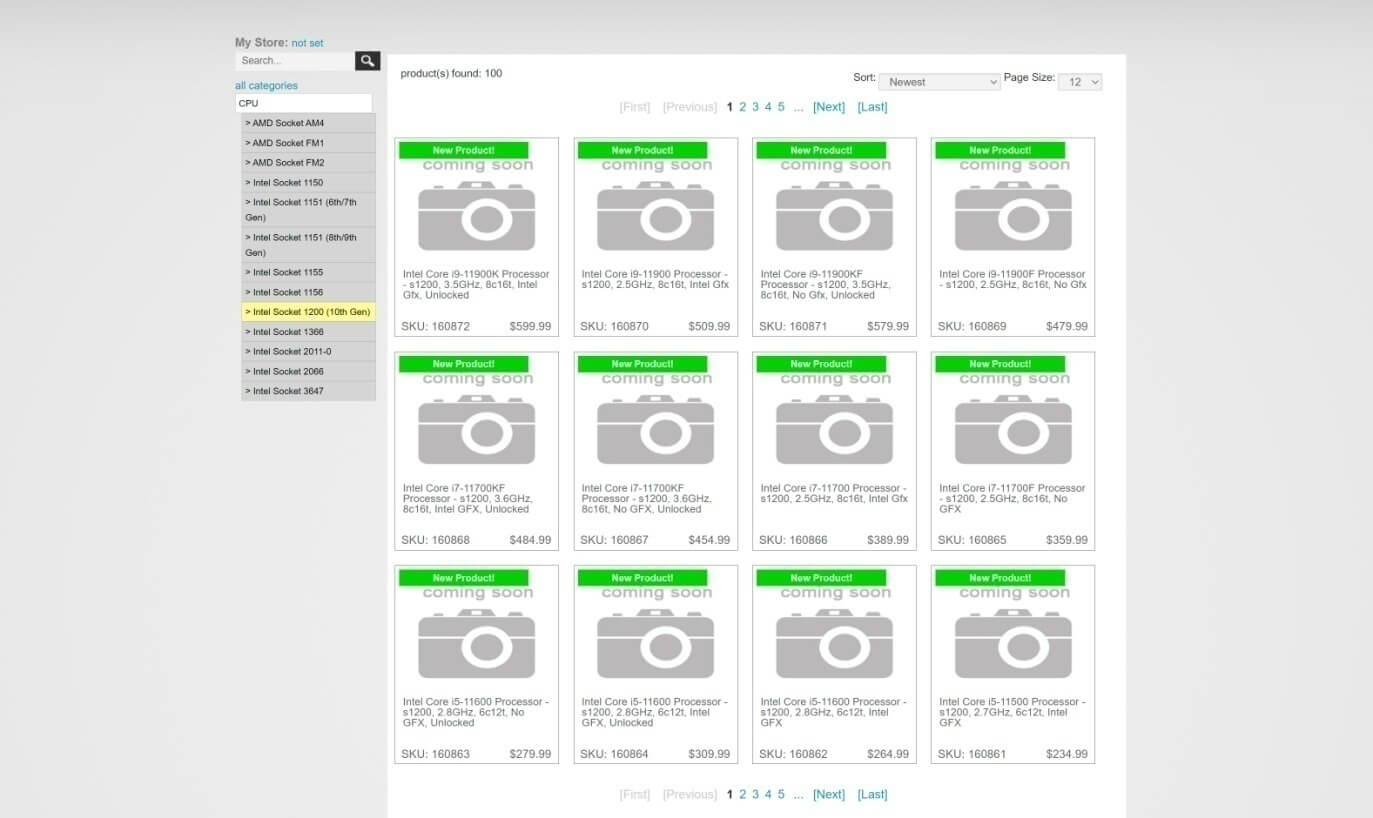
Following are the preliminary pre-order price listings:
- Core i9-11900K – $599.99 US
- Core i9-11900KF – $579.99 US
- Core i9-11900 – $509.99 US
- Core i9-11900F – $479.99 US
- Core i7-11700K – $484.99 US
- Core i7-11700KF – $454.99 US
- Core i7-11700 – $389.99 US
- Core i7-11700F – $359.99 US
- Core i5-11600K – $309.99 US
- Core i5-11600KF – $279.99 US
- Core i5-11600 – $264.99 US
- Core i5-11500 – $234.99 US
- Core i5-11400 – $214.99 US
- Core i5-11400F – $179.99 US
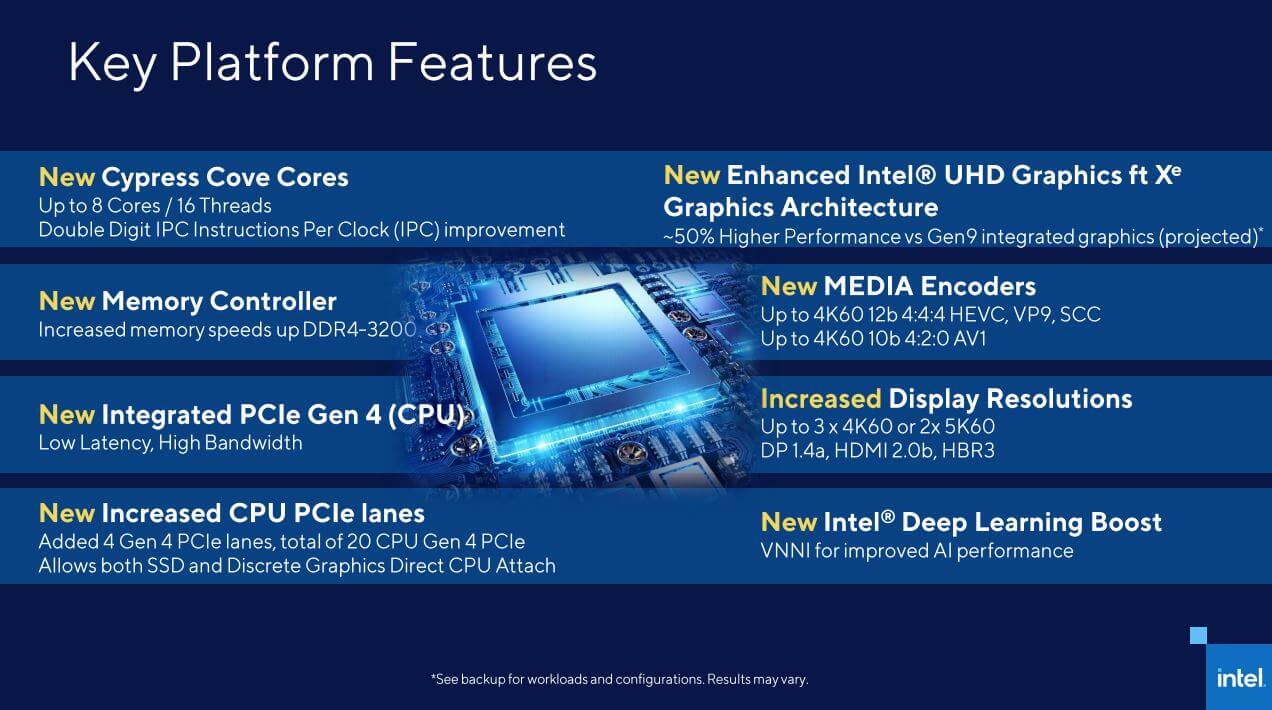
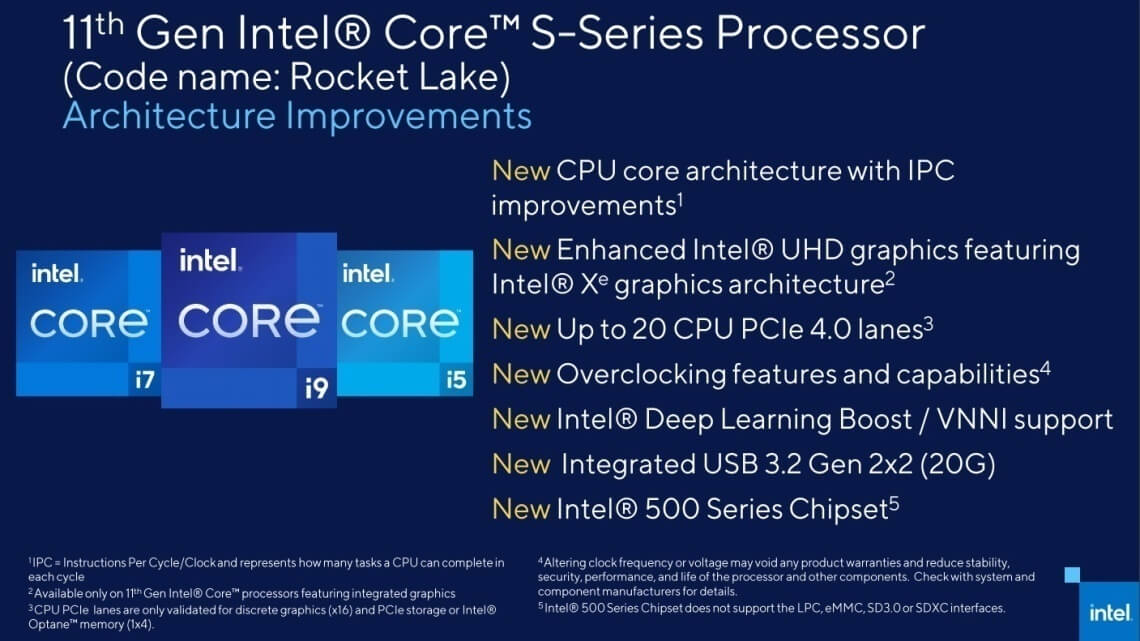
Intel’s 11th gen desktop processor lineup will feature both Rocket Lake-S and Comet Lake-S “refresh” CPUs. The 11th generation lineup includes 13 Rocket Lake/RKL and a total of 13 Comet Lake refresh desktop CPUs. Rocket Lake lineup features the core i9, i7 & i5 variants, while the Comet Lake refresh desktop CPUs will come in Core i3, Pentium & Celeron variants.
Rocket Lake-S desktop platform should also be the last CPU architecture to be based on an advanced 14nm process node. Comet Lake-S was also fabbed on this aging process node, which has held Intel back in terms of IPC uplift and efficiency gains over AMD’s Ryzen lineup.
RKL processor family is expected to share the same socket and motherboard compatibility as the current 10th Gen Comet Lake processors, thus providing an upgrade path even for those rocking the flagship Core i9-10900K Comet lake CPU.
Rocket Lake-S will be housed on the 500-series motherboards. Although the Rocket Lake-S lineup will be the last to feature the LGA1200 socket and the Z490 chipset, Intel is planning a full range of chipsets, including workstation W580, high-end gaming Z590, H570, and budget-oriented B560 and H510 series. The current 400-series motherboard chipsets will also support these upcoming SKUs after a BIOS update.
Intel has also broadened the DMI interface, which connects the processor to the platform controller hub (PCH), from x4 to x8.
John Bonini (VP and GM of Client Computing Group Desktop, Workstation, and gaming at Intel) has also confirmed that the 11th gen core series of processors codenamed Rocket Lake will be Intel’s first lineup to support the PCI-Express gen 4.0 interface, a feature which has been seemingly missing in Intel’s client desktop CPU platform for quite some time.
Rocket Lake will deliver desktop users up to eight cores and sixteen threads on the high-end, which means two cores and four threads less than the current Comet Lake processor lineup. But the reduction in core count could also mean that Intel plans to rely on increased single-threaded performance, thus boosting overall system performance through single-threaded gains.
Single-thread performance will help Intel to compete more in the CPU market segment, even if AMD can deliver higher core count SKUs. Not all applications or tasks are highly multi-threaded in nature, which makes the single-threaded performance all the more important.
But you should also note that even though Intel touts IPC gains of up to 19%, and full support for the PCIe 4.0 gen interface, the Rocket Lake-S platform is the last to use the aging LGA 1200 socket, so obviously your upgrade options are going to be limited (should you plan to buy a new INTEL CPU in near future).
So the LGA 1200 socket will be considered as obsolete and short-lived by many once the next-gen LGA 1700 socket platform arrives with the new Alder Lake-S CPU lineup.
Stay tuned for more tech news!
UPDATE:
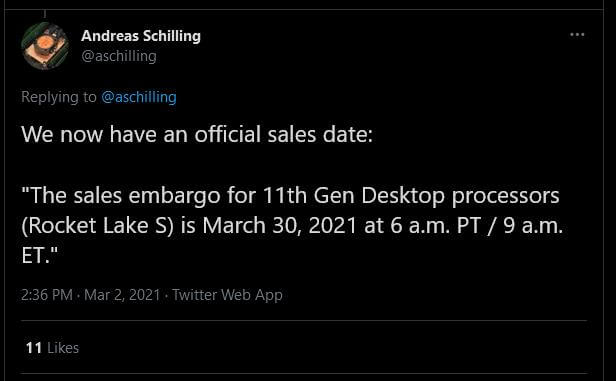
Intel has officially confirmed that its 11th gen Rocket Lake-S desktop CPUs will be launching on the 30th of March, 2021. In response to Hardwareluxx, an Intel spokesperson confirmed the Rocket Lake CPU’s launch schedule.
“The sales embargo for 11th Gen Desktop processors (Rocket Lake S) is March 30, 2021 at 6 a.m. PT / 9 a.m. ET”. – Intel Spokesman to HardwareLuxx.
This corresponds with what Wccftech reported earlier, that Rocket Lake 11th gen core family will be officially unveiled on 16th March 2021, and the sales/review embargo ends on 30th of March 2021.
So on 16th March at 8 AM (Pacific Time). Intel will open pre-orders and will allow retailers to advertise the CPU officially. Intel will also allow the press to provide full specs, pricing, and more detailed information about these processors.
However, the review and sales NDA ends on the 30th of March at 6 AM (Pacific Time), so you have to wait for two weeks for the reviews to go live. If you pre-order, then obviously you need to place your purchasing decision based on the previously leaked/rumored specs and performance of these processors.
On some other note, in case you didn’t know, German retailer Mindfactory has been selling these 11th gen core processors even before the official embargo date. Almost 1 month ahead of launch. However, this appears to be some mistake made in the supply chain, and/or the communicated sales embargo date.
But the retailer claims that they were allowed to sell these CPUs.
Intel has also stated that they are aware of retailers selling unreleased products and that they have ongoing discussions with both partners and retailers, that are confidential as part of Intel’s internal policies.
However, Intel did not comment whether Mindfactory retailer was responsible for breaking the official embargo date, or whether they violated the company’s guidelines as well.

We take our embargo agreements seriously. We are aware of a retailer selling unreleased products and are following up as appropriate.
We cannot comment on particular actions taken by retailers. We have ongoing discussions with partners which are confidential as part of our policy. We take our embargo agreements seriously and are following up as appropriate. – Intel Spokesman to HardwareLuxx.
Hello, my name is NICK Richardson. I’m an avid PC and tech fan since the good old days of RIVA TNT2, and 3DFX interactive “Voodoo” gaming cards. I love playing mostly First-person shooters, and I’m a die-hard fan of this FPS genre, since the good ‘old Doom and Wolfenstein days.
MUSIC has always been my passion/roots, but I started gaming “casually” when I was young on Nvidia’s GeForce3 series of cards. I’m by no means an avid or a hardcore gamer though, but I just love stuff related to the PC, Games, and technology in general. I’ve been involved with many indie Metal bands worldwide, and have helped them promote their albums in record labels. I’m a very broad-minded down to earth guy. MUSIC is my inner expression, and soul.
Contact: Email


I might grab me a new 11700K for my NAS/Unraid box
You have a NAS box ? Which model/make is it, QNAP, Synology or some other ? I wanted to buy this model before, the Synology 2 DiskStation DS220+ (Diskless), but then I dropped the idea.
I know that’s an entry-level NAS, for home use, but I don’t want to shell out more cash on higher end models, though I have not decided yet.
How does a NAS thing even work? I know its about storage but i keep seeing people using SSD and normal hard drives. Is the SSD speeding the old drives? or whats the deal?
I literally dont get it, and i keep seeing those NAS drive boxes in my local store. I wonder whats the deal
With NAS you can actually remotely access data, and it acts like a mini-server that sits on your desk. You can connect it directly to your computer through a USB cable, but that would negate its main benefit: the network.
If you have a NAS set up, you can store data on it and then access it from any other device you own, just like with a cloud storage provider.
NAS are faster than a remote cloud server: while your up- and download speeds to a remote server might depend on a host of factors, from Internet connection, to server firmware etc. The connection speed to your NAS is only limited by your network speed and the NAS’ hardware.
If for whatever reason your network isn’t fast enough, you can just connect your computer to your NAS directly using the USB and transfer data at your HDD’s read/write speed.
The other main benefit to a NAS is that you’re hosting the files yourself, without a third party having anything to do with it.
Actually, NAS creates a small network all its own that any device with the right credentials (username and password) can access. It is a step up from using a simple external HDD, and a step toward creating your own personal cloud storage.
NAS will allow you storage and retrieval of data from a central location, and even to authorized network users and varied clients. NAS is like having a private cloud. It’s faster, less expensive and provides all the benefits of a public cloud on site, giving you complete control.
Because NAS is like a private cloud, data may be accessed remotely using a network connection.
Ohhh, so this thing is totally not for me. My network is not fast enough… even the brand new “super fast” net that i just got is not even close to the speed of the USB 2.0 cable lol. Let alone 3.0 and so on. Not to mention that i don’t really need a cloud storage cus i never go anywhere and all my computers are in one room 😛
Thanks for the great explanation btw, i did check google but it wasn’t very clear. I knew i could count on you! 🙂
Pretty much, NAS stands for network attached storage – Whenever its accessible through the wan (internet) or only on the lan don’t change the term really. Its awesome to have when you got an ok network and say a media player (like nvidias shield for instance)
What I have is UNRAID, you buy 120$ license and install it on any PC.
I have ROG STRIX Z490-H GAMING [Best motherboard for home servers] + 10700K, 16GB RAM, 2TB SATA SSD as read cache, 512gb NVMe SSD as write cache and bunch of 10Tb and 12Tb HDD’s that I shucked from external HDD’s so they much cheaper, mostly WD 5400RPM 10Tb models and some fast ones like 7200rpm 12Tb WD Black from external Xbox branded box and all new Seagate external models above 10Tb come with Enterprise Xenos 7200rpm HDD’s inside so i have a few of these.
I installed RJ45 10G LAN card [now they for for 70USD with good Aquantia chip] connected to ASUS router that has x2 10G ports and my mobo has 10Gb Aquantia build-in so my access to UNRAID is faster then max HDD speed, i write to unraid as if i was writing to local SATA.
Also UNRAID is not raid, you can mix and match HDD drives, they all appear separately BUT it has parity drives so if one HDD dies you can recover.
Also UNRAID supports virtual machines and can be more then just “NAS”, you can install operating systems, you have docklets and so on
It has tons of virtualization stuff, like i have ad blocking DNS server on it, you can do torrent and it will automatically download movies for you and so on.
Share your videos on local network and be a backup too
I have the Synology DS1019+ and it’s been awesome for the past 2 years.
Too much hassle(as in I’m too lazy lol) setting up Unraid on an old pc and takes up more space.
Costs a bit more but it’s all done for you and the Synology software suite has everything you could want, Own DNS server, Surveillance etc etc
Which ever way you go either Unraid or off the shelf NAS unit, First thing to get and set up for it is a USB UPS! I just use a cheap CyberPower BRICs LCD 1200 VA / 720 Watts UPS gives the NAS plenty of time to automatically shut down the NAS safely
Saved my a$$ a few times with power blackout.
Other thing to do is set up a drive or 2 as redundancy in case 1 dies you won’t lose anything, Also have important data backed up on another pc and offsite.
I couldn’t live without a NAS these days, Centralised storage is a must have, Plex server, data, backup etc etc
Glad to hear that !
I run a “Nas” on a normal “server” which is basically a normal PC with a proper raid card (hardware offloaded xors for raid 6) with a bunch of 8tb drives (6+1 spare leaving room to expand as the raid card can handle sas expanders etc and have all the neat features like online raid expansion/migrations etc). Using normal windows with some additional tweaks. OS resides on an ssd.
Costed about as much as most nas’es that still are basically just software raids run on the cpu unless just jboding or keep the volumes separate
cool !
My 9900K isn’t getting anywhere near 100% usage. Neither is my 3600X. I’m stuck with the GPU bottleneck until this shortage is over. I’m curious to see how much an improvement this is given the premium. Probably not much. I’m hoping the new Intel leadership shakes things up, but we’re at least a few years out from that.
Hahahahaha. What was that some of you dudes were saying about Intel being the “better” of the two corps? After people complained about the new Zen3 Ryzen prices jumping $50 in MSRP, they tried to prop Intel up on some pedestal talking about how Intel was supposedly going to be cheaper competitively with 11thGen. Look at these new 11th Gen prices, they’re even more expensive than the Zen3 Ryzen chips. Not a single one of these corps cares about offering you better value for your money, the 10th Gen price cuts were only a strategic move months after those chips had already well saturated the market.
To be honest. Right now you can get a 10 core intel cpu what is just as fast than a 100 $ more expensive 8 core amd cpu. And they preform the same…
Some of the models seems expensive. If you don’t want integrated GPU then you save almost 30 bucks more. Like the Core i9-11900KF
This CPU could be the best for MMO gaming since those ones tend to be highly CPU limited and single core.
Still way way overpriced. Never ever
with mmo ?
ESO , FFXIV, GW2?
Whats the difference between a K and a KF model ?
Intel® Core™ Processor Suffixes
To understand what a processor suffix indicates, consult the list below. Not all processor generations or families include all product suffixes.
Suffix
Meaning
G1-G7
Graphics level (processors with new integrated graphics technology only)
E
Embedded
F
Requires discrete graphics
G
Includes discrete graphics on package
H
High performance optimized for mobile
HK
High performance optimized for mobile, unlocked
HQ
High performance optimized for mobile, quad core
K
Unlocked
S
Special edition
T
Power-optimized lifestyle
U
Mobile power efficient
Y
Mobile extremely low power
The K means that the Intel processor is unlocked and can be overclocked for maximum performance.
While the F SKU on the other hand means that that processor lacks integrated graphics or iGPU, but supports overclocking. The primary difference between the K and KF series of processors is the lack of or iGPU in the KF series processors to provide a slightly lower cost than the K series processors.
Though, both the K and KF chips offer the same clock speed, TDP, and processor count. The F series Intel processors are identical to the non-K series of processors, which both have a locked multiplier and, on a few occasions, lower clock speeds.
“KF” chips have nonfunctional GPUs, while the “K” CPUs have fully functional graphics.
K = unlocked multiplier (supports overclock).
F = no integrated graphics.
Thanks for the explanation.
For me as a gamer with a seperate GPU i should only check the KF series then ?
No, you can also go for the plain K CPU. Suppose if your GPU dies, then for the time being you can use the integrated graphics. Because you won’t be able to boot your system, if you go for the KF CPU, without a discrete graphics card..
That would require another discrete GPU to boot. So with plain K series CPUs, we at least have some backup to boot the OS/system, in case of any GPU failure.
thx for all the links for every cpu Metal Messiah .
GJ my boy
Noice !