

Ori and the Will of the Wisps is a new metroid-vania platformer that came out on the PC a few days ago. The game features stunning hand-painted graphics, as well as a fully orchestrated original score. As such, it’s time now to benchmark it and see how it performs on the PC platform.
For this PC Performance Analysis, we used an Intel i9 9900K with 16GB of DDR4 at 3600Mhz, AMD’s Radeon RX580 and RX Vega 64, NVIDIA’s RTX 2080Ti, GTX980Ti and GTX690. We also used Windows 10 64-bit, the GeForce driver 442.59 and the Radeon Software Adrenalin 2020 Edition 20.2.2 drivers.

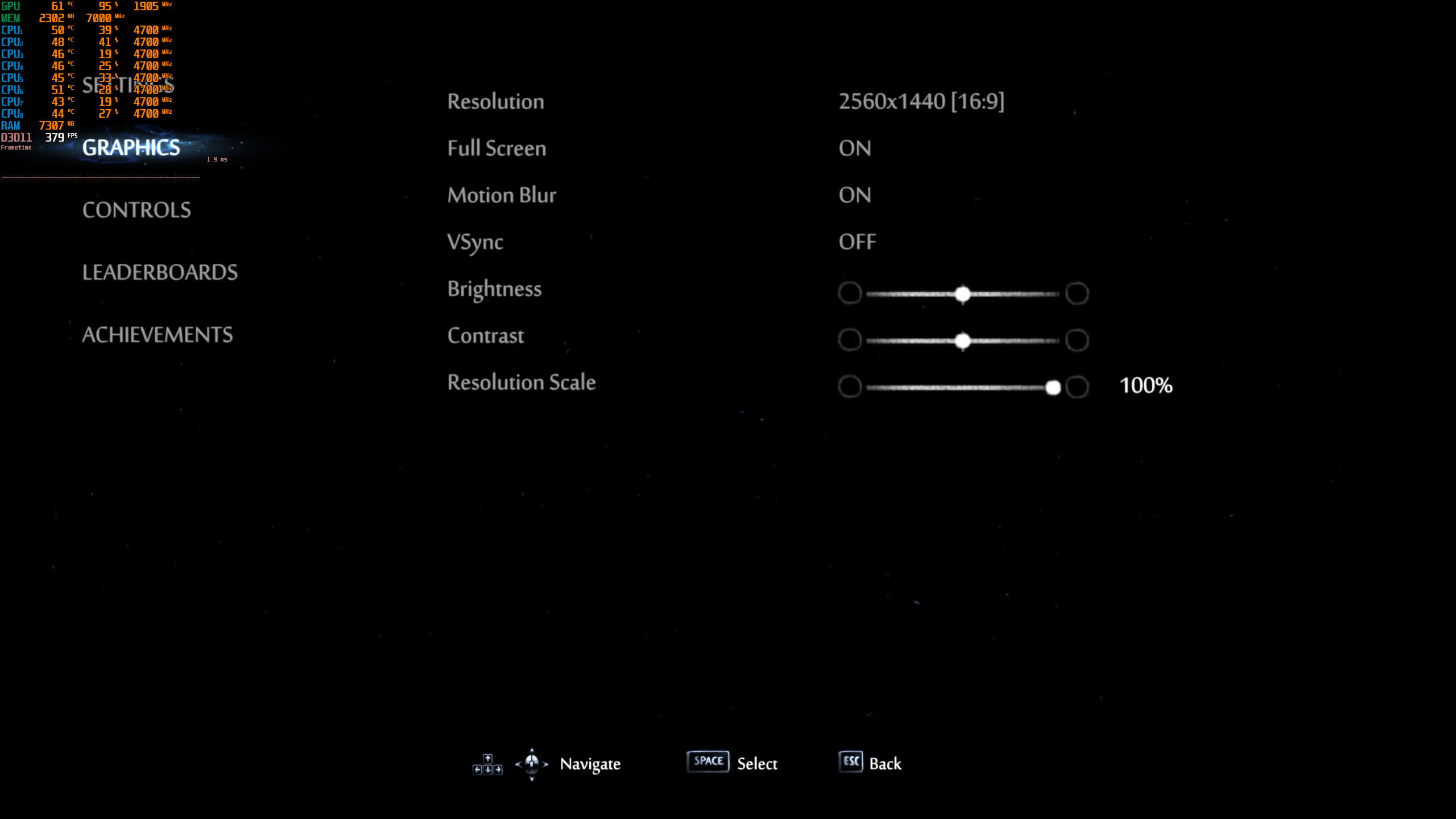
Moon Studios has not implemented a lot of graphics settings. PC gamers can only adjust the game’s internal resolution, choose between window and fullscreen mode, and tweak its resolution scale. There is also an option for Motion Blur and VSync, and that’s it.
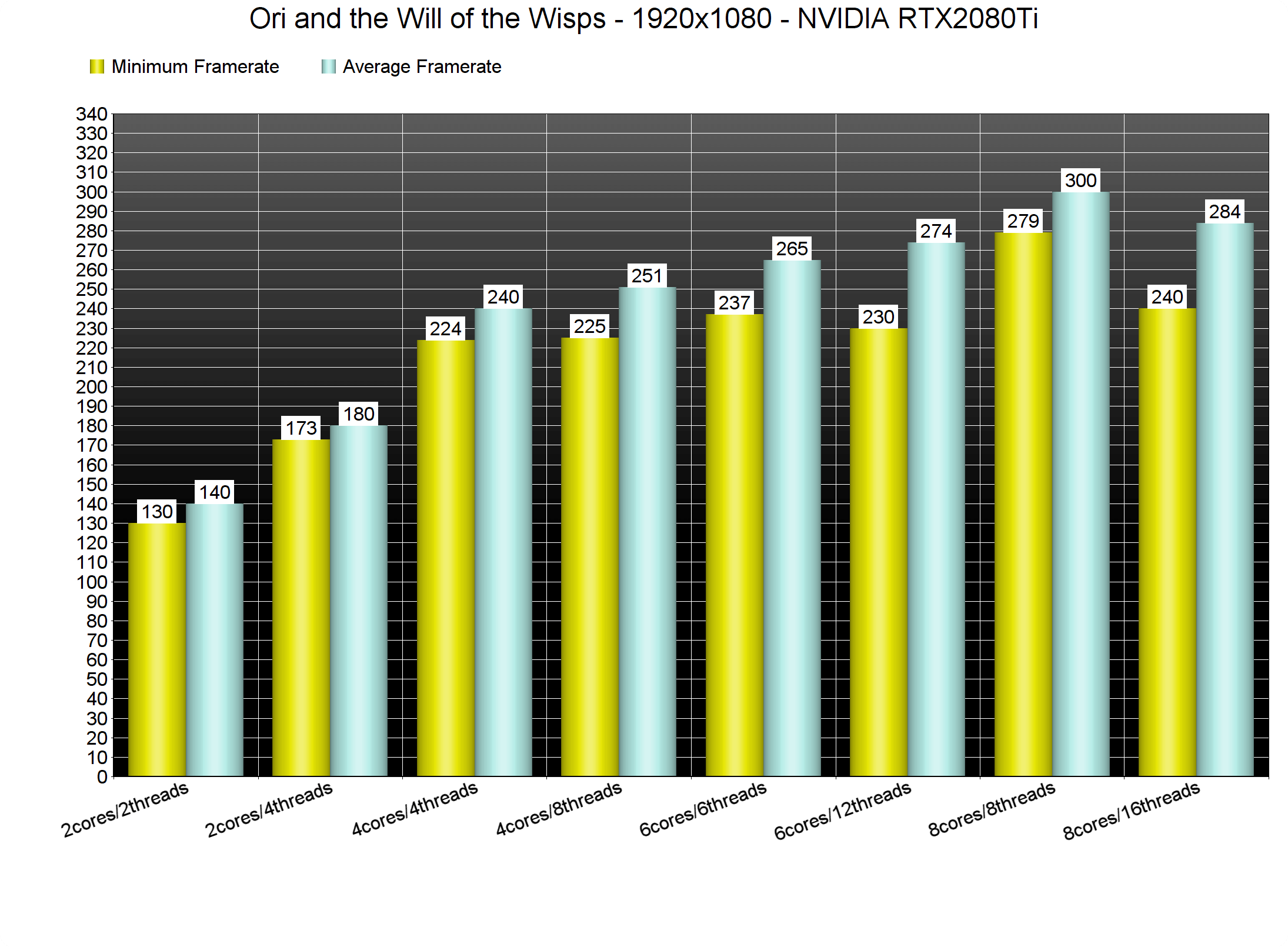
In order to find out how the game scales on multiple CPU threads, we simulated a dual-core, a quad-core and a hexa-core CPU. And thankfully, the game runs smooth on all of these different PC configurations.
What we also discovered is that Hyper Threading negatively affects performance in this title. When we enabled Hyper Threading, we experienced longer initial loading times and various stutters while playing the game. These issues vanished the moment we disabled Hyper Threading. So yeah, if you are having annoying stuttering issues, make sure to disable HT.
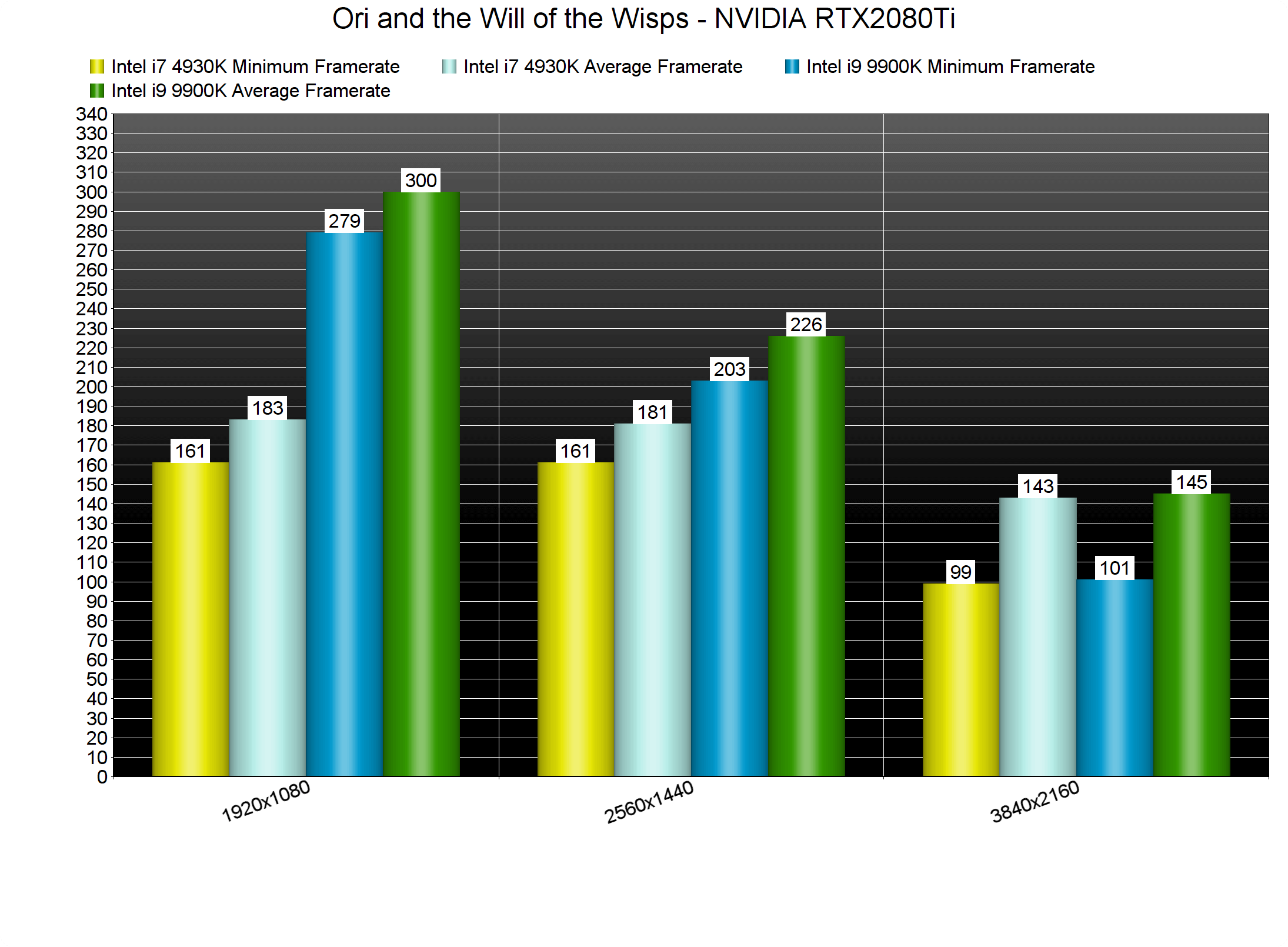
Not only that, but there was a significant performance difference on our Intel i9 9900K with all of its eight cores enabled. Ori and the Will of the Wisps is powered by the Unity Engine and uses DX11, so this combination may be the reason behind its underwhelming multi-threading performance. Therefore, we strongly suggest disabling Hyper Threading for this particular game.
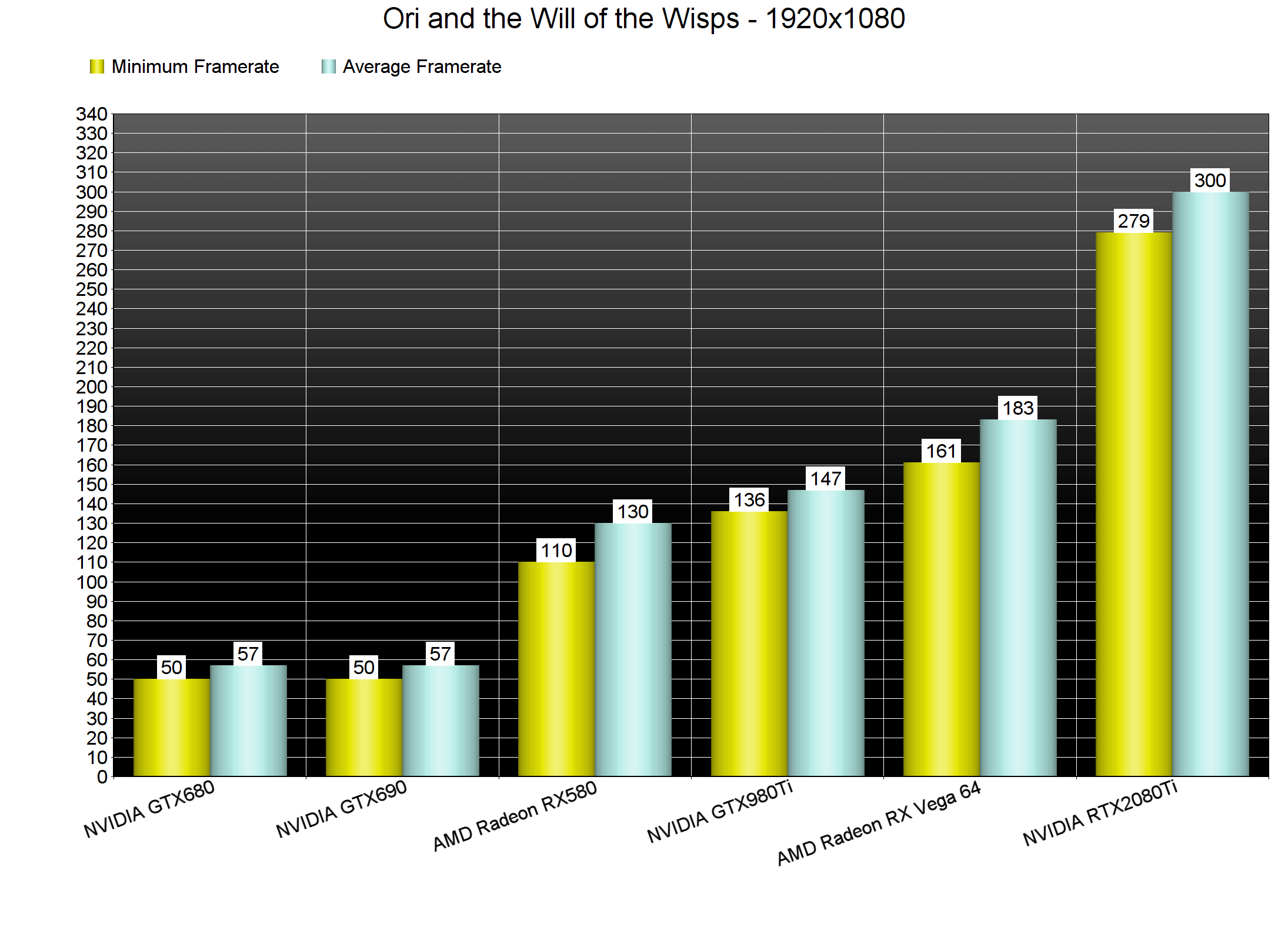
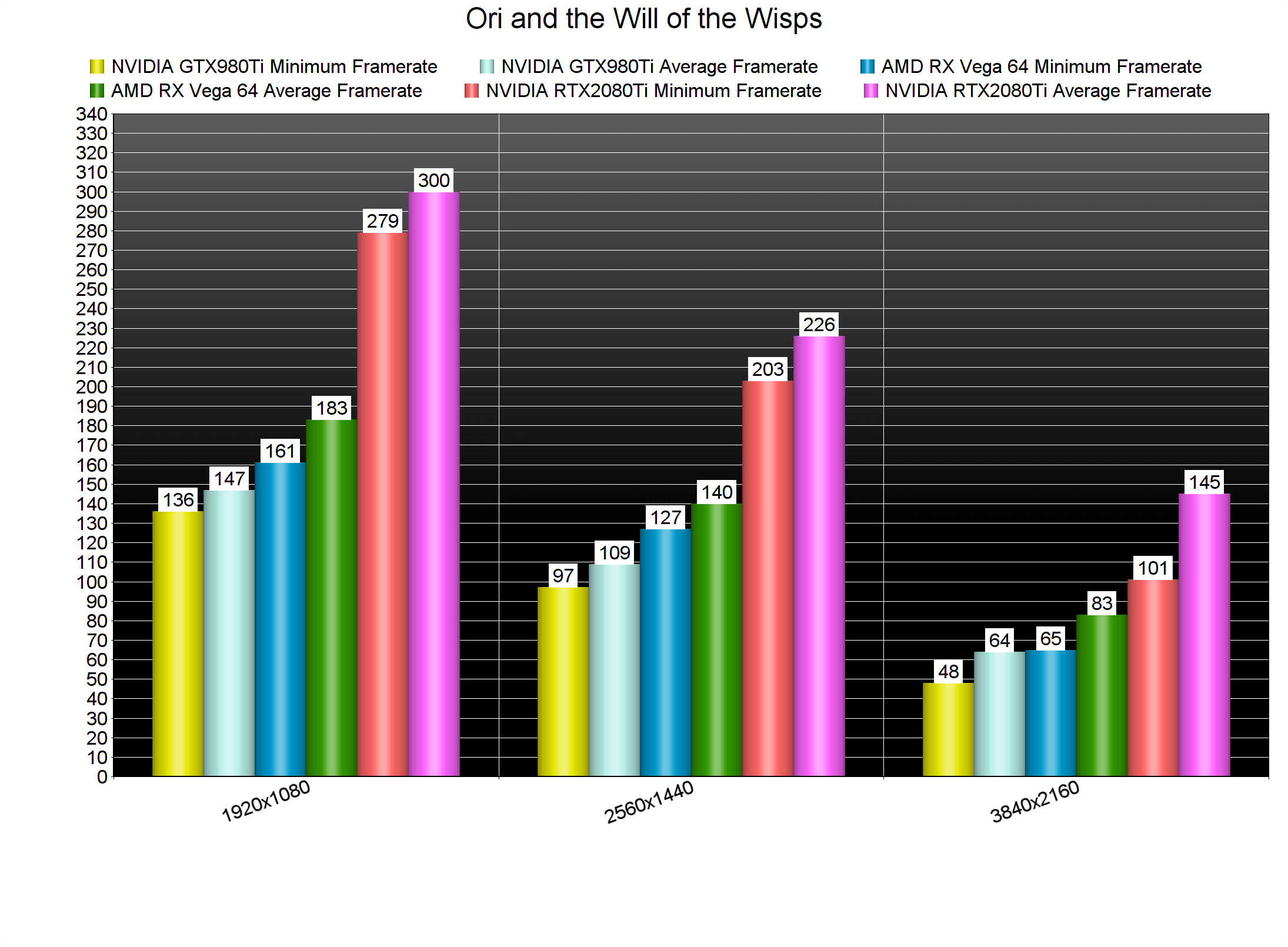
At 1080p, most of our graphics cards were able to offer a 100fps experience. Even our dated GTX690 (which ran in single GPU mode due to the lack of an SLI profile) was able to offer a 50-57fps gaming experience. What this ultimately means is that Ori and the Will of the Wisps is not a particularly demanding title.
At 1440p, all of our top three GPUs were able to offer a smooth gaming experience. As for 4K, both our AMD Radeon RX Vega 64 and NVIDIA RTX2080Ti were able to push a constant 60fps experience. Hell, even our GTX980Ti came close to a 60fps experience. Oh, and given the game’s awful performance on Xbox One X, the GTX980Ti can run it faster in 4K. Now that’s a huge surprise.
Graphics wise, Ori and the Will of the Wisps looks incredible. The game features an amazing and colorful art style. As we’ve already said, it features 3D objects for all characters, vegetation and objects. Moreover, there are a lot of moveable objects and vegetation, as well as some cool wind effects. The weather effects are also stunning, as are the designs of your enemies. Seriously, this is one of the most beautiful games of 2020. And, as we’ve already shown, its CPU and GPU requirements are really low on the PC platform.
In conclusion, Ori and the Will of the Wisps works like a charm on the PC. As said, the game has issues with Hyper Threading so make sure to disable it if you experience stuttering issues. Not only that, but the game does not require powerful GPUs or CPUs. Most PC gamers will be able to run it at full 60fps speed. We really don’t know why the Xbox One X drops to as low as 35fps. What we do know, however, is that the PC version is in a great state.
Enjoy!



John is the founder and Editor in Chief at DSOGaming. He is a PC gaming fan and highly supports the modding and indie communities. Before creating DSOGaming, John worked on numerous gaming websites. While he is a die-hard PC gamer, his gaming roots can be found on consoles. John loved – and still does – the 16-bit consoles, and considers SNES to be one of the best consoles. Still, the PC platform won him over consoles. That was mainly due to 3DFX and its iconic dedicated 3D accelerator graphics card, Voodoo 2. John has also written a higher degree thesis on the “The Evolution of PC graphics cards.”
Contact: Email