
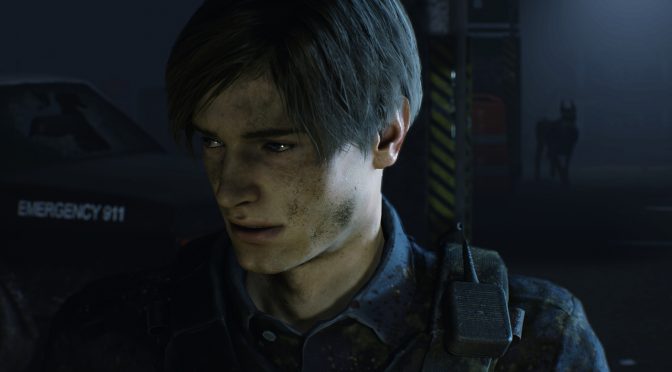
Resident Evil 2 Remake demo runs with 60fps on Max settings in 4K on the NVIDIA GeForce RTX2080Ti

The PC demo of Resident Evil 2 Remake has been released and we’ve decided to share our initial PC performance impressions of it. The game comes with one of the best graphical menus we’ve seen lately (we’ll talk about this in our upcoming PC Performance Analysis for the final game).

The demo supports both DX11 and DX12, however DX12 appears to be significantly slower than DX11. As such, we strongly suggest avoiding DirectX 12 for now (or at least Capcom improves it so it can run on par or better than DirectX 11).

With the exception of one hallway room, the PC demo of Resident Evil 2 Remake ran with more than 60fps on Max settings in 4K on our NVIDIA GeForce RTX2080Ti. The game also looks beautiful however the anti-aliasing solutions are not that great. The demo supports FXAA, SMAA, TAA and FXAA + TAA. Unfortunately, there is no sharpening slider when using TAA and the game looks blurry (as such Reshade will be a must for this game). On the other hand, those that decide to use SMAA will encounter many jaggies and high frequency artifacts.

In the following screenshots we used SMAA in order to get a crisper image, though you will immediately notice the numerous jaggies (we’ve also tried to avoid any spoilers). We’ll definitely experiment with Reshade when the game comes out and report on it.

Still, the good news is that the game looks great and appears to be running smoothly in 4K. We don’t know whether the final version will see any performance improvements and whether Capcom will implement any RTX effects.

Enjoy!

40 thoughts on “Resident Evil 2 Remake demo runs with 60fps on Max settings in 4K on the NVIDIA GeForce RTX2080Ti”

  1. shows us your reshade settings :)) these ae the funniest articles when you say looks better with reshade than vanilla and in reality you shows us the contrary.

  2. – NEVER use TAA, this is an abomination, it doesn’t reduce aliasing it blurs the entire screen making 1080p look like 720p or 4K look like 1080p not only does this basically cut in half your image quality it you lose fps because it takes processing to destroy your quality >< - disable motion blur, also something that kills picture quality for zero positive effect - depth of field you can keep but it also makes some parts very blurry for no good reasons other than "style" - disable the chromatic abberration and lesne distortion or whatever also settings that should not be enabled by default or as max as they reduce graphic quality to add "style" - film grain can look better or not depending on what you like, sometimes it makes "average" textures look better, I played with it off

      1. TAA or DLSS does make 4k look like dogshit. Shut the f*k up you 3rd world russian scum, i bet the only computers you get are 10 years old and fell off a lorry bound for western europe. Someone should put your sh**ty country out of it’s misery pronto.

          1. So your a spy who poisons people then, still scum. Don’t you sleep with your male spy friend before missions like phags. I pity whatever country took your poor dirty a*s in.

          2. You do know he’s not really Vladimir Putin don’t you. His avatar is just a pic from the internet just like I’m really not a Skyrim cat.

    1. Actually, TAA when properly implemented is a must these days, where games are too complex with lots of specular and shiny materials and textures that normal AA methods cannot cover, ever, especially not in motion, which is where TAA shines. Combining TAA with another type of AA, like FXAA in the case of RE 2 here, helps with getting a consistent picture both in motion and static images. Other games, like Shadow of The Tomb Raider, combine some form of MSAA along its TAA, to provide similar results, but it’s a bit more performance intensive.

      Motion blur is also a nice effect when properly implemented, again, not talking about blurring the whole screen in a cheap way like most games used to do 10 years ago, but a proper per pixel and per object implementation like some modern titles are using today, and it really enhances the overall smoothness, and looks, of games.

      The blurriness from TAA can be compensated a little bit by increasing the resolution scale; the game runs quite well so those with good enough GPUs should have room to spare and it’s quite possible to, at least, get 60 solid FPS at higher resolution scale. Or yeah just a slight sharpen filter via Reshade, like the article mentions, I guess that’d do it too.

    1. 50 fps max on 1440p with my gtx 970! ! very good while most games runs 30-40 fps max settigns 1440p this runs muchbetter!

    1. Ermmm, have you seen price of Vega 7? You get a 1080ti and pay almost $700 for privilege, minus any extra features that an RTX card would provide, plus a higher TDP.

      And here’s the best bit, almost 3 years after a 1080ti launched.

      AMD, an acronym for Almost Made something good, but Didn’t

      1. I have a 1080Ti FTW3 🙂

        Vega VII has 16GB of HBM. Excellent card for a pro user that also games. You could get a 2080 with Space Invaders, but do you remember the audio loop? dumb DUMB dumb DUMB dumb DUMB 😉

        1. 16gb hbm 2 . Whooo!!!… cause that will really increase performance drastically right?

          That’s really only going to help if you are a) in need of extra ram due to texture sizes (won’t happen any time soon) or B) GPU is struggling to pull through information fast enough, which is generally not an issue anyway

          This card is underwhelming as gaming card and as professional card.

          It’s pricing is in line with RTX cards, but minus any advantages they offer.

          RTX is over priced, but at least brings advanced features with it.

          Vega 7 brings 2017 back with it.

          1. You do realise that GPUs are also used for compute? What compute card comes close in performance, while offering the same amount of memory, not to mention the HBCC that is part of Vega?

            RTX brings only a poor attempt at supporting DXR, not worth it. Wait until hardware is designed for DXR. We had the same situation with Maxwell at launch and it’s promised support for async compute. Turned out that Maxwell was using a software scheduler, hence the poor performance.

          2. Oh really? Didn’t know that. Thanks for enlightening me.

            You realise professionals don’t use these gaming cards right?

            If you happy to get an over priced 2017 gaming GPU whch is less efficient than its competitor’s previous generation in terms of energy consumption, offers no performance advantages as whole, offers no next generation features, and you’re happy to pay $700 (more for after market cards) for privilege of it being used as a pretend professional GPU, be my guest.

            I’m pretty sure though that RTX cards would be better better for both purposes though

          3. “You realise professionals don’t use these gaming cards right?” … Oh really? Guess I must be the odd one out 😉

            “I’m pretty sure though that RTX cards would be better better for both purposes though” … I’m sure you are 😉

    2. Oh, wow, I though I saw the dumbest person in this site’s comment section before, but boy do you take the cake, and that’s a hard cake to get with very worthy challengers.

      If you have absolutely no idea what DXR and RTX are, don’t open your mouth about them, only stupid things will come out of it.

  3. The game seems a bit unimpressive visually, especially the AA implementation. Shame really as it can run very smooth at 4K, which is wasted because of the poor AA.

  4. I’ve actually been wondering, just what the hell the “ultra” textures are exactly, because they look virtually no different from high, yet they demand more gigs worth than even the damn 1080ti, meaning they want you to use a sodding RTX Titan/2080ti.

    The days of legit demand games is over. Now it’s all games that force throttle artificial settings, to make one think the game is demanding, when it really isn’t.

      1. ? ??? ?????? ?? ????? ??? ???? ??? ???? ????? RYZEN 7 1700 16 GB DDR4 3200MHZCL15 GS KILL RIP JAWS GTX 970 G1 GAMING 4GB DELLP2416D 24” 2560X1440 60 HZ IPS ASUS PRIME X370 PRO CORSAIR 750M 750 WATT WD BLACK 4TB, 1TB. O??? ??? ?? ????????? ???? ??? ???? ?????? ultra 1440p 30+ fps. ?? pc ????? ????

  5. Also, I’m not sure what RTX features the game even needs. Why does it even need to toss in “slightly” better shadows, while eating up 50% more performance?.

    Like BFV, RT isn’t a mega Crysis level game changer, and it’s certainly not worth the jump in price and lesser resolution/performance.

  6. How is it fake Ultra settings when it’s just a Demo 😀 Maybe they have plans for DXR 😀

  7. I love TAA, it makes the game a bit blurry, yes, but also makes it look like a cinematic experience. Looks terrific on 4k + TAA.

  8. This game has the weirdest optimization I’ve ever seen. I have a 1080 and putting the graphics on high puts my VRAM usage above the actual amount of RAM on my card. With minimal difference in quality. And then, it runs perfectly fine anyway.

    Also the demo somehow doesn’t support HDR on my card even though it worked on RE7.

    1. Some games are designed to run whatever ram is available and will literally allocate whole available amount, even if they aren’t using it in reality

Leave a Reply

Your email address will not be published. Required fields are marked *
