
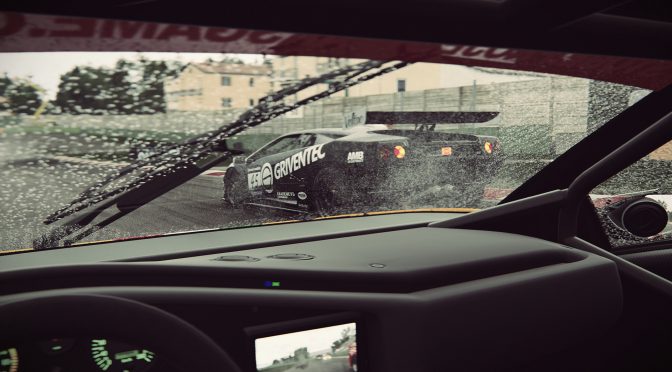
Project CARS 2 GamesCom screenshot

Here is Project CARS 2 running in 8K on Ultra settings with 60fps

YouTube’s ‘DudeRandom84’ has shared a new video, showing Project CARS 2 running in glorious 8K. DudeRandom84 has used two NVIDIA GeForce GTX1080Ti graphics cards and the latest version of the NVIDIA GeForce drivers. And as we can see, this combo can handle the game with more than 60fps on Ultra settings in sunny days.

However, and as soon as the rain kicks in, the framerate drops below 50fps. And to be honest, this is to be expected as Project CARS 2 looks beautiful on the PC and is without a doubt a GPU demanding title during rainy races.

This video will give you a glimpse at the future of PC gaming in ridiculously high resolutions, so be sure to watch it!


Project Cars 2 Pc 8K Resolution GTX 1080 TI SLI Frame Rate Performance Test

31 thoughts on “Here is Project CARS 2 running in 8K on Ultra settings with 60fps”

      1. And here I thought I was gonna get rearended by fan boys. Turns out there’s quite a few of us, and we’re not happy with this IP.

  1. Note that both CPU and GPU utilisation were nowhere near being maxed out at any point during the video. Perhaps with some further optimisation of the game then the framerate will remain above 60fps at all times with those graphics settings.

  2. I still need to play PC2, because just maybe I will like gameplay on my racing wheel, but graphics in this game looks disappointing when I compare it with GTSort or forza 7. To me it looks like PC2 developer tried to do everything in realtime and without tricks that would mask imperfections. In some screenshots it even looks worse than ps3 gt5/gt6 and x360 forza 3/4.

    1. No one cares, XB1 is a potato, doesn’t take much to improve potato hardware with DDR3 as it’s primary memory bandwidth, marketed as a media “TV” box.

      1. “potato hardware with DDR3 as it’s primary memory bandwidth”

        Yes first Xbox was slow. Bandwidth was slower than on GTX 750Ti.
        – console use 68 GB/s 4 channel DRR3 memory (256bit)
        – GeForce 750TI was faster thanks to 86 GB/s GDDR5 (128bit)

        New generation is faster… 6x faster. This is a real fast console like Xbox 360 in 2005. Hardware for next 6-8 years.

  3. Pre-load is active… 100GB 🙂

    Average download speed on my connection is 86-90 Mbps… (ISP speed limit 150 Mbps). It will take some time to download 100 GB.

  4. Nope, it was not because of the game, the game is acctually pretty good graphically the best yet, and got better handling after the latest updates enabling gave the extreme handling option which basically disabled all of the assists, it should have had it at launch. Anyway, 30 fps really makes a difference in gameplay, the game physics is not thaaat bad, but driving at 30 is a problem for me at least.

    1. So Sony shut down the studio because of what exactly?!
      they shouldn’t have came in this direction, their PS3 games where good specially Motorstorms 2 but Driveclub on the other hand is nothing of that sort. the game was disappointing, the only good things about Driveclub are beautiful environments and great whether effects, everything else is just bad or mediocre at best.

      1. To be fair, the information about the cause as far as i know was not disclosed, But the final game after all updates and is a very nice package. The real problem was that the game launched almost like a beta, and people got really upset and the bad marketing made people all over the place call it a terrible game which is not. You talk like people who never played it, just heard of or seen reviews that do not covered the final update. So please, pick the game put handling on the extreme and give a try. if you are a racing game enthusiast, btw best played with a decent wheel.

        1. I played the game back when it was getting the big updates, but i haven’t tried it after the last update or Bikes DLC. OK i will give it another try but i’m sure there is not a big difference because there is limit what they could have done with updating the game.

          1. Fair. Obviously don’t expect the reaction times to be comparable to 60 fps games, but sure, disabling the assists makes the game feel more controlable and the physics act more naturaly, althought some curves i have the impression that they have some big magnets pushing me.

  5. Agreed. There’s something for everyone and you can upgrade your GPU when you want to without having to replace the entire PC like you do with consoles. There’s also far, far more options with PC than just that but in the last 4 years I have upgraded my GPU twice to have the gaming experience that I want and it has, and still does beat anything money can buy with consoles.

  6. I am not sure if this is 8K.
    When I played the demo it seems like the resolution scaling option was multiplying the amount of pixels, not the vertical and horizontal resolution.
    So 4K with 200% would be roughly equivalent to 5120×2880 in terms of pixels.

    EDIT: I’m currently redownloading the demo in order to test this.

  7. I got the game again, and tested it in actual 7680×4320, it’s 10-15% more intensive than running 4K with 200% resolution scaling.
    My 1080Ti was running 4K on that map without maxed usage at 60 fps.
    But something seems to be broken, it makes no sense that this game would run 8K 60 fps like this, if you look at native footage, it’s extremely jaggy, it looks like it’s rendering at half the resolution you input.
    If I had 200% resolution scaling to 7680×4320 then it actually looks as smooth as 8K is supposed to be, and the performance drops drastically to what you’d expect at around 15 fps.
    TLDR: Game seems to be bugged and renders at half the resolution you input if you have 100% res scale in settings, setting it to 200% seems to make it run that resolution natively.

Leave a Reply

Your email address will not be published. Required fields are marked *