
Cyberpunk 2077 Path Tracing Overdrive

Ten minutes of gameplay from Cyberpunk 2077 with Path Tracing, ReSTIR GI & DLSS 3.5 Ray Reconstruction

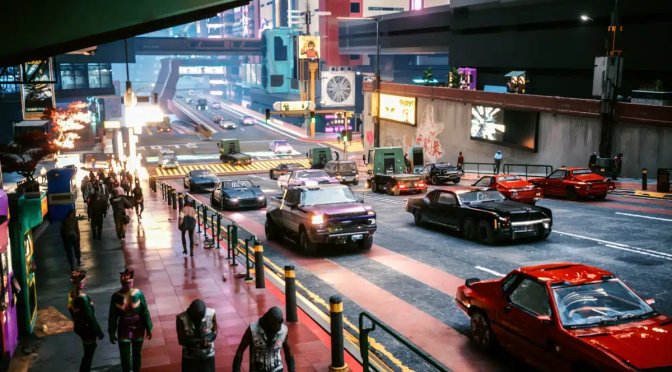
CDPR has just released Update 2.1 for Cyberpunk 2077. This new update introduced ReSTIR GI to the PC version, making Path Tracing even better. As such, we’ve decided to capture ten minutes of gameplay from the game, using Path Tracing, ReSTIR GI, and DLSS 3.5 Ray Reconstruction.

In order to capture this video, we used an AMD Ryzen 9 7950X3D, 32GB of DDR5 at 6000Mhz, and an NVIDIA RTX 4090. We also used Windows 10 64-bit, and the GeForce 546.29 driver. Moreover, we’ve disabled the second CCD on our 7950X3D.

Cyberpunk 2077’s Path Tracing is quite demanding, even for the RTX 4090. To get playable framerates, we used DLSS 3 Frame Generation. We also used DLSS 3 Super Resolution on Balance Mode.

With these settings, our NVIDIA RTX4090 was pushing framerates between 70-90fps. For those wondering, I didn’t have any major issues with the input latency at those framerates. The game was very playable.

Let’s start with some good news. Most of the ghosting that could previously occur with Ray Reconstruction seems to be addressed. Or at least I didn’t notice any major issues. Path Tracing also seems more stable. Again, some ghosting issues that plagued it are nowhere to be found.

However, I’ve experienced some other weird graphical glitches and issues. Even with Path Tracing, there are still some SSR reflections. You can see them in various scenes of our video. And, I just don’t get it. One of the main reasons for using RT reflections is to fix the SSR artifacts. But here we are with CP2077, using “full Ray Tracing” and still having these issues. This just shows that this is a hacked implementation of Path Tracing. This isn’t as advanced as what we saw in Quake 2 RTX. I also noticed a bunch of flickering shadows and textures. Shadows can pop in and out, right in front of you. It’s pretty distracting and, in some cases, totally ruins the immersive experience. I highlighted this issue at the end of the video.

In conclusion, while standing still, Cyberpunk 2077 can look great with Path Tracing. However, in motion, the game can fall apart. Distant objects can have different lighting settings/colors, shadows pop in as you move closer to objects, there are a lot of flickering issues with billboards/objects, there are some shading issues, and there are still some SSR reflections. I’m not exaggerating here, the game can look like a complete mess at times with all those issues. And, let’s be honest here. Since day-1, CP2077’s Path Tracing had numerous visual glitches and issues. That’s the complete opposite experience I had with Quake 2 RTX or Portal RTX. Let’s at least hope that CDPR will keep working on it so that it can fix these issues.


Cyberpunk 2077 - Update 2.1 - Path Tracing + ReSTIR GI + DLSS 3.5 Ray Reconstruction

25 thoughts on “Ten minutes of gameplay from Cyberpunk 2077 with Path Tracing, ReSTIR GI & DLSS 3.5 Ray Reconstruction”

    1. You should better educate yourself before expressing an opinion (otherwise it makes you look dumb). These issues have NOTHING to do with the quality of DLSS.

      1. thanks for the answer bro i love dso gaming .(though the answer was not so pleasing lol )digital foundry said alan wake 2 with quality dlss is fine but with balanced dlss we can see postering effects .so i said that

        1. DLSS at lower quality can make things blurrier, especially for games that use Ray Tracing. However, that’s one of the areas that DLSS 3.5 Ray Reconstruction addresses (DLSS Balanced now looks great with Ray Reconstruction as all the RT effects look sharp… well… at least most of the time). Flickering shadows, objects that suddenly appear when you walk, pop-in issues, and SSR reflections are issues that have nothing do to with DLSS (these are issues of the path tracer renderer).

          1. The posterize issue of Alan Wake 2 is not present in CP2077 😛 (or at least I could not notice it). The posterize effect of AW2 has nothing to do with the issues I highlighted. With this out of the way, DLSS Quality is the way to go, even at 4K. In this game, though, which is so demanding, DLSS Balanced looks fine.

    2. DLSS Balanced upscales from 0.58 of the target resolution, which looks terrible at 1440p since it’s upscaling from 1485 x 876.

      You can make DLSS Balanced look passable by increasing the internal resolution to 0.625 (1600 x 900) using DLSS Tweaks, but that’s close enough to DLSS Quality (0.667 / 1776 x 960) that you might as well just use DLSS Quality.

      I found the game looked much better by using the normal raytracing at psycho (since ray reconstruction works outside of pathtracing), then setting the DLSS Quality scaling to 0.75 / 1920 x 1080. With a 4070 ti, I was still able to maintain a locked 60 fps.

    3. Depends on your base resolution. It’s probably passable on a 4K monitor but it does look like sh*t on a 1440p monitor where you are upscaling from 720p. With 4K you are basically upscaling from 1080p so there is enough information for the upscaler to work with.

      I was able to make the game look much better with the regular Ray Tracing and DLSS quality and still get decent frame rates and considerably less system lag than Path Tracing with DLSS balanced and Frame Generation which since I was dipping into the 50’s without it the lag was noticeable but not real bad but the graphics quality just wasn’t there after the degradation caused by DLSS balance plus more with Frame Generation

      Still not sold on FG because if I can already get above 60 FPS in a single player game then I don’t really need it and prefer the better quality graphics and if I can’t get 60 FPS the lag it causes just doesn’t make it worth it to me. However one thing I’ve seen a couple of people note is that the lag seems to be worse or at least more noticeable with a mouse than with a controller

  1. [Editor/PathTracing]
    UseScreenSpaceData = false
    UseSSRFallback = false

    Shouldn’t have to use .ini tweaks to disable the SSR, though.

    1. Witcher 3 Next Gen has some of the same problems, for instance Ray Trace Ambient Occlusion doesn’t automatically turn off HBAO+/SSAO you need to do that manually. Ditto with shadows, if you use Ray Traced Shadows you have to turn the normal shadow setting to low manually. Failing to do so tanks your FPS and causes artifacts and shadow pop-in

    1. Volumetrics like fog and clouds are always costly. It’s one of the first places I go when optimizing a game. However it might be an oversight in this case

      Path Tracing isn’t meant for gameplay, CDPR has been very clear about that for the start. It’s a tech demo and a way for Nvidia to gather more data to train the algorithm with LLM (Although it should really be called Large Data Models in this particular case)

      What John really should be testing here is Ray Reconstruction that is now available for the normal Ray Tracing modes. In my opinion that’s the more significant part of this update because that’s the one most people will be using in gameplay and will be useable for people who don’t have a 4090 which is over 99% of us.

    1. You won’t notice it in regular gameplay unless you are superman or pausing at the right time or running it less than 60fps

  2. naturally like your web site however you need to take a look at the spelling on several of your posts. A number of them are rife with spelling problems and I find it very bothersome to tell the truth on the other hand I will surely come again again.

Leave a Reply

Your email address will not be published. Required fields are marked *