
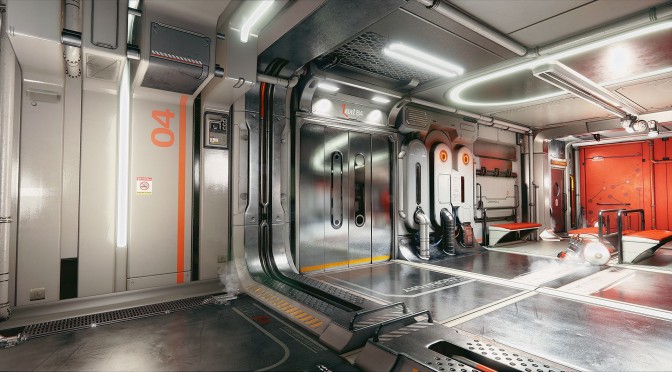
Modder’s ‘Disting’ recreation of Deus Ex: Human Revolution in Unreal Engine 4 is one of the best recreations we’ve seen these past months. Surely Bioshock and Zelda look great in Unreal Engine 4, but this Deus Ex: Human Revolution map sports some of the best visuals we’ve seen to date. Thankfully, there is a way to download this map yourselves, although there is a slight catch to it.
YouTube’s member ‘club4ghz’ has posted a new video, showing off this map in real-time. Disting’s map is currently available for download via UDK’s Marketplace. Hopefully there will be an alternative download link soon enough but until then, those with access to it can go ahead and download it.
Enjoy!
[UPDATE]
Dirty Dan has shared with us a download link for this UE4 demo. Those interested can download it from here.
Here are also Dirty Dan’s personal config tweaks to get decent performance out of it:
r.motionblurquality 0r.shadowquality 2r.PostProcessAAQuality 0r.temporalaasamples 0r.mipmaplodbias -1

John is the founder and Editor in Chief at DSOGaming. He is a PC gaming fan and highly supports the modding and indie communities. Before creating DSOGaming, John worked on numerous gaming websites. While he is a die-hard PC gamer, his gaming roots can be found on consoles. John loved – and still does – the 16-bit consoles, and considers SNES to be one of the best consoles. Still, the PC platform won him over consoles. That was mainly due to 3DFX and its iconic dedicated 3D accelerator graphics card, Voodoo 2. John has also written a higher degree thesis on the “The Evolution of PC graphics cards.”
Contact: Email
Waiting for the link 🙂 and… THX
It look jaw dropping
This video is relief after official announcement of Tom Clancy’s Division downgrade. “Multi-platforms are as follows: The Division (Xbox One is now lead platform)”
wccftech. com /microsoft-e3-2014-conference-details-leaked-ryse-2-halo-5-epic-xbox-exclusive-gears-war/
This looks like it would make my graphics card explode.
Here’s a link everybody. No waiting times and no speed limitations 😀 Oh wait there’s more: All maps/levels from Marketplace is included and downloadable. Enjoy and thank me later:
https://mega(.)co(.)nz/#F!FYgHFSSS!cYzmuxRF6NNGakdhZ7qURw
(admin might update this newspost with a link as provided)
Cheers!
Thanks, but there’s one problem, there’s no “.exe” in this scifi hallway folder 🙂
I think those are the project files. Not playable versions. You need the 4.1 editor for those files.
yea , i googled the link and got to some russian forum , there are tons of new demos available posted there , but needs actual tools to play them :/
Dirty Dan link is working, thanks :). I need to say, that map has almost CGI quality, but textures quality could be better (for example letters on signs looks blury). Performance wise, it runs OK, 53-62 fps on 1080p (680GTX 2GB, 1200@7000), but theres some issues with texture streaming on my PC, few times I could easly see textures showing up in front of me, especialy on that moving robots on the ceiling (I thought that maybe 2GB Vram isnt enough but even after using 640×480 resolution, that texture streaming issue was still present)
BTW. I tried to use “PostProcessAAquality 0” line, it makes everything sharp, but whole picture starts to shimmer, like if there was some kind of camera noise, it looks just bad.
It’s UE4’s temporal anti-aliasing probably, there is nothing MSAA can do to stop it with the newer engine post effects, though even Crysis from 2007 had post aliasing and shader aliasing issues but that was a time when post AA wasn’t in mainstream games.
We have to get used to a blurrier image I’m afraid with the rendering tech used, it’s basically like CG movies. SMAA 2TX and 4 is probably the next best thing.
I would like to see SMAA in this engine, but for now it looks very blury, even TXAA looks very sharp compared to post AA in this unreal engine.
You can easily add that with SweetFX. I’m assuming the PostAA is FXAA in UE4.
Is crap that because it’s only 1x samples and like Crysis 3 even SMAA 2TX still has loads of temporal and shader aliasing.
We could fix a lot of it by disabling Temporal Anti Aliasing or TXAA. We could use SMAA through SFX or use the sharpening aspect to fix TXAA. It’s done good before. I prefer using Post with some SMAA or 2X MSAA with SMAA. There’s always an alternative ;P
Yes, the shimmering is annoying though, FXAA is horrendous. Seems devs thought about the rendering tech first without thinking of the AA tech. Deferred based engines in mainstream games were awful until post AA came along and on top of that, MSAA has a huge performance hit in DX11 as well.
setting r.postprocessingaaquality 4 really helps a ton
Try r.PostProcessAAQuality 4. And try r.MipMapLODBias -1. K-putt told me it was blurry after some of my tweaks, the sign I mean. The only thing I could think of is the Temporal Aliasing, which is known for blurring, has a sharpening value that could be enhancing it. I would try only turning down shadows and PostAA first, see how it looks then try turning down the TXAA. Also if you put for example “custom.ini” in the Binaries folder, with the settings you like, you can in game type “exec custom.ini” and it’ll run that list. Also FOV “XX” works too.
UE4 natively supports TXAA or are you assuming the temporal AA is TXAA?
Is there a trick to getting Mega to work? Keeps dying at the end of the download, 96% and nothing.
Try to use mega addon for firefox, it worked for me.
Try using JDownloader
Try keeping PostAA on 4 and up the sample quality on the sharpening factor of TXAA. When I get home I’ll post the commands I’m thinking of. I believe it’s:
r.TemporalAASharpeningSamples
r.SSRSharpeningSamples
r.SSRQuality
I’ll double check when I get home
“r.temporalaasharpeningsamples” improve sharpness, thanks Dirty Dan :).
Doesn’t run too bad at 1080p got about the same as PB. Still when SLI drivers are out could see UE4 games getting a tonne more framerate.
Amazing , thanks Dirty Dan , i got 50fps on 270x , not bad. Bad thing is we probably won’t see a game that looks like this anytime soon, PC games and graphics are held back too much by consoles last couple of years , we did and still do get real PC game here and there but nothing like we used to , i really hope we get something similar looking in the future.
wow, thanks DSOG and than you Dan
The graphics fidelity is quite amazing!
I was able to get 57-62fps on GTX 770 @ 1680×1050…
Every time i put custom settings it resets itself? can i avoid this also i cant find sharpening samples settings.
Make custom.ini file, place in binaries folder. Put the settings you want in the file. Then ingame type “exec custom.ini”. And the value you want is r.temporalaasharpeningsamples
Graziouze love le onchisme