Deliver Us Mars feature

Deliver Us Mars PC Performance Analysis

Deliver Us Mars is a new atmospheric sci-fi adventure game that came out last week. Powered by Unreal Engine 4, it’s time to benchmark it and see how it performs on the PC platform.

For this PC Performance Analysis, we used an Intel i9 9900K, 16GB of DDR4 at 3800Mhz, AMD’s Radeon RX580, RX Vega 64,  RX 6900XT, RX 7900XTX, NVIDIA’s GTX980Ti, RTX 2080Ti, RTX 3080 and RTX 4090. We also used Windows 10 64-bit, the GeForce 528.24 and the Radeon Software Adrenalin 2020 Edition 22.11.2 drivers (for the RX7900XTX we used the special 23.1.2 driver).
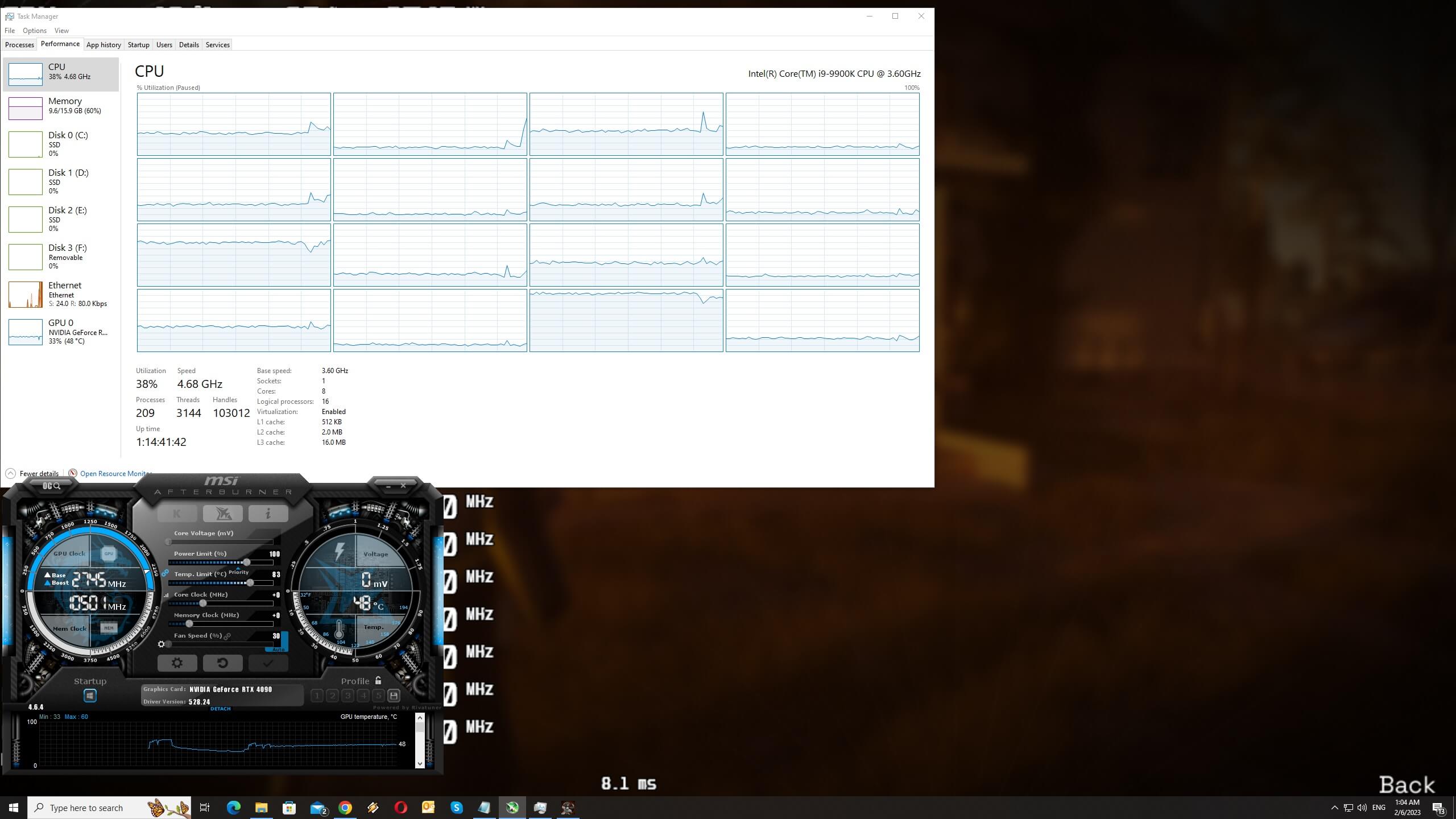
Deliver Us Mars CPU scaling

KeokeN Interactive has added a respectable number of graphics settings. PC gamers can adjust the quality of Shadows, View Distance, Post-Processing, and Textures. There are also options for Motion Blur and Framerate. Furthermore, the game supports ray-traced reflections and shadows, as well as DLSS 2/3.
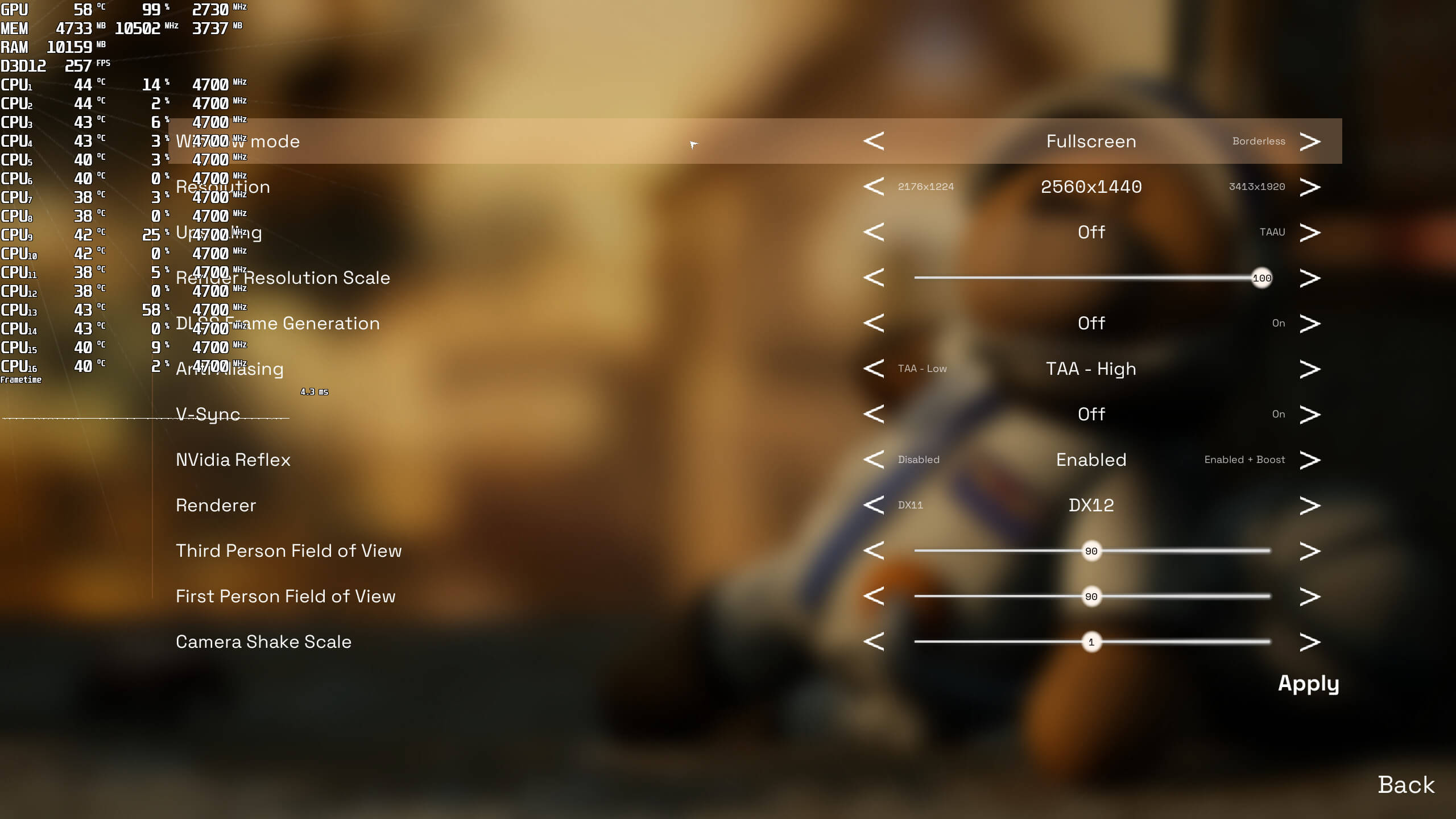
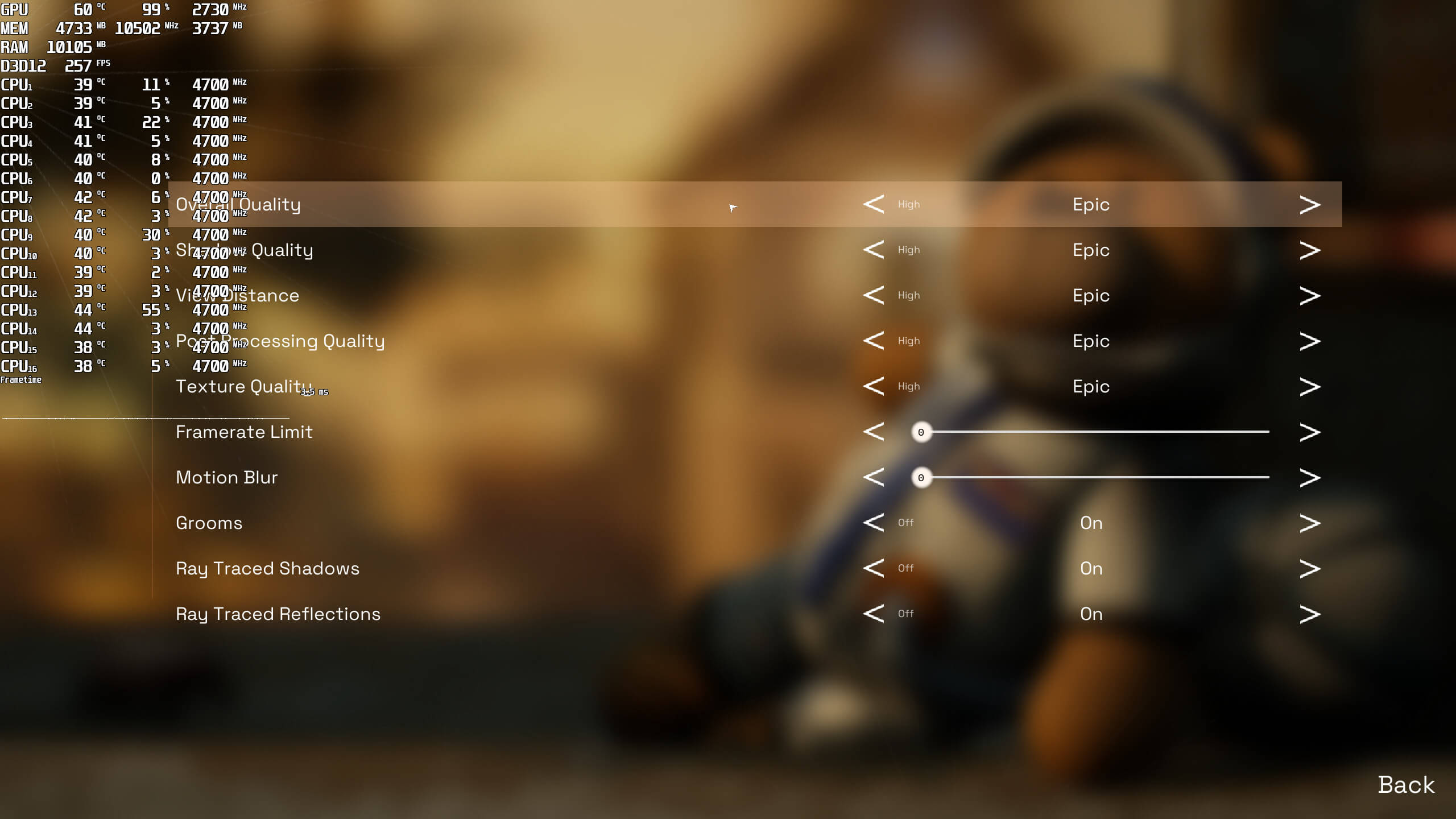
Deliver Us Mars graphics settings-1Deliver Us Mars graphics settings-2

Deliver Us Mars does not feature any built-in benchmark tool. As such, we’ve benchmarked the game’s intro sequence. Moreover, and since the game is GPU-bound, we didn’t test any other CPU configurations.

Let’s start with the game’s rasterized version. At 1080p/Epic Settings/No RT, the game requires at least an NVIDIA RTX2080Ti for a smooth experience. Our AMD Radeon Vega 64 and NVIDIA GTX980Ti were only able to offer a 30fps experience. As for the AMD RX580, the game was unplayable with those framerates.

Deliver Us Mars GPU benchmarks-1

At 1440p/Epic Settings/No RT, the RTX2080Ti was unable to run the game with 60fps. On the other hand, our RTX3080, RTX4090, RX 6900XT and RX 7900XTX were able to push over 60fps. And as for native 4K, the only GPU that could run the game smoothly was the RTX4090.

Deliver Us Mars GPU benchmarks-2

As said, the game supports Ray Tracing for Reflections and Shadows. And unfortunately, these effects come with a HUGE performance hit. For these Ray Tracing tests, we only used NVIDIA GPUs (as the game does not support FSR 2.0).

At native 1080p/Epic Settings/Ray Tracing, the RTX2080Ti could not push over 56fps. At native 1440p, the only GPU that could run the game with over 60fps was the RTX4090. And as for native 4K, NVIDIA’s most powerful GPU was only able to push an average of 48fps.
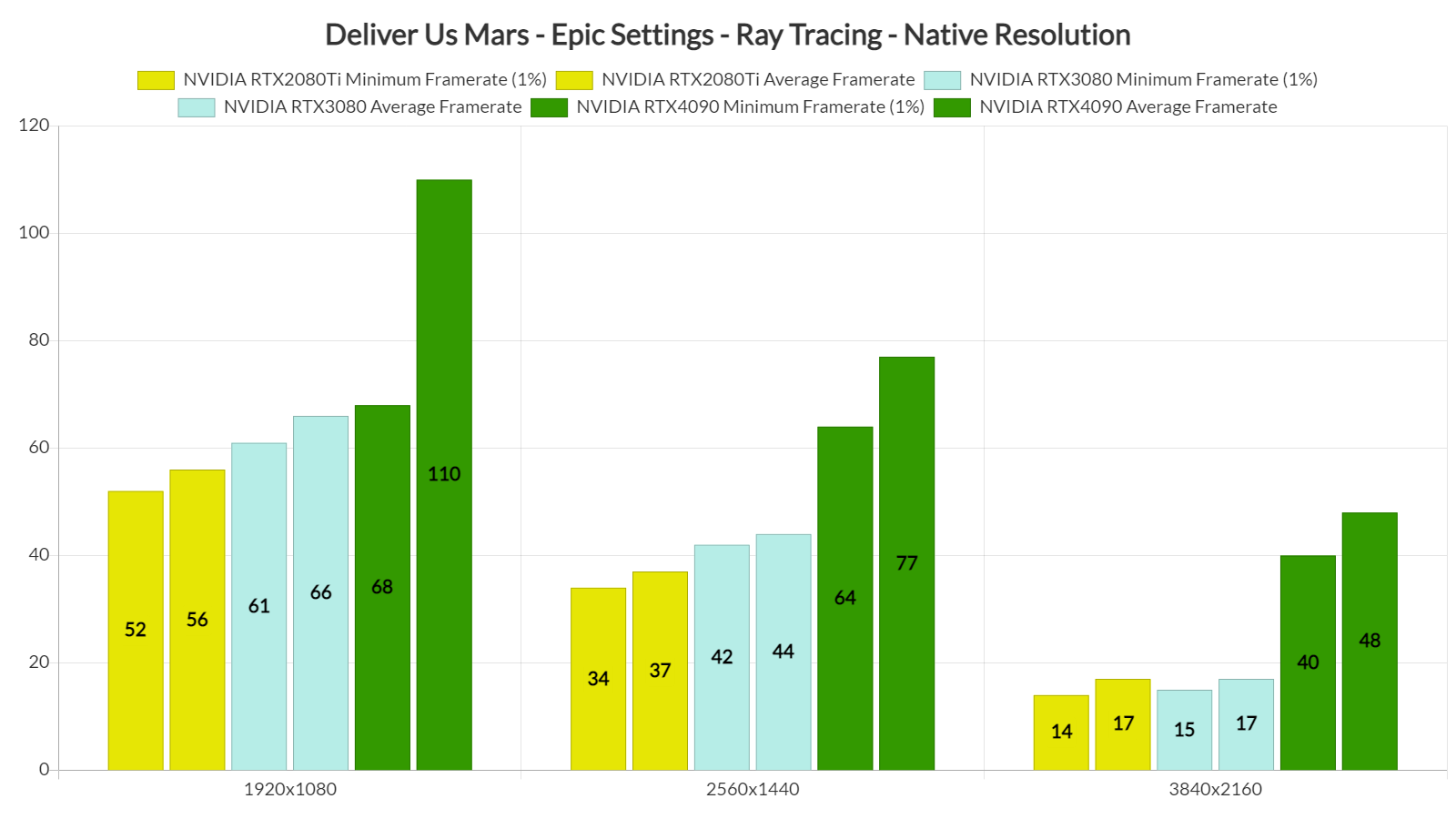
Deliver Us Mars RT benchmarks-1

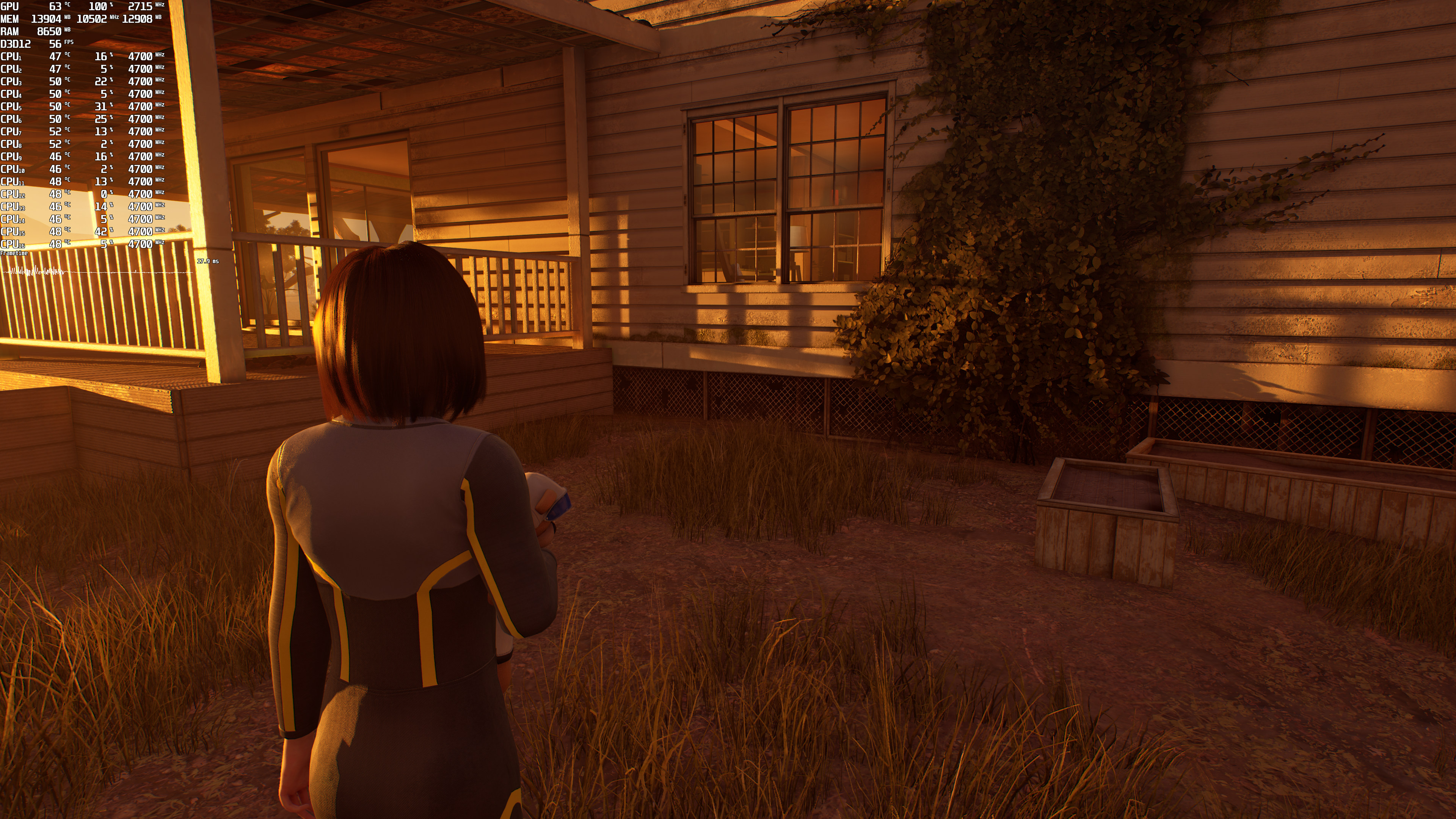
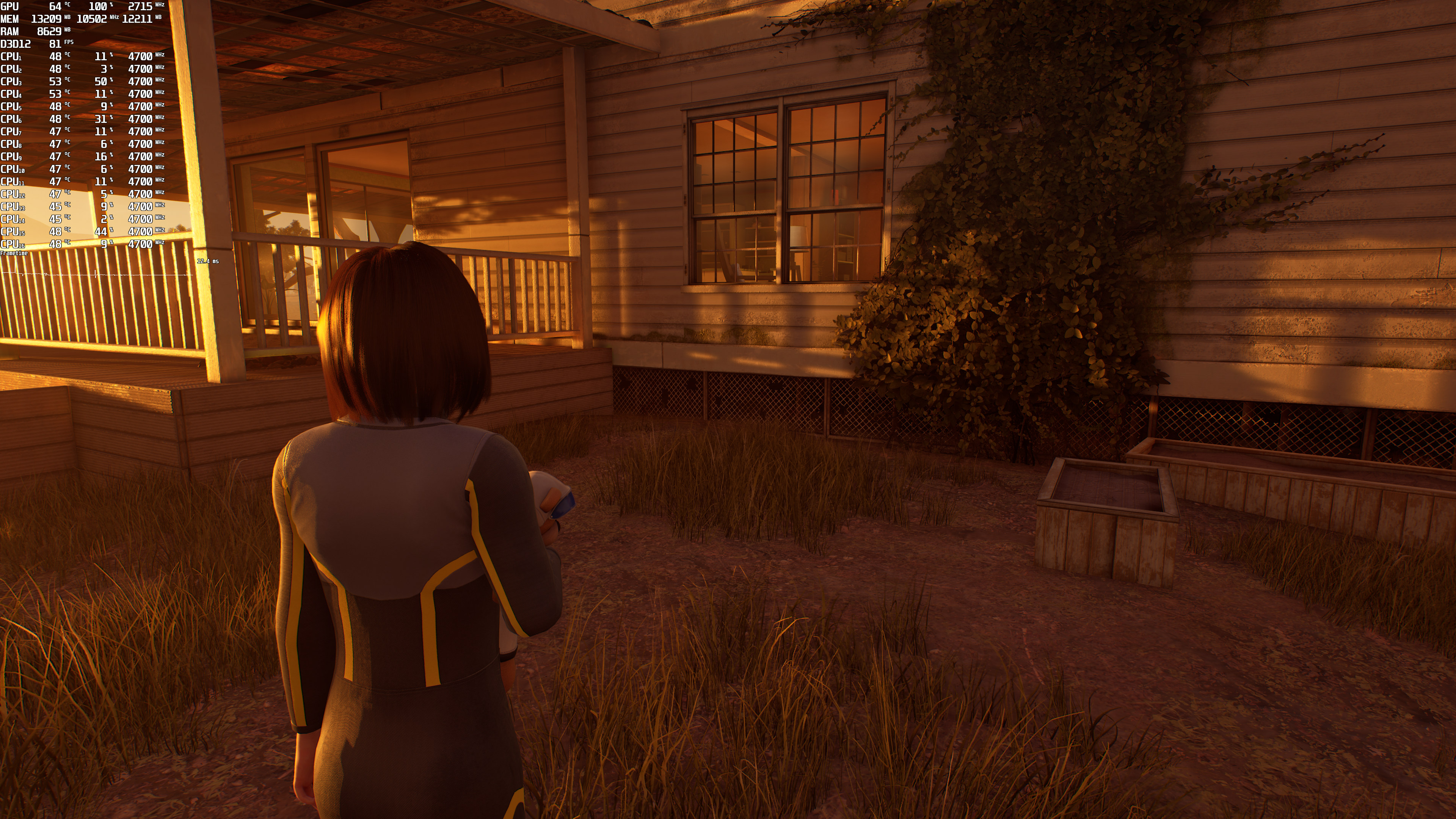
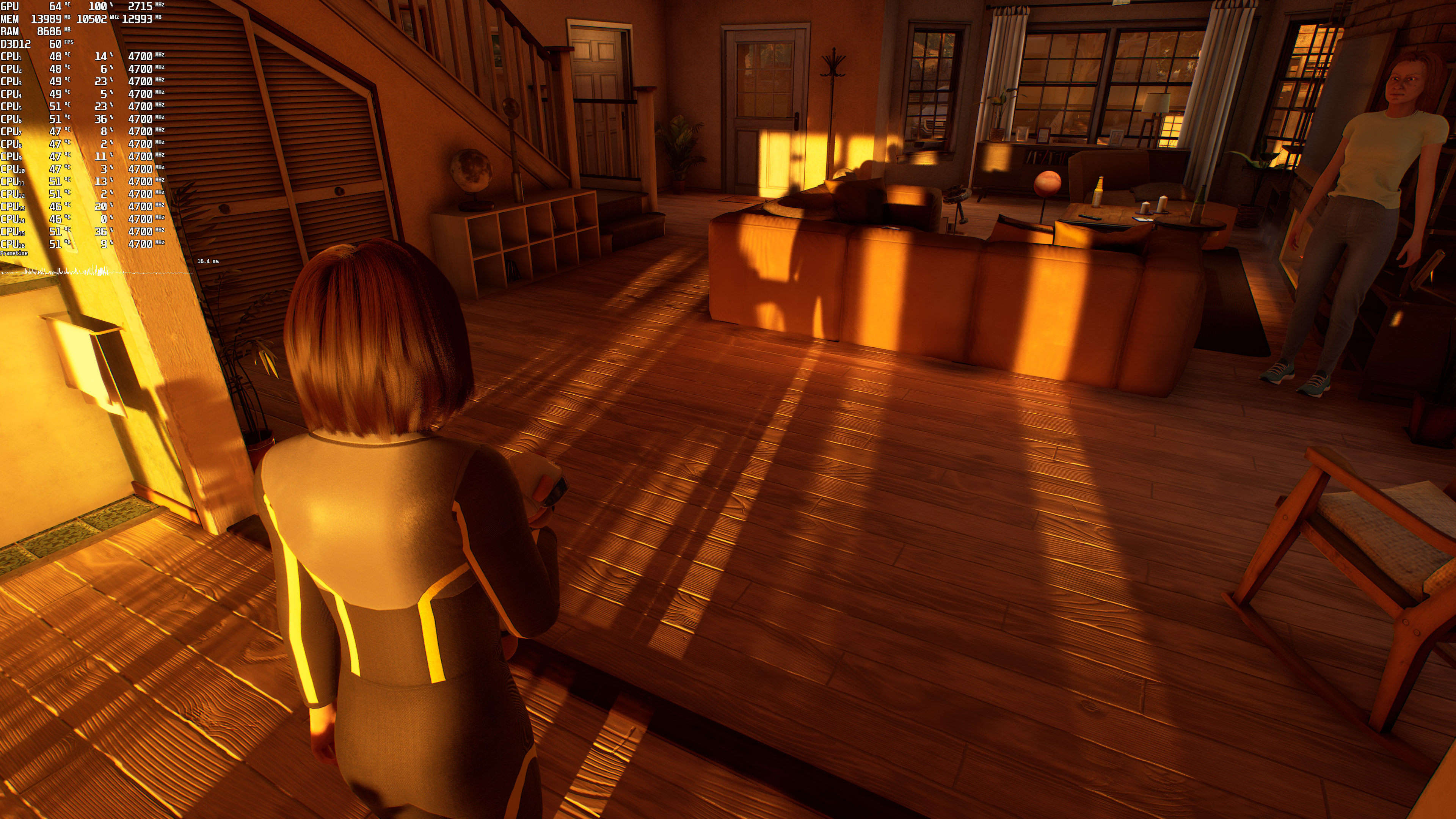
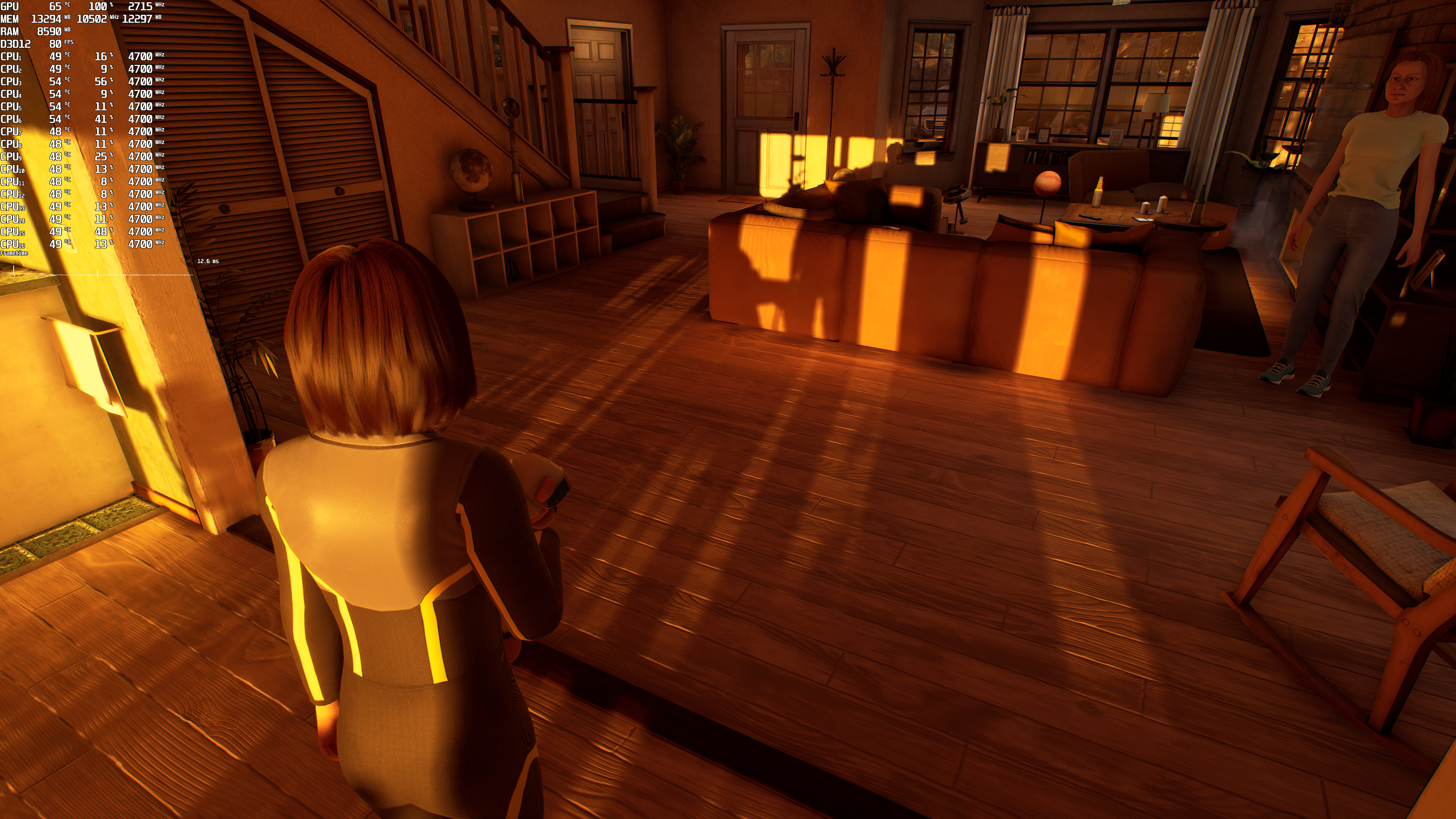
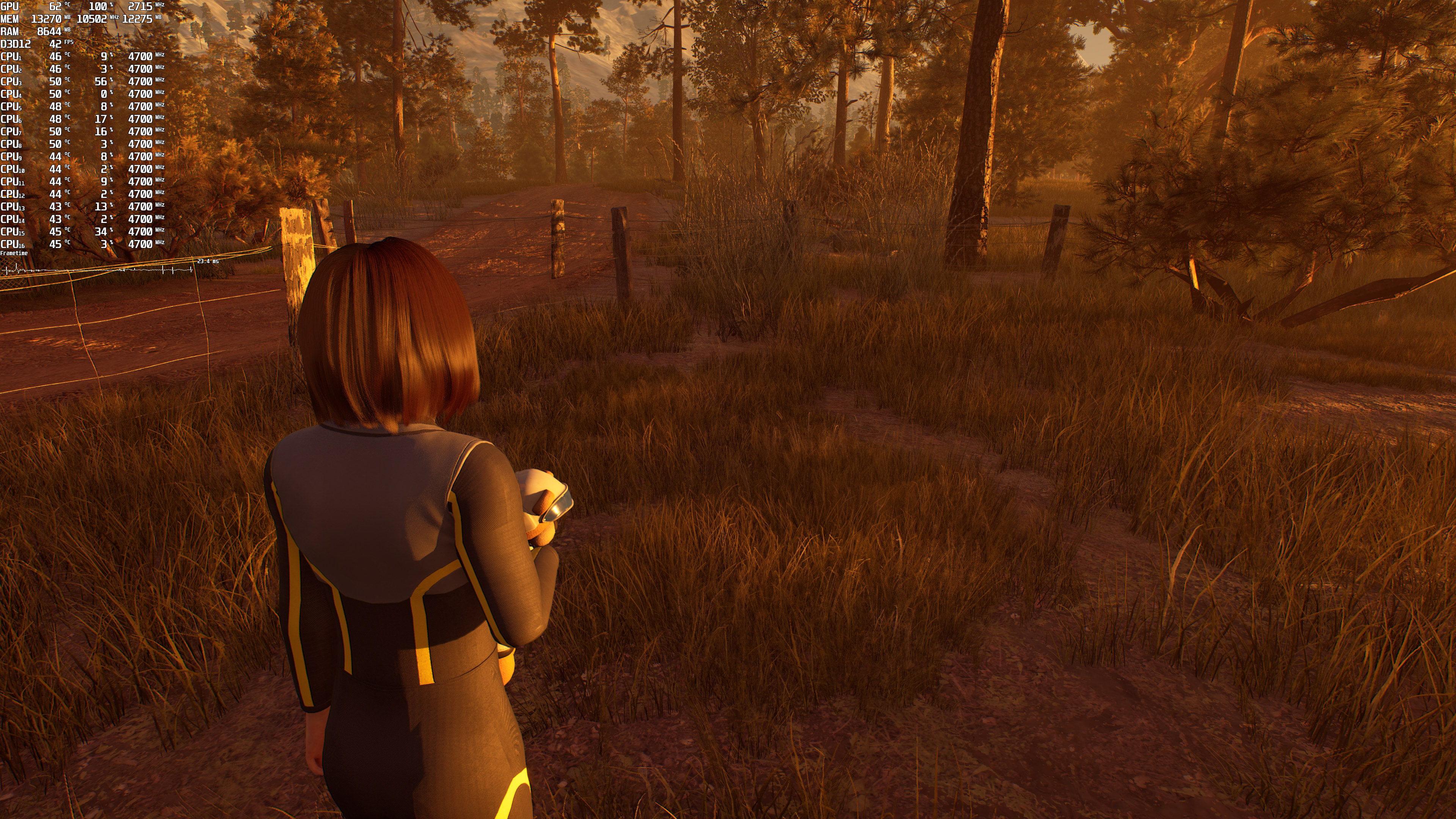
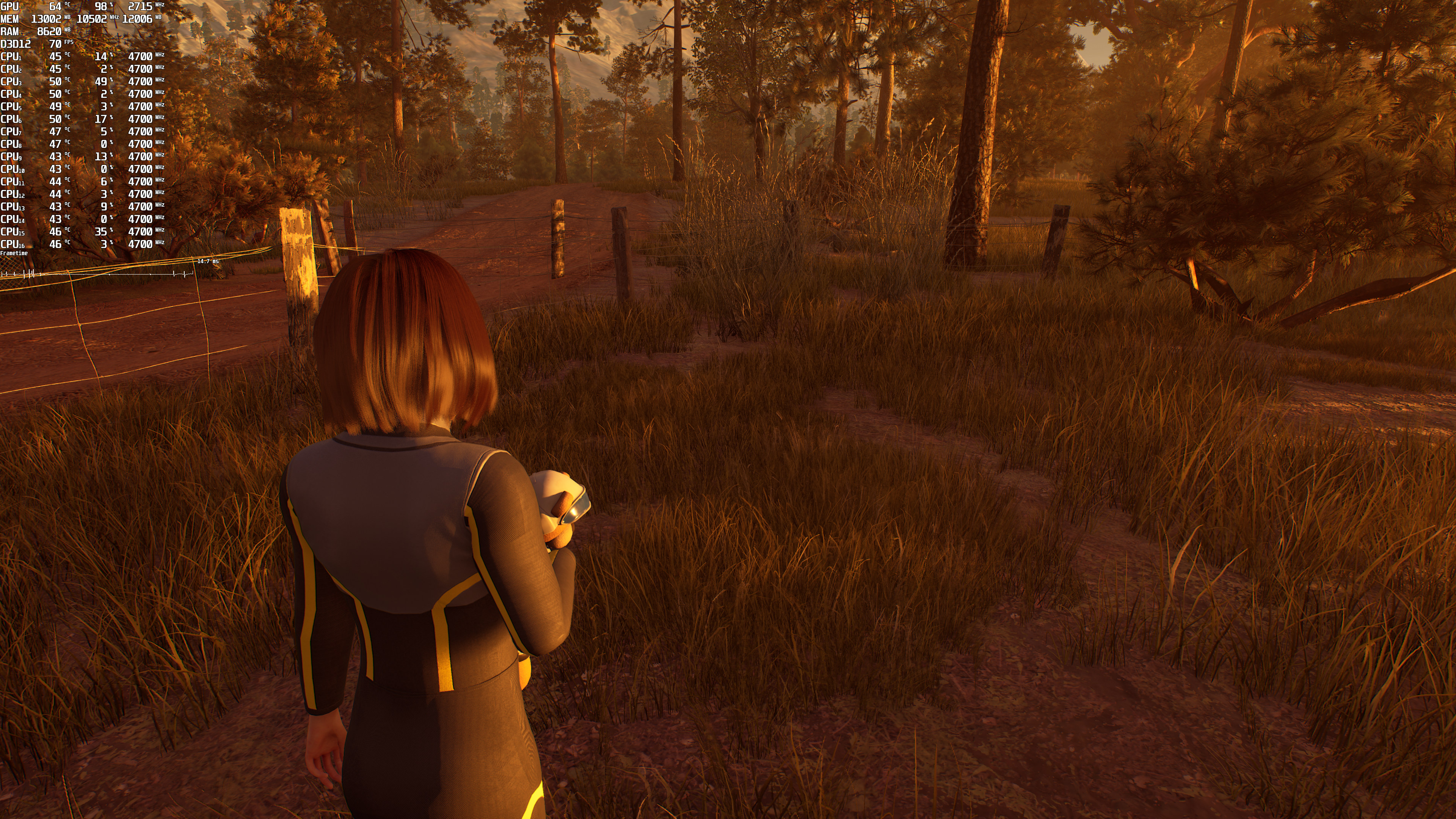
To be honest, these RT effects are not that great. Below you can find some comparison screenshots. The left screenshots are with RT On and the right screenshots are with RT Off. And yes, while there are some differences between them, the game’s RT effects do not justify their huge GPU requirements.
Deliver Us Mars Ray Tracing-1Deliver Us Mars No Ray Tracing-1 Deliver Us Mars Ray Tracing-2Deliver Us Mars No Ray Tracing-2 Deliver Us Mars Ray Tracing-3Deliver Us Mars No Ray Tracing-3 Deliver Us Mars Ray Tracing-4Deliver Us Mars No Ray Tracing-4

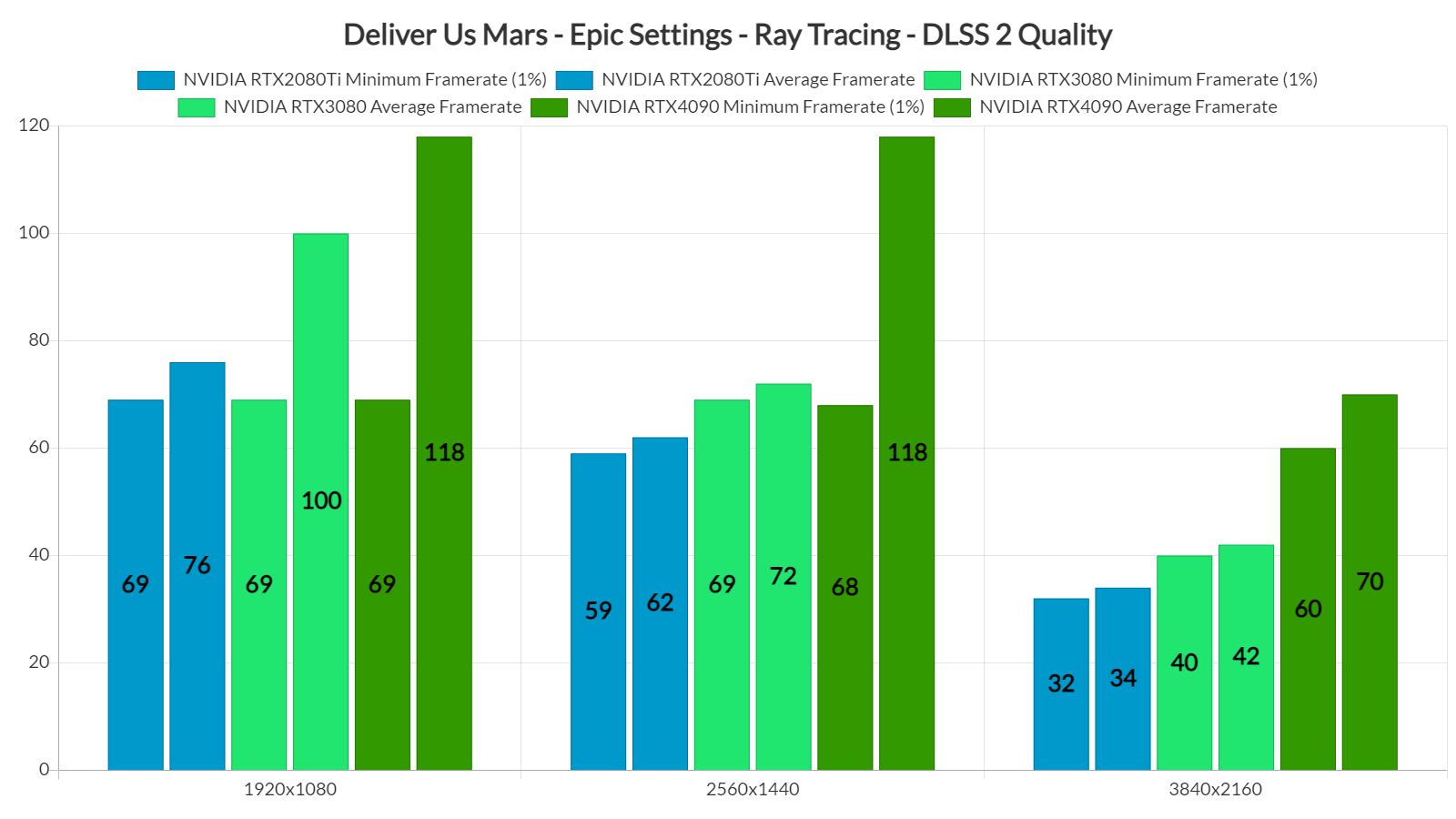
As said, the game supports both DLSS 2 and DLSS 3. And, by enabling DLSS 2 Quality, we can significantly improve performance. Thanks to DLSS 2 Quality, the RTX2080Ti can now offer 60fps at 1080p. Similarly, the RTX3080 can push over 60fps at 1440p. And finally, the RTX4090 can borderline run the game with 60fps.
Deliver Us Mars RT benchmarks-2

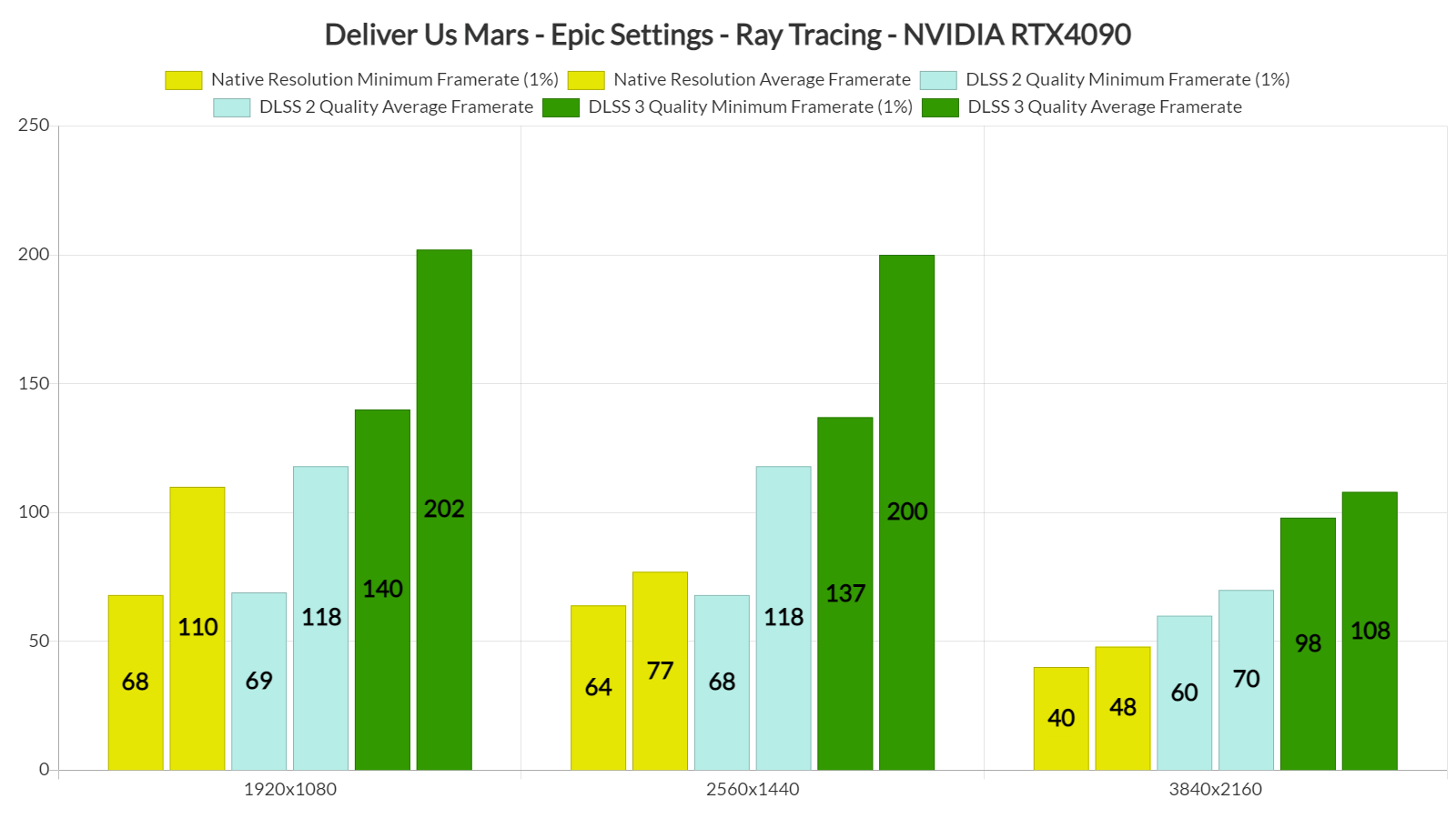
However, and as you may have noticed from the CPU scaling image, the game suffers from major CPU optimization issues when you enable its Ray Tracing effects. Deliver Us Mars mainly uses one CPU core/thread, which will limit overall performance in a lot of PC configurations. Seriously, due to these CPU issues, our minimum framerate drops from 140fps to 68fps at 1080p. Ouch. Thus, and similarly to The Witcher 3, you’ll need DLSS 3’s Frame Generation in order to overcome these CPU optimization issues.

With DLSS 3 Quality, our RTX4090 was able to push a minimum of 98fps and an average of 108fps at 4K with Epic Settings and Ray Tracing.
Deliver Us Mars RT benchmarks-3

So, Deliver Us Mars is a really demanding game. But do its visuals justify its high GPU requirements? In our opinion, no. Don’t get me wrong. I get it, KeokeN Interactive is a small team. However, and for what is being displayed here, the game should be running better.

All in all, Deliver Us Mars will require really powerful GPUs to achieve smooth framerates. The game also has shader compilation stutters. Thankfully, it lets you enable/disable settings without the need to reload the game. In conclusion, overall performance is not up to what we’re expecting. But hey, at least you can enable DLSS 2 and DLSS 3 to overcome some of these optimization issues, so that’s something I guess!

42 thoughts on “Deliver Us Mars PC Performance Analysis”

    1. The question you should be asking is when developers will start utilizing more CPU cores/threads. It’s really laughable what is going on lately with the PC releases. In this game, the 9900K is being used by only 38%. It’s laughable. PC gamers should not be forced to upgrade their CPUs when games can’t take full advantage of them, plain and simple. We’ve talked about this multiple times and after so many years, it really puzzles me why people prefer to brute force their way by using the latest CPUs over properly optimized games. What’s the point of moving to a 7900X with its 12 cores and 24 threads if games only use one-two cores/threads?

      If you take a look at the Steam forums, owners of Intel’s Core i7 13700 (that’s a new CPU you know) have the same issues with RT. You know why? Because the game is single-threaded. Now if they were reading our articles, they’d have known why they have that kind of performance.

      Also, a lot of people have misunderstood the purpose of our articles. Right now, the 9900K can expose A LOT of optimization issues. And that’s the purpose of our articles. We’re not merely benchmarking. The article is not titled “Deliver Us Mars PC Benchmarks”. Instead, we explain why a game behaves the way it does. If people want just benchmarks and numbers, they can certainly visit other websites. And these articles take A LOT of time, so don’t expect us to be using the 9900K once, and when, we upgrade the CPU.

      1. its time to change your CPU ,
        because every time you make an article where a game doesn’t hold 60fps your article is targeted by all the sites that talk about consoles and the whole PC GAMING is mocked and discredited.

          1. Yup they are basically a nerfed 3700x and by nerfed I mean lower TDP (less power available) and slower clocks because there is less power available. Sony can ramp up the clocks slightly but they have to lower the GPU clocks at the same time so the package TDP remains the same and the opposite is true for the GPU, they can raise the GPU clocks but at the cost of having to lower the CPU clocks to make up for it.

            There is no free ride in Physics …… They are immutable laws you have to obey whether you want to or not

          2. The PS5 has one core (2 threads) reserved for the OS, not two cores. Despite this, I still think PS5 is more powerful than 3700X on PC, because PS5 has a very light OS compared to Windows, and it also has a dedicated decompression block.

            On PC developers decompress the data on CPU. Now, GPU decompression is also possible, but I’m not so sure if developers are going to go down that road, because it requires a lot of GPU resources as well, so they will probably face stuttering issues.

          3. Performance – Most stutter are actually due to sloppy coding IE not compile the sharders prior to execution so they have to be compiled during run. And thats where consoles gain mostly from – Sloppy coders. It seems hard to follow a few simple rules like pre compiling etc.

            As for raw cpu performance – Many coders don’t know how to thread properly and that just like the consoles cap the performance even if you have 16 cores / 32 threads available… and just 10% is used yet bottlenecks it.

            But then again what do i know 🙂

      2. It’s ridiculous that Developers are only making use of 1 or 2 cores today. Lazy or incompetent Developers are holding PC gaming back. According to the Steam Hardware Survey the number of gamers using either 4 core or 6 core or 8 core CPUs totals 80%.

        It’s been over 15 years since I used a 2 core processor. It’s way past time for Developers to move forward.

        1. It’s because they don’t understand how DX12 works. DX11 is a high level API and CPU threading is handled by the API itself making it easy to work with. However when it was originally developed everything was dual core, and handful of 4 core and hyperthreading was only available on Intel Xeon processors so it only handle 4 core/threads well and the rest are underutilized although some game engine developers worked around that somewhat. It also handled the memory management and had a basic FIFO type of shader pipeline

          DX12 on the other hand is a low level API meaning it’s up to the game engine developers to program the CPU threading as well as memory management and the new shader pipeline is parallelized and can use out of order instructions making it very fast and more capable if programmed correctly. It should be able to compile shaders on the fly quickly but only if you program it correctly, if not you get stuttering because the compile time takes too long

          In programming language terms DX11 is like a high level programming language such as BASIC, easy to use but slow and not as flexible while DX12 is like a low level programming language such a C, harder to use but much faster and more flexible.

          UE4 is basically a DX11 game engine while EU5 is specifically for DX12 although UE4 does have provisions to make it do better threading with the DX12 APIs but you still have to know how CPU threading works in DX12 and be able to code it in C++. UE5 was expected to help handle some of the threading so the game developers don’t have to but I’ve yet to see that happen in real world applications.

          1. As knowledgeable as you clearly are, NONE OF IT MATTERS. Because everyone you said is top notch knowledge but they don’t care. All this hardware is going to waste and that’s the shameful part. DX12 has been a disaster because I’ve yet to seea dev give a damn. Even Vulkan is being pushed to the side. The last game I played that used Vulkan was The Surge 2 and even that game had some crash and burned issues that the first game didn’t have. Everything you said sounds good and is factual on paper. But in real life none of it is being executed or utilized. PC gaming has been held back for about 12-15 years now.

          2. CPU threading in Vulkan is pretty much exactly the same in Vulkan as it is in DX12 so if they can’t get DX12 correct they won’t get Vulkan correct either. I’m not a programmer I’m an Electronics Engineer with almost 30 years experience but I understand programming conceptually and can do some programming because I have to for design and testing but I leave the final product up to my software engineers who can write tight code.

            Speaking of Vulkan if you want to learn a little more about CPU threading in games they have some excellent documentation.
            https://vkguide.dev/docs/extra-chapter/multithreading/

        2. And then to see the dummies go on and on about bottle necking and that you should buy a new CPU. It’s all these bs marketing terms they love to believe and abide by. We shouldn’t be this behind. PC gaming has made no strides in the last 15 years as you suggested. It’s all sideways instead of forward. We saw that Intel was famous for that until AMD dropped threadripper and zen 3 on their heads. Then they started to move forward again. With the power we currently have games should be way more optimized and way faster.

          The GPU business is also outdated and needs to be revolutionized. I feel as if they come up with a concept and just stick with that till thy kingdom comes. It’s mind boggling that Parrarel computing is still a chore for them. Parrarel is the essence of computing. Now they are at DDR5 with absolutely no benefits to anything at all. You could still be on DDR3 at this point and it wouldn’t matter. Just about every generational leap since DDR4 have just about ZERO benefits to gaming. DDR3 & PCIe3 was a giant leap, you might as well just comeback to that at this point. Anyways I’m done agreeing with you and ranting at the same time. Peace ??

          1. It’s not that easy to code multithreaded software properly.
            – That said a person who is supposed to be a game coder shouldn’t be there if they can’t take that challenge.

          2. It’s not that easy to code multithreaded software properly.
            – That said a person who is supposed to be a game coder shouldn’t be there if they can’t take that challenge.

      3. Spot on John, these clowns think it’s all about speed. When cores aren’t being utilized. Gaming needs an overall and new fresh blood that wants to do things differently. Yes, the same silliness is what we have all across the board.

      4. It doesn’t matter that the games are badly optimized for cpu to this day, a better cpu would make your 4090 soar at the moment you performance analysis does not show what the 4090 is capable when paired with a more recent cpu.

        Even then mid range 13400 is 2 times faster in single core loads which is critical for gaming until devs figure out how to use multiple cores more efficiently, and even when that will happen newer cpu’s will have a huge edge over the aging 9900k.

        1. A 13400 is NOT 2 times faster than a 9900 ….. It’s about 25% faster in single core and in GPU bound titles you’d probably only gain 3 or 4 FPS which you wouldn’t even notice in game play. If you play a lot of multiplayer twitch shooters it would make a difference but in single player high graphical fidelity games that are GPU not so much.

          It’s like the arguments for Vulkan, Vulkan in this game wouldn’t help and in fact would likely get worse performance because where it shines is for CPU bound games because it moves some of the load off the CPU and puts it on the GPU. However if your GPU is already maxing out at 100% it’s not going to help and will likely harm performance. However in a twitch shooter where you turn down the graphics to get higher framerates it will help considerably. You can see how that works in RDR2, with Vulkan you can gain a little on average FPS but the 1% and 0.1% lows are much worse while with DX12 you lose a few FPS on average but the 1% and 0.1% lows are much better and you get a smoother experience with less stuttering. Vulkan and DX12 both have their place but also places where they don’t work so well.

      5. Completely agree, pounding a single thread while leaving the rest basically unutilized isn’t really a bottleneck – Its poor coding. So i hope more take note of your example, run a non-“best” cpu that punishes lazy dev’s that don’t multi-thread properly and only upgrade once the old been bottlenecked for real.

      6. Completely agree, pounding a single thread while leaving the rest basically unutilized isn’t really a bottleneck – Its poor coding. So i hope more take note of your example, run a non-“best” cpu that punishes lazy dev’s that don’t multi-thread properly and only upgrade once the old been bottlenecked for real.

    1. Well it’s only there to counter the age old low …. thievery

      Complaining about Denuvo is like complaining about people having locks on their doors and automobiles to keep you out

      If you want to end Denuvo then start turning in hackers and crackers

      1. Huge falacity there m8 -> A lock is there to protect the owner’s property… not the company that makes the property and here the gamer is the one who take a performance hit – Not the company that makes the game and gain from the drm. So yeah, can understand when peeps have to pay the price for the drm fallout where the lock would be a win!

      2. Huge falacity there m8 -> A lock is there to protect the owner’s property… not the company that makes the property and here the gamer is the one who take a performance hit – Not the company that makes the game and gain from the drm. So yeah, can understand when peeps have to pay the price for the drm fallout where the lock would be a win!

      3. What a butchered analogy. Actually it would be more like if you bought a home and the person you bought the home from forced you to have locks on your doors, and only the specific lock they put on there, and these locks were driving up your energy bills and made it exceptionally more difficult to enter your house everyday. Meanwhile, the people who want to break into your house and take things just walk right on in unimpeded because the method to defeat the lock is nothing compared to the effort to use this shoddy lock.

  1. naturally like your web site however you need to take a look at the spelling on several of your posts. A number of them are rife with spelling problems and I find it very bothersome to tell the truth on the other hand I will surely come again again.

    1. Yep, so we ended up not gaining anything really. We could have most games run at locked 4k 120 with just DLSS 2 on at least the 4080, but that now amounts to barely 60-70.

  2. A few months back when the 4090 came out, ppl considered it an overkill. Now only 2 months later, we keep getting dogshit a*s unoptimized messes that put 0 effort into optimization yet still look worse than last gen Sony first parties. It just shows that we can’t have nice things and that laziness and incompetence will always trounce technology so that we essentially stay in the same place and spend more money to do so.

  3. I never understand why performance reviews never use the ‘most popular’ Nvidia GPUs (according to Steam HW Survey), instead 980Ti – really? And all the xx80s and of course 4090 because THAT will ‘inform’ the average user … of what, exactly?

    The old IT grognard saying is “any hardware is only as good as the software (driver) running on it”. Telling me that a badly optimized game runs bad on the latest 600Watts-per-frame card, is like telling me about the Adventures of the Kardashians. I do not care.

    The most popular AMD cards were included. Great! Why not the most popular (average) Nvidia cards? None around, in the office? Do you only get review cards of the ‘latest and greatest’ marketed GPUs, instead what the (again) average consumer buys?

    Just curious.

Leave a Reply

Your email address will not be published. Required fields are marked *